Technically Speaking
Computing, MIDI
(MM Nov 86)


Magazine Archive
Home -> Magazines -> Issues -> Articles in this issue -> View
Micromusic | |
Melody Making on the AppleArticle from Electronics & Music Maker, November 1981 | |
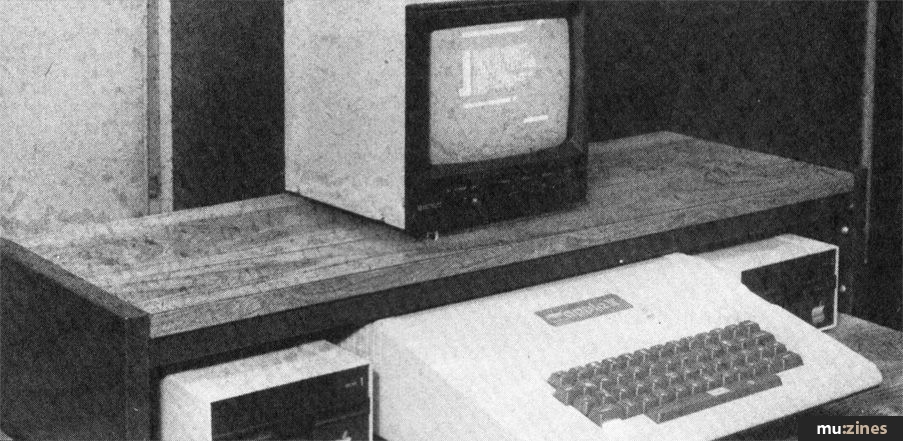
Unlike the Sharp MZ-80K the Apple computer does not have a specified syntax for making music in its versions of BASIC. However, it does have a speaker so that it is possible physically for it to make music. A program is now described to do this and it is listed in full at the end. It allows you to feed in a piece of music, play it when you wish, save it on disk and so on. It is written in Applesoft BASIC. You can type this in directly and use it immediately since it is self-explanatory. The notes that follow explain some of the techniques used in more detail.

Figure 1.
First, it is necessary to describe how each individual note is played. The heart of this is a short mysterious three-line routine, shown in Figure 1.
Line 2015
The numbers represented by B(J), the note's duration, again range from 0 to 255. For most tunes we use 240 for a crotchet, 120 for a quaver, 60 for a semi-quaver, and so on. This means that it is impossible directly to play a dotted crotchet, minim or longer note. It can be done indirectly, however, by playing such a long note as two successive notes with the same pitch.
Line 2020
This line 'CALLs' a machine code subroutine stored in a set of 23 memory units beginning at the unit numbered 770. This subroutine is POKED into these memory units by the lines 100 to 140 (see Figure 2).
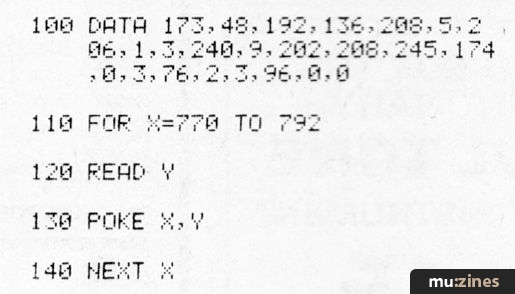
Figure 2.
It is not necessary to know what these numbers in line 100 actually stand for. It is enough that, when stored by lines 110 to 140, and called by line 2020, they act very quickly to facilitate or make possible musical sounds.
With these routines typed in, it is necessary to plan a program that will make it possible to input the sequence of notes making up a piece of music, save the tune on disk, recover it from disk, amend it or add to it, and of course play it. This is done using a menu and a modular system of subroutines. When RUN the screen looks like Figure 3.
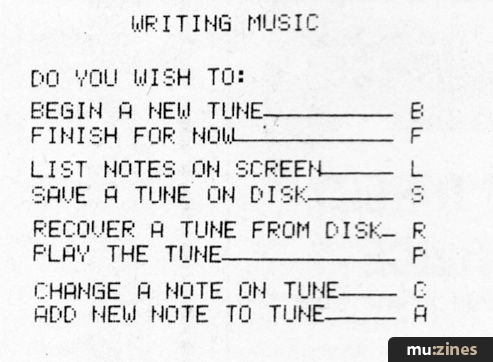
Figure 3.
Line 2010
Table 1
| G# | 60 | |
| G | 64 | |
| F# | 68 | |
| F | 72 | |
| E | 76 | |
| D# | 80 | Second |
| D | 85 | Octave |
| C# | 90 | |
| C | 96 | |
| B | 102 | |
| A# | 108 | |
| A | 114 | |
| G# | 121 | |
| G | 128 | |
| F# | 136 | First |
| F | 144 | Octave |
| E | 152 | |
| D# | 161 | |
| D | 171 | |
| C# | 181 | |
| C | 192 | - Middle C |
| B | 200 | |
| A# | 214 | |
| A | 228 |
The number represented by A(J), the note's pitch, can range from 0 to 255 and the numbers corresponding to two octaves, beginning at the A below middle C, are shown in Table 1. Note that the numbers get smaller as the pitch gets higher.
Most of these are fairly normal Applesoft BASIC routines and, since they are listed at the end of this article, are not analysed in detail here. However, the first (BEGIN) routine has a number of complications that need a more careful description.
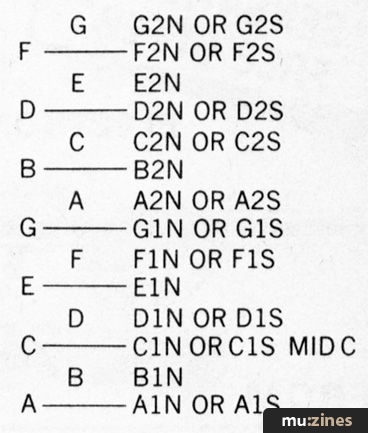
Table 2
The user is invited at line 650 to put in each note in the form of a 3-symbol combination, for example, 'C2S'. The first symbol, C in this case, represents a note and must be a letter from the set A, B, C, D, E, F, G. The second symbol is a number, either 1 or 2. The 1 stands for the octave which runs from the A below middle C to G. The 2 stands for the octave above this. The third symbol is either N for natural, or S for sharp. The possible combinations are shown in Table 2.
This three symbol combination is input in line 651 and stored in Z$. So that, for our example, Z$ = "C2S". String functions are then used to separate the three symbols and store them in L$ M$ and R$. Sothat, in this case:
L$ = "C" : M$ = "2" : R$ = "S"
We now wish to translate any such set of symbols into a number in such a way that the notes are in numerical sequence. That is, if DIN is represented by 6, then E1N is represented by 7, and so on. Table 3 shows the model used to do this. It is read from the left, choose one of A to G: then along the top, choose either octave 1 or octave 2: finally the second line on the top, either N or S. So that D1S is 13. The numbers 15 for octave 2, and 8 for sharp have been chosen to ensure that the numbers are sequential.
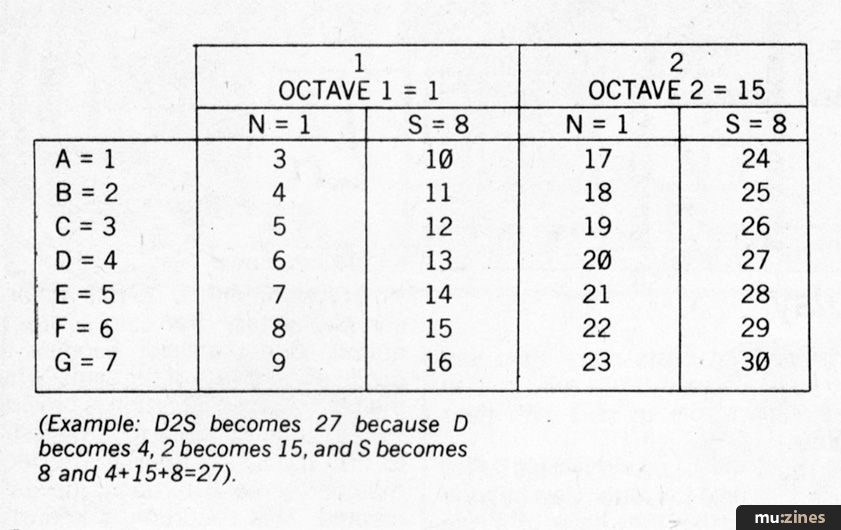
Table 3
All of this is done on program lines 653 to 680, using the functions ASC and VAL. Line 655 is a test linearising out of a subsequent subroutine and can be ignored here. Finally, on line 700, N is put equal to the note's number which is reduced by 2 so that the numbers run from 1 to 28. Line 710 sends the program to a different routine for each value of N and at each of these, A(Z) is given the proper number appropriate to the actual note, as shown in Table 1.
The subroutines used are as follows:
500-1040 Begin and Input Tune
1500-1550 Save on Disk
1600-1660 Recover from Disk
1700-1720 Change a note
1800-1840 Add notes
2000-2030 Play tune
2500-2530 Print data on screen
3000 End
The variables used are as follows:
X - memory units
Y - machine code
Z - counts notes
L - note numbers
M - octave numbers
R - natural or sharp
W - duration of note
N - overall note number
J - counter
XI - note to be changed
Z1 - temporary value of Z
A(J) - array to hold note pitch
B(J) - array to hold note duration
Y$ - menu and casual input
Z$ - note as 3-symbol combination
L$ - left of 3 symbols
MS - middle of 3 symbols
R$ - right of 3 symbols
D$ - disk control character
N$ - disk file name
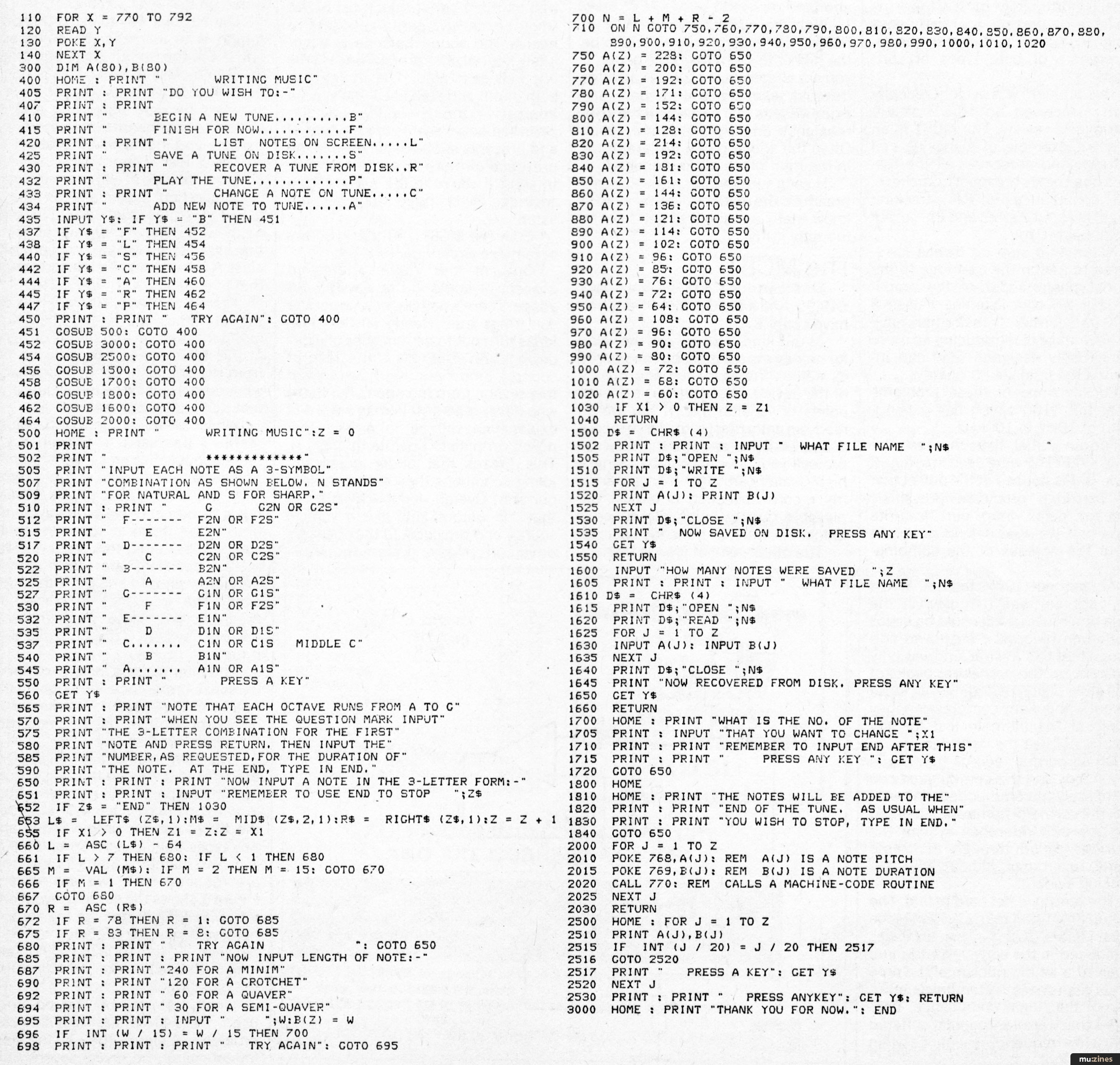
Apple Melody Maker Program listing.
(Click image for higher resolution version)
More with this topic
 |
 Software Support - Hints, Tips & News From The World Of Music Software |
 Sord M-5 |
 Software Support |
 Technically Speaking |
Software Support - Hints, Tips & News From The World of Music Software |
 Spectrum MIDI |
 Musical Micro - Editing Packages |
 PC Notes |
 Synth Computers |
Mac Notes |
 The Musical Micro - Take It From The Top |
Browse by Topic:
Computing
Publisher: Electronics & Music Maker - Music Maker Publications (UK), Future Publishing.
The current copyright owner/s of this content may differ from the originally published copyright notice.
More details on copyright ownership...

Electronics & Music Maker - Nov 1981
Feature by Seamus Dunn, Valerie Morgan, Roger Morgan
Help Support The Things You Love
mu:zines is the result of thousands of hours of effort, and will require many thousands more going forward to reach our goals of getting all this content online.
If you value this resource, you can support this project - it really helps!
Donations for October 2026
Issues donated this month: 0
New issues that have been donated or scanned for us this month.
Funds donated this month: £0.00
All donations and support are gratefully appreciated - thank you.
Magazines Needed - Can You Help?
Do you have any of these magazine issues?
If so, and you can donate, lend or scan them to help complete our archive, please get in touch via the Contribute page - thanks!
Please Contribute to mu:zines by supplying magazines, scanning or donating funds. Thanks!
Monetary donations go towards site running costs, and the occasional coffee for me if there's anything left over!

 @mu_zines
 RSS Feed
 Blog
Blog