Home Taping - Steve Waye
Home Studio
(IM May 85)


Magazine Archive
Home -> Magazines -> Issues -> Articles in this issue -> View
Planning Your First Studio | |
Everything you need to start recording at homeArticle from Recording Musician, October 1992 | |
Exactly what equipment do you really need to make a start in home recording? We take you through it, step by step.
Setting up a studio at home needn't be difficult, or too expensive, but what exactly is involved? Paul White guides you through the creation of your first home studio.

Image credit: Fostex UK
There's more to putting together a recording studio than simply buying a Portastudio and plugging it in, but it is possible to make good recordings using the bare minimum of additional equipment. It may seem obvious to those of us with recording experience, but first-time users have been known to express surprise that a Portastudio has no built-in speaker or that it doesn't produce finished, mixed, stereo master tapes without the aid of a separate stereo tape machine.
A device such as a Portastudio allows us to record a number of instruments or voices at separate times and later enables us to mix these into stereo. Depending on the model and the sophistication of its mixer section, it may or may not allow external effects to be plugged into it. Obviously, there are models that offer greater flexibility when it comes to making professional-sounding recordings, but even a basic model makes an excellent aid to songwriting. Regardless of the type or model, however, the final stereo mix must be recorded onto a conventional stereo tape machine of some sort, to produce what is known as a master tape. For home demos, a stereo cassette deck is perfectly adequate, with the proviso that it is fitted with recording level controls and meters. Cheaper systems or portables with automatic record level controls are quite useless for this application. Another excellent and often overlooked alternative for recording the stereo master is a domestic hi-fi video recorder, the performance of which will far exceed that of a cassette deck.
Amplification and Monitoring
Another essential is an amplification system, which will enable the recordings to be played back, both during the initial recording stages and later while mixing. It is possible to work entirely using headphones, but these tend to give a false impression of what is really going on, especially at the bass end, so if you do like to work with headphones, it helps to have an amplifier and speaker system too, in order to provide a 'second opinion' when you finally come to mix. Listening to a recording over either headphones or loudspeakers is also known in recording circles as monitoring.
Both the stereo mastering and monitoring requirements can be satisfied by a straightforward hi-fi system as long as it has 'Aux' inputs. These are provided to allow external devices, such as CD-players, to be fed through the system, and the best facilities are usually available on hi-fi systems made up of separate items rather than all-in-one entertainment packages. Indeed, it is far easier to work using a hi-fi system than trying to set up your own monitoring system using a studio power amplifier, because hi-fi amplifiers invariably provide a convenient means of switching between the aux input and the cassette deck, making it easier to play back the master tape after it has been recorded.
If you don't have a suitable hi-fi system, consider buying a hi-fi power amplifier plus speakers and a separate cassette deck to use in your studio. Even new, you could get all you need for as little as £250, but the second-hand market can produce real bargains, especially if you're prepared to put up with something that doesn't have the latest in cosmetic styling. Car boot sales may seem an unlikely place to shop for studio equipment but, providing you know what you're looking for and are prepared to risk buying a turkey, you can pick up some amazing deals. To date, I've had a complete hi-fi separates system without speakers for a fiver, a good tuner/amplifier for a tenner and a perfectly good stereo, open-reel tape recorder for ten pounds. After a good clean, they all worked perfectly!
When it comes to amplifiers, try to get one rated at 30 Watts per channel or more, because lower powers can easily be overloaded, leading to unpleasant distortion and possibly speaker damage. Make sure that there are separate sockets on the rear for the connection of external equipment (aux inputs) and that provision is made to connect a cassette deck. The front panel should also have a switch allowing the user to select between tape, record deck, aux, tuner and so on.
If you can't find an amplifier with an aux input, the tuner input should work equally well. Models with phono sockets on the back are the easiest to deal with, though some models have the multipin DIN sockets. The problem with DIN sockets is that you need the manual to find out where all the different pins go, and though ready-made leads are available, getting the right combination can be a bit hit and miss. Individual phono sockets are, on the other hand, quite unambiguous.
Choose speakers that seem to produce a faithful sound rather than ones that are artificially flattering. Small two-way hi-fi speaker systems are generally best for home use and we'll be covering this subject in more depth in the near future. Don't worry if the amplifier is rated at a higher power than the speakers — it is unlikely to damage the speakers unless they are driven to the point of audible distortion. In any event, you're less likely to damage the speakers by using a large amplifier than you are using an under-powered model driven into distortion — the harmonics produced by distortion are more damaging than the occasional, undistorted overload.
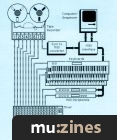
Figure 1 shows how a typical home recording system goes together; the amplifier is switched to Aux when recording and overdubbing and then to Tape when you want to play back your master stereo cassette.

Figure 1: Basic Home Recording System
External Effects
The most useful single effect when making a recording is digital reverberation, but to use this with a Portastudio-type cassette multitracker, it is essential that the mixer section is equipped with auxiliary send and return facilities (sometimes called effects send and return). Furthermore, digital reverberation devices invariably produce a stereo output, so you'll need to make sure your mixer section has a stereo aux return. For more details on cassette multitrackers and their facilities, see the July issue of RM which lists all the important features of every currently available model; you could also check out this month's 'Music In Our Schools' feature, which goes into some detail about cassette 4-tracks and gives some models to consider.
As regards the reverb unit itself, this need not be sophisticated or expensive. A model that offers a selection of presets rather than full programmability gives more than enough scope, while being easy to use and very affordable. Preset models are available at under £200 and give surprisingly good results. Multi-effects units also represent good value, and many models cost little more than a dedicated reverb processor.
Microphones
We will shortly be conducting a survey of low-cost microphones suitable for use with budget home recording systems, alongside an introduction to microphone types, but in the meantime, there are some points to be taken into consideration. Most home recording equipment is designed to work with so-called low-impedance microphones. Some microphones are available with switchable impedances but most come either as high or low impedance. If the microphone handle has a standard built-in, three-pin XLR socket, then it is likely that it is a low impedance model, but if in any doubt, check with the supplier. Conversely, a microphone with a fixed lead is likely to be high impedance, but again — ask. The low-cost Tandy PZM mic (see review in this month's 'Widgets') works with just about anything, while many of the microphones used for live performance are equally useful in recording. Some cassette multitrackers can accept both high and low impedance microphones, but you'll need to look in the manual to check this information.
Leads
Microphones are traditionally supplied without leads — which can be very frustrating when you get your system home and find that you can't plug anything in. For use with a standard low impedance mic fitted with an XLR connector, you'll need to buy an XLR to unbalanced jack mic lead — or make one up. To make your own, wire pins 1 and 3 of the XLR connector together and solder these to the braid or screen of a piece of coaxial cable. Pin 2 goes to the centre core of the cable. The mono jack is wired to the other end of the cable, such that the central core is connected to the tip of the jack plug and the screen of the cable to the barrel of the plug.
Instruments and effects units are plugged into the recorder using standard jack-to-jack leads available from any music store, but again, it can pay to make your own, especially if you need a lot of them. Alternatively, use ready made phono leads and plug jack adaptors onto the end. The multitracker and cassette deck generally connect to the power amplifier by means of stereo phono leads, which are available at a modest cost from most electrical shops or Tandy branches, as are phono-to-jack adaptors. There is little point in making up your own phono leads, as the ready-made models are cheap and quite robust.
Speakers should be wired up with heavy-duty twin cored cable, such as heavy twin lighting cord, or the orange cable used for garden appliances. You can pay a fortune for fancy speaker cables, but in this application, the main thing is to use something fairly heavy-duty. Keep the speaker cables as short as possible and ensure that both are of equal length.
Finally, it is better to plug all your mains plugs into a single extension block, which is then plugged into a single wall socket, than to plug into separate sockets all around the room. Recording equipment takes very little current, so you won't overload your system even with half a dozen different things plugged in, and keeping all the power in one place reduces the risk of unpredictable hums and buzzes cropping up. If the electricity supply isn't fitted with a safety current trip, it is advisable to buy a separate safety circuit breaker which can be plugged in between the distribution board and the mains wall socket. These are available from many hardware shops and shops which supply gardening equipment.
What's Next?
The purpose of this brief article is to define the main components of a simple home recording setup, so that you'll know what part each item plays in relation to the other parts. In future issues of RM, we'll be looking at the individual parts of the system in far more detail, as well as looking at ways in which a basic system can be expanded, by, for example, adding a separate mixer or MIDI sequencer.
Headphones
For serious monitoring, open or semi-open hi-fi headphones give the best sound and, while they don't usually give an accurate impression of the amount of bass in a mix, they are excellent for checking stereo positioning (left/right position of sounds in the mix) and for picking up small noises or traces of distortion that might go unnoticed over loudspeakers. Check the manual for your multitrack recorder to find out what impedance range of headphones can be accommodated. This will be expressed in ohms, and it is wise, to ensure that any prospective purchase falls within the specified range. If in doubt, take the manual to the hi-fi shop when checking out headphones. You can expect to pay between £20 and £50 for a good pair of headphones, with professional models costing up to £100 or more.
More with this topic
 |
 At Home in the Studio - Band in a Box Studio |
 How to Set Up a Home Studio (Part 1) |
 Studio Construction Set - Which Gear is Right for You? |
 Home Studio Recordist |
 Getting Your Priorities Right |
 At Home in the Studio |
 Studio Ergonomics - Making Yourself At Home In The Studio |
 Readers' Systems - From SOS to 8-track |
 Home Taping - Is Skill In Music |
 Home Taping - The Big Dream |
 Get it out of your System - (The best that is) (Part 1) |
Browse by Topic:
Home Studio
Publisher: Recording Musician - SOS Publications Ltd.
The contents of this magazine are re-published here with the kind permission of SOS Publications Ltd.
The current copyright owner/s of this content may differ from the originally published copyright notice.
More details on copyright ownership...
Recording Musician - Oct 1992
Feature by Paul White
Previous article in this issue:
Next article in this issue:
Help Support The Things You Love
mu:zines is the result of thousands of hours of effort, and will require many thousands more going forward to reach our goals of getting all this content online.
If you value this resource, you can support this project - it really helps!
Donations for September 2026
Issues donated this month: 0
New issues that have been donated or scanned for us this month.
Funds donated this month: £0.00
All donations and support are gratefully appreciated - thank you.
Magazines Needed - Can You Help?
Do you have any of these magazine issues?
If so, and you can donate, lend or scan them to help complete our archive, please get in touch via the Contribute page - thanks!
Please Contribute to mu:zines by supplying magazines, scanning or donating funds. Thanks!
Monetary donations go towards site running costs, and the occasional coffee for me if there's anything left over!

 @mu_zines
 RSS Feed
 Blog
Blog