Boss DS330 Dr. Synth - GM/GS Synth Module
(SOS Sep 92)


Magazine Archive
Home -> Magazines -> Issues -> Articles in this issue -> View
Boss Dr Synth DS-330 | |
Sound ModuleArticle from Music Technology, November 1992 | |
Carry On Doctor...
Not content with keeping us in shape rhythmically, the Doctor now has the perfect prescription for those hooked on Sound Canvas voicing but looking for accessibility and a bargain price. Has medicine ever tasted so good..?

Image credit: James Cumpsty
During the past year, Roland have been busy making the sound-generating technology they introduced on their Sound Canvas SC-55 module available across a wide range of instruments - from home keyboards and digital pianos to synths and computer-based sound cards. However, with the exception of the PC-compatible SCC-1 card, the line-up hasn't, to date, included a sub-£500 instrument - a significant omission in today's budget-conscious marketplace.
Cue: Roland's Boss division - as ever the impoverished musician's friend - and a budget, desktop version of the 1U half-rack Sound Canvas known as the Dr Synth DS-330. At £339 it's some £200 cheaper than the SC-55 and strong competition for Yamaha's budget General MIDI module, the TG100.
What you get for your money is a 16-part multitimbral sound module with 28-voice polyphony, 156 instrumental Tones (ie. patches), and some 100 drum and percussion sounds organised into eight Drum Sets. Sound Canvas owners may note with a touch of envy that the DS-330 actually has four more voices than its more expensive relative; quite how the Boss design team have achieved this increase isn't clear, but achieve it they have.
Inevitably, some sacrifices have been made in order to achieve the new module's budget price (though not as many as you might suppose). For a start, the SC-55's bank of MT32 sounds hasn't been retained. The cheaper module also drops 27 of the Sound Canvas's 40 SFX Tones along with Church Bell, Italian Accordion, Chorus Guitar, Funk Guitar, Castanets and Concert Bass Drum. Among the drum and percussion sounds assigned to its Drum Sets, the Dr Synth gains two Jazz Kick drums but loses Scratch Push, Scratch Pull, Metronome Click, Metronome Bell and Bell Tree.
Also foregone in the name of economy are the SC-55's SFX and CM64/32L-compatible Drum Sets, along with its MIDI In 2 socket, remote control unit and stereo audio inputs. Additionally, the DS-330 omits the Sound Canvas' voice reserve feature, although it does at least implement a voice priority ranking system for the 16 Parts. By assigning important musical lines to the higher priority Parts you can minimise the impact of voice-stealing, which occurs whenever the instrument's maximum polyphony is exceeded.
Unlike the Sound Canvas, the Dr Synth has two play modes: Single and Multi. When you select the former, the 330 effectively becomes a single-Part module, responding via MIDI either on all MIDI channels (Omni mode) or on a single channel. Single mode allows you to edit each Tone's filter, envelope and vibrato parameters, combine it with any other Tone in split and dual keyboard textures, and give it its own reverb and chorus settings.
In addition, Single mode allows you to take advantage of a feature known as Fat, which again is programmable per Tone. Drawing on the Fat and Octave key mode functions introduced by Roland on their JV30 synth, Fat, as you'd imagine, allows you to fatten up a sound by detuning it against itself or by adding notes one or two octaves below the played notes. It can be an effective feature, though of course it does eat into the polyphony, especially with two-voice Tones.
You can use Fat in conjunction with split and dual keyboard textures, though it can only be applied to the upper of the two Tones in each case - so you can't use it to thicken a bass sound in a split texture, say. Fat, Reverb, Chorus, Split and Dual can all be switched on/off from dedicated front-panel buttons, so, for example, one moment you could be playing layered electric piano and strings with both Tones routed through reverb and chorus, the next moment you could be playing an electric piano/synthbass split with both sounds routed through reverb only and the electric piano Fat-tened up. Any on/off changes are automatically memorised by the 330, so you don't have to store them before selecting a different Tone.
Single mode, then, is really intended for live performance work. Multi mode, on the other hand, is for sequencing applications. Each Part can play one Tone or Drum Set and be assigned to a single MIDI channel; normally you'll want to assign Parts 1-16 to MIDI channels 1-16, but if you wanted to layer a couple of Tones you could assign them to the same MIDI channel. Alternatively, you could perhaps set up layer and split textures from your sequencer or MIDI keyboard.
Multi mode is a Fat-free zone, while reverb and chorus settings in Multi mode are of course common to all 16 Parts - though you can at least program Part-specific on/off and level settings for each effect. Other Part-specific settings provided are Level, Pan and Transposition. Although you can't select edited Tones directly in Multi mode, it is possible to edit Tone parameters for each Part remotely by means of non-registered MIDI parameter numbers - though I suspect most DS-330 owners will have neither the time nor the inclination to go down this particular road.
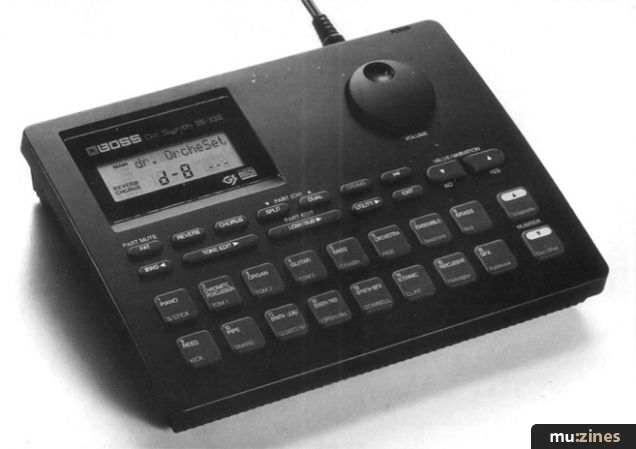
The Dr Synth allocates voices to Parts dynamically in Multi mode, while in both Single and Multi modes sustained sounds can overlap patch changes - thankfully this latter feature is fast becoming de rigeur on new instruments. The Split and Dual buttons become Part up/down buttons in Multi mode, while the Fat button becomes a Part Mute button - dual functions which are clearly labelled on the module's front panel. Using these three buttons you can quickly select a Part and drop it out - a useful feature for 'music minus one' applications.

Image credit: James Cumpsty
Pressing the DS-330's front-panel Drums button assigns a selection of sounds from the last-selected Drum Set to the module's 18 front-panel pads. You can then play (non-dynamic) rhythm parts, and record them into a MIDI sequencer, without the need for an external performance source. This, of course, isn't a feature you'll find on the 1U half-rack SC-55 - and is only available on the Dr Synth in Single mode, so you can't record rhythm parts from the pads while listening to other sequenced instrumental parts playing back on the module.
The Sound button, on the other hand, is active in both Single and Multi modes. Pressing this button triggers a single note using the currently-selected Tone, so you can check sound edits in Single mode or the assignment of Tones to Parts in Multi mode when you don't have a MIDI performance source to hand.
Drum Set List
Standard
Room
Power
Electronic
TR-808
Jazz
Brush
Orchestra
Effects List
Room 1
Room 2
Room 3
Hall 1
Hall 2
Plate
Delay
Pan
Delay
Chorus
Tone List
Pianos: 11
Chromatic Percussion: 8
Organ: 11
Guitar: 14
Bass: 10
Strings/Orchestra: 8
Ensemble: 10
Brass: 11
Reed: 8
Pipe: 8
Synth Lead: 9
Synth Pad: 8
Synth SFX: 8
Ethnic: 9
Percussive: 10
SFX: 13
Room
Power
Electronic
TR-808
Jazz
Brush
Orchestra
Effects List
Room 1
Room 2
Room 3
Hall 1
Hall 2
Plate
Delay
Pan
Delay
Chorus
Tone List
Pianos: 11
Chromatic Percussion: 8
Organ: 11
Guitar: 14
Bass: 10
Strings/Orchestra: 8
Ensemble: 10
Brass: 11
Reed: 8
Pipe: 8
Synth Lead: 9
Synth Pad: 8
Synth SFX: 8
Ethnic: 9
Percussive: 10
SFX: 13
True to form, the Boss designers have come up with a straightforward, accessible, friendly user interface for the Dr Synth which should help to win the module a lot of friends - even if it is let down a bit by cheap rubber buttons and a non-backlit LCD. The 16 Bank pads and two Number pads are a master stroke. When not being used to trigger drum and percussion sounds, these respectively call up the 16 categories of instrument available on the DS-330 (see the Tone List) and the individual instruments/Tones within each category. Each Bank button is clearly labelled with its assigned instrument category, so whether you want a guitar sound, a bass sound or a synth lead sound you can quickly locate it.
In addition, Variation up/down buttons allow you to select variations on these Tones where they exist. Each Bank button can be made to select a particular Tone within its category when pressed, so you can easily switch between any pair of Tones in different Banks - a particularly useful feature in Single mode.
Because Roland are using the same Sound Canvas chip in some 18 different instruments, all of which conform to the company's GS Format specification (see 'GS Format and General MIDI' side bar), there's a high degree of sonic compatibility across the range. Having compared the Tones on the DS-330 module and the JV30 synth (reviewed MT June '92), I can say that the cheaper instrument sacrifices nothing in the way of sound quality, and the sounds themselves are, indeed, exactly the same - with the sole exception of the Santur, for some odd reason.
The commercial implications here for MIDI songfile sales should be obvious, though anyone thinking of composing songfiles using the DS-330 should bear in mind two points: it has far less sound effects than the other GS instruments and its increased polyphony might lead you to program songfiles which 'overload' the other instruments' polyphony.
As always, it's possible to point to individual weak sounds (such as the sitar and the bagpipes) and to lament certain omissions (for instance, a hard-edged Rhodes electric piano wouldn't have gone amiss alongside the tinkly, pretty, electric pianos which are included), but the vast majority of the DS-330's sounds are very impressive in their quality, character and playability.
Digital clarity, sparkle and presence are the order of the day, along with equal facility in producing sounds which are sharp and punchy or full and smooth. Note attacks are mostly well captured, while the positioning and length of sample loops are such that the sounds are allowed to breathe and the loops aren't, on the whole, obtrusive. In addition, Roland's digital filtering is, as always, a strong plus point.
Info
What it comes down to is that the DS-330 is a great all-rounder instrument, and the sheer quality, range and playability of its sounds coupled with its appealing appearance and friendly user interface make it the module to go for in the budget price range.
GS Format and General MIDI
Like the SC-55 Sound Canvas module and all the other Roland instruments which use the Sound Canvas chip, the DS-330 is a GS Format instrument. As such, it implements a standardised minimum set of 128 instrumental sounds (known as Capital Tones) and 47 'drum kit' sounds, and organises these sounds in a standardised way.
This minimum set and its organisation also conform to the General MIDI standard ratified by the two official bodies of the MIDI world, the MIDI Manufacturers Association and the Japanese MIDI Standards Committee. However, the GS Format spec allows an instrument to implement further instrumental sounds in the form of Variation Tones, together with more than one 'drum kit'. The idea behind these Variation Tones is literally to provide variations on the Capital Tones. From the DS-330's front panel, these additional Tones can be selected by pressing the Variation up/down buttons; via MIDI you have to transmit MIDI Bank Select controller data in order to select additional sets of up to 128 Tones, and then transmit patch change commands to call up the actual Tones.
In theory, a GS instrument could implement as many as 128 sets of 128 Tones - 65 sets preset in ROM (including one MT32 set) and 63 programmable in RAM. However, as this would mean it providing 16,384 Tones, it's unlikely to happen in practice! But the freedom to implement multiple sound sets does at least allow the number of Tones to be varied according to the cost of the instrument.
Roland's GS Format is therefore effectively an extension of General MIDI, making any GS instrument automatically GM-compatible - hence the inclusion of both the GM and GS logos on the DS-330's front panel.
This minimum set and its organisation also conform to the General MIDI standard ratified by the two official bodies of the MIDI world, the MIDI Manufacturers Association and the Japanese MIDI Standards Committee. However, the GS Format spec allows an instrument to implement further instrumental sounds in the form of Variation Tones, together with more than one 'drum kit'. The idea behind these Variation Tones is literally to provide variations on the Capital Tones. From the DS-330's front panel, these additional Tones can be selected by pressing the Variation up/down buttons; via MIDI you have to transmit MIDI Bank Select controller data in order to select additional sets of up to 128 Tones, and then transmit patch change commands to call up the actual Tones.
In theory, a GS instrument could implement as many as 128 sets of 128 Tones - 65 sets preset in ROM (including one MT32 set) and 63 programmable in RAM. However, as this would mean it providing 16,384 Tones, it's unlikely to happen in practice! But the freedom to implement multiple sound sets does at least allow the number of Tones to be varied according to the cost of the instrument.
Roland's GS Format is therefore effectively an extension of General MIDI, making any GS instrument automatically GM-compatible - hence the inclusion of both the GM and GS logos on the DS-330's front panel.
The Spec
Tones: 156
Tone parameters: vibrato rate, vibrato depth, vibrato delay, filter cutoff frequency, filter resonance, filter and amplitude attack time, filter and amplitude decay time, filter and amplitude release time.
Drum Sets: 8
Parts: 16 (Multi mode), 1 (Single mode)
Polyphony: 28 voices
Display: 66 x 26mm LCD, non backlit
Connectors: MIDI In, Out and Thru; L/Mono and R audio out jacks; stereo headphones output (mini-jack); AC adaptor jack
Power supply: 12V AC (BRA AC adaptor supplied)
Dimensions: 8 7/16" (W) x 6 1/2" (D) x 2 1/2" (H); 215mm (W) x 165mm (D) x 57mm (H)
Weight: 1lb 7oz/650g
Tone parameters: vibrato rate, vibrato depth, vibrato delay, filter cutoff frequency, filter resonance, filter and amplitude attack time, filter and amplitude decay time, filter and amplitude release time.
Drum Sets: 8
Parts: 16 (Multi mode), 1 (Single mode)
Polyphony: 28 voices
Display: 66 x 26mm LCD, non backlit
Connectors: MIDI In, Out and Thru; L/Mono and R audio out jacks; stereo headphones output (mini-jack); AC adaptor jack
Power supply: 12V AC (BRA AC adaptor supplied)
Dimensions: 8 7/16" (W) x 6 1/2" (D) x 2 1/2" (H); 215mm (W) x 165mm (D) x 57mm (H)
Weight: 1lb 7oz/650g
Also featuring gear in this article

Publisher: Music Technology - Music Maker Publications (UK), Future Publishing.
The current copyright owner/s of this content may differ from the originally published copyright notice.
More details on copyright ownership...

Music Technology - Nov 1992
Review by Simon Trask
Ads for Gear in this article:

Help Support The Things You Love
mu:zines is the result of thousands of hours of effort, and will require many thousands more going forward to reach our goals of getting all this content online.
If you value this resource, you can support this project - it really helps!
Donations for August 2026
Issues donated this month: 0
New issues that have been donated or scanned for us this month.
Funds donated this month: £0.00
All donations and support are gratefully appreciated - thank you.
Magazines Needed - Can You Help?
Do you have any of these magazine issues?
If so, and you can donate, lend or scan them to help complete our archive, please get in touch via the Contribute page - thanks!
Please Contribute to mu:zines by supplying magazines, scanning or donating funds. Thanks!
Monetary donations go towards site running costs, and the occasional coffee for me if there's anything left over!

 @mu_zines
 RSS Feed
 Blog
Blog