


Magazine Archive
Home -> Magazines -> Issues -> Articles in this issue -> View
Floor Show | |
Boss ME10 Multi-Effects UnitArticle from Recording Musician, October 1992 | |
Designed with live performance in mind, the Boss ME10 has a range of features which make it particularly effective in the studio.
This elegantly presented guitar multi-effects floor unit is designed to tolerate the rigours of touring — but is it any use in the recording studio? Paul White finds out.
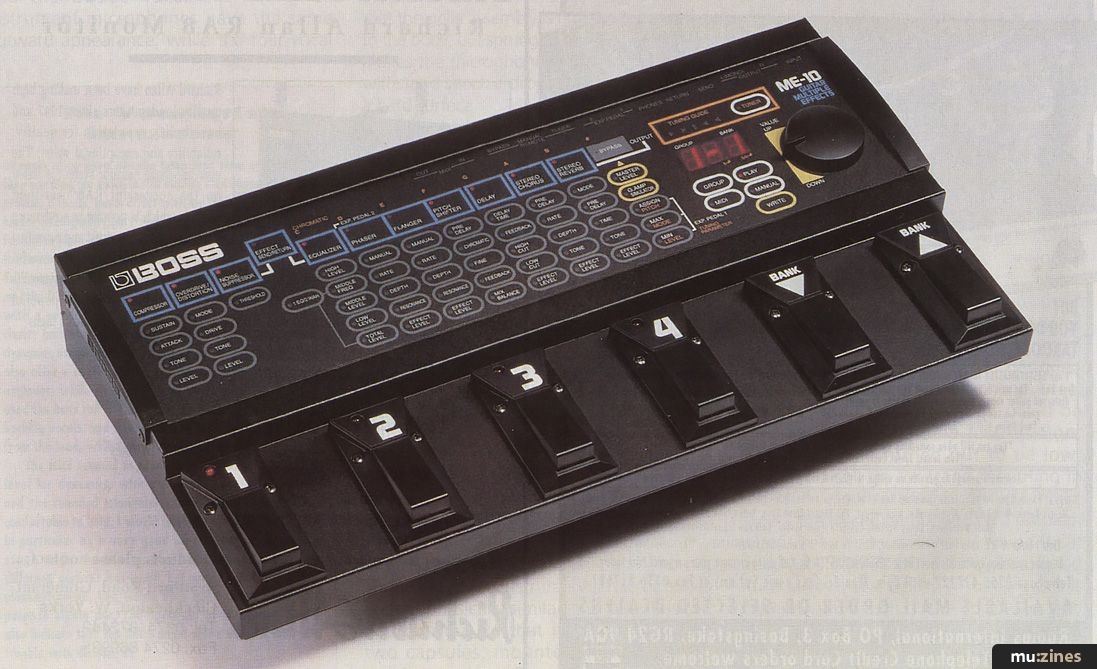
Back in my pre-MIDI gigging days, it used to take ages to connect up (and tape down) all my effects pedals — then I had to set all the controls by hand. Changing from one effects combination to another often meant trying to jump on two or more pedals at the same time, and adjusting effect parameters entailed bending down to the controls either during or between numbers — most unprofessional. If I'd had a Boss ME10 then, I'd have been in absolute heaven!
ME10 Features
- Nine Guitar Effects: Compressor, Overdrive/Distortion, Noise Suppressor, EQ/Wah, Phaser/Flanger/Pitch Shifter, Delay, Stereo Chorus, Stereo Reverb, Guitar Amp Simulator
- Built-in chromatic tuner
- External effects loop
- Shuttle dial for parameter editing
- All nine effects can be used simultaneously
- Internal memory stores 128 patches
- Footswitch/expression pedal connection facility
The ME10 can be considered equivalent to nine effects pedals, pre-connected in the most logical order, and made fully programmable. The whole thing is built into a tough, mains-powered floor unit complete with foot switches, and any combination of effects and their settings can be stored as a program to be called up later by a couple of pedal presses or, for the more ambitious, externally via MIDI. Like Boss's traditional pedals, a combination of analogue and digital technology is used and each effect has the bare minimum of parameters, making setting up very easy. The analogue effects include overdrive/distortion and compressor, while the delay-based effects are all digital.
The range of effects, in the order in which they are connected is: Compressor, Distortion/Overdrive, Noise Suppressor, Equaliser (which can be controlled via a pedal for wah wah effects), Phaser, Flanger, Pitch Shifter, Delay, Stereo Chorus and Stereo Reverb. An effects send and return loop is located between the noise suppressor and the equaliser, the in/out status of which can be stored as part of a program, while the amp/speaker simulator comes at the end of the signal chain. The unit also includes a rather sophisticated tuner, which uses LEDs to indicate whether the note is sharp, flat or in tune. The note being played is also shown in the unit's display window.
As you can see from the photograph and line drawing, the unit is logically set out, with six footswitches along the front and all the connections on the rear panel out of harm's way. The control surface makes extensive use of membrane switches behind a scratch-resistant, back-printed plastic panel, while data entry is performed by a spring-loaded data wheel at the right-hand side of the top panel.
Given that most guitar effects have an input socket and one or two output sockets, the provision of ten rear-panel jacks, (not including the phones mini-jack or the MIDI In and Out sockets), might seem somewhat overwhelming, but they're all there for a reason. There's a single guitar input jack followed by a pair of jacks to provide a stereo output, though a mono output can be obtained by using just the left socket of the pair. A further pair of jacks is dedicated to the effects send and return, while two more allow the connection of optional expression pedals, one to control level and the other to control various effects parameters in real time. A jack provides remote access to the tuner, and the two remaining jacks take optional footswitches, which activate the Bypass and Manual modes. Bypass is self-explanatory; Manual disables part of the programming system, allowing the six footswitches to be used to turn six of the effects on or off directly, as though they were separate effects pedals. The effects responding to the footswitches are: Compressor, Overdrive/Distortion, Equaliser, Flanger, Delay and Stereo Chorus.
Patch Allocation
Normally, the ME10 would be used in its normal program mode, where up to 128 effects settings can be created and stored for future recall. The effects are arranged in four Groups of 32, with each group further subdivided into eight Banks, each containing four effects Patches. The desired group is selected by means of the group button on the front panel, then the data knob is used to step through the four possibilities, the current group number being displayed in the numeric LED display window. Any of the 32 patches within a group may then be selected using only the footswitches.
The two Bank footswitches are used to increment or decrement through the eight banks, (the bank number appearing in the display window with the patch number), and then the number switches are used to select an effect from that bank. The effect only changes when a number switch is operated, and the circuitry ensures that that any reverb or delay effects die away uninterrupted when a change is made. There is an optional way of switching, which causes the effects to change as soon as a bank or number switch is pressed, but unless the effects are stored in a convenient order for this style of access, I don't see it offering any tangible advantages. Likewise, if you really want the reverbs and delays to cut off as you change patches, there is a user-selectable option to allow this.
Creating a new patch is simply a matter of selecting an existing, unwanted patch and then changing it to something you like better. The new parameters are then stored in place of the old ones using the Write button. Patches may also be copied from one location to another. Each patch contains information as to which effects modules are on and which are off and the parameters of the selected effects. Also stored is the effects loop status (in or out), the speaker simulator status (on or off), master level and expression pedal settings — but not Bypass, as this would be pretty pointless. Interestingly, expression pedal 1 may also be used to change a selected parameter while in the edit mode, for the benefit of those with an aversion to the data dial. Expression pedal 2 functions as a volume control between the equaliser and phaser sections; this is prior to all the delay effects, so the reverbs and delays will decay naturally even if the pedal is turned down abruptly.
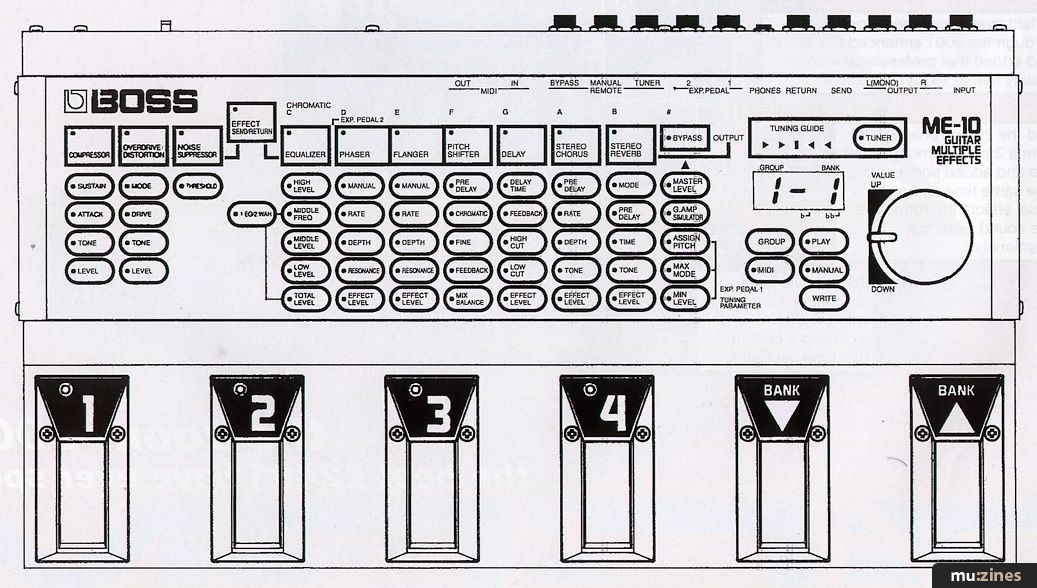
ME10 front panel, showing the unit's logical layout, with assignable footswitches, shuttle dial for more efficient parameter editing, and graphic representation of effects and parameters available.
"To my mind, the chorus and flanger are amongst the best effects of their kind available — they really move, and literally sparkle with detail and depth."
The Effects
Looking at the top panel of the unit, it is easy to see how the effects and their parameters are arranged. Each effect is represented by a blue box, in which is the name of the effect and a status LED. The box also incorporates a membrane switch, and pressing it turns the effect on or off. Below each effect box is a a series of oval parameter boxes, the bottom one usually relating to the level of the effect. These are selected for editing one at a time, by pressing them; a status LED then lights to show they are active. The parameter value is shown in the display window and may be changed by using the data knob. This is certainly an easy system, as all the parameters are constantly on show, with no need to delve into a multilayered menu hierarchy.
First in line is the analogue compressor, which is useful in creating both clean sounds and — in conjunction with the overdrive section — dirty sounds. In addition to being able to set the degree of compression with the Sustain parameter, it is also possible to set the attack time to emphasise the start of notes by, in effect, slowing down the reaction time of the compressor. A tone control provides general treble boost or cut, while the Level parameter allows the user to balance the relative level between the effects. With the exception of the noise suppressor section and speaker simulator, all the effects have their own level controls.
Overdrive offers a choice of four types of distortion — rather like having four different types of distortion/overdrive pedals to choose from. The first two settings are fairly warm, while the second two are brighter and more aggressive. In all cases, the drive level can be varied to create differing degrees of distortion, and the Tone control offers a degree of variation over the brightness of the sound. Following the overdrive section is the Noise Suppressor, which functions as a slow-release noise gate suppressing all noise below a threshold set by the user. This should be set up to remove background hum and noise when the guitar is not being played, but the threshold should not be set so high as to cause wanted notes to be cut short.
The equaliser offers cut or boost in three bands with the mid frequency being variable over the range 200Hz to 2kHz. A further parameter button acts as a switch to allow the equaliser to be used as a wah wah under the control of expression pedal 1. The wah wah range and centre frequency can be set by the user.
Moving on, the next section is the digital Phaser with adjustable rate, depth and feedback (Resonance); the adjacent Flanger section offers exactly the same parameters. The Pitch Shifter has a shift range of up to one octave in either direction, which can be set in semi-tone steps and/or fine tuned. A degree of pre-delay can be added, up to 100mS, and there is the option to add feedback to create shifts that spiral up or down. In place of a level control is a balance control that regulates the mix of treated and untreated sound. The degree of shift may be assigned to the expression pedal for tremolo arm type effects.
The delay section is mono, offering delay times of up to 1.2S with feedback to create multiple, decaying echoes. A high-cut filter is included for mellowing the echo sounds (useful for tape-loop simulations), and a low-cut filter allows the bass to be rolled off for a thinner echo sound. It is possible to control the delay time from the expression pedal, but this sounds a little glitchy and is not recommended for serious use.
No Roland or Boss product of this type would be complete without a chorus section — after all, Roland invented it — and I'm glad to say that the ME10 has a particularly good stereo chorus section. Aside from the usual depth and speed controls, there is provision to add treble boost or cut, and a pre-delay of up to 60mS may be used to create richer chorus sounds or doubling effects. Even the reverb is quite well specified for a unit of this type, with two halls, two rooms and two plate settings to choose from.
"The ME10 can be considered equivalent to nine effects pedals, pre-connected in the most logical order — and made fully programmable."
The reverb decay time is variable over quite a large range, with the option of adding pre-delay of up to 150mS to create more spatial effects. Again, the sound may be brightened or darkened to simulate different reverberant environments, but there is no reverse setting, which I would have liked to have seen on a guitar unit. Finally comes the Guitar Amp Simulator, which enables the ME10 to be DI'd into a mixer by compensating for the speaker characteristics and amplifier voicing of a typical guitar combo. Without this facility, overdrive-type sounds tend to sound thin and fizzy when plugged directly into a mixer or hi-fi.
The Sound
There are no formal technical specifications for this unit, but it could be argued that these are irrelevant in the case of a guitar processor, as guitar amplifiers have a limited frequency response, diverse colourations and distortions, and tend to be noisy. This unit is not unduly noisy, being on a par with the individual Boss pedals, and indeed, the subjective quality of the effects is comparable with the existing stand-alone pedal range. All four overdrive modes are reminiscent of one Boss pedal or another, and though none offers a true valve amp simulation, all the classic metal and rock sounds are in there somewhere. The compressor is fine for adding sustain to the guitar sound, and by combining the effect of the compressor and its tone control with the overdrive section, it is possible to create a very wide range of musically useful overdrive sounds. I was also very pleased with the noise suppression system which, when properly set up, works very unobtrusively. Similarly, the EQ frequencies seem to have been well chosen for guitar applications.
I couldn't fault the chorus or phaser sections but I'd have liked a stereo delay and also one or two reverse reverb settings. Otherwise, the reverb is surprisingly good and is infinitely better than the spring units generally built into guitar amps. Indeed, it would be quite good enough for general vocal or drum use and I suspect it is based on the design used in the excellent Boss reverb pedal. The only real weak area is the pitch shifter which, to be fair, is as good as most budget shifters. It tends to sound lumpy or glitchy when large amounts of shift are used; it's fine for detuning, but larger shifts are best disguised with distortion or by adding a lot of unshifted sound into the mix.
The speaker simulator isn't as sophisticated as some of the dedicated units I've tried but it is certainly effective in making the sound DI'able. It needs a little help from the EQ, either in the unit or on the console, but it removes the fizz and beefs up the sound.
Impressions
Foremost, this is a very practical piece of equipment, both in its construction and in its ease of use; in fact I'd go so far as to say this is the easiest multi-effects device to program that I have ever encountered.
The subjective sound quality is good in that most of the clean or dirty guitar sounds you hear on record can be emulated — anything from country and western to thrash metal. If the overdrive falls down anywhere, it's when recreating those in-between, raunchy, bluesy sounds — but with a little perseverance and the right combination of compression, overdrive and EQ, you can get pretty close. What's more, the speaker simulator provides an instantly usable sound straight into the mixer, while the noise suppressor keeps the hiss at bay without being in any way intrusive.
The facility to use an external pedal to control the pitch shift, delay time or wah wah is useful, but I feel a unit of this type really should have at least one pedal built in. The programmable effects loop is a good idea, and the ability to control an external device over MIDI certainly adds to the flexibility. It should, however, be kept in mind that the external effects loop is only mono.
"I'd go so far as to say that this is the easiest multi-effects device to program that I have ever encountered."
Boss ME10
- Ease of Use
- Low Noise
- Good effects, especially the chorus
- Sensibly set out for performance use
CONS
- Overdrive sounds are not the most convincing around
- The floor unit format results in a higher cost than a straightforward guitar multi-effects unit
PERFORMANCE 8/10
VALUE FOR MONEY 7/10
For me, the ME10 really excels in creating rich, three-dimensional phase, chorus and flange sounds. What's more, there's a separate effect for each function so you can have all three at once if you like. To my mind, these are amongst the best effects of their kind available — they really move, and literally sparkle with detail and depth. The only let-down is the inevitable lumpy pitch shifter, but I'm realistic enough to know that you just don't get a good pitch shifter for this kind of price.
The effects presented in this unit are both accessible and versatile, and it is likely that most users will have no desire to add on extra processors or to use MIDI control. Even so, the facility is there, which could be useful for adding some degree of effects automation in the studio or for saving patches via SysEx dump. I'd have given my back legs for something like this in my more gig-intensive days, but nowadays, the ME10 faces some quite aggressive competition. Even in this light, I think the ME10's ease of use, combined with the high quality of the effects, especially the superb chorus and flanger, puts it near the front of the pack when it comes to guitar multi-effects floor units.
MIDI
Further Information
Boss ME10 £599 including VAT.
Roland UK Ltd, (Contact Details).
Publisher: Recording Musician - SOS Publications Ltd.
The contents of this magazine are re-published here with the kind permission of SOS Publications Ltd.
The current copyright owner/s of this content may differ from the originally published copyright notice.
More details on copyright ownership...
Recording Musician - Oct 1992
Review by Paul White
Previous article in this issue:
Next article in this issue:
Help Support The Things You Love
mu:zines is the result of thousands of hours of effort, and will require many thousands more going forward to reach our goals of getting all this content online.
If you value this resource, you can support this project - it really helps!
Donations for October 2026
Issues donated this month: 0
New issues that have been donated or scanned for us this month.
Funds donated this month: £0.00
All donations and support are gratefully appreciated - thank you.
Magazines Needed - Can You Help?
Do you have any of these magazine issues?
If so, and you can donate, lend or scan them to help complete our archive, please get in touch via the Contribute page - thanks!
If you're enjoying the site, please consider supporting me to help build this archive...
...with a one time Donation, or a recurring Donation of just £2 a month. It really helps - thank you!

 @mu_zines
 RSS Feed
 Blog
Blog