


Magazine Archive
Home -> Magazines -> Issues -> Articles in this issue -> View
IBM Software | |
Article from One Two Testing, November 1985 | |
why USA musicians favour big computers
OSTENSIBLY, the subject of this issue's sermon is more guff on how musicians might benefit from diving into MIDI (and especially computers and MIDI). But that would only be a blanket of useful facts wrapped around a solid chunk of anger. Because I am angry... angry about two of the three things I care about passionately in my music-making.
The three things: quality of vision; the best tools I can lay my hands on; and power (sheer, plain, unadulterated, raw-and-I-like-it-that-way power).
Quality of vision I can't do anything about, because it's strictly between you and your muse. But all around me I see musicians sabotaging themselves... finally over their computer phobias, ready to dig in, but skimping on the quality of their tools, denying themselves access to the power that's out there waiting to be grabbed.
So forget your Commodores and Spectrums and Apple IIEs and BBC micros. The software isn't serious.
This leaves the real power concentrated in IBM land.
STEP 1 WHY AN IBM PC?
It is common, in some computer circles, to sneer at the IBM PC. You don't hear it from people actually using PCs. And with good reason. They're wonderful computers, especially for musicians.
First, the PC has an easy operating system (yes, the documentation is lousy — isn't nearly all documentation? — but there are good independent books). It's more difficult to teach yourself a good selection of blues turnarounds and riffs than it is to learn everything you'll ever have to use in the way of DOS (Disk Operating System) commands.

Second, the PC can have a lot of memory, all the way up to 640K. That much memory means room for bigger, more powerful music programs, as well as plenty of musical storage space.
Third, because of IBM's ubiquity, just about every hardware and software accessory or service you might ever imagine is available out there.
Fourth, there's a ton of good software indirectly related to music to be bought off-the-shelf and then customised to meet your needs.
Fifth, there's a choice of working MIDI interfaces for the PC: Roland's MPU-401 and Octave Plateau's smaller, cheaper, single-card version, the OP 4001 (which only has one MIDI OUT and no Roland SYNC OUT, but compensates by adding the capacity to sync to 5V clicks, or convert them to FSK and vice-versa).
Sixth, rapidly falling prices as North Korean manufacturers cut their list prices and IBM feels the double-sided pressure of that and their own overly-large inventory. Basic PCs will drop below $1000 by January of '86 without question.
Seventh and most importantly, though, there are three major MIDI recording programs for the PC. All are good. One is devastating (with a few caveats and cautions). The third is just plain devastating.
Anyone who thinks MIDI is limited is right, but the power of these programs pushes the horizon a long way back.
STEP 2 SO WHAT'S AVAILABLE?
TEXTURE PROGRAM written by Roger Powell. Cost: $200 from Cherry Lane Technologies, (Contact Details). Hardware required: at least 256K of memory, MPU-401 or OP 4001 interface.
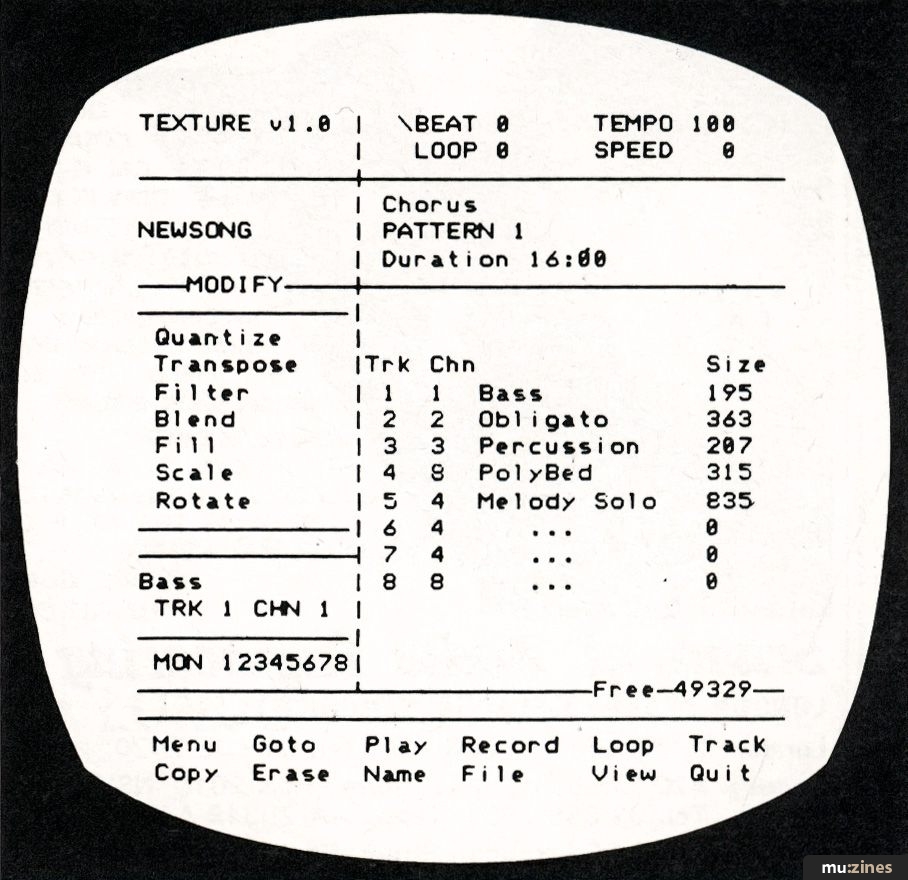
ROGER POWELL is both a long-time pro keyboard player (mostly with Todd Rundgren) and a long-time computer music hacker/hobbyist. Texture is his first commercially released software product and while a few of its rough edges are showing it will be easily comprehensible because of its structural resemblance to programming a drum machine.
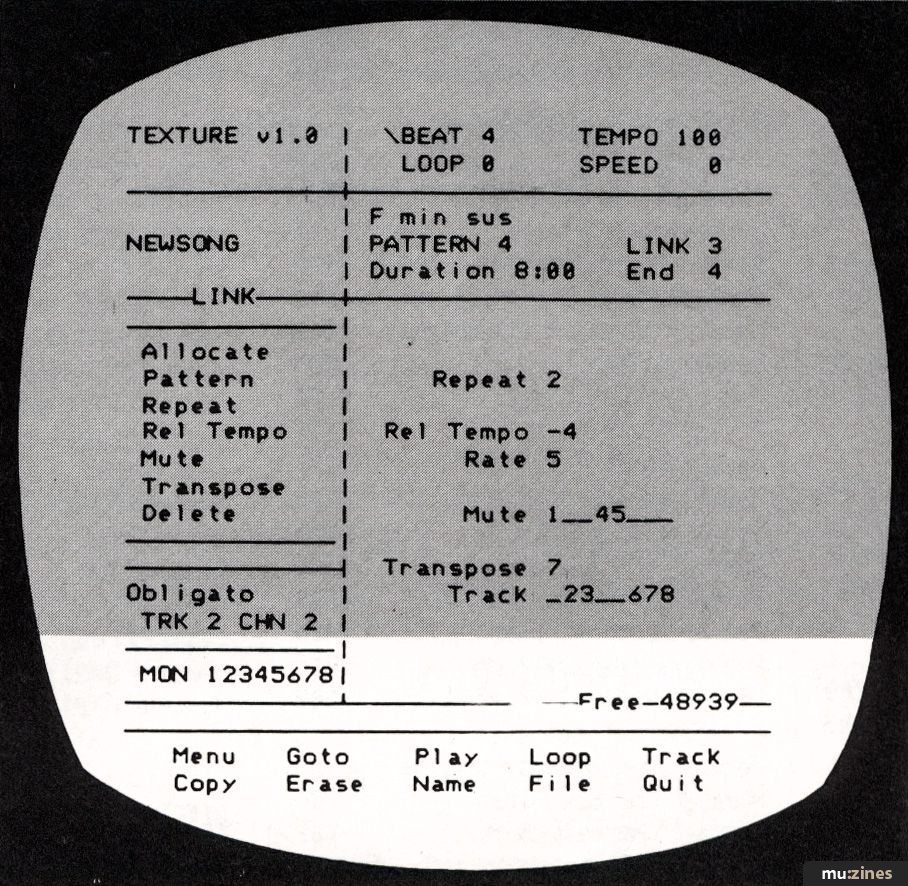
In fact structure is the key word here. Texture takes an approach that Roger refers to as "modular recording". Composing with it is like building mosaics, creating a song out of smaller sections that repeat and go through variations in calculated ways. Each song can have up to 64 "links" — each link can be made up of different combinations of 64 "patterns" — and each pattern can be a single piece of multitrack music, with up to eight tracks, that you record into the program by playing a MIDI keyboard, guitar, or other device.
On the bigger scale, it's a lot of fun to work with. This fission/fusion writing technique is very much a computerised version of what rock'n'rollers have been doing in garages for years ("Okay, Lennie, you play the A section twice and then Biff will intro the chorus with a triplet. Hit it!"), and seems pretty natural.
Less natural is the microscopic approach the program allows you. MIDI is serial data, zeroes and ones spewed out in a single line. In Texture there is a window where you can step through that serial data literally word-by-MIDI-word, and edit it as you see fit. Not for the faint-hearted. But fascinating.
PERSONAL COMPOSER PROGRAM written by Jim Miller. Cost: $495 direct sale, distributed in America by Ameregan Bulleycode, (Contact Details). Hardware required: 300K or more of memory, MPU-401 or OP 4001 interface, Hercules monochrome graphics card or IBM EGA color graphics card, Epson FX-series dot matrix printer (for music printouts). THIS PROGRAM is nearly perfect, OK, or useless, depending entirely on how strongly your approach to music is grounded in written notation.
Here's what it does best, in fact better than any microcomputer program available anywhere in the world: it lets you write in actual music notation on the screen, in up to orchestral complexity, using a "mouse" and computer keyboard commands. And then it plays the score through MIDI instruments. If you are a composer who writes, or an arranger, or someone who wants to print their own sheet music inexpensively, this is killer stuff. Better still, the music is sharp and crisp on both screen and printout, at least 500% better than most of the hand-done charts that session players are used to coping with.
Here's what it does less well: it can take what you play on a MIDI synth, record that in its 32-track sequencer, and then translate your music into written notation for you. Sort of.
Oh, it makes a noble effort, sure enough. But the timing resolution is limited to sixteenth notes in this format, and no matter how many tracks you've played they all come up on a grand piano staff. Do not buy the program expecting it magically to handle all your notational chores. You will be able to get approximations, by applying certain tricks and paying strict attention to time when you play, but inevitably you'll have to go in and edit the score by hand.
Included with the program are the already-mentioned 32-track sequencer (not bad as a pure recording tool, but since you can't edit the tracks except by converting them to notation and editing the notation, a bit limited), a page for designing your own notation symbols, and a DX7 editing/librarian program that (as of version 1.31, the current release) is useful but not yet fully debugged.
SEQUENCER PLUS PROGRAM written by Jim Wright, Bruce Frazer, and High Steele. Cost: $450 from Octave-Plateau, (Contact Details). Hardware required: at least 256K of memory, MPU-401 or OP-4001 interface.
REMEMBER I said power, before? This is the real thing. Version one of Sequencer Plus was good. Version two, which is just out, is the single best piece of music software, MIDI or otherwise, that I have ever encountered, for the simple reason that it gives me complete and total control over every aspect of the music I've recorded and, better still, it does it in an easy-to-use way.
Here's what you get for the bucks. Sixty-four tracks, to start with, and each track can be individually named, quantised, looped, transposed over a ten-octave range, muted, assigned to a MIDI channel, and given a start-up program number. Around 60,000 notes of memory in a 640K PC, to continue, with the capacity to edit the pitch, velocity, start-time, and length of every single note (and we're talking resolutions of a 1/384th note here). The capacity to sync to virtually anything. Programmable tempo changes. Programmable program changes. Simultaneous tracks in different time signatures (for that matter, each single measure can be in a different time signature, if you want; polyrhythm heaven). Total editing of all MIDI events. Insertion and deletion of notes. Eleven memory buffers for cutting and pasting sections of music with. A "Files" screen that automatically alphabetises the files you've stored on your disk, plus the capacity to store single and recall single tracks, so that pieces of one composition can be moved into another one. Consistent and logical commands, function names... and very little jargon.
One caveat: no notation. Instead, it displays music in one of two graphic formats. In the View screen you get a shorthand look at all the tracks in your sequence. If a measure has music in it, there's a little box. If not, a dash. As the sequence plays, the cursor moves from measure to measure (box to box) along whichever track has been selected. You can start playback from anywhere in a sequence just by putting the cursor on the bar you'd like to begin on.
The second graphic mode shows only one track at a time, with your notes displayed as bars on a grid. The height of the bar on the grid shows its pitch (the grid is marked with note values at both sides of the screen, for quick reference); the length of the bar and its position show start-time and an approximation of actual length.
Editing is easy. Watch the measures scroll by on the screen until you hear what you want to change, and press the computer's space bar. That will stop the program dead on the measure you want to alter — and if you're reasonably together, on the note itself. Single key commands do the rest from there.
The power of Sequencer Plus is so great, in fact, that you'll be discovering new uses for it daily. It has been invaluable to me in completing my first album. Here are just a few of the stunts at which it shined...
...sync to tape. My 8-track machine became a 24-track when I used a tape track of FSK timecode to drive Sequencer Plus, which in turn drove 18 tracks of synths in perfect sync with the music on the tape.
...sync to tape editing. If I changed my mind about something on tape, and that something had been simultaneously recorded on Sequencer Plus, all I had to do was edit the computer score, sync the machines back together, and drop in the corrected take.
...arranging. More than once I broke a song down into single chords, gave each chord a track all its own, and then sat back and manipulated them in time and transposition until I liked the skeleton I'd built, and could lay music on top of it.
...turning rehearsals into "final sessions". It was enough to get close to a good take with my synth players, because after they left I could carefully edit out their errors, tighten their timing, and so on (not to mention reorchestrating their parts!).
More could be said about Sequencer Plus. More will be said, and not just by me, if there is any justice in this world. Check it out for yourself. Sequencer Plus, Texture, and Personal Composer are the first generation of software that really, finally (and almost fully) justifies all the MIDI hype.
In the meantime, listening to my master tape and realising how much of a hand the computer had in it, as electronic recording studio, as composing tool, as writing medium, as a mirror to hold my ideas up against... well. I might just name my first child IBM PC in sheer gratitude.
Also featuring gear in this article

Music Pak
(MIC Apr 89)

Personal Composer System/2
(SOS Dec 88)

Sequencer Plus
(SOS Nov 87)


Voyetra Sequencer Plus - Version 4
(SOS Mar 91)

Browse category: Software: Sequencer/DAW > Cherry Lane Technologies
Browse category: Software: Sequencer/DAW > Jim Miller Software
Browse category: Software: Sequencer/DAW > Voyetra Technologies
Publisher: One Two Testing - IPC Magazines Ltd, Northern & Shell Ltd.
The current copyright owner/s of this content may differ from the originally published copyright notice.
More details on copyright ownership...

One Two Testing - Nov 1985
Gear in this article:
Software: Sequencer/DAW > Cherry Lane Technologies > Texture
Software: Sequencer/DAW > Jim Miller Software > Personal Composer
Software: Sequencer/DAW > Voyetra Technologies > Sequencer Plus
Gear Tags:
Review by Freff
Ads for Gear in this article:


Help Support The Things You Love
mu:zines is the result of thousands of hours of effort, and will require many thousands more going forward to reach our goals of getting all this content online.
If you value this resource, you can support this project - it really helps!
Donations for April 2026
Issues donated this month: 0
New issues that have been donated or scanned for us this month.
Funds donated this month: £0.00
All donations and support are gratefully appreciated - thank you.
Magazines Needed - Can You Help?
Do you have any of these magazine issues?
If so, and you can donate, lend or scan them to help complete our archive, please get in touch via the Contribute page - thanks!
Please Contribute to mu:zines by supplying magazines, scanning or donating funds. Thanks!
Monetary donations go towards site running costs, and the occasional coffee for me if there's anything left over!

 @mu_zines
 RSS Feed
 Blog
Blog