


Magazine Archive
Home -> Magazines -> Issues -> Articles in this issue -> View
Korg SQD Sequencer | |
Article from One Two Testing, November 1985 | |
big memory with drive
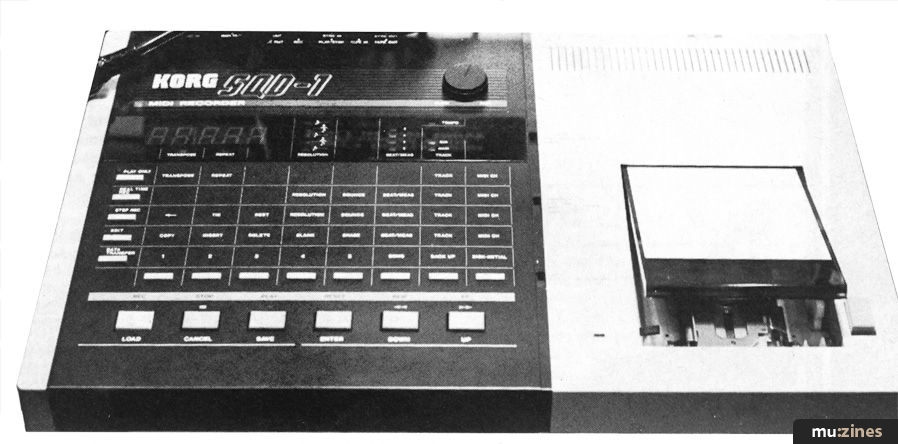
THE THING I'd like to know is; if Korg's SQD-1 is "so easy to use that we didn't even call it a sequencer", as they obscurely, but gaily, proclaim in their promotional literature, then why is the wretched device accompanied by a 128 page manual?
To be strictly fair. I think you'd call the SQD-1 fiddly rather than complex, but it is not a gadget for bluffers. Procedures must be followed accurately or else you'll get absolutely nowhere.
At first sight it looks daunting, with the multi function matrix taking up most of the control panel. If this doesn't put you off right away, closer inspection wil reveal three 3-position switches lurking down one edge plus a number of LED displays in addition to the five digit main screen, not to mention the back which is littered with Sync, MIDI, Tape, and Click in- and outputs, and a row of MIDI, function switches that are so small you practically have to whip out a magnifying glass.
All heady stuff of course, but off-putting to the potential but nervous sequencer buyer. If the SQD-1 hasn't been replaced by the SQD-2 by the time you've ploughed through the manual, you'll discover that this is nonetheless an excellent recorder in many ways.
The sheer weight of front and rear panel activity indicates that you are being offered precise control over data, and certainly Korg have avoided many of the common complaint areas.
You can, for instance, mix step time and real time recording, both from track to track, and within one track itself. The real time recording mode also has various levels of auto correct as well as effectively uncorrected High Res. Most importantly, you can store and specify a number of distinct songs using the built-in Quick Disk.
But though these features have been included, the lack of which severely limit many other recorders' usefulness, Korg's basic method of recording can prove limiting in itself. On most MIDI recorders you have a number of tracks onto which data is stored. On a four track model like Casio's SZ-1, once you have recorded on all tracks, fairly obviously, that's it. You either like it, lump it or re-record over a previously recorded track. Korg's method is to provide simply a main track and a sub track (à la Yamaha QX7).
The good point about this is that, within reason, you are not tied to say four or eight tracks. You simply continue to bounce down until the SQD's note-handling capacity of 16 notes at a time has been reached. However it's not entirely unlikely that having recorded and bounced down for a third or fourth time, you begin to regret lines recorded earlier.
On a set-track recorder, the answer is merely to re-record the offending track. Here, however, having bounced a number of tracks together, you cannot easily extricate one from another. I should hastily point out that this doesn't apply to the sound of a track, because this is governed by MIDI channel numbers and accompanying MIDI instruments in a very basic way. But in order to edit note data, you have to erase the offending bar (specifying the track's MIDI channel number), record again on the sub track, and then re-bounce it back on to the main track again.
A performance.
Your first recorded data, always stored on the main track, also governs the overall length of a piece. Subsequent recordings cannot be longer than this initial part. Provided you have a clear idea of what you want, and are not prone to making too many mistakes, the day-to-day mechanics of recording and bouncing soon become second nature.
You have good control over bar lengths, which are indicated on the Beat/Meas row of LED's, 5/4 and 7/4 can be selected just as easily as common time, and you can stop mid-way through a piece and insert a "clever' bar any time you want.
The fact that you can auto correct real time recording means that you may not have to use step time mode too often. But Korg have presented this mode in quite a useable and most comprehensive way.
If all you want are streams of dead-accurate semi quavers, then you merely select the relevant note resolution, sidle into step time recording, and play the notes on your keyboard. The screen keeps you informed as to which beat you're on. But there's a lot more. For a start you can input velocity data (mercifully simply by playing the particular note harder!), and you can select certain passages to be played legato (smoothly) by keeping the resolution button pressed down as you play those notes.
One thing that you don't see too often is simple step time recording for chords. Here it is merely a matter of playing the chord instead of a note. At least some things are straightforward on the SQD.
With tie and rest controls, and the ability to change note resolution values at any point during recording, there appear to be no limitations as to what you can record. Even such goodies as after touch, program change, and pitch bend data can be added to a step time recorded track by inserting them later on in real time.
Without using the associated Quick Disk, you can store up to 15,000 notes. With the QD, 30,000 notes can be stored. This can be divided up into around ten specific songs.
People have gone to all sorts of lengths to increase the memory capacity of recorders like Roland's MSQ700. With the QD in tow, and a small number of disks, such problems will never occur here. The SQD-1 does not continually read off disk, and you have to load the information into the recorder 15,000 notes at a time which would obviously erase any data already there. It would seem sensible to stock up on disks to avoid disasters.
In addition to its own internal clock, the SQD-1 can take timing commands from both a MIDI device and a non MIDI device using 48bpqn Sync. There's even tape sync for those who are feeling brave.
Provided you have a clear head and are prepared to learn how to use the SQD-1, you get a lot for your money. However if you just want a digital note pad that you can operate at two in the morning when inspiration strikes, you may be better off elsewhere.
What seems to have become apparent during my time with this recorder is that most things are possible if you read carefully, and don't panic.
Various pieces of MIDI information can be selectively recorded or inserted, editing is comprehensive though sometimes torturous, and although you have to keep a close watch on 'notes remaining' (or else some functions just don't work), the memory capacity is large, and of course infinitely expandable.
KORG SQD-1 MIDI recorder: £599
CONTACT: Korg UK, (Contact Details).
Also featuring gear in this article

Korg Sequencer
(IT May 86)
Part of the Furniture - Korg SQD1
(EMM Sep 85)

Step by Step
(EMM Nov 85)
Step by Step
(IM Dec 85)
Browse category: Sequencer > Korg
Publisher: One Two Testing - IPC Magazines Ltd, Northern & Shell Ltd.
The current copyright owner/s of this content may differ from the originally published copyright notice.
More details on copyright ownership...

One Two Testing - Nov 1985
Review by Julian Colbeck
Previous article in this issue:
Next article in this issue:
Help Support The Things You Love
mu:zines is the result of thousands of hours of effort, and will require many thousands more going forward to reach our goals of getting all this content online.
If you value this resource, you can support this project - it really helps!
Donations for June 2026
Issues donated this month: 0
New issues that have been donated or scanned for us this month.
Funds donated this month: £0.00
All donations and support are gratefully appreciated - thank you.
Magazines Needed - Can You Help?
Do you have any of these magazine issues?
If so, and you can donate, lend or scan them to help complete our archive, please get in touch via the Contribute page - thanks!
If you're enjoying the site, please consider supporting me to help build this archive...
...with a one time Donation, or a recurring Donation of just £2 a month. It really helps - thank you!

 @mu_zines
 RSS Feed
 Blog
Blog