


Magazine Archive
Home -> Magazines -> Issues -> Articles in this issue -> View
Line 6 AxSys 212 | |
Digital Guitar ComboArticle from Sound On Stage, March 1997 | |
A guitar combo where the sound doesn't come from valves, or from transistors, but from digital, mathematical models of how valves, amplifiers, and speaker cabinets actually behave. Paul White puts the AxSys 212 through its paces.
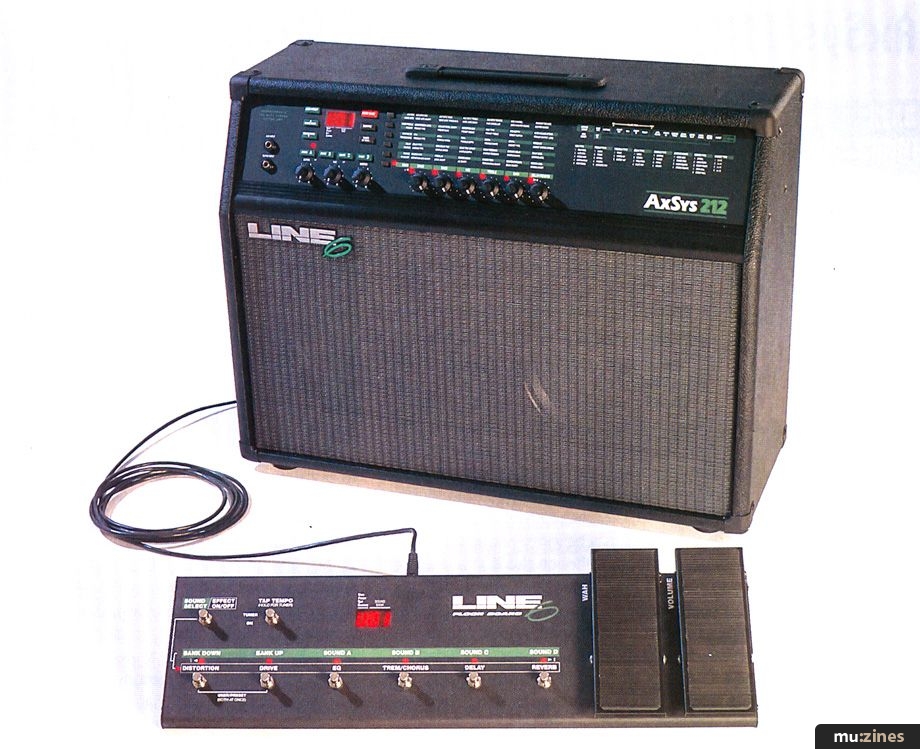
The valve versus transistor debate has gone on long enough to be seriously boring, but while, a few clever solid-state designers have proved you can get a classic guitar sound from silicon, most solid-state amps still sound unsatisfying. Strangely enough, most hi-fi systems are solid-state, and a nicely recorded valve guitar amp sounds just as tube-like when played from CD. In a roundabout way, the AxSys guitar amplifier works on this principle. If you can create a truly authentic guitar amp sound in the preamp stage, all the power amps need do is make the signal 'bigger' — they don't need to add any more colour or distortion. And the cheapest way to make an honest power amp is to build it using transistors or MOSFETs.
Of course, this has been tried before. People have built valve preamps and teamed them with solid-state power amps, but they don't usually sound as good as all tube designs. Why? Because the sound of a good guitar amp is the combination of several elements, including the preamp tonal and overdrive characteristics, the way the power amp stage saturates, and the way the loudspeaker cabinet colours the sound. Miss out any one of these elements and the sound is bound to be wrong. So, how does the AxSys approach the problem?
Line 6, the company behind the AxSys, spent a lot of time testing, measuring, and documenting the performance of dozens of different classic amps, tube stages, and speaker cabinets, then they set about the task of designing a computer model that would accurately emulate all the characteristics of the real thing. In other words, the signal is processed in exactly the same way as it would be by valves, but no conventional circuitry, valve or solid-state, is involved in creating the tone. Instead, it's all done by computing numbers.
Those of you familiar with Roland's V Guitar system will see a similarity, although Line 6 have approached the subject rather differently. They've built a preamp incorporating a very powerful digital processor to emulate all the tonal characteristics of a complete guitar amp and speaker setup, added a sophisticated but easy to use stereo effects processor, then fed the output into a stereo pair of 50 Watt, solid-state power amps, each feeding a specially commissioned 12-inch Eminence speaker. Then they threw in a few computer models of popular distortion boxes, added a couple of acoustic guitar simulations for good measure, and here's the best bit, they built it all into a neat 2 by 12 combo for little more than the cost of a conventional rackmount guitar effects preamp box! There's even a computer model of a spring reverb that's so accurate, you don't know it's not the real thing until you kick the combo and it doesn't twang! Furthermore, because it is easy to make digital devices programmable, the AxSys is able to offer 128 factory preset memories plus 128 user memories for your own amp/effect combinations.
For the benefit of those performers needing a clean input for a mic, guitar synth, drum machine or bugged acoustic guitar, the AxSys also has a variable level Aux input, complete with programmable two-band EQ and reverb, accessible from the front panel.
THE BEAST
Presented as a fairly conventional open-backed combo, the vinyl-covered wood cabinet contains two Eminence 12-inch speakers, each driven by its own 50 Watt power amplifier, plus the digital processing circuitry and input AD converters. The reason for the two amplifiers is that the effects are in stereo; even with the speakers relatively close to each other, you still get an enhanced sense of stereo depth. Furthermore, extension speaker cabs may be used for a wider stereo image if needed.
Both the amplifiers and DSP electronics are housed in a chassis at the top of the cabinet in the traditional combo manner, but the front panel looks rather different from what you'd expect to find on, say, a Fender Twin. I'd be the first to admit that the front panel isn't as pretty as a Fender Twin either, but there's logic to it being set out this way — it's actually incredibly easy to use.
The bane of most digital devices is that you have to program them using fiddly buttons and menus, when most of us really just want to twiddle knobs. And with the AxSys 212, you get to twiddle knobs! In the centre of the front panel are six knobs, above which is a matrix of parameters for setting up amp sounds and effects. The bottom row relates to a conventional guitar amp, giving direct control over Drive, Bass, Middle, Treble, power amp Gain, and Delay/Reverb amount, but by pressing the button at the start of any row, you can use the knobs to adjust those parameters instead. For example, the next row up enables you to adjust reverb settings and/or switch key elements on or off, such as reverb, EQ, delay, and so on.

The way the AxSys knobs work is rather different to conventional knobs, because once you switch to a different parameter row or load a new patch, the physical position of the knob will almost certainly be different from the actual parameter value. For example, if you switch from a patch with little overdrive to one with lots of overdrive, the Drive knob will still be in the same place, but the drive parameter will have changed considerably. To get around any problems this might cause, each knob has an LED, the brightness of which relates to the parameter value. When you turn the knob, no change is heard until you pass through the position corresponding to the current parameter value; the knob then smoothly picks up control, allowing you to make changes as normal.
In all, there are six main rows of parameters, each with a selector button and status LED at the left-hand side. Closer examination reveals that all rows apart from the bottom one actually comprise two sub-rows of parameter names, and pressing the row selector button a second time toggles between these two sub-rows with an arrow shaped status LED following your selection. This is a very simple and visual way of selecting any parameter for editing very quickly — it completely does away with the tedious menu nonsense of traditional digital effects. To adjust any parameters, all you have to do is select the row it's on, then turn the knob directly below the parameter name.
There are three types of parameters: most have variable values, some are simply on/off switches, and others offer a list of options, such as guitar amp or speaker cab types. Parameter values are shown in a three digit LED to the left of the panel; if more detail is required regarding amp types and so on, complete listings are provided in the manual.
The bottom row of parameters relates to amplifier tone and drive settings, and each patch can have different settings. However, on the night of the gig, you might want to make overall changes to suit the room acoustics, so by pressing the bottom row selector button a second time, the arrow shaped status LED flashes to let you know you've entered global mode. Now, whenever you call up a program, its values are automatically modified by the actual knob settings, so if you want to brighten everything a little to compensate for a dull-sounding venue, you just turn the knobs as you would on a conventional amp. This is a great idea, because one of the limitations of traditional digital control is that it usually precludes you from making quick manual changes during performance. Using the AxSys system, if your amp is too loud or too bassy, you just dive for the appropriate knob as you would with a regular amp.
THE SIGNAL CHAIN
On paper, the AxSys looks like a chain comprising pedals, guitar amp, rack effects, speaker cab, and so on. The complete signal path is as follows:
Noise Gate > Compressor > Volume Pedal (Pre) > Distortion Box > Wah > Preamp EQ (including three-band EQ) > Volume Pedal (Post) > Auto Volume > Graphic EQ > Bass/Middle/Treble > Stereo Tremolo > Stereo Delay > Stereo Chorus > Stereo Reverb > Cabinet Simulator.
The volume pedal, which plugs into the rear panel, can be selected pre or post the preamp section. The pedal input is designed to work best with a Roland passive volume pedal. A second input is provided, allowing the same type of of pedal to be used for wah-wah, but if you only have one pedal, the amp is clever enough to switch from volume to wah mode according to the program selected.
EFFECTS AND AMPS
The available effects are as listed above, and to keep operation simple, relatively few parameters are available for adjustment compared with a studio processor. Even so, there are five basic types of reverb from spring, through room to hall. Once a reverb is selected, six further parameters may be varied, including decay, pre-delay, and level. Although this isn't as flexible as you'd expect from a dedicated effects unit, it's still arguably more than you really need for a guitar amp, so you won't feel limited. An Auto Volume effect, not unlike the Boss Slow Gear, is included for the creation of slow attack, bowing effects. To keep down circuit noise caused by using high gain overdrive settings and/or noisy pick-ups, the AxSys has a built-in noise gate and hum canceller, that may either be set per patch or globally. The hum canceller reads the local mains frequency and adjusts automatically.
"... there's plenty of variety, from a clean Twin sound to a steaming Boogie."
Delays can be mono, stereo, ping-pong or multi-tap up to a maximum of 1.25 seconds (and there's a ducking delay option), while chorus actually provides a choice of chorus, flange, phase or rotary cab emulation. Again, there are six variable parameters per choice. A tap tempo facility is available, making it easy to customise delay effect tempos to song tempos, and for extra tonal control, there's a six-band graphic equaliser. The Tap Tempo button also doubles as a selector for the internal tuner, which uses the LEDs next to the six knobs as a readout. A nice touch here is that the guitar input is muted during tuning, but the Aux input remains active, just in case you're using it for a mic and you want to tell the audience a joke while you're tuning. It is also possible to call up the tuner as a MIDI program.
When it comes to amplifier types, the AxSys pulls no punches — it provides 36 different amp types. In the manual, it names names, so you know exactly what amplifier it's setting out to emulate, from a Boogie Dual Rectifier or Fender Twin to a Marshall JCM800 or a Soldano Super Lead. All but the acoustic simulations have a three-band preamp EQ section, enabling the signal to be pre-equalised before being fed into the overdrive section. Two acoustic simulations are included, and despite not sounding quite like the real thing, they do deliver a passable approximation for live use in situations where you don't want to change guitars.

The virtual amp you choose can then be played through any one of 12 different virtual speaker cab types, from a Marshall 4 by 12 loaded with Celestions to a Fender Bassman. Alternatively, you can leave the cabinet simulation off and just use the AxSys speakers as they are. To make sure the emulations are as accurate as possible, the system also takes account of the character of the AxSys speakers and cabinets, then applies mathematical compensation to the various cabinet types so as to restore an accurate sound. I think the word 'deconvolving' came up somewhere along the line! Finally, there's the variable ratio compressor, an authentic sounding wah-wah, and a choice of nine overdrive box types, based on different settings of the Tube Screamer, the Rat, and the EH Big Muff Pi. Naturally, all trademarks mentioned are acknowledged as being the properties of their respective owners.
Once a program is loaded for playing, it can be edited freely, but the changes will not be saved unless the program is saved into one of the user memories. As soon as you select another program, unsaved changes are lost. However, there is a compare button that lets you compare edits with the previously stored version. The relative level of each program can also be set using the Preamp Output Level parameter.
Those familiar with MIDI can also dump program data to a MIDI data filer or sequencer as a security measure. AxSys also provides for MIDI patch selection and control over wah and volume, so just about any MIDI patch selection floor unit can be used. However, Line 6 have their own FloorBoard controller due out any time now (see photo on previous page), and that includes both a pedal and program select footswitches.
USING THE AXSYS 212
Selecting a patch from the front panel is very straightforward — first you use the User/Preset button to... I know you're ahead of me here... to select either the User programs or the factory Presets. In both of these categories, the patches are arranged into 32 banks — each bank consists of four sounds — and the desired bank is called up using, predictably enough, the Sound Bank Up/Down buttons. The selected bank is shown in the display window, prefixed by a P if it's a preset or U if it's a user program. If you tweak any parameters, the display changes to an E prefix to show the sound has been edited. While you're actually adjusting parameters, the value is shown on the display. To select a sound within a bank, one of the four buttons Sound A, B C, or D is used, and unlike most effects units, patch change is instantaneous, so you won't find a big hole in your guitar sound when you come to switch programs. Storing an edit is simply a matter of hitting Store Sound, stepping through to a desired user location, then hitting store again. And that's really all there is to it. But now I suppose you'll want to know what it sounds like.
THE AXSYS SOUND
Initially, I felt the AxSys sounded a little odd, but then I put my finger on it. Once you've set up a sound, it stays essentially the same, regardless of how loud the amp is set. Even at low levels, heavy rock guitar still sounds loud in the same way that a rock track sounds powerful when played back at domestic listening levels. The noise gate was also set up to be a little too intrusive, but after backing this off, the whole amp felt more lively and responsive.
The factory presets provide a good idea of what the system is all about, and there's plenty of variety, from a clean Twin sound to a steaming Boogie. There are even a few ethereal, slow attack patches with lots of chorus, just to show off the versatility of the effects section.
On the whole, the sounds are very much like the amps and speakers they set out to emulate — the Marshall Stack settings produce a heavy, stooped sound, while the Boogie is more focused with plenty of upper mid emphasis and second harmonic squeal. A huge amount of tailoring can be done by combining different amps, preamps, preamp EQ settings, graphic EQ settings, plus the main EQ and drive settings; you even get a different effect depending on whether you drive the preamp or the output stage the hardest. What's more amazing is that all these elements are simply the imaginings of a tiny silicone chip, barely larger than the brain of a typical MP!
Almost as important as the sound is whether or not the AxSys 212 responds like a real valve amp, and that's not easy to judge, because valve amps vary so much. Some are so responsive you barely have to look at the guitar strings, whereas some valve amps I've owned have had me wanting to trade them in for a solid-state amp within hours of buying them!
A good valve amp changes tone quite considerably when you back off the volume control or play more gently — the sound can go from almost total thrash to verging on the clean in half a turn, and to a large extent, that touch sensitivity is duplicated here. I don't think the degree of responsiveness is quite the same as the real thing, but it's certainly along the right lines. For me, the amp works slightly better on lead sounds than it does on chords, but providing you pick the right amp type and work at the settings, you can get a good overdrive chord sound with plenty of power and angst.
The effects work as well as any stand-alone mid-priced multi-effects units, and the spring reverb emulation is simply too accurate to believe. Admittedly, the speakers are too close together to get a great stereo image, but it still sounds more interesting than mono, and routing one of the amps to an extension speaker cabinet would certainly improve things in this respect.
CONCLUSION
For anyone needing a wide range of sounds on stage, or even in the studio, this little monster has a lot going for it. It's also capable of playing punishingly loudly. The convenience of not having to carry around, or patch in, effects is very worthwhile, especially if you're doing the pub circuit, where there's never enough room to set up properly. The AxSys also eliminates the problem of where to plug in the effects for optimum matching and the best results. Unfortunately, unless you buy a serious foot controller, there's no simple way of channel switching. For example, a footswitch that would allow you to step around the four programs in the currently selected bank would be a great help, but no such facility is provided. However, because the four sounds in each bank have their own buttons, you can call them up manually very quickly, and because the amp is quite responsive, you can turn down your guitar to clean up the sound or turn it up to solo. The Aux input is also a great bonus for anyone wanting to use a mic or a bugged acoustic guitar at the same time.
The range of overdrive sounds is very wide, and when you're editing, it pays to take the time to get the pre and post-EQ right as you can coax sounds out of this amp that you might at first have thought impossible. The clean sounds are also nice, especially when you add delay, reverb, and chorus effects. Because the effects editing is so simple, you'll actually get around to doing it, unlike some effects boxes where the operating system puts you off before you start.
Line 6 are to be credited for this amplifier, which not only makes physical modelling for the guitarist very affordable, but it is also easier to operate than just about any other digital product I've come across. If you're sceptical, I suggest you try one of these amps out — I think you'll be pleasantly surprised. Anything the AxSys may lack in total authenticity, it certainly makes up for in versatility.
AxSys 212 £999 inc VAT.
Music Connections Chelsea, (Contact Details)
pros & cons
pros
- Hugely versatile.
- Surprisingly inexpensive.
- Surprisingly loud!
- Very simple operating system.
cons
- No easy hands-free way of changing sounds without either a FloorBoard or a MIDI controller of some kind.
- Not quite as tactile as a real valve amp, but surprisingly authentic nevertheless.
summary
A division of Fast Forward Designs, Line 6's designers have been instrumental in the development of several major Alesis products and at least one classic Oberheim synthesizer, so I'm not surprised they've come up with something a little bit special, but I am pleasantly surprised that they've managed to keep the price so low.
DIGITAL NICETIES
The signal processing section, which is based around Line 6's own TubeTone modelling algorithms, is impressive. Included in the system is detailed modelling of 12AX7, EL34, and 6L6 tube stages. The Digital Signal Processor (DSP) is capable of performing 48 million instructions per second — making it around ten times more powerful than many stand-alone digital effects processors. Because it is so powerful, the processor can simultaneously model amplifier and speaker performance while adding complex digital multi-effects. The overdrive characteristics of the preamp and power amp stages are controlled separately, and the 128 factory presets are complemented by 128 user memories where customised amp/effects combinations can be stored. A program stores all parameters except for the Global controls and the master volume — these are designed to be available as 'live', real-time controls that affect all programs.
REAR PANEL CONNECTIONS

The rear panel is fitted with an IEC mains inlet, two 8 Ohm extension speaker sockets (normally connected to the internal speakers), MIDI In and Out sockets, a headphone outlet, two pedal input jacks (volume and wah), and a special connector for the FloorBoard remote. A small red push button on the back panel switches on the mains supply.
AxSys can send and receive MIDI on any of 16 MIDI channels as well as accepting wah control (Controller 3 or 4), volume (Controller 7 or 11), and Bank Select (Controller 0 or 32). SysEx can be sent and received, and MIDI patch dumping is initiated via the top right-hand selection on the front panel parameter matrix.
Publisher: Sound On Stage - SOS Publications Ltd.
The contents of this magazine are re-published here with the kind permission of SOS Publications Ltd.
The current copyright owner/s of this content may differ from the originally published copyright notice.
More details on copyright ownership...

Sound On Stage - Mar 1997
Review by Paul White
Help Support The Things You Love
mu:zines is the result of thousands of hours of effort, and will require many thousands more going forward to reach our goals of getting all this content online.
If you value this resource, you can support this project - it really helps!
Donations for June 2026
Issues donated this month: 0
New issues that have been donated or scanned for us this month.
Funds donated this month: £0.00
All donations and support are gratefully appreciated - thank you.
Magazines Needed - Can You Help?
Do you have any of these magazine issues?
If so, and you can donate, lend or scan them to help complete our archive, please get in touch via the Contribute page - thanks!
If you're enjoying the site, please consider supporting me to help build this archive...
...with a one time Donation, or a recurring Donation of just £2 a month. It really helps - thank you!

 @mu_zines
 RSS Feed
 Blog
Blog