


Magazine Archive
Home -> Magazines -> Issues -> Articles in this issue -> View
Sound Bites | |
Article from Recording Musician, February 1993 | |
More tricks, more techniques and more general sound advice.
This new regular feature offers a feast of easily-digested recording tips and techniques designed to help you get the best results in your studio.
Phones Phobia
I find it difficult to record vocals while wearing headphones. Is there any alternative?
When recording vocals, most people use headphones to avoid the sound of the backing tracks from spilling into the vocal mic. A little reverb in the headphones usually helps the singer to give their best performance, as it helps pitching and makes them feel more confident; this reverb doesn't need to be recorded to tape so there's still scope to process the sound in any way deemed appropriate when it comes to doing the mix.
For those people who really don't like singing with headphones on, there is a dodge you can try using loudspeakers, which is shown in Figure 1. The idea is to feed both loudspeakers from a mono source, which is easily achieved if your mixer or power amplifier has a mono button fitted. Failing that, simply use the pan pots to pan all the monitored sounds to the centre of the mix.

Figure 1: Out-of-phase monitoring arrangement.
The next stage is to reverse the two speaker wires feeding one of the speakers only — it doesn't matter which one. This means the speakers are out of phase with each other. A microphone positioned midway between the speakers will pick up an equal amount of each, and because of the phase reversal, the sound will cancel out, resulting in little or no signal. However, the singer will hear plenty of level because the human hearing system uses two ears, not one, and though the out-of-phase nature of the sound might be a little odd, it's quite adequate for monitoring the backing track while overdubbing.
The result is that the singer can have a reasonably loud monitor mix over the speakers and can perform more naturally, yet a high degree of isolation is maintained. A little fine tuning of the microphone position is required to get the best spot for cancellation, and though the degree of cancellation may not be 100%, it is usually quite acceptable.
Hard Nut Blues
When setting up my electric guitar, I found that the locking nut needs a little filing down, but the metal is too hard to file. What can I do?
In my experience, one of the most overlooked problem areas on any guitar is the way the nut has been cut. If the slots are insufficiently deep, then not only are the strings difficult to fret down at that end of the fingerboard, the tuning also goes out as the fretted strings are invariably a touch sharp when compared to the open string. Cutting the nut slots so that the open string clears the first fret by about the same amount as a fretted string clears the fret above improves matters significantly. However, when it comes to locking nuts of the type which accompany many modern tremolo systems, the solution isn't quite so simple, because these nuts tend to be made from tempered steel and a file just glides over them.
It is possible to adjust the overall position of the new nut by packing it with thin metal or plastic shims, but all too often, the neck camber is different to that of the nut slots which might, for example, mean that you get a good action on the middle couple of strings but a high action on the outside strings. This is exactly what happened to me recently when I was upgrading my Tokai Strat by fitting a JHS Floyd Rose licensed model — which actually turned out to work fabulously well once fitted. It might be a budget unit, but I give them full marks when it comes to metal hardening! Having tried (and failed) with needle files and hacksaw blades, I resorted to softening the metal by heating the nut casting to red heat on the gas ring, then letting it cool naturally. This took just enough edge off the temper to allow the slots to be cut or filed, but without rendering the metal too soft to function as an effective nut. The black chrome ended up more of a gunmetal colour, but once the clamps and bolts were refitted, this wasn't visible. It just goes to show that if at first you don't succeed, losing your temper might produce results after all!
(Needless to say; if you attempt this, you should be very careful when heating metal. Children or teenagers should have parental supervision.)
Vocals Without A Studio
Not having an acoustically treated studio, my vocals always sound as though they are recorded in a tea-chest. Help!
The trouble with vocal mics is that they pick up more than just the sound of the singer — they pick up everything that is in the room to some degree. Even a directional microphone isn't completely 'deaf' at the back and sides, but the most likely reason for a boxy sound is that the mic is picking up room reverberation reflecting from the wall directly behind the singer. The first step is to get the singer reasonably close to the mix, say six inches or so, which improves the ratio of direct sound to unwanted room ambience. Working at this distance, a pop shield is essential, but we've already explained how to make one of these from a piece of stocking material stretched over a hoop or from a frying pan splash guard. The next step is to minimise the reflections from directly behind the singer, and the best way to improvise this is to get hold of a duvet or a sleeping bag and drape it over a clothes drying frame or similar and position so that it is behind the singer's head. Not only will this absorb most of the reflected sound that's causing the trouble, it will also tame the overall room sound to some extent. Using this technique and a half-decent mic, you can get very close to the sound obtained in professional studios. If the problem persists, check that you don't have a boxy singer!
Easy MIDI Switch
How do I avoid repatching the input to my sequencer when switching from my MIDI keyboard to my MIDI guitar?
Most of the time, MIDI systems stay much as they are, but when it comes to changing controllers or feeding the MIDI Out of a synth module to the sequencer's MIDI In socket for editing, a MIDI switch is far more convenient than repatching your leads. Such switching units are relatively inexpensive, and companies such as Philip Rees make switchers that can handle far more complex tasks than simply swapping one MIDI connection for another, but if that's all you need to do, then why not make your own? All you need is a double-pole, double-throw toggle switch and three 5-pin, 180 degree DIN sockets. Add a few inches of wires and a couple of blobs of solder and there you have it.
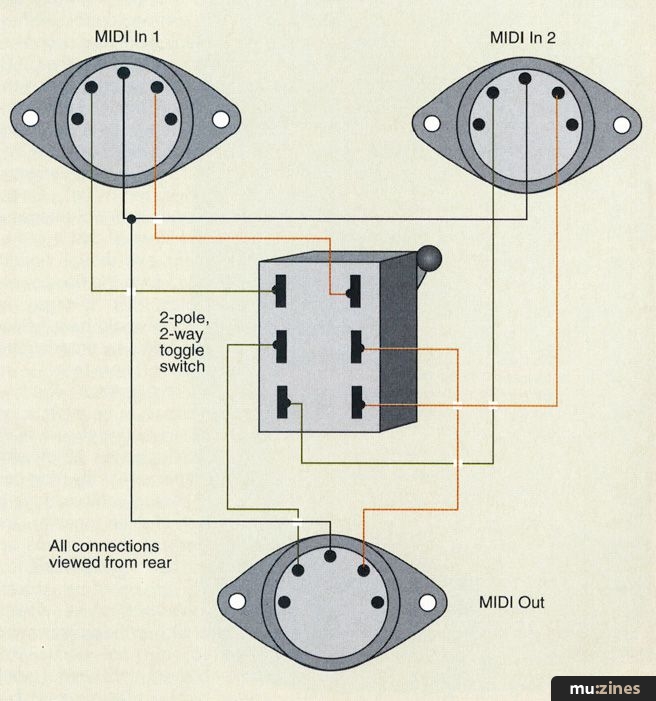
Figure 2: MIDI switch construction.
Suitable switches are available in the Maplin catalogue or from any Tandy store, though the more ambitious amongst you might want to extend the idea to offer more switching options, in which case a two-pole, rotary switch can be used to provide a choice of four or more inputs, depending on the switch you choose. It's easy so long as you know which wires you have to switch. MIDI only uses three of the five pins of a five-pin DIN connector; the middle pin is used as the signal ground and the pins directly adjacent are used to carry the MIDI signal. The two outermost pins are unused. There is no need to switch the ground signal on the centre pin — this can be connected on all the sockets, all the time, but the two signal leads must both be switched, which is why you need a two-pole switch.
Send Us Your Tip!
Publisher: Recording Musician - SOS Publications Ltd.
The contents of this magazine are re-published here with the kind permission of SOS Publications Ltd.
The current copyright owner/s of this content may differ from the originally published copyright notice.
More details on copyright ownership...

Recording Musician - Feb 1993
Donated & scanned by: Mike Gorman
Feedback
Help Support The Things You Love
mu:zines is the result of thousands of hours of effort, and will require many thousands more going forward to reach our goals of getting all this content online.
If you value this resource, you can support this project - it really helps!
Donations for July 2026
Issues donated this month: 0
New issues that have been donated or scanned for us this month.
Funds donated this month: £0.00
All donations and support are gratefully appreciated - thank you.
Magazines Needed - Can You Help?
Do you have any of these magazine issues?
If so, and you can donate, lend or scan them to help complete our archive, please get in touch via the Contribute page - thanks!
Please Contribute to mu:zines by supplying magazines, scanning or donating funds. Thanks!
Monetary donations go towards site running costs, and the occasional coffee for me if there's anything left over!

 @mu_zines
 RSS Feed
 Blog
Blog