


Magazine Archive
Home -> Magazines -> Issues -> Articles in this issue -> View
Studiomaster Pro Line Gold | |
Mixing DeskArticle from Music Technology, January 1991 | |
If you can't afford to be without a fully-featured mixing desk but can't afford the usual asking price, it could be that you haven't checked out Studiomaster's Pro Line Gold. Tim Goodyer has...
If you're serious about your MIDI studio you'll have realised you need a serious desk. The trouble is, serious desks cost serious money - or do they?
WHILE MANY OF today's MIDI studios have evolved from the commercial audio-only setups of yesterday, others are the direct product of musicians' needs - needs which have pushed them in some logical direction intended simply to achieve a musical goal. It is reasonable, then, that a MIDI studio can be anything from a sophisticated hybrid of audio and MIDI technology, through a comprehensive application of MIDI sequencing and automation, to a simple sequencer and sampler setup. And the musical ends to which any of these installations may be put are as varied as the approaches adopted to their configuration.
There is, however, one area of equipment common to all but the most straightforward of (MIDI) recording studios: the mixing desk. Regardless of whether you're furiously overdubbing a pseudo-classical magnum opus, sequencing up a killer dance track, or finalising the route on a journey through some ambient soundscape, the mixing desk provides the essential control over the levels, tones and treatments of your sounds.
To the old-school studiophile, the desk represents an end in itself; it symbolises the ultimate control exercised by the engineer over the studio. To the musician, however, the mixing desk is more likely to represent a drain on the financial resources that might otherwise have been used to add to the arsenal of sound sources from which he or she may construct music.
There are, of course, other applications for mixing desks besides the recording studio - live music for example. Here a desk may find itself handling the front-of-house sound enjoyed by the audience. Alternatively, it might find itself responsible for the on-stage monitor mix being listened to by the performers themselves. Most likely, in all but larger, professional gigs, the desk will be called upon to provide both.
No easy task, then, designing a mixing desk. It must be flexible enough to accommodate a wide variety of demanding situations, yet readily understandable to its intended users. And its cost should make it appealing to the musician as well as the technician.
LINE OF ASCENT
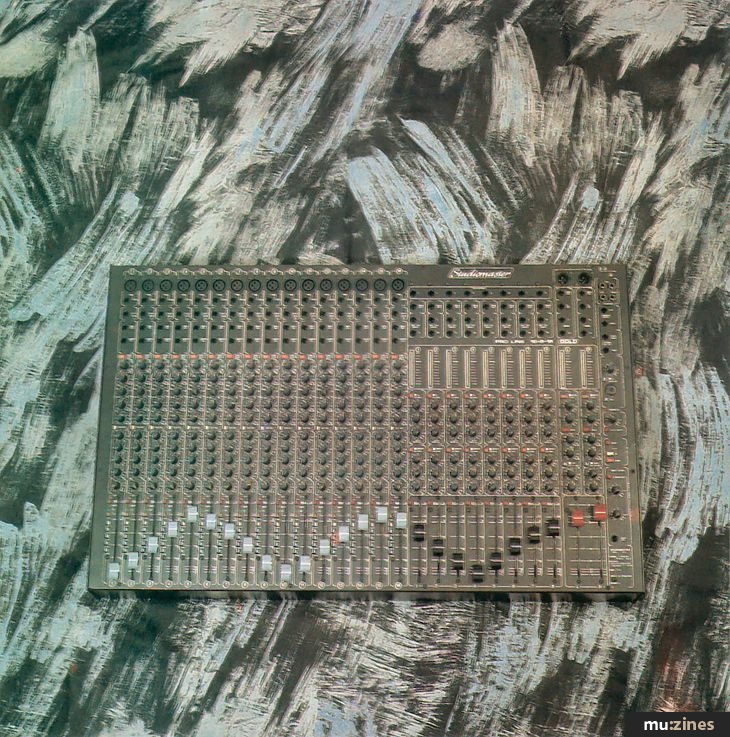
WHILE THERE ARE many desks of reduced sophistication (and, hence, cost), Studiomaster's Pro Line series has been designed with all the considerations of a "professional, fully-featured" desk in mind. It has also been brought in on the kind of budget that could see it in the hands of many users who would otherwise be sacrificing flexibility purely in the interests of saving money. The Pro Line itself isn't a new design either, but its recent metamorphosis to the Pro Line Gold series has brought it further refinements such as EQ defeat on all input channels and an internal talkback mic - all of which help to increase its usefulness in a variety of situations.
The Pro Line Gold series sits between Studiomaster's cheaper Session Mix Gold and more upmarket Mixdown Gold series. It also offers the desk in a number of configurations; 8:4:8 rackmount, 16:2 rackmount, 16:4:8 flatbed and 16:8:16 flatbed. Additionally, both flatbed models may have their input capacity expanded in units of eight channels to a maximum of 40 inputs. MIDI muting is also available for all models except the 16:2 rackmount. The model under the spotlight today is an unexpanded 16:8:16 with MIDI controlled muting (MCM).
For those not conversant with the conventions of describing mixing desks, the 16:8:16 tells us that the desk has 16 input channels, eight sub-groups - which might be used to feed an eight- or 16-track tape machine - and 16 monitor channels. The Pro Line Gold is also described as a "split" (as opposed to inline) desk, meaning that the monitor returns are situated alongside the input channels. This makes the desk less compact than an in-line desk, but clearer to work with.
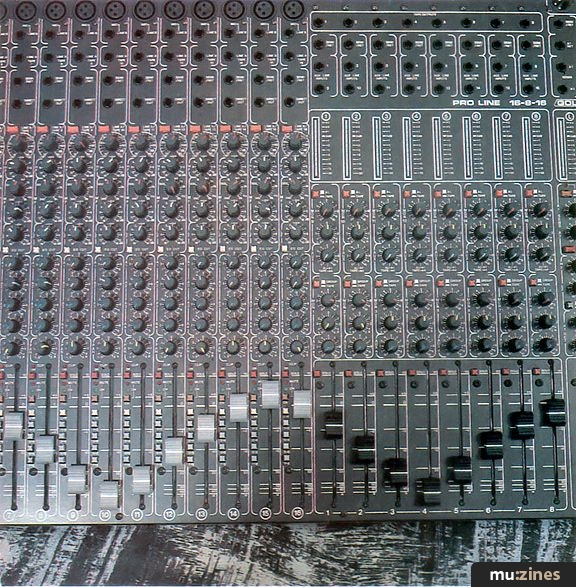
Running down one of the input channels we find the following: a latching switch to select between the Line A/tape input and the Line B input; input level; channel EQ (HF, swept mid 240Hz-8kHz, LF, all with 16dB cut or boost); EQ cut switch; aux sends 1-4 (1 and 2 pre-fade, 3 and 4 post-fade); pan pot. Beneath these are a clip LED, solo button, mute and channel status LEDs, channel active switch, routing switches (L-R, 1-2, 3-4, 5-6, 7-8) and a 100mm-throw fader.
Above the channel controls are balanced XLRs and quarter-inch jacks for Line B and jacks for Line A/tape audio inputs, insert points on stereo jacks, and a direct out jack.
"It's less a case of the Pro Line Gold's facilities being exceptional or revolutionary, more a case of getting an amazing number of them for your cash."
To the right of the input channels is the sub-group and monitor section. Eight 12-segment LED level bargraphs are provided, one for each sub-group. Beneath these are the 16 monitors, each of which features switching between tape return, sub-group monitor and aux line input, and contains level and pan controls and aux send (1-8 to aux 4 only; 9-16 aux 1 for aux line input, aux 4 for tape monitor). At the bottom of the section are solo buttons and 100mm faders for each sub-group, while at the top are the audio tape outputs, insert points for each sub-group and 16 jacks Studiomaster call Aux Line Inputs. More on these later.
Finally, on the extreme right of the desk, there are the stereo master outputs, sundry monitoring facilities and the MCM section. Each stereo master has another LED level bargraph, beneath which are the master send level controls for the four auxiliaries (including mute buttons for sends 1 and 2), two-band EQ which can be applied to either the master outs or the aux 1 and 2 returns, level and pan for aux returns 1 and 2, and the master faders. Above the LED ladders are main outputs on unbalanced XLR connectors, insert points, aux 1 and 2 return jacks and aux 1-4 send jacks. Sitting alongside the master channels are left and right input and output connections for a mastering machine (two-track, cassette or DAT) on phono sockets, monitor output jacks (to studio control room monitors), a stereo aux return pair on jacks, talkback mic and level/1kHz slate tone switch (for lining the desk up to a multitrack recorder), level control for the stereo aux return mentioned above, MCM section, two track monitor switch, monitor level, headphone level and stereo headphone jack.
As all channel, sub-group, monitor and master connections are on the top panel of the desk, the rear panel hosts only the mains connection and switch and the MIDI In, Out and Thru and MIDI channel selector for the MCM system (when fitted).
ON THE LINE
ENOUGH TECHNICAL LISTINGS, what is the Pro Line Gold like to use, and what does it sound like? If you're still of the opinion that it's only the instruments you're using that have a sound, and that a mixing desk is "transparent", let me enlighten you.
Any signal processing circuitry is likely to add its own character to a signal passing through it - and what that character is depends upon the quality of the components used and the bandwidth of the circuits.
I'm pleased to report, then, that the Pro Line Gold "sounds" good. Perhaps most immediately noticeable on synth string sounds, the desk has a warm character in keeping with an even frequency response (quoted as 30Hz-20kHz), rather than a stronger character suggestive of uneven treatment of the audio spectrum.
In use, once you've taken a little time to familiarise yourself with the layout, the desk is very comfortable to use and should present no problems to anyone either familiar or unfamiliar with mixing desks. The most complex aspects of the Pro Line's use are thrown up by its flexibility, but the organisation and layout are such that these present the minimum of confusion. The input channels are completely self-explanatory, with the routing buttons sending the signal to pairs of sub-groups selected between with the channel pan control. The EQ is smooth and quite musical in use, and the EQ defeat makes it easy to keep track of exactly what you're doing to an input signal - a worthwhile "Gold" improvement over the original Pro Line.
Essential to any self-respecting mixing desk are its effects (or aux) sends - the more the better. The Pro Line Gold has four: 1 and 2 are permanently postfade (the aux send level varies corresponding to the level set by the channel fader) while 3 and 4 are pre-fade (the aux level remains constant regardless of the channel fader). Usually, post-fade sends are used for effecting a signal, as the effect level will vary with the instrument level. Pre-fade sends tend to be used for monitoring (studio and stage), as a monitor mix can be set up that's not affected by subsequent changes of the "main" mix. Pre-fade sends can still be used for effects, however, if attention is paid when changes are made to the channel level. Each of the four aux mixes has a master level on the right of the desk. Nothing remarkable about that except that sends 1 and 2 have solo and mute switches associated with them - and the mutes can be placed under the control of the MCM system (more soon). Personally I'd have liked to see aux 3 and 4 switchable between pre- and post-fade, but four sends of any description should meet most requirements.
"It's difficult to see how Studiomaster can deliver such a powerful desk for so little money - the Pro Line Gold is the ideal desk for all but the bigger-budget MIDI studio."
Another important aspect of a desk's auxiliary facilities is that of returns. To complement the four sends, the Gold has two mono aux returns, each with level, pan and two-band EQ (which can be alternatively switched to the main output busses, if you prefer). Additionally, there's a stereo aux return to be found above the desk's talkback section. This is devoid of any control other than over its level, and is configured to accept a signal on two mono jacks rather than one stereo jack. The beauty of this arrangement is that it can equally easily be used to accommodate the return from a stereo effects processor or to increase the desk's input capacity in a heavy mixing session.
Perhaps the most appealing aspect of the Pro Line Gold to the MIDI studio owner, however, (short of the MCM system) is the availability of the 16 monitor channels for use as auxiliary line inputs. To this end, there are group/tape select switches for monitors 1-8 and aux line/tape select switches for monitors 9-16. These select, sensibly enough, between the tape return on the correspondingly-numbered input channel and aux line in the case of monitors 9-16, and the tape input and corresponding sub-group in the case of monitors 1-8 - unless there's a plug in the aux line input, in which case selecting tape brings up the aux line signal. Rest assured, it sounds more complicated than it is in use.
During a session with the multitrack, these monitors allow you to monitor up to 16 tape tracks while keeping all 16 input channels free for your gear. In the absence of a multitrack machine (say, you're mastering direct to DAT), the monitor channels can be used as extra inputs from your gear.
The upshot of this is that if you're running your music from a sequencer and recording direct to DAT (or any other mastering medium), the effective capacity of the 16:8:16 is some 32 input channels - more if you use any of the aux returns. The shortcoming of this second set of 16 inputs is that they come sans EQ. They do, however, boast pan pots and access to various of the aux busses (see above).
The unavailability of EQ on aux line ins should present the user of synths, samplers and drum machines with fewer problems than any other - if the signals directed to this section of the desk are carefully selected, the nature of modern electronic instruments will allow the sounds to be created as they're required for use. In other words if you've got a sample that needs EQing, route it to one of the main input channels; sounds that can be perfected within the Instrument itself and needing no further treatment (other than any effect that may be added via the aux buss) can be assigned to the aux line inputs. Easy.
GROUP THERAPY
THE PRO LINE Gold's sub-group arrangement is nothing unusual in the world of professional mixing desks. Each input channel can be assigned to the main output buss (L-R) or any pair of the sub-groups (1-2, 3-4, 5-6, 7-8). With the sub-group outs connected to an eight- or 16-track recorder, these provide you with the necessary route to get a signal to tape. If you're working to eight-track, then each group's output will go directly to the appropriate tape input; if you're working to 16-track, split leads will present the signal to pairs of tape tracks (1 & 9, 2, 10 and so on), leaving the final selection to be made on the multitrack itself.
Alternatively, the sub-groups can be used for grouping input channels together for easy control. For example, all the drum channels can be grouped as a stereo pair, enabling the level of the total drum sound to be adjusted with just one pair of faders. Or you might find grouping the whole rhythm section together more useful... Groups of sounds can also be effected at this point rather than as individual channels.
"More interestingly, The Gold's MIDI Controlled Muting system can be put to 'creative' use in bringing musical parts in and out of a piece during the mix."
CONTROL LINE
PERHAPS THE MOST significant area of the Pro Line Gold, as far as MT is concerned, is its MIDI Controlled Muting system. It's not a standard facility, but can be fitted from new or as a later upgrade.
Taking the form of mute automation (rather than full fader, pan and EQ automation), the MCM system is effective and easy to use. Each channel may be placed under MCM control, as may the aux send 1 and 2. This control may be exercised either as snapshots of all mutes or as individual mutes sent and received as MIDI note on/offs, and stored as part of a sequence. The snapshot approach is probably better suited to step-time composition, while individual control of mutes lends itself to real-time sequencing. Muting can be used simply to reduce background noise by killing musically silent channels (a task normally managed by noise gates). More interestingly, it can be put to "creative" use in bringing musical parts in and out of a mix (including effects treatments). Such creative sequencing can be achieved by some sequencing software, but this approach won't help you with those noisy sound modules.
To use the MCM, it must first be switched on. The Reset button clears any information held in the MCM's memory, and you're ready to go. The first option open to you is non-MIDI - that is, by setting a pattern of live and muted channels and switching the MCM off, this pattern can be recalled at will by reactivating it.
The method by which a channel is muted or enabled is through the Ch(annel) button. With it depressed and the MCM on, the green channel LED lights; with it released the red mute LED lights. At all times there's a clear visual indication of channel status.
With the system active, recording a track of mutes is as simple as running your sequencer, muting and unmuting channels as required. This can include such tricks as presenting the same signal on separate channels at different levels and switching between them to change levels, and unmuting channels to reveal effects treatments at strategic points in the mix. Remember, all this is subject to the usual editing facilities of your sequencer.
Finally, the desk status is constantly re-transmitted over MIDI. Embedded in your sequence, this information ensures that the correct pattern of mutes will be active within two seconds of running your sequencer - from any point in the sequence. Of course, you could choose to filter it out to save sequencer memory, but then you'd have to run a song from the top every time, as you do when using basic FSK timecode.
Just one word of warning: the desk retransmits incoming MIDI messages as well as generating its status information during receipt of sequence data. Consequently, MIDI loops are easily set up; you have been warned.
VERDICT
ONE OF THE most significant aspects of penning a review of the Pro Line Gold is that you're forced to recognise just how comprehensive its facilities are. It's less a case of their being exceptional or revolutionary, more a case of getting an amazing number of them for your cash. And if the description makes it all sound rather involved, remember that the desk was designed to be used rather than written about - I know which I find easier.
The importance of the Gold's MCM system shouldn't be underestimated. At a time when MIDI is coming of age in terms of its integration into the whole music making process and in its acceptance in "pro" areas of the industry, the Pro Line Gold represents a highly-specified desk that's readily MIDI-conversant - and shouldn't exceed the budget for pro pre-production suites or serious MIDI studios. In fact, it probably comes uncomfortably close to certain more costly desks for their manufacturers' comfort. Add to this the Gold's facility for expansion, and you've got a desk that you may not be able to afford to ignore.
On the subject of cash, while the Pro Line Gold can't realistically be called cheap, the facilities on offer for the price make it impossible to regard as anything else. It's difficult to see how Studiomaster can deliver such a powerful mixing desk for so little money. Add to this the opportunities for expansion (40 inputs with full MIDI muting?), and the Pro Line Gold is the ideal desk for all but the larger-budget MIDI studio. Given a free choice, I'd have to be in a position to buy a significantly more expensive desk before I'd be tempted to put anything else in my studio.
Prices 16:4:8, £1395; 16:8:16, £1645; 16:4:8 8-input expander, £410; 16:8:16 8-input expander, £440; MIDI Mute kit for both desks, £270; MIDI Mute kit for 8-input expander, £125. All prices exclude VAT.
More From Studiomaster UK Ltd, (Contact Details)
Publisher: Music Technology - Music Maker Publications (UK), Future Publishing.
The current copyright owner/s of this content may differ from the originally published copyright notice.
More details on copyright ownership...

Music Technology - Jan 1991
Gear in this article:
Review by Tim Goodyer
Previous article in this issue:
Help Support The Things You Love
mu:zines is the result of thousands of hours of effort, and will require many thousands more going forward to reach our goals of getting all this content online.
If you value this resource, you can support this project - it really helps!
Donations for June 2026
Issues donated this month: 0
New issues that have been donated or scanned for us this month.
Funds donated this month: £0.00
All donations and support are gratefully appreciated - thank you.
Magazines Needed - Can You Help?
Do you have any of these magazine issues?
If so, and you can donate, lend or scan them to help complete our archive, please get in touch via the Contribute page - thanks!
Please Contribute to mu:zines by supplying magazines, scanning or donating funds. Thanks!
Monetary donations go towards site running costs, and the occasional coffee for me if there's anything left over!

 @mu_zines
 RSS Feed
 Blog
Blog