


Magazine Archive
Home -> Magazines -> Issues -> Articles in this issue -> View
Supersoft Micro Vox Sampler | |
Article from One Two Testing, December 1985 | |
C64 steal

HERE COME Supersoft — arriving late, but with great panache — trumpeting a package, "Microvox", that turns your unused Commodore into a low-rent Synclavier.
Microvox claims to be a "digital sound editor" on the front panel of its blue and cream metal box. It takes less than a minute to load and run the software from the disk supplied.
Microvox was designed from scratch by 23-year old Andrew Trott, a guitar-playing Jam fan with a Portastudio. He's a professional programmer, but his musician-friendly approach compares favourably with more boffin-oriented systems.
The nine-course Microvox menu begins with Page 1 — the Sound Sampler. Sampling is dead easy on the Microvox. The input circuit takes anything from mike to line level and a green peak meter on the screen display allows continuous gain adjustment. Hit the return key, make a noise and the screen blanks for a couple of seconds. Move the cursor to "Listen" and hear your sample back. It really is that simple, and the Microvox puts the elaborate control rituals of a lot of other sampling devices to shame. And it sounds like an eight-bit sample. A few years ago people were jumping up and down when a Fairlight sample sounded half as good as this.
Sample quality can be improved by intelligent manipulation of the Page 1 controls: threshold level, a "compander", input and output filters, and the all-important bandwidth control: eight discrete settings from 853ms at 20kHz (a sampling rate of 40kHz) down to a virtually useless 17.92 secs at 1kHz.
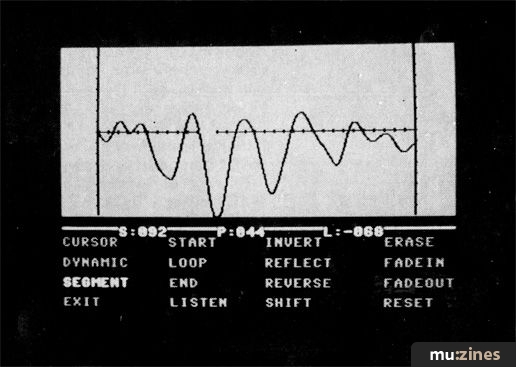
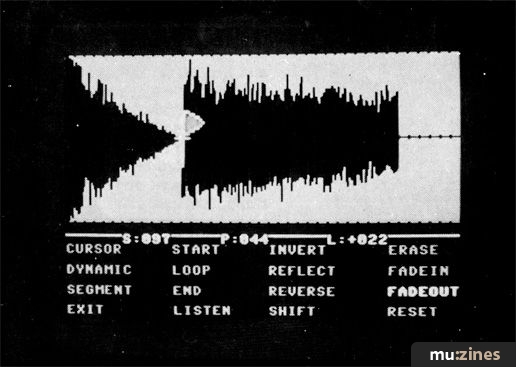
Microvox scores impressively with Page 2, the Waveform Editor. The sound you have just sampled can be shown in (segment) form — the sound chopped into 280 segments of waveform memory — or in (dynamic) form — an envelope display. With practice it is possible to perform quite sophisticated sound manipulation, starting and stopping (with green and red flags!) the sample where you like and erasing segments that create noise.
FADE-IN and FADE-OUT commands effectively control the attack and decay of the sample, and there is scope for some very interesting sound manipulation using these and the REVERSE and REFLECT commands — all controlled by the same five keys — and you quickly develop favourite techniques for mucking about with sound.
A LOOP command enables you to cycle continuously round a particular group of segments starting at the blue loop flag, and nasty glitching can be reduced by starting and ending loop cycles at precise points within the waveform segment.
Unfortunately, the usefulness of these looped sounds is reduced by the absence of a release cycle in the Microvox hardware design. When you take your finger off the LISTEN key the loop stops abruptly, and some echo, reverberation or other jiggery-pokery is going to be needed to make a useable sustained sound.
Another major flaw is the absence of any fine-tuning control. You can't change the pitch of a sample by anything less than a semitone, so tuning, pitchbend and vibrato are out of the question.
I would be interested to see an intelligent sound creation program for the Microvox: in common with many bigger manufacturers, Supersoft have ignored synthesis in their quest for the ultimate sample.
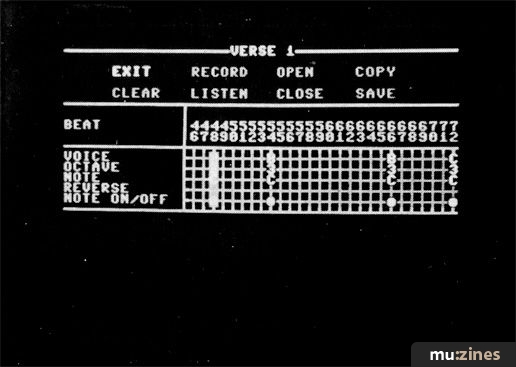
Page 3 is pretty boring: The Voice Handler does the house keeping. Page 4 enables you to play your samples using the top and second row of the Commodore keyboard as 'black and white' music keys (or a £10 stick-on Music Maker keyboard); if you have a MIDI keyboard or drum machine to hand, Page 8 gives you control of the Microvox and a choice of MIDI idiosyncracies. All very good, but too much fiddling for most musicians.
Like the Emulator, the Microvox samples at middle C — confusing when you want to sample a different pitched note. The Keyboard Assignor on Page 6 organises a four-octave keyboard so that any key can play any chromatic note from C1 to B4 in any register.
Useful commands like COPY and SWEEP speed up this process and it is possible to split the keyboard into quite sophisticated multi-samples: you might, for instance, sample each string of a guitar to make up a six register composite. But bear in mind that all the registers have to share the total sample time available — to employ more registers at once you have to use shorter sounds or put up with smaller bandwidths and duller sounds. Also note that a note sampled at middle C with 20kHz bandwidth cannot be played higher than the E a major third above. A 13kHz sound limits you to a minor seventh — a 10kHz sample, a tenth.
My pleasure at using a system based on disk storage is somewhat marred by the fact that a long, good quality sample can take over two minutes to load.
The sequencer operated from Page 5 is a bit of a dog's dinner. It plays in time and syncs up beautifully to MIDI but is crudely conceived, difficult to use in real or step time, and very wasteful of the 6k RAM it takes up. It doesn't drive other synths through MIDI and even very simple drum patterns take up huge chunks of disk space. A lot of ingenuity has been wasted to make a fundamentally half-hearted system work OK; a tape sync interface (for about £25) is planned as an accessory; a decent sequencer page would enable a Microvox user with a home multitrack to come up with some very impressive demos.
Page 7 — Special Effects — turns our hard-working Commodore into a digital delay line using whatever waveform memory is left from sampling. Get rid of your samples and you can have a delay of up to 1.327 seconds at 13kHz bandwidth. It's a touch noisy and confusing to operate but another useful way to make the Commodore earn its keep.
The Microvox could be a very useful addition to a home demo studio. "You get what you pay for," is a common phrase, but I'd say that in the case of the Microvox you get what a lot of other people have paid for: the hours that Andrew Trott put in to turn a private obsession into a commercial product; the genius of Peter Vogel and the original Fairlight team; the hard work and inspiration that hundreds of artists and producers have invested to make artistic sense of sampling technology; and the business suss and sheer luck that made the Commodore the ubiquitous home micro it is today.
If you want to get into sampling and don't mind the limitations of the Microvox — no fine-tuning or pitchbend, no release on looped sounds, slow disk drive, mono-only play, and a dodgy sequencer — this is worth getting. At that price you don't have to fool yourself into thinking that your sampled sounds will save the world.
SUPERSOFT Microvox C64 sampler package: £229
CONTACT: Supersoft, (Contact Details).
Also featuring gear in this article


Publisher: One Two Testing - IPC Magazines Ltd, Northern & Shell Ltd.
The current copyright owner/s of this content may differ from the originally published copyright notice.
More details on copyright ownership...

One Two Testing - Dec 1985
Donated by: Neil Scrivin
Review by John L Walters
Ads for Gear in this article:

Help Support The Things You Love
mu:zines is the result of thousands of hours of effort, and will require many thousands more going forward to reach our goals of getting all this content online.
If you value this resource, you can support this project - it really helps!
Donations for May 2026
Issues donated this month: 0
New issues that have been donated or scanned for us this month.
Funds donated this month: £0.00
All donations and support are gratefully appreciated - thank you.
Magazines Needed - Can You Help?
Do you have any of these magazine issues?
If so, and you can donate, lend or scan them to help complete our archive, please get in touch via the Contribute page - thanks!
Please Contribute to mu:zines by supplying magazines, scanning or donating funds. Thanks!
Monetary donations go towards site running costs, and the occasional coffee for me if there's anything left over!

 @mu_zines
 RSS Feed
 Blog
Blog