


Magazine Archive
Home -> Magazines -> Issues -> Articles in this issue -> View
Tascam 246 - an Un-Reel Machine | |
Article from Home & Studio Recording, January 1986 | |
Tascam pioneered the Portastudio concept and their latest addition to this range seems set to keep them out in front.

There was much scepticism when Tascam first proposed the idea of a cassette based recording system but they proved their critics wrong and now there are several competing products on the market following the same four tracks on a cassette concept. A lot has happened over the last few years in the areas of tape head design and tape formulations so it should be possible for this model to offer a significant improvement in sound quality as well as operational flexibility. Firstly though, just what does this new Portastudio have to offer?
Overview
The 246 hasn't departed radically from the original design concept of its immensely popular predecessors but it has been significantly improved in several areas. For a start, you have now a 6-channel mixer section with proper routing facilities, insert points on every channel and two effects sends. In the EQ department, you don't expect to get quite the same flexibility as you would on a full-blown studio mixer, but you are nevertheless provided with a 2-band sweepable system which is probably the best compromise and makes good use of the available panel space by incorporating dual concentric controls.
Metering is more than adequate with four large illuminated meters for the four record busses (incorporating peak reading LEDs), and two smaller ones for the master left/right mix, and the tape transport controls now incorporate a memory feature as well as a zero return facility. Even better, the tape counter display can also show elapsed time rather than some arbitrary figure related to tape length and there is a choice of two tape speeds so that you can still play your pre-recorded stereo cassettes on the 246 if you wish; there is of course vari-speed too. For serious multitrack recording, the higher speed of 3¾ips is to be recommended as the quality is noticeably better.
The noise reduction system is DBX but in recognition of the fact that some drum machines and time codes don't like it, you can either switch it out on channel four only or completely by means of slide switches located on the rear panel.
The unit is housed in an attractive plastic case with the controls being colour coded in true Tascam tradition and though it is not unduly heavy, it does feel solid and workmanlike.The layout is sensible from the operators point of view with the mic/line inputs being along the front edge of the machine rather than round the back and you only need a stereo lead to plug into your hi-fi set up and you can start recording.

The Mixer Section
As with most all-in-one recording packages, it's as well to consider the mixer and recorder separately for the purpose of investigating the controls. Physically, the two areas are separated but the record status buttons have encroached into the master section and are even now advancing on channel six.
First let's take a look at the input channels. There are six of these and to all intents and purposes they are identical with the exception of the input selector switches on channels five and six. Because there are only four tape tracks, there is no need for a remix position on these channels and so there's an extra line input setting called Line B which is routed to a pair of input jacks on the rear panel. Channels one to four then give you a choice of Mic/Line, Off or Remix whilst channels five and six offer Mic/Line, Off or Line B and of course there's a level control directly below this switch to set the input gain. The Off position is useful to use as a mute switch. Tascam have stuck to their original system of using the same input for mic or line use to simplify operation and the circuitry is designed to match virtually any high or low impedance unbalanced microphone via the standard quarter inch input jacks. In order to make level setting easy, there's an overload LED next to the gain control on each channel.
Moving down the panel to the EQ section we come across a couple of dual concentric controls with orange caps. The inner control, (the top part of the knob), sets the amount of cut or boost and the outer part of the control sets the frequency at which this occurs. The high control has a range from 1 kHz to 8kHz and the low control covers 62Hz to 1.5kHz. This sweepable system is very easy to use, as it allows you to tune in on a particular frequency and then apply just the right amount of cut or boost.
Next in line is the effect or auxiliary section which consists of two post-fade sends labelled Effect One and Effect Two. Being post-fader, the effects levels are affected by the channel faders which is a good thing; if you use a pre-fade send and then decide to turn a channel fader down, the level of the effect will remain the same and this is generally undesirable. Curiously, Effect Two has a mute switch and while this may be useful on occasions, I can't see why it featured on the designer's list of indispensable controls.
Before we get down to the Pan control, there are four routing buttons used to determine which tape track receives which input channel. Again I don't know why four buttons were used when you can normally get by with two using the Pan control to select odd or even, but it works so don't let me worry you. Even so, you still need to use the Pan control to determine how much signal goes left or right, odd or even. Finally, below the Pan control is the channel fader.
Master Section
Right at the top of the monitor section are the monitor controls which provide gain and pan for each of the four tape busses. Again, these are dual-concentric to economise on panel space, the outer section being the pan control, and these monitor the signals going to or coming from tape depending what operation you are performing at the time. Thoughtfully, a Mono button is fitted to this section so that you can make periodic checks to see if what you are doing is mono-compatible; important with some so-called stereo effects.
Moving on down we come to the Effects masters which give control over the send level from the two Effects busses and these signals may be monitored via the headphones if required. Apart from the Phones Level control and the obligatory Master Faders, all the other controls on this section take the form of buttons. The uppermost bank determines which signal is monitored on the main meters and there is a choice of Pgm, Monitor or Effect. This gives you the opportunity to meter the Monitor output levels, the Stereo Programme levels or both Effect levels, Effect One being assigned to the left meter and Effect Two to the right.
Below this set of switches is another set which determine which signal is being fed to the headphones. Here you have a choice of either Effect, Monitor output or Stereo programme out. A nice touch is that there are sockets for two pairs of phones and these are located in the centre of the front edge of the machine which is convenient. As previously mentioned, the Record Status buttons also live in this section of the mixer and these take the form of a further four buttons, each with a red status LED which flashes in the Ready mode and illuminates continuously during record. The last two buttons are Cue/Pgm and Insert, the former when selected to Pgm routing the mic, line and programme inputs to the monitors regardless of record/play status. With the switch in the Cue position, the Insert switch below becomes active and this would be the normal operating mode for track laying and overdubbing. What this does is cause the monitoring to automatically switch from programme to tape at the appropriate points when recording or doing drop-ins and both buttons have status LEDs.
All the buttons on the mixer have grey caps, but the bodies are coloured and this coloured section is visible only when a button is not depressed. This provides an easy way to tell at a glance which buttons are in and which are out and is just another proof that the engineers at Tascam are on the ball.
Recorder Section
The cassette itself lives under a perspex door which keeps the dust out without obscuring your view of the tape so you can see when you're about to run out. Also under this door is the speed switch which gives you 1⅞ or 3¾ips operation. Above this section is the orange Power switch. All the other controls are below the cassette door.
The only rotary control is the varispeed Pitch control and this offers ±12% speed variation. So that you know when the machine is running at the normal speed, there is an On/Off switch for the Pitch control and this has a rectangular red LED indicator. Directly below this is another LED indicator, green this time, and this tells you if the DBX noise reduction is switched in or out, a feat performed by a pair of slide switches on the rear panel.
The bottom row of controls should be quite familiar to anyone who has used any kind of tape recorder before, these being the usual transport controls for winding, playing, recording and pause. All these buttons have very little mechanical travel and make an audible click when pressed so that you know when you've operated one.
The remaining controls are to do with the Zero Return and Memory facilities and operate as follows. All the memory functions are geared to the tape counter and this is switchable from index count to real time. If the reset button is pressed, any Memory data is cancelled. The Zero return may be set to stop at zero or automatically enter play mode so you have three switches; Stop, Off and Play. Below is the slightly more complex Memory section and this may remember any single tape position whether the tape is running or stationary when the Enter button is pressed. Pushing Check will display the Memory position on the tape counter. As in the return to zero mode, there's a choice of the transport halting but you may also set it to enter Rewind automatically. Used together, these functions can sequence through a section of tape so that you can practice drop-ins and so on. So far then everything does much as you might expect it to so over to the rear panel.

Rear Panel
This unit somehow manages to give you most of the facilities you would want without presenting a cluttered rear panel. Each of the six input channels has its own insert point in the form of a stereo jack socket and above these are phonos for the tape outs and the two line B inputs. Phonos are also provided for the Programme buss inputs and outputs should you need access to these at any time. Two of the output lines are used for the main stereo mix, however, because at mixdown, everything is routed to programme busses one and two. Additionally there are phono outs for the stereo monitor mix and the two effects sends. Putting the inputs on the front panel has obviously helped to keep the rear panel fairly simple.
The mains lead is an integral part of the system and next to this is a jack socket for the optional punch-in footswitch and there is also a multi-pin connector for an optional remote control unit. Lastly come the two slide switches which as you may remember are used to switch out the DBX if not required. You can turn off all four channels or just one, the latter being useful if you're recording drum machines or sync codes.
In Practice
This unit is certainly easy to use and the basic sound quality is certainly very good and because of the DBX, noise is not really a problem, even if you do a lot of bouncing. DBX does however upset some drum machines and though there are lots of arguments on paper as to why DBX is the best noise reduction system with the least drastic side effects, I still prefer Dolby C. One major argument against DBX is that it accentuates frequency response anomalies caused by tape type or head wear and though this is true when you test the system with pure tones, it isn't so relevant when you're recording a complex signal such as music. This is because the system takes the RMS value of the incoming and outgoing signals to control the VCAs so if there's a slight dip in one part of the response, its effect on the tracking accuracy is going to be minimal. On paper, this system is indeed more forgiving of headwear than other systems but it will accentuate wide band drop-out caused by using substandard or damaged tapes, or dirty heads. On most signals it does indeed work well reducing the noise to nil as near as makes no difference but it does take the edge off percussive sounds such as drum machines so you may need to tweak the EQ just a little to compensate. Like all noise reduction systems, the noise is only reduced when the signal is low or absent. When the recorded level is high, so is the noise but the signal masks it. This only falls down when you are recording bass guitars as you can hear the noise breathing with the signal level but this all gets lost as soon as you add a few more instruments.
The sweep EQ is certainly nice to use and gives you more control over the sound than you might expect, but like all EQ, it should be used sparingly if you want a natural sound.
The Lone Arranger
In the transport department, the new Memory facility is nice to have as the automatic cycling between zero and memory and this is of particular benefit to the musician working alone, especially whilst practicing parts or timing drop-ins.
Operating the system should not present a problem and in this respect, Tascam must be praised for their highly detailed and well prepared handbook armed with which, even the absolute novice would be able to find his or her way round in no time. It is however quite essential to use first class cassettes if you want good results, three for a quid from Woolies is not on. TDK SA have always been a firm favourite in home studios but having tried their new HXS tapes, I feel that these are a much better tape giving a cleaner sound and accepting more level without distortion. Anyway, enough of the free ad for TDK, let's wind up this story.
The switches are all nice and quiet in operation and dropping into record is also silent but don't forget the inevitable drop-out gap. You can drop-in using the transport controls or by using the record status switches and either way seems fine.
Conclusions
Like all good things, the 246 is not cheap but as cassette based systems go it's got to be at or near the front of the pack. Apart from my persistent whitterings about the shortcomings of DBX, it does its job magnificently on most types of material and I can live with its side effects in exchange for the first rate noise figures it produces in the context of a cassette based system.
For the same price you could get a used open reel 4-track machine and a mixing desk but a lot of people will relish the convenience of this type of system as it can be plugged into the hi-fi to form the basis of a well equipped home studio without the expense of separate monitoring and mastering facilities, not to mention the miles of cable and the general untidiness. The results are certainly up to producing your own cassette releases or even small runs of vinyl records and the audio/visual contigent are also certain to take an interest in this machine as are the pro songwriters. I would venture to say that the results obtainable on this system are comparable if not superior to what I used to achieve using my first Teac 3340S open reel 4-track machine.
Check it out — I think you'll like it!
The Tascam 246 costs £1114.35 including VAT.
Further information from: Harman (Audio) UK Ltd, (Contact Details).
Also featuring gear in this article

Reviews
(IM Dec 86)

Tascam 246 Portastudio - Studiotest
(IM Dec 85)

Tascam 246/Audio-Technica Portastudios
(12T Feb 86)
Browse category: Cassette 4-Track > Tascam
Publisher: Home & Studio Recording - Music Maker Publications (UK), Future Publishing.
The current copyright owner/s of this content may differ from the originally published copyright notice.
More details on copyright ownership...
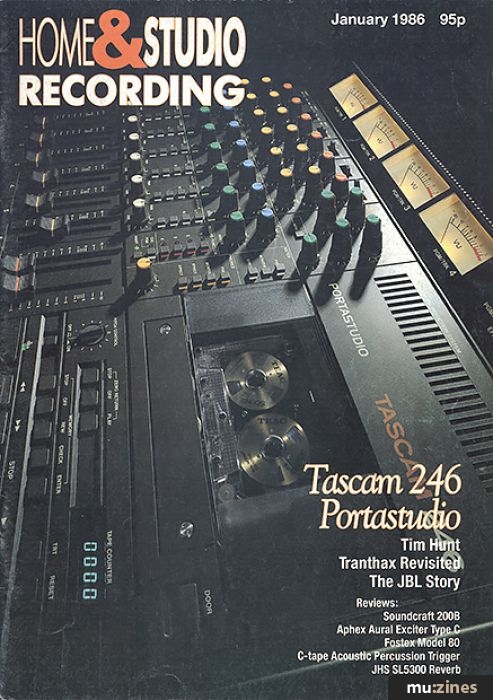
Home & Studio Recording - Jan 1986
Donated & scanned by: Mike Gorman
Review by Paul White
Ads for Gear in this article:

Previous article in this issue:
Next article in this issue:
Help Support The Things You Love
mu:zines is the result of thousands of hours of effort, and will require many thousands more going forward to reach our goals of getting all this content online.
If you value this resource, you can support this project - it really helps!
Donations for July 2026
Issues donated this month: 0
New issues that have been donated or scanned for us this month.
Funds donated this month: £0.00
All donations and support are gratefully appreciated - thank you.
Magazines Needed - Can You Help?
Do you have any of these magazine issues?
If so, and you can donate, lend or scan them to help complete our archive, please get in touch via the Contribute page - thanks!
Please Contribute to mu:zines by supplying magazines, scanning or donating funds. Thanks!
Monetary donations go towards site running costs, and the occasional coffee for me if there's anything left over!

 @mu_zines
 RSS Feed
 Blog
Blog