


Magazine Archive
Home -> Magazines -> Issues -> Articles in this issue -> View
Article Group: | |
Ablesure Hot Foot | |
Dual port programmable MIDI remote controllerArticle from Music Technology, August 1993 | |
MIDI control from the ground up
You let your fingers do the programming, but there are other ways of talking to your MIDI system. Ian Waugh puts his foot down.
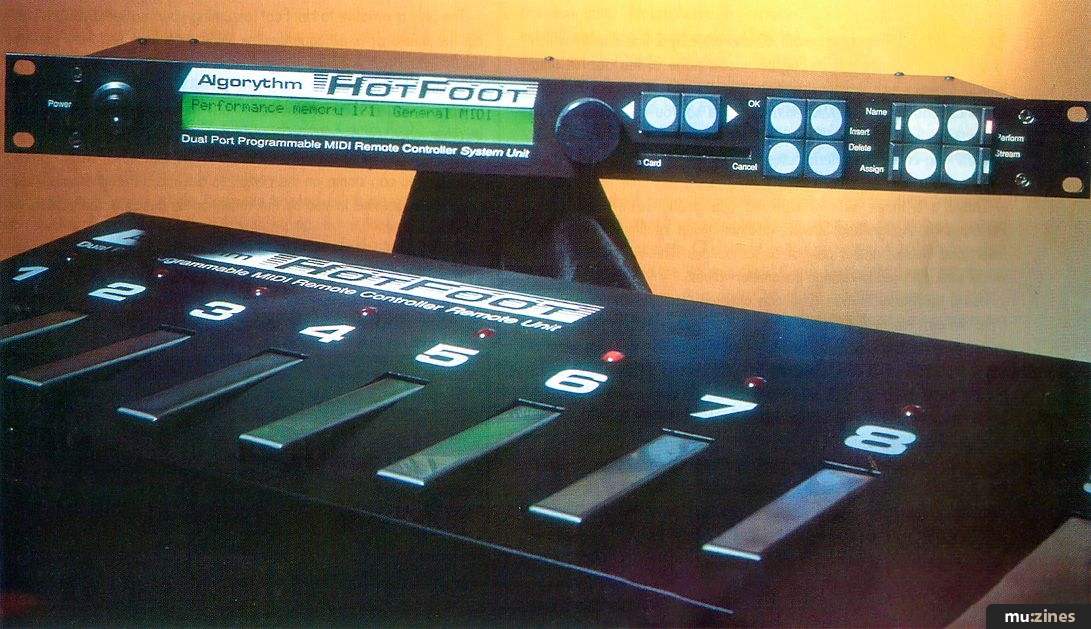
Yes, the name is a bit of a mouthful, isn't it? But at least it tells you what Hot Foot is - and the publicity blurb completes the picture... "Hot Foot - when you can't put your finger on it". It comes in two parts - a rackmount system unit and a foot pedal remote: you program from the system unit and perform from the foot pedal.
The pedal itself looks like it was made in a Russian tank factory; it's so solid it could almost be roadie-proof. It actually comprises eight individual pedals numbered 1 to 8 - each with an LED above it - plus a further two labelled S (for Shift) and P (for Performance) with a 2-digit LED above to tell you what mode the unit is in and which Performance has been selected.
As you might imagine, it is when these pedals are pressed that MIDI data is actually transmitted, but they can also transmit messages when released or when held down.
They may be programmed with just about any kind of MIDI message (including SysEx data) and these are referred to as Data Streams. They're organised into eight Banks of eight Groups, to give 64 Performance Memories in all, each holding 32 Data Streams which can be accessed using Shift on the pedal board (bearing in mind that the pedals can send a message when pressed and when released). However, the unit can only hold 150 Data Streams so not all of the possible 2048 (64 x 32) settings can be different.
The system unit has a mammoth 40-character-by-2-line display which gives you information in English - and none of the abbreviated hieroglyphics which most instruments seem to rely on. It also includes two independent sets of MIDI Ins and Outs so you can send data to separate sections of your MIDI setup. Connection to the remote unit is via an 18ft-long cable which terminates in a latching plug so it won't come out if you trip over the wire.
There are three sets of buttons - a group labelled Name, Performance, Assign and Stream; another group labelled OK, Cancel, Insert and Delete; and a pair of cursor buttons. There's also an alpha wheel which is used to change parameter values.
Using the Name button, you can christen your Performances and Data Streams etc, with titles of up to 16 characters - making it possible to get quite descriptive. Performance mode is selected when you want to use the pedal board, while Stream lets you browse through and select the individual Data Streams which may be edited by pressing the Assign button. Incidentally, Performance Memories are battery-backed and can also be saved to an optional data card.
To help with your programming you can copy Performance Memories and Data Streams, and set the number base to decimal or hex. Most manufacturers use hex for SysEx, and computer freaks like to use hex too. But there is a utility which converts between decimal and hex in case you're not a wirehead. There's also a Help mode which is a useful aide-memoire if the manual isn't handy.
Speaking of which, the manual is well written but it's essentially a reference book. No tutorial is included apart from a 2-page Quick Reference guide in the Appendix which shows how to define a Data Stream and assign it to a pedal in a Performance Memory. A few hands-on - or foot-on! - walk-throughs (sorry!) would have been very helpful.
As the Quick Reference section confirms, the biggest complication with Hot Foot is setting up the commands. It's not difficult, it's just that there are a lot of steps to go through and the steepness of the learning curve isn't improved by the inclusion of so few function buttons. That said, once programmed, the controlling front end is superb; the designer is obviously a member of the Musicians' School Of Friendly Interfaces.

So, could you benefit from using Hot Foot? Well, it was principally designed as a real-time device for live use, and if you're someone who finds yourself flitting between settings and setups during a gig, it would certainly merit further investigation to see how much time and effort it could save. Even master keyboards can't easily handle the amount or variety of messages Hot Foot can generate.
If you find that you regularly have to configure and reconfigure your gear on stage or in the studio, then Hot Foot could save you considerable time and trouble, too. Remember, it can do a whole lot more than simply send Program Change messages.
The only alternative to Hot Foot (assuming your master keyboard can't cut the mustard) is a sequencer or MIDI data filer, but then you are totally in the hands of the programmed sequence. You can't easily go round the chorus again, for example, or tell the band that you're going to segue into a different number. But the importance of such an inconvenience will depend on how rigid your sets are.
Another use which springs to mind is the control of MIDI lighting systems. You can stomp on the pedals to activate different effects which might be suggested to you by the venue or the action of the punters on the dance floor.
You'll probably know by now if Hot Foot can help you in your music. It's a solid unit, versatile and (once programmed) easy to use in the field. If you're still not sure, Ablesure is offering a 14-day money-back guarantee so you can try before you buy. Can't say fairer than that.
THE LAST WORD
| Ease of use | Good, considering the range of data it has to handle |
| Originality | Not seen many of these around, have you? |
| Value for money | Solid gear at a fair price |
| Star Quality | A versatile beacon in a MIDI wilderness |
| Price | Hot Foot MIDI Controller £485 + VAT |
| More from | Ablesure Limited, (Contact Details) |
Recognised MIDI messages
- Note On and Note Off. These can be set to any MIDI channel and velocity value. Note values range from C-5 to G+6. You can program the unit to play individual notes and chords.
- Controllers from 0-127 can be assigned any MIDI channel and value.
- Aftertouch (Key) is assigned a note name, MIDI channel and velocity (polyphonic pressure value).
- Aftertouch (Channel) is assigned the channel pressure value and the MIDI channel number.
- Program Change takes a number and a MIDI channel.
- Pitchbend values are set using four figures and assigned a MIDI channel.
- SysEx can be entered in decimal or hex. Hot Foot puts a EoX (end of SysEx) message at the end. You need to know what you're doing when messing around with this.
- Song Position Pointer
- Song Select Number
- Start
- Continue
- Stop
- Tune Request
- System Reset
Data Stream programming
Assign a MIDI command to the Data Stream. Press the Assign button and you'll see the first command in the LCD which will be called 'Empty!' Use the cursor keys to move to the name and scroll through the available MIDI commands (see 'Recognised MIDI messages' for a complete list) with the alpha dial. Use the cursor keys to move the cursor to any associated parameters such as the MIDI channel, and alter with the dial.
Each item of data in a MIDI message uses a memory position or step. Hot Foot increments these automatically so you can assign several messages to one pedal. Up to 64 items of data can be assigned to a command.
When all the assignments are complete, press Stream and you will be given the option of saving the settings or cancelling them.
Assign the Data Stream to a Performance Memory. Press Perform and scroll to the required Performance Memory. Press Assign. Select one of the eight pedals, shift mode (shifted or unshifted) and the output (No Output, MIDI 1, MIDI 2 or both).
Select Contact type. This can be Momentary, which allows a different Data Stream to be sent on each press and release of the pedal; Latched, which allows a different Data Stream to be sent for each press/release pair; or Continuous, which sends a Data Stream 50 times a second as long as the pedal is held down.
Select Sense. This can be set to Down or Up. Down will send the data when the pedal; is pressed (Down) or on the first press/release for a latched pedal. Up will send the data when the pedal is released (Up) or on the second press/release for a latched pedal.
Move the cursor to the Data Stream name and scroll through them to select the one you've just programmed. Press Perform. Press OK to save.
Scroll to the Performance Bank and Group you want to assign the Data Stream to. Press Name and name it.
Publisher: Music Technology - Music Maker Publications (UK), Future Publishing.
The current copyright owner/s of this content may differ from the originally published copyright notice.
More details on copyright ownership...

Music Technology - Aug 1993
Quality Control
Gear in this article:
Review by Ian Waugh
Previous article in this issue:
Next article in this issue:
Help Support The Things You Love
mu:zines is the result of thousands of hours of effort, and will require many thousands more going forward to reach our goals of getting all this content online.
If you value this resource, you can support this project - it really helps!
Donations for April 2026
Issues donated this month: 0
New issues that have been donated or scanned for us this month.
Funds donated this month: £0.00
All donations and support are gratefully appreciated - thank you.
Magazines Needed - Can You Help?
Do you have any of these magazine issues?
If so, and you can donate, lend or scan them to help complete our archive, please get in touch via the Contribute page - thanks!
Please Contribute to mu:zines by supplying magazines, scanning or donating funds. Thanks!
Monetary donations go towards site running costs, and the occasional coffee for me if there's anything left over!

 @mu_zines
 RSS Feed
 Blog
Blog