


Magazine Archive
Home -> Magazines -> Issues -> Articles in this issue -> View
Frontier X-TRA Ram Deluxe | |
Atari ST Memory ExpansionArticle from Music Technology, June 1992 | |
If the limitations of your Atari are restricting your music, you may have been thinking about trading it in against something more powerful - but there are alternatives. Tim Goodyer rejuvenates the ST with a memory expansion.
One problem presented by the phenomenal increase in Atari ST music software is the limitation of the computer's memory - but a RAM expansion could completely revise your MIDI setup.
YOU KNOW HOW it is - the track you're working on is coming together nicely until you realise that the bass patch you can't manage without isn't currently in the Super Jupiter's memory. Instead, it's neatly filed away with a thousand other patches in your patch librarian. And in order to load it, you're going to have to save off your sequence, quit the sequencer program, load up the librarian, transfer the patch, quit the librarian, and reload the sequencer and the song file before you can continue. You may be lucky, of course and have a patch librarian that runs as a desk accessory, but then it'll be a sample which needs editing, or a synth without a decent user interface. Sooner or later it comes to us all, and there's nothing quite like farting about with computer programs to persuade you that the "anti-computer lobby" might just have a point after all.
Yet it doesn't have to be this way. You may have thought that buying a 2Meg or 4Meg Atari was an unjustifiable extravagance when you opted for your 1040 or 520 - or it might simply have been outside your budget - but while you're waiting for the sequencer to reboot, you may find yourself thinking about the possible advantages of being able to run a multi-program environment like C-Lab's Softlink, Steinberg's M.ROS or Dr T's MPE. But they sure won't run in your humble 520/1040. Or will they?
Fitting a memory (RAM) expansion to up your computer's memory to 2Meg or more would enable you to run several programs at once - C-Lab's Creator/Notator and Digidesign's Turbosynth, for example. You needn't even choose to limit yourself to music-orientated programs; you might choose to run Quinsoft's Trax studio management program alongside your sequencer. And I certainly could have finished reviewing Alesis' D4 drum module more efficiently if I'd been able to switch between a sequencer and my word processor - instead of constantly quitting one in order to work with the other. Another, more general, advantage of having plenty of RAM available is when using "D drives" or RAM drives. Of course, you may simply want that extra memory to finish off your latest sequenced opera... So what's actually involved in expanding your ST's memory?
If you're the proud owner of one of the newer E-series STs, fitting extra RAM is a relatively straightforward matter of opening the machine up and dropping SIMMs (Single In-line Memory Modules) into the slots provided. The older STs, however, were designed before SIMMs had become available; consequently things aren't quite so simple. If you own one of these machines, you'll actually need to fit a modification to your ST so that it will accept SIMMs. There are various such upgrades available, but only one currently allows you to upgrade to some level under the 4Meg maximum which the ST can accommodate, and then add to the expansion at a later date - Marpet Developments' Frontier Xtra-RAM Deluxe.
A FISTFUL OF K
As you have a choice of upgrade options, there is a choice of upgrade kits. You can fit an unpopulated RAM board (with a view to obtaining SIMMs from some other source), or a board with 0.5Meg, 2Meg or 4Meg already fitted. Due to the architecture of the ST, RAM needs to be presented to the central processor in a specific way. In a 1040ST, the 1Meg of onboard memory is presented as two banks of 0.5Meg. Any additional memory you fit must be presented in a similar way - that is, if you add 2Meg to a 1040ST, you will have to disable one of the 0.5Meg banks and substitute the new 2Meg bank, giving a total of 2.5Meg of RAM. Yes, that 0.5Meg you've disconnected lies dead inside the machine; your 2Meg expansion to your 1Meg computer only gives you a total of 2.5Meg. Similarly, if you fit a full 4Meg expansion to your ST, you will have to disable both 0.5Meg banks and substitute 2Meg of SIMMs for each. And due to the fact that Atari have produced a variety of STs with differing architectures, you may even find that you have to disable both banks of a Mega1 to fit your 2Meg upgrade, in which case you only end up 1Meg better off. I'm afraid that there's no way around it.
Assuming you've decided you want to upgrade and have decided how much RAM you want to add, Xtra-RAM Deluxe offers you two ways to go about it. The easy option is to send your ST to Peak Electronics (official fitters appointed by Marpet) where trained hands will do the dirty work for you. The other option is to roll up your sleeves and do it yourself. The DIY alternative necessarily involves you interfering with the innards of your computer. This doesn't involve the use of a soldering iron, however, and fitting Xtra-RAM Deluxe may be safely undertaken without the benefit of a large amount of technical experience. In addition to this, the company operate a telephone help-line service should problems arise.
EXPANSIONS
I put my faithful Mega1 ST through Marpet's mind-expanding experience. Opting for a 2Meg upgrade, it wasn't until I'd opened the computer up and discovered that it was blessed with a 100109 MMU chip that I found that I was going to have to disconnect both banks of internal memory - but we'll come to that in a moment.
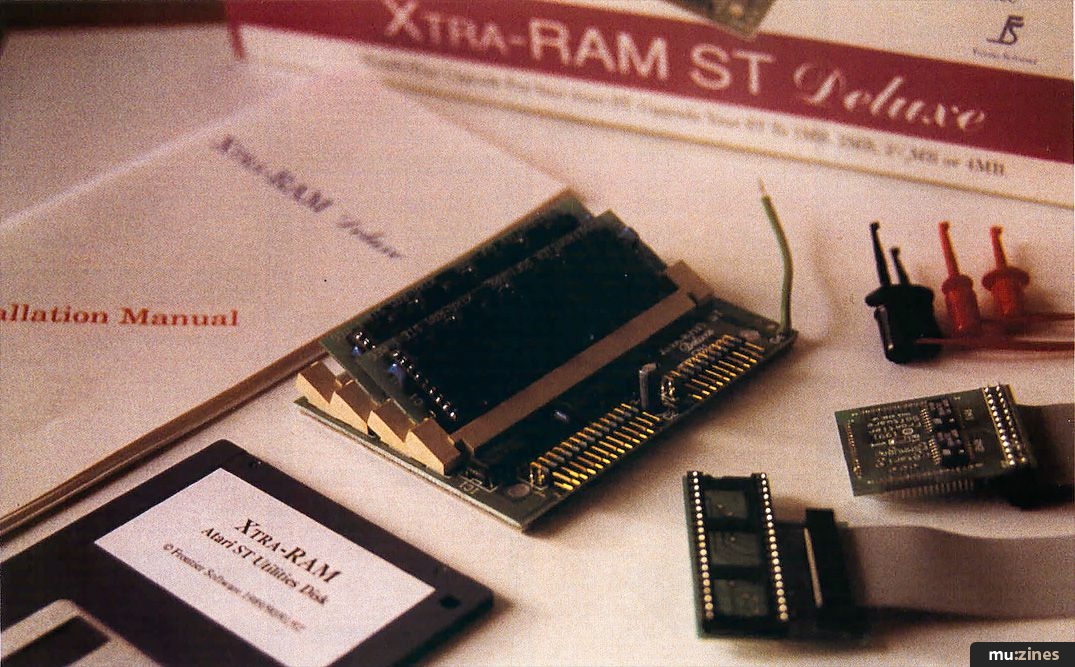
The upgrade comes neatly boxed and contains everything you need except a couple of screwdrivers and a small pair of wire cutters. The modification itself consists of a mother board containing the SIMMs, a "piggy-back" board which fits over the MMU chip, and another board which fits into the socket occupied by the ST video shifter chip and provides alternative accommodation for it. There are also four "flying" leads necessary to disable the onboard RAM, a disk containing a RAM-testing routine and an instruction manual.
You're directed to read the manual before beginning work and it's sound advice. At only 34 pages, it's not an arduous task and you'll discover that, since it covers all the various ST revisions, only part of the directions will actually apply to your situtation.
"Fitting the Xtra-RAM Deluxe upgrade isn't difficult - if you've dabbled with electronics at any level, it should be well within your capabilities."
Marpet reckon the job is about an hour's worth of work and, very helpfully, advise you of the amount of space you'll require as well as easy steps in getting the job done. Possibly the most important directions relate to static precautions, as all integrated circuits are susceptible to damage from static discharges from your body. All that's actually involved is making sure you've safely earthed yourself before beginning and preventing the build-up of static during the operation.
The first stage of the upgrade is identifying which of the instructions you should follow. There are four distinct types of STF/STFM as well as separate categories for the Mega1 and Mega2. Once you know which directions apply to you, you're ready to disassemble your ST. The instructions are clear and concise. Once inside, you're instructed to remove the spring clips securing it and fit the piggy-back board. (Certain STs have surface-mounted MMUs rather than the more usual socketed ones, in which case Marpet supply an alternative adaptor to the piggy-back board.) I found this straightforward, but be warned: the board is a very tight fit. Next you have to remove the video shifter chip. This is accomplished with a small screwdriver and a little care. The adaptor board is then fitted in place of the video shifter, and the video shifter is fitted into the socket on the adaptor. This was considerably easier than fitting the MMU board. In both cases, care must be taken to ensure correct orientation of all components.
Fitting the Xtra-RAM board itself is simply a matter of attaching ribbon cables from the MMU board and the video shifter board; disconnecting the ST's onboard RAM is a little more drastic. Using a table in the manual, you have to identify up to four resistors (two related to each bank) which must be cut at one end and have the flying leads attached. The other end of the leads are then clipped to the 5V supply found on certain capacitors. (The table informed me that I had to disconnect both banks of onboard RAM, leaving me with a total of 2Meg instead of a possible 2.5Meg.) Once this has been done, the modification is complete, and your ST may be reassembled.
TROUBLESHOOTING
I know three other people who have fitted an Xtra-RAM Deluxe upgrade to their Ataris; none of them had any problems. I did.
When I tried to run the test program, I was met with a blank monitor screen and a silent ST. Turning to the troubleshooting section of the manual, I was directed to first check the fitting and orientation of the MMU board and then to de-install the Xtra-RAM by removing the MMU board and restoring the video shifter chip to its socket. Unfortunately, neither course of action proved helpful. The MMU board was correctly orientated and removing both that and the video shifter board failed to improve things. It was time to put Marpet's help-line to the test.
First problem: disconnecting both banks of onboard RAM had left the Atari with no RAM whatsoever (hence its failure even with the upgrade partially de-installed). Second problem: tucked away at the rear of the manual (behind the troubleshooting guide) was a section entitled Inserting SIMMs. Had I read it, I would have discovered that my particular configuration of computer required me to move the two SIMM boards to the two empty slots on the Xtra-RAM Deluxe board. Armed with this information, I was confident I could finish the upgrade. I was wrong.
Relocating the SIMM boards and re-installing the upgrade left me with a computer that seemed to address any disk inserted in its disk drive, but steadfastly refused to give me a display on the monitor. Calling the help-line again, I was advised to check the MMU socket for damage caused by installing the piggy-back board. On inspection one of the pins did, indeed, appear to be out of line with the others. This was easily corrected by removing the MMU chip and adjusting the offending pin.
Reassembled with the Xtra-RAM re-installed, my ST was then a fully-functional 2Meg machine.
"The difference between running one program at a time and switching between two or more programs represents a dramatic saving in both time and frustration."
VERDICT
I have to accept that missing the section of the manual which told me to move the SIMM boards on the Xtra-RAM Deluxe was my own fault. In mitigation, I'd say that it could have been better located within the manual, but... On the other hand, I'm reluctant to concede that the damage to the MMU socket was caused by my negligence. That said, I'm not prepared to blame Marpet either. The fact is that the MMU socket was never designed to have another set of pins forced around those it already has - unlike the Atari STE, the ST series was not intended to be readily upgradeable and so any such modification involves inflicting a certain amount of abuse upon it. Looked at another way, the problems I encountered gave me a chance to put the help-line to the test - and it passed with flying colours.
Fitting the Xtra-RAM Deluxe upgrade really isn't difficult. If you've dabbled with electronics at any level, it should be well within your capabilities. Even if you haven't, a practical mind and the patience to read through the manual before getting started should see you through. If the lure of extra memory is strong, but your confidence is weak, you may prefer to use the fitting service.
Only you can say whether or not you and your music would benefit from some extra memory. The difference between being limited to running one program at a time and being able to switch freely between two or more programs (GEM compatibility permitting) using C-Lab's Softlink represents a dramatic saving in both time and frustration. The streamlining such a system can bring to the operation of your studio has to be experienced to be fully appreciated. Certainly, I've seen a few pro studios surviving nicely on Mega2 STs, thank you.
Of course, one of the virtues of Xtra-RAM Deluxe over other upgrades is that you can add further SIMM boards (up to the Atari's maximum capacity of 4Meg) at a later date. It's a course of action which I'd thoroughly recommend - but with a couple of words of warning. First off, the Atari version of Digidesign's popular Sound Tools direct-to-hard disk recording and editing system is marketed as requiring a Mega4 ST host machine. Unfortunately it's not enough to upgrade another machine to a capacity of 4Meg, as Sound Tools ST also requires an expansion socket found only on the Mega4. Secondly, if taking an Atari out on the road already represents a risk, adding another circuit board isn't going to improve matters.
But if you're looking to vastly improve the usefulness of a computer-based music setup without either spending a fortune or having to learn a new computer and sequencer, the Xtra-RAM Deluxe option has got to be seriously considered.
Price Xtra-RAM Deluxe unpopulated, £34.99; Xtra-RAM Deluxe 0.5Mb, £64.99; Xtra-RAM Deluxe, 2Mb £109.99; Xtra-RAM Deluxe 4Mb, £179.99. All prices include VAT.
More from Marpet Developments, (Contact Details).
Fitting £15 (excluding carriage).
More from Peak Electronics, (Contact Details).
Publisher: Music Technology - Music Maker Publications (UK), Future Publishing.
The current copyright owner/s of this content may differ from the originally published copyright notice.
More details on copyright ownership...

Music Technology - Jun 1992
Donated & scanned by: Mike Gorman
Review by Tim Goodyer
Help Support The Things You Love
mu:zines is the result of thousands of hours of effort, and will require many thousands more going forward to reach our goals of getting all this content online.
If you value this resource, you can support this project - it really helps!
Donations for April 2026
Issues donated this month: 0
New issues that have been donated or scanned for us this month.
Funds donated this month: £0.00
All donations and support are gratefully appreciated - thank you.
Magazines Needed - Can You Help?
Do you have any of these magazine issues?
If so, and you can donate, lend or scan them to help complete our archive, please get in touch via the Contribute page - thanks!
Please Contribute to mu:zines by supplying magazines, scanning or donating funds. Thanks!
Monetary donations go towards site running costs, and the occasional coffee for me if there's anything left over!

 @mu_zines
 RSS Feed
 Blog
Blog