


Magazine Archive
Home -> Magazines -> Issues -> Articles in this issue -> View
Open & Shut Case? | |
Commander C80 MIDI Master KeyboardArticle from Sound On Sound, June 1993 | |
It may be completely dumb, but it's a pretty smart cookie... Derek Johnson checks out an 88-key Italian MIDI master keyboard with more than a few tricks up its sleeve.

When first introduced, dedicated MIDI master keyboards were ahead of their time. Even Yamaha's KX88, introduced in 1985, though much appreciated by hardened devotees, ceased to be brought into the UK due to lack of interest not too long after its launch, becoming the subject of something of a renaissance a few years later. It was rejuvenated interest in second-hand KX88s that eventually persuaded Yamaha to make new models available in the UK again.
Several years on, and there's now a wider range of controller keyboards on the market from the likes of Roland, Akai, Kawai, Peavey, Fatar and Cheetah — but it's only been recently that the facilities offered by such 'dumb' instruments have begun to be fully appreciated by a broad range of musicians. A mute keyboard may seem like a luxury in a world where all synths have keyboards, but when synths and samplers can be bought without a keyboard (with the attendant savings in cost and space) a single, MIDI-equipped, master keyboard starts to make more sense, especially to the gigging keyboard player.
There is a lot of choice out there — from inexpensive keyboards with 'plastic feel' synth actions to more luxurious devices that emulate the weighted action of a real piano and offer as much control over external MIDI devices as possible. The master keyboard we have under review here falls into the latter camp: the Italian-manufactured Commander C80 is relatively affordable and offers a weighted, piano-effect keyboard. It has the full 88-note compass expected by piano-biased pros, and comes built into its own sturdy flightcase. The result is certainly not bulky (surprisingly, it fits in the back of my Escort) but is definitely heavy — or perhaps I've just been off the road for too long? Design-wise, the C80 is fairly sophisticated and certainly looks the business; the keyboard even has a strip of red felt across the backs of the keys, just like a real piano!
MIDI CONTROL
From a MIDI control viewpoint, the C80 can transmit data simultaneously on four different MIDI channels, through four separate MIDI Outs if you like, so you can have control of four voices on one multitimbral sound source, or one voice on each of four synths. How you configure the setup is up to you. The four parts are called 'Sections' in C80 parlance, and each Section has its own key range, velocity curve, aftertouch curve, program change (including Bank Select if needed for those synths that have more than 128 patches available), MIDI channel number and MIDI output assigned to it, amongst a comprehensive selection of parameters. Four Sections, with associated parameters, make up a C80 Patch, of which there are 280 on board.
Reconfiguring your setup is simply a matter of choosing a Patch — all the relevant program changes are sent out to your sound source(s), and the transpositions, key splits and other parameters come into play. If 280 Patches isn't sufficient, a RAM card can store a further 280. There are no factory preset Patches — since every musician's setup is different, presets would be of no practical use. Luckily, editing the C80 is fairly straightforward.
PATCH EDITING
Setting up a C80 Patch can be undertaken in a couple of ways: by pressing one of four Section Edit buttons that are located above the four Section Volume controls in the Sound Control section, and using the Data Wheel to scroll through the parameters; or by pressing a button corresponding to the desired parameter being edited (Split, Transpose, Pitchbend, Channel Out and so on) on the Control Matrix. These two methods offer a slightly different view of editing; in general, accessing parameters from the Control Matrix shows abbreviated values in the LCD for a given parameter for all four Sections at once. Either way, you'll quickly have a customised Patch.
Parameters such as Split and Transpose behave logically; however, obtaining satisfactory velocity splits means manipulating the 16 preset velocity curves, rather than simply setting high and low velocity values for each zone, as is more familiar. Various positive and negative responses, combined with the ability to fix high and low velocity limits, allow something like a velocity split to be 'fudged'. There are 15 aftertouch curves, although not all of these transmit channel aftertouch information — they transmit Control Change 10 (Pan), Pitch Bend or Volume (Control Change 7) to produce some rather interesting effects. If you can think of some of the wilder factory performances offered by synth manufacturers like Korg and Roland, then you'll get an idea of what you will be able to do, but with the difference that all your synths can become part of the equation. You're not just tied to a velocity split orchestra and tympani, and key-split strings and woodwind on one instrument. If you want a tymp from a Sound Canvas, a string section from a Proteus 2 and winds from an 01/W, then (providing you own the instruments!) you can do it from the C80.
Other slightly obscure facilities include a Delay function, where a note is repeated according to the parameters you set — delay time, number of repeats and so on. This is implemented in an odd way, however: the effect doesn't kick in until you take your finger off a given note, and then the delay starts at a user-definable interval, unrelated to the delay time as such. It cannot be sync'ed to MIDI clock either, which might have been an interesting option. One especially welcome trick is being able to have the C80 memorise details of the expanders you have attached to it — it can remember up to four expanders, and it does take a bit of work on your part, but when you're done, selecting a program change on the C80 results in the display showing the correct name of the current patch on your attached synth(s). It comes pre-programmed with a General MIDI set of program names.
CONCLUSION
The Commander C80 is a fine and powerful master keyboard offering the gigging or studio keyboardist all the control you could ever want. It is definitely a device to suit the traditional piano-based player, or one who doesn't mind developing a bit of stamina and strength in wrist and fingers. The action is as far away from synth-like as it is possible to go without wood, ivory and hammers. The weighting, to me at least, is very welcome, and I personally found the response to be somewhat better than that on the KX88, and perhaps slightly more to my taste than one of the recent Roland master keyboards. This is just my opinion, of course, and the reaction to a keyboard's 'touch' is different for every musician.
Operationally, the C80 really can become the heart of your studio or stage MIDI setup — input routing and filtering options abound, and external program changes, velocity and key splits etc can be easily organised from one central place, and stored in a Patch that will call up your required setup time after time. The trigger start control over sequencers and drum machines makes the C80 ideal for the solo gigging musician, and these facilities are valid in many other situations.
Lacking for me was the ability to really do some damage with System Exclusive — Emu's MPS keyboards, for example, allow you to send out entire streams of SysEx data with the press of a button. I know the C80 is already powerful, but the addition of a few more facilities would make it unassailable — it's not far off already. Other negative points include a display that shows signs of interference when rapid parameter changes are made; nowhere to stow the mains lead when moving the keyboard; and a RAM card slot that is at the front of the instrument, where it could get knocked accidentally. Also, the clasps for the lid and the carrying handle might get in the way for some players.
I found the individual volume controls and pitch and mod wheels seemed to have a rather coarse resolution. There was a definite 'zipper' effect when going for fast, wide pitch bends or volume changes while playing a budget General MIDI module — the steps were very apparent. The effect was a lot less obvious on more sophisticated modules; perhaps this problem could be solved in a software update?
On the 'wish list', it would have been really clever if the C80 had been provided with four independent streams of MIDI data — ie. four independent Sections for each MIDI Out, giving a total of 16 controllable voices — but that may be too much to expect from a keyboard that is still on the right side of affordable.
Such criticisms aside, I have nothing but praise for the C80. The price (a little under £1200) might seem steep, but for the facilities on offer I think it's fair — it's cheaper than a new KX88 (currently £1545 inc VAT), for example, and offers more MIDI facilities (eg. merging, routing and filtering). The package is (just about) portable and looks the part. But what matters most is the all-important point of playability, and it is here that the C80 scores very highly indeed.
Further Information
Commander C80 £1199 inc VAT.
Bluebridge Music Ltd, (Contact Details).
PANEL
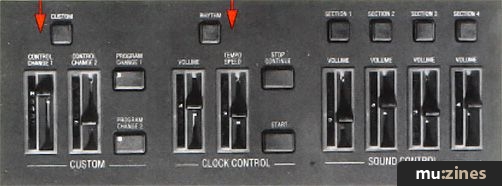
CUSTOM SECTION
Allows you to assign two MIDI controllers to the two control change sliders beneath the Custom button, and two Program Change numbers to the pair of Program Change buttons in the same vicinity. You can choose MIDI channel, MIDI Output, controllers and program numbers (including bank select). The two MIDI controllers (in addition to the pitch bend and mod wheel) especially make the C80 a more powerful instrument.
CLOCK CONTROL SECTION
Controls the volume, tempo and stop/start/continue operations of any MIDI rhythm units or sequencers from the C80; these settings can be different for every C80 Patch.
SOUND CONTROL SECTION
Gives immediate access to the edit pages of each of the four Sections, as well as offering a volume control for each Section, in addition to the master volume control. Note that the volume faders control MIDI volume (Controller 7), not actual audio.
PANEL
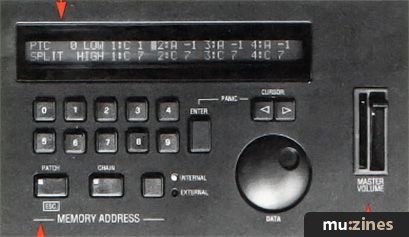
INFORMATIVE LCD
What can we say? Big, informative and backlit — this is where you actually see what you're doing, whether editing or selecting Patches.
MEMORY ADDRESS SECTION
Consists of a keypad, cursor buttons and data entry wheel and is used for selecting C80 Patches and altering parameter values during editing.
MASTER VOLUME SLIDER
Controls the overall volume of everything connected to the C80 — this is over and above the four individual volume controls.
C80 FEATURES
- 2 MIDI Inputs
- 4 MIDI Outputs
- 2 MIDI Thru sockets
- Expression pedal socket
- Footswitch socket
- Power socket
EDITABLE SECTION PARAMETERS WITHIN A C80 PATCH
- Split
- Key Velocity
- Transpose
- Pitch Bend
- Aftertouch
- Modulation
- Hold
- Delay
- Channel Out
- Outputs
- Program Change
- Poly/Mono
- Master Volume
Also featuring gear in this article

Publisher: Sound On Sound - SOS Publications Ltd.
The contents of this magazine are re-published here with the kind permission of SOS Publications Ltd.
The current copyright owner/s of this content may differ from the originally published copyright notice.
More details on copyright ownership...

Sound On Sound - Jun 1993
Gear in this article:
Review by Derek Johnson
Ads for Gear in this article:

Help Support The Things You Love
mu:zines is the result of thousands of hours of effort, and will require many thousands more going forward to reach our goals of getting all this content online.
If you value this resource, you can support this project - it really helps!
Donations for October 2026
Issues donated this month: 0
New issues that have been donated or scanned for us this month.
Funds donated this month: £0.00
All donations and support are gratefully appreciated - thank you.
Magazines Needed - Can You Help?
Do you have any of these magazine issues?
If so, and you can donate, lend or scan them to help complete our archive, please get in touch via the Contribute page - thanks!
If you're enjoying the site, please consider supporting me to help build this archive...
...with a one time Donation, or a recurring Donation of just £2 a month. It really helps - thank you!

 @mu_zines
 RSS Feed
 Blog
Blog