


Magazine Archive
Home -> Magazines -> Issues -> Articles in this issue -> View
Twister | |
Programmable Automation ComputerArticle from Music Technology, June 1988 | |
A powerful and expensive automated MIDI mixing system attracts the attention of Chris Many. But how much should you have to pay for automation, and what should it do for you?
MIDI automation of your mixing desk in a 1U-high rack-mounting box sounds convenient and effective but is it cost-effective?

IT WAS ONLY a matter of time until someone brought out a rack-mounted, MIDI-based, high-quality automated mixing system. Of course, when you start cramming that much electronics into a single rack space, you're going to have to make compromises. The trick is to cut the right comers and retain the right features. If it's done well it could be a remarkable package. The risk you run is ending up with a dedicated unit that quickly becomes relatively useless in a marketplace that updates its wares twice a year. Twister, one of the latest additions to the proliferation of MIDI mixing automation packages, fits somewhere in between.
Overview
EACH SINGLE SPACE rack unit controls eight audio channels, so initially Twister appears pointed toward smaller studio applications. However, units can be chained together so that up to 64 audio channels are placed under Twister's control - enough for most major studio applications. Interfacing with a mixing desk is achieved through insert points - a standard arrangement in mixer automation. There are eight stereo jacks on the back of the unit for this purpose, plus an RS232 port (for connection to an external computer) and three MIDI ports (In, Out and Thru). The front panel contains eight buttons to select which channel of audio you're working with, and six other buttons which allow you to choose a variety of other functions (grouping, mutes and so on). Last, but not least, is the Twister equivalent of a fader: a dial and LEDs to determine gain.
Compromise number one: no faders and just a single dial to control attenuation. Channel switching selects the single track of audio you're controlling. Compromise number two: Twister is a "snapshot" mixing system. Not that it won't do real-time automation - it does - but the first half of the documentation describes the use of Twister as a means of recording and recalling audio levels. For those unfamiliar with this type of system, the snapshot method is just what it sounds: like; a "picture" of the current attenuation levels, mute and group status is taken, and can be stored in internal memory. Twister has 99 memory locations to store these snapshots, and any one can be recalled at the push of a button or two.
Snapshot Mixing
OPERATION IN SNAPSHOT mode is very straightforward: select the channel you wish to adjust by pressing one of the eight buttons, and by using the dial (or "digi pot", as it's called in the manual), set the desired level. Three sensitivity levels are available which allow you to fine tune your mix: enigmatically entitled Coarse, Medium and Fine. By the way, Twister has been optimised as an attenuation only device, so when the volume control is all the way up, the LED bargraph display will show 0dB.
Mutes work just as simply: press the Mute toggle button, and mute the channels you wish. Once you've got the snapshot mix set up, store it to one of 99 internal memory locations. Grouping is also intuitive - press the Set Group button and select which channels you want included in the group. Voila, everything now responds to the movement of the digi pot, relative to its original level. Everything is actually related to the highest level in the group, and if you try and push channel one (which is at -10dB, let's say) up a few notches, while channel two is already scaled to 0dB, you'll see flashing LEDs, informing you of your error. To handle this, you can exit from Group mode and return to Channel mode, in which case you can adjust channel two to its rightful volume.
What use is a snapshot mix? Well, live performance represents one answer, because you can select mixer and effects routings from your master keyboard as patch change numbers. Selecting pre-programmed levels for effects units in or out of the studio, such as your favorite reverb level mix, represents another. But to be honest, I'd find it hard to justify investing in Twister solely to store 100 preset volume levels, no matter how inconvenient it is to manually reset eight faders.
Real-Time Mixing
WHAT MOST PEOPLE are likely to want from an automated mixing system is real-time mixing automation. Twister is dependent on an external sequencer for storage and playback of mix moves. There are pluses and minuses to this approach - cue compromise number three. Your familiarity with the limitations of that sequencer will determine how easy or difficult it will be to use Twister. Some sequencers function well in this capacity, others not so well. But you won't have to learn new methods of storage, retrieval, editing and adjustment because you'll be working with a tool you're (hopefully) familiar with.
The cost of a storage medium is not included in this package (although by the time you've expanded it to 24 channels and added in the cost of a computer/sequencer, it's debatable whether or not it's competitive with other automation systems with a storage device built in.)
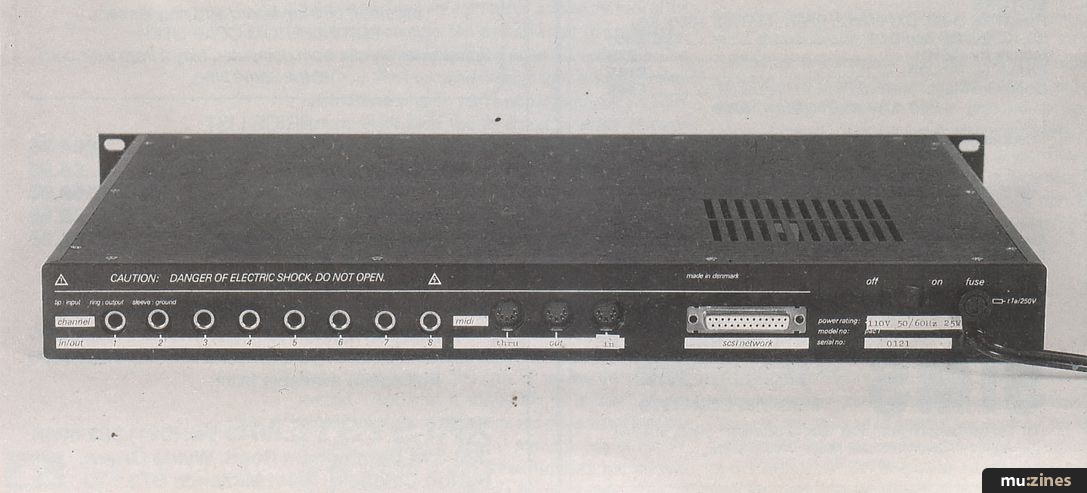
The disadvantages are obvious: you're relying on equipment outside Twister as a basis upon which one of its major functions depends. Because there are so many different sequencers on the market, it's hard to predict all the quirks and problems you might run into when interfacing Twister with any one of them. For example, your sequencer must not repeat information received at the MIDI In port at the MIDI Out port (or it must have some method of defeating this) or you'll set up a loop of MIDI data going to and from Twister, rendering the operation useless.
Mixing in real time using Twister involves getting used to mixing one channel at a time with a dial on a rack-mount unit instead of a bank of faders on a desk, or a representation of faders on a computer screen. I didn't find one channel at a time bad, but it feels odd using a dial to mix with. I suppose I could get used to it, but it's something you should be prepared for. Aside from the awkwardness of this setup, correcting mix errors, or even adjusting them can be a pain in the sequencer. First of all, you need to remember to save your moves on the sequencer each time you finish (although again, this depends on your sequencer: some require you to select a track before you begin, others afterwards; some will automatically cycle to the next available track while saving the last MIDI information received, others...).
To correct a move, you'll need to set up your sequencer to punch in and out at the appropriate points, or you can punch a few buttons on the front of the Twister unit. Twister listens to MIDI data coming in over the selected channel, but when you move the digi pot, it will stop listening and react to the data incoming from its own front panel.
A computer interface program is also available with the package for the Atari ST (for monochrome mode only, although colour is apparently forthcoming). This makes it a bit more controllable, as you have a screen with eight faders, and a duplicate of Twister's front panel display. Unfortunately, it does little more than mirror what you an accomplish from the front panel. You'd think it'd at least give you additional storage for snapshot settings. It's also not intended for real-time mixing, unless you have a second ST/Mac/IBM/C64 or stand-alone sequencer. Also, Digidesign's Q-Sheet package for the Mac (see review, January '88) will allow automation of the Twister from a computer screen while locked to SMPTE and playing back sequences.
The documentation is pretty thin - 34 pages with only 18 pages dedicated to the operation of the unit. There's no index, so you'll find yourself flipping through it to get any questions answered. On the left-hand side of every page, however, is a short, two- to three-word description of the information directly to the right - I didn't find it very helpful, though.
Verdict
SO, WHAT DOES this all add up to? Twister is an eight-channel MIDI automation product that requires you to mix with a dial or a mouse. It will store 100 snapshots of level, mute and group settings, all recallable from the front of the unit or using an external MIDI device. It allows realtime mixing but demands storage of this information to the sequencer of your choice. Its audio quality is excellent (the circuit board layout gives an indication of the extreme care paid to sound quality), and the (Aphex) VCAs used are transparent and produce no extraneous noise. But in spite of all this, I'm still not sure it's worth its hefty price tag.
If your system consists of a 4- or 8-channel desk and you don't predict a need for 16 or 24 tracks arising in the immediate future, you might consider looking into Twister. But keep in mind that you'll be mixing with mouse or a dial, one track at a time.
If the price were about half of what it is, I'd recommend this package to budget studios and musicians playing live. As it is, the compromises that have been made (a dial instead of faders, no onboard storage and mainly a snapshot-oriented system) make Twister's applications rather limited. I'm sure converts won't see it this way, but when I added up the figures and made comparisons with other MIDI automation systems I couldn't convince myself.
Price Basic 8-channel system £995; Fader conversion computer £995; 8-channel console interface boxes £185 each; complete 24-channel system, £4580. All prices exclude VAT.
(Contact Details)
Also featuring gear in this article

MIDI Automation Systems (Part 2)
(SOS Mar 88)

Twister - Programmable Automation Computer
(SOS Aug 87)
Browse category: MIDI/Mixer Automation > Twister Engineering
Publisher: Music Technology - Music Maker Publications (UK), Future Publishing.
The current copyright owner/s of this content may differ from the originally published copyright notice.
More details on copyright ownership...

Music Technology - Jun 1988
Gear in this article:
Review by Chris Many
Help Support The Things You Love
mu:zines is the result of thousands of hours of effort, and will require many thousands more going forward to reach our goals of getting all this content online.
If you value this resource, you can support this project - it really helps!
Donations for May 2026
Issues donated this month: 0
New issues that have been donated or scanned for us this month.
Funds donated this month: £0.00
All donations and support are gratefully appreciated - thank you.
Magazines Needed - Can You Help?
Do you have any of these magazine issues?
If so, and you can donate, lend or scan them to help complete our archive, please get in touch via the Contribute page - thanks!
If you're enjoying the site, please consider supporting me to help build this archive...
...with a one time Donation, or a recurring Donation of just £2 a month. It really helps - thank you!

 @mu_zines
 RSS Feed
 Blog
Blog