


Magazine Archive
Home -> Magazines -> Issues -> Articles in this issue -> View
Connecting Lynx | |
Article from Electronic Soundmaker & Computer Music, March 1984 | |
Last month's Lynx rhythms
Chris Everard investigates the Lynx rhythmic potential
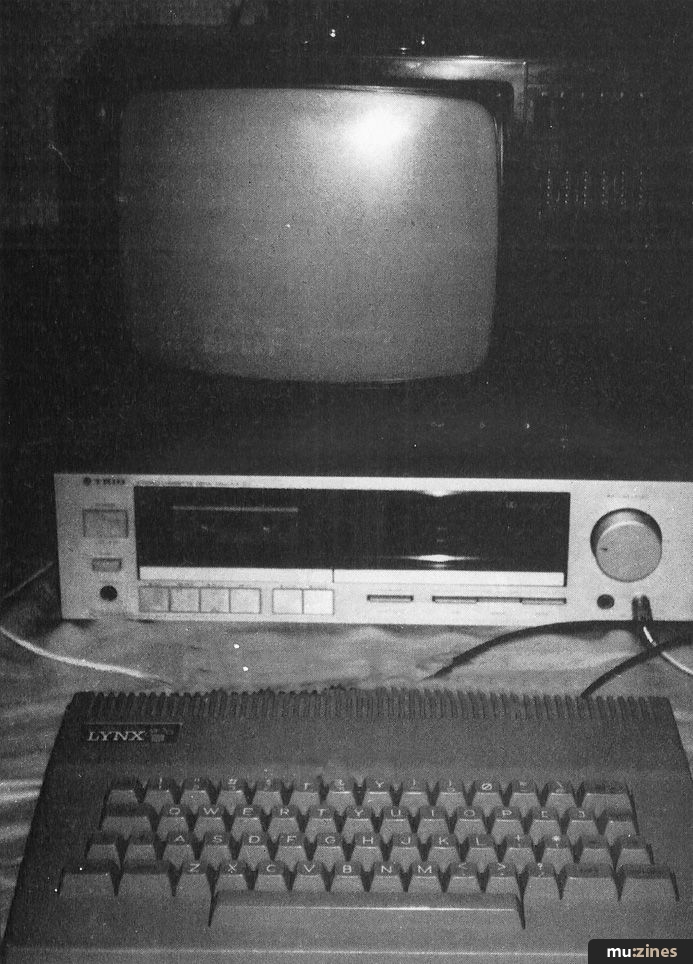
Thumbing through the books and magazines on the market, I am amazed at the interest given to certain computers and the complete ignorance of and indifference shown towards others — some of which have better and more adaptable soft and hardware available than their superstar, mollycoddled competitors. One such computer is the Lynx. English bred and marketed widely, the Cambridge company who make them have managed to sell a considerable number. So, it is with a certain pride that I now present to all you high resolution home computer freaks out there, a taste of what this little machine can do in the field of electronic music (what else!).
As this is something of a 'taster' for greater things to come, I thought it best not to go over the top. The programme in this article allows a Lynx computer to control sequencers (either on-board or separate) via the TRIG IN or EXT SEQ IN sockets on most synths. The ambiguous word 'most' is used because it's impossible to try out this programme on every unit on the market. Suffice to say that it happily triggers a JX3P and a CS15 (EG's only on the latter). By altering the third digit on line 280 after the BEEP command you can acquire different trig pulse amplitudes. Thirty-four is just about right for the poly sequencer on the JX3P.
Feel The Rhythm
For this particular programme, the way rhythms are put in is via a potted notation. Typing in a C will represent and produce a crotchet (one beat), an M will come out as a minim (two crotchets), a Q for quavers (half a crotchet) and an S for a semi-quaver (half a quaver). Depressing the space bar will increase the tempo and the colon will decrease. Pushing the 'at' abbreviation button will start the pulses and depressing the A key will stop the trig pulses. A restart option will be given in the form of; "Restart Y/N?"; as if you couldn't work it out for yourselves, the Y means Yes and the N means No. There is also a facility for backspacing and deleting using the '/' button. By hitting this once for every step you wish to delete and re-entering the correct information, it avoids the need to start all over again if you enter a wrong letter.
Bingo!
As I said at the beginning of this article, the following programme is a mere sample of what the Lynx is ultimately capable of in the field of electric music making. The following programme may have some things which you may wish to alter or completely leave out — on the other hand, it may inspire you to develop it to such a point that you never have to bother about using the sequencer's on-board pulse notation again! Eyes down... and away we go.
Rhythm notation software listing
101 PRINT "M = MINIM"
102 PRINT "C = CROTCHET''
103 PRINT "Q = QUAVER"
104 PRINT "S = SEMI QUAVER"
110 LETD = I
120 DIM N (200)
130 LET C = O
140 REPEAT
150 LET AS = GETS
160 IF A$= THEN GOTO 240
165 IF AS = THEN LETC = C-I
170 PRINT AS;""
171 IF AS = "/" THEN GOTO 150
191 LFTC = C+I
200 IF A$= "C" THEN LET N(C)=3000
210 IF AS = "Q" THEN LET N(C)= 1500
220 IF A$= "S" THEN LET N(C)=750
230 IF AS = "M" THEN LET N(C) = 6000
240 REM
250 UNTIL A$="@"
260 REPEAT
270 FOR X-I TOC
280 BEEP 1, 1,34
290 BEEP 0,0,0
300 LET T$ = KEYS
310 IFT$ = " ''THEN LETD = D-0,1
320 IFT$ = ":" THEN LETD = D + 0,1
330 LET T$ = "X"
340 PAUSE N (X)*D
350 NEXT X
360 UNTIL KEYS = "A"
370 PRINT
400 PRINT@0,30; "RESTART Y/N?"
410 Z$ = GETS
411 PRINT@ 0,30; "
420 IF Z$= "Y" THEN GOTO 260
More with this topic
 Digital Signal Processing (Part 1) |
 PC Notes |
 Atari Notes |
 PET/Muse - Interfacing Paia Synthesizers to PET Computers |
 Computer Checklist |
 Synth Computers |
ST Notes |
 Questionnaire Results (Part 1) |
 PC Notes |
 On The Net |
Amiga Notes |
 Atari Notes |
Browse by Topic:
Computing
Also featuring gear in this article

Publisher: Electronic Soundmaker & Computer Music - Cover Publications Ltd, Northern & Shell Ltd.
The current copyright owner/s of this content may differ from the originally published copyright notice.
More details on copyright ownership...

Electronic Soundmaker - Mar 1984
Donated & scanned by: Mike Gorman
Feature by Chris Everard
Help Support The Things You Love
mu:zines is the result of thousands of hours of effort, and will require many thousands more going forward to reach our goals of getting all this content online.
If you value this resource, you can support this project - it really helps!
Donations for May 2026
Issues donated this month: 0
New issues that have been donated or scanned for us this month.
Funds donated this month: £0.00
All donations and support are gratefully appreciated - thank you.
Magazines Needed - Can You Help?
Do you have any of these magazine issues?
If so, and you can donate, lend or scan them to help complete our archive, please get in touch via the Contribute page - thanks!
If you're enjoying the site, please consider supporting me to help build this archive...
...with a one time Donation, or a recurring Donation of just £2 a month. It really helps - thank you!

 @mu_zines
 RSS Feed
 Blog
Blog