


Magazine Archive
Home -> Magazines -> Issues -> Articles in this issue -> View
Light Fantastic | |
XRI Systems XRL8 MIDILiteArticle from Sound On Sound, October 1990 | |
Best known for their SMPTE synchronisers and MIDI patch bays, XRI Systems have entered the growing field of MIDI controlled lighting with the compact XRL8 MIDILite. Kendall Wrightson seeks illumination.
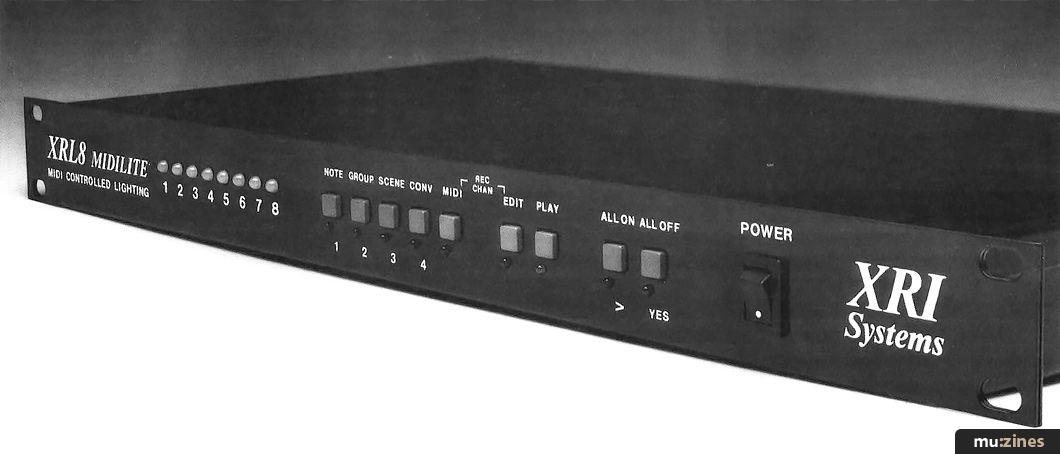
Bands who can't afford their own lighting engineer traditionally have very limited options when it comes to audio/lighting synchronisation — they are faced with a choice between nothing at all or the kind of stone-age sound-to-light system used by the local mobile disco. By dividing the audio spectrum into several frequency bands and then using the amplitude of each band to control lights, such systems provide a degree of automatic synchronisation, but as the harmonic content of any sound is so complex, it is impossible to control the result with any real degree of accuracy.
Now, however, MIDI has presented us with a neat way of sidestepping all the problems of using an audio signal to control lights, via the XRI Systems XRL8 MIDILite. With this at the heart of things, a light system can respond to music more accurately, and it can make available all sorts of new control possibilities: you can trigger lights with MIDI notes generated by drum pads or a keyboard; a continuous controller can be used to fade lights up and down; patch changes can recall preset lighting 'scenes'; a MIDI sequencer can be used to edit and automate a whole series of lighting changes.
HEY DJ!
Musical instrument manufacturers have long appreciated MIDI's lighting control potential, but their pre-1990 efforts at getting the message across to lighting engineers were so spectacularly unsuccessful that they abandoned the whole idea. However, about 18 months ago the manufacturers on the other side of the fence — the established lighting console designers — began updating their systems to incorporate MIDI, and the people who have pushed them in this direction seem to be disc jockeys rather than traditional lighting engineers.
The Collins English Gem Dictionary describes a disc jockey as "one who gives a recital of gramophone records". No doubt Collins will want to update their entry, since the 1990 model disc jockey does a lot more than play records. Contemporary DJs prompted the development of the new units when they asked lighting console manufacturers if they could control lights from their MIDI sampling keyboards. The MIDI manufacturers were right all along — they just had lousy timing, and spoke to the wrong people.
THE CONTROL VOLTAGE PRINCIPLE
Lighting consoles, like audio mixing desks, come in many shapes and sizes and in many levels of sophistication: £50 buys a box with eight faders while £250 gets you a 12-channel console capable of memorising two 'scenes'. At the other end of the spectrum, a console suitable for a major Wembley concert will have hundreds of channels, integral light 'chasers' (sequencers), plenty of external hard drive storage and a six figure price tag.
However, regardless of size or degree of sophistication, lighting consoles all operate on a simple and uniform principle: each console fader produces an international standard control voltage (CV) of 0 to 10 volts DC. This low power output signal, which is proportional to the position of the fader, is not sufficient to directly drive spotlights which operate at AC mains voltages, so the console's CVs are fed into a device called a dimmer. Each dimmer channel puts out an AC mains voltage proportional to the low power CV input, and a channel is rated by the maximum current it can drive.
MIDILITE
If MIDI is to be used as a means of control for lights, as an alternative to a simple fader, then what we need is a box that will convert MIDI data into standard analogue lighting control voltages — not to be confused with analogue synth Gate/CV control voltages — and this is exactly what the XRI XRL8 MIDILite does. The unit is is an eight channel MIDI-to-CV convertor neatly packaged into a compact 1U rack. The basic XRL8 can be upgraded to a 16-channel system (the XRL16) with the simple addition of an internal card which costs £150. In either configuration, you can use pitch bend and polyphonic aftertouch to control lighting channel levels in real time, recall preset lighting scenes with patch change messages, and automate the whole process with a sequencer.
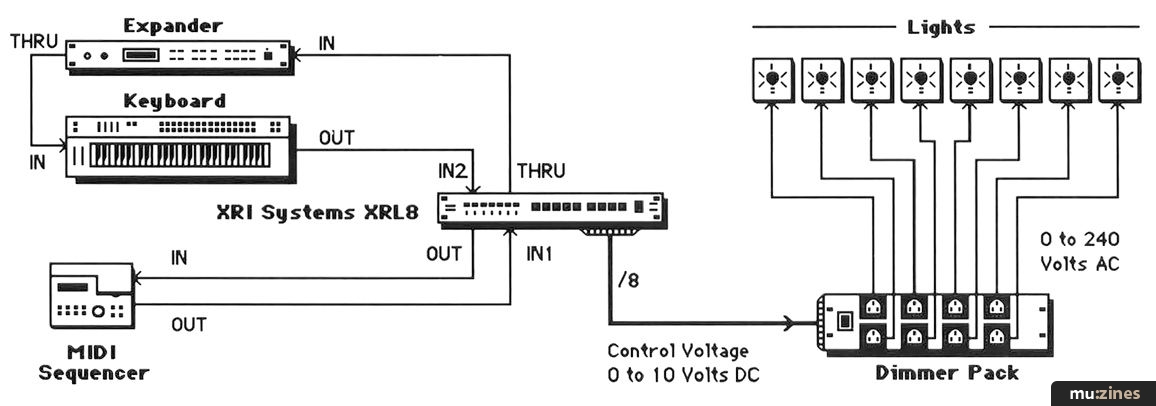
Figure 1. A typical lighting system controlled by the XRL8.
The MIDILite's rear panel has two MIDI Ins, one for the programming controller with which you would generate MIDI data 'live', and one for a MIDI sequencer. There are also MIDI Out and Thru sockets. See Figure 1. The connection between the MIDILite and the dimmer pack is also made via the rear panel, using a 25-pin female D-type connector. XRI supply pre-wired leads for the most popular dimmer packs, such as the Pulsar 8 x 5a (which offers eight 5-amp outputs). To the left of the dimmer connector there are two small holes which give access to two trim pots labeled Low and High. By pressing the front panel All Off/Yes button and adjusting the Low pot, you can turn all connected lights fully off, and compensate for any problems with component tolerances within individual dimmers. A similar procedure can be carried out with the All On/> button and the High pot. Both All On and All Off buttons (the latter more often referred to as Dead Black Out by lighting engineers) are obviously useful in performance too.
The XRL8 has only two modes, Play and Edit, and two front panel buttons allow you to select these. The five function buttons (Note, Group, Scene, Conv and MIDI) are used in conjunction with the Edit, > and Yes buttons to programme the XRL8.
NOTE ON
Each MIDILite unit will respond to data on only one MIDI channel (so you can use 16 XRL8s at once), and from this provides eight output lighting channels. Each lighting channel is assigned to a single MIDI note, the default mapping being C3 (Channel 1), D3 (Channel 2) E3 (Channel 3), up the scale of C Major to C4 (Channel 8). The note determines what lighting channel will be addressed, and the note's velocity value then sets a lighting level.
The front panel has eight LEDs which glow red when a channel is addressed. In a 16 channel system the LEDs turn green when Channels 9 to 16 are addressed, and if Channels 1 and 9 (or 2 and 10 etc.) are in use simultaneously, the LEDs turn yellow. I simply can't imagine why 16 single colour LEDS weren't fitted in the first place, since they're probably cheaper than eight tri-colour LEDs.
The MIDI note defaults can be edited by pressing and holding Edit and then Note. LED 1 lights up, indicating that Channel 1 is being edited, and the XRL8 transmits the MIDI note assigned to Channel 1. Press Edit again, play the new note on your MIDI controller, and it is now assigned to the lighting channel. The next channel can be edited by pressing Note again, and pressing Play at any point will take you out of the editing procedure. The remainder of the MIDILite's programmable functions are all edited in a similar manner, with the All On/> button used to navigate between channels, and the All Off/Yes button used to confirm new data.
GROUPS AND SCENES
Besides allowing you to control lights channel by channel, the XRL8's Groups allow you to play two or more lighting channels from the same MIDI note — you can create seven of these Groups. You can also create and store 10 or 16 Scenes (16 on the unexpanded XRL8, 10 on the XRL16), in which you set levels for eight of the maximum 16 channels, which can be recalled by MIDI patch change commands. Of the 10 Scenes, only eight are actually programmable because Scenes 1 and 2 are preset to All On and All Off respectively.
To set the level of an individual light, you simply play the appropriate note, and any subsequent pitch bend data will control its brightness, either in real-time performance or when programming a Scene. As pitch bend is a channel command, one would expect it to dim all the XRL8's lights, since they are all on the same MIDI channel. However, XRI have ignored part of the MIDI specification and allowed pitch bend to affect only the last note played. (This minor deviation is probably excusable, given that there isn't yet any standard for MIDI-to-light control units, although this is something that the MIDI Manufacturers' Association and the Professional Light And Sound Association are looking into.) This is fine for programming Scenes, but it means that only one light can be dimmed in a real-time performance. It also means that complex multiple light dimming sequences recorded into a MIDI sequencer cannot be performed using the pitch bend command, since only the last light played will actually dim.
RECORDING A LIGHTING SEQUENCE
XRI have overcome this problem by also allowing polyphonic aftertouch to control lighting levels, and in this way data for eight lighting channels can be carried on the same MIDI channel. Many people, however, do not have keyboards with poly aftertouch, a fact that XRI have recognised. Pitch bend data from a controller arriving at MIDI In 2 will be converted to polyphonic aftertouch which is note specific rather than channel specific. The converted data is then sent to the MIDI Out, thereby allowing you to record it into a MIDI sequencer, and overdub successive tracks for each lighting channel.
Although the poly aftertouch data may have to be considerably thinned out, both in order to control eight lighting channels at once and to save sequencer memory, the persistence of vision and the relatively slow response of light bulbs to voltage changes combine to limit any noticeable quantisation in the lighting control.
In practice, overdubbing each light's level in separate passes is far from ideal, since the adjustment of one light begs the adjustment of several more. Imagine an audio mixing automation system that only allowed one channel to be overdubbed at once. For this kind of sequence recording, an alternative to a keyboard controller is a real necessity. What you need is a device with eight faders which could generate MIDI velocities or poly pressure, and such a controller would also have the advantage of being more suitable for non-musicians. J.L. Cooper's Fadermaster (around £250) immediately springs to mind, as it has the right hardware, but unfortunately its eight faders cannot be assigned to MIDI notes or poly pressure. Alternatively, the Italian company LEMI (UK distributors XRI Systems) make two fader-equipped MIDI control boxes, the MC12 and MC24 (12 and 24 faders respectively), both of which generate MIDI notes, making them ideal companions for the XRL8/XRL16. However, at £633 and £729, they're hardly a minor additional expense, and more cost-effective control solutions can be found in software.
SOFTWARE
Computer sequencer owners could create an animated virtual control panel for the MIDILite, using the MIDI Manager pages of either Cubase or Creator/Notator on the ST, or the equivalent slider functions of Mac, PC and Amiga sequencers. XRI provide MIDILite templates for both Cubase and Creator/Notator. As virtual control panels can be designed from scratch with an almost unlimited number of faders and switches, you could design panels for even more sophisticated lights, such as those employing stepper motors which make lights twist, tilt or change colour. Each of these additional functions also operate on the 0 to 10 volt standard CV, which means that a light with three motorised functions would take up four XRL8 channels.
CONCLUSION
The MIDI revolution has now brought practical lighting control within the reach of the average musician, and that must be a good thing. An XRL8 will cost you £399.95, and adding a Pulsar 8 x 5a dimmer and eight 300W spots would make the price of a complete 8-light system under £750 — not really all that much for a regular gigging band or mobile disco, especially when the improved lighting should bring in more bookings.
MIDILite software updates currently in preparation include programmable fade times, and an increase in the number of Scenes. (There is already a £50 memory upgrade to 64 Scenes). Other changes that XRI might think about include fitting 16 front panel LEDs rather than eight, and upgrading the XRL16 to allow all 16 channels in a Scene to be programmable. Other improvements for a MkII MIDILite might include adding eight small front panel faders (such as those found on the current wave of rack mounting line mixers). Both of these last two changes would undoubtedly make the MIDILite more attractive to other potential users like theatres, many of which now own MIDI keyboards.
With the arrival of the MIDILite and the news that the MMA and PLASA are trying to devise a standard MIDI lighting protocol, the future looks bright for MIDI controlled lighting.
FURTHER INFORMATION
£399.95 inc VAT.
XRI Systems, (Contact Details)
Related products:
Terralec (lights) (Contact Details)
Pulsar (dimmer systems) (Contact Details)
Publisher: Sound On Sound - SOS Publications Ltd.
The contents of this magazine are re-published here with the kind permission of SOS Publications Ltd.
The current copyright owner/s of this content may differ from the originally published copyright notice.
More details on copyright ownership...

Sound On Sound - Oct 1990
Donated & scanned by: Mike Gorman
Gear in this article:
Review by Kendall Wrightson
Help Support The Things You Love
mu:zines is the result of thousands of hours of effort, and will require many thousands more going forward to reach our goals of getting all this content online.
If you value this resource, you can support this project - it really helps!
Donations for May 2026
Issues donated this month: 0
New issues that have been donated or scanned for us this month.
Funds donated this month: £0.00
All donations and support are gratefully appreciated - thank you.
Magazines Needed - Can You Help?
Do you have any of these magazine issues?
If so, and you can donate, lend or scan them to help complete our archive, please get in touch via the Contribute page - thanks!
Please Contribute to mu:zines by supplying magazines, scanning or donating funds. Thanks!
Monetary donations go towards site running costs, and the occasional coffee for me if there's anything left over!

 @mu_zines
 RSS Feed
 Blog
Blog