


Magazine Archive
Home -> Magazines -> Issues -> Articles in this issue -> View
Master or Servant | |
Article from Micro Music, April/May 1989 | |
Phil Brammer & Co test drive Master Tracks Pro for the ST
Phil Brammer takes a look at the latest sequencer from Passport Software

The Master Tracks Pro is a 64 track MIDI sequencer which is supplied as a single sided disk with a manual housed in a grey and maroon coloured box file. That's all. No dangly bits to hang from your ST.
Given one week to review it, I realised that I wouldn't be able to go in deep, but aimed to give a broad impression of it's modus operandi, keeping a watchful eye for special features. With the help of Gogz and Mart from the Warholas, Pups of The Groove Toys, their respective home studios and one professional recording studio, I have put the MTPro through its paces.

Loaded
The virgin screen displays three windows, which reminded Pups of the IBM Microsoft Windows environment (and he should know). These turn out to be pretty groovy, but more about them later. For now we have the sequencer window top-screen with a black dot in the box for Track 1 REC and beneath this the Conductor (tempo) and Transport (recorder) windows.
Sequencer
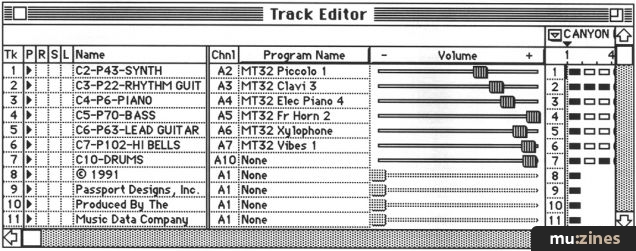
Clicking the mouse on the name grid for Track 1 in the sequencer window highlights that part of the grid and evokes an Edit Text "Dialog Box" into which you type your track name - say "Bass". Click on OK and the box vanishes, leaving the name of the track in its proper place.
Clicking on the CHAN box conjures a similar "Change Value" dialog box. Type 1, click OK and the sequencer is prepared for MIDI information on channel 1.
By now Pups (or was it Mart?) had set the Roland D50 to send and receive on MIDI channel 1 and as someone was itching to record...

Key pressure sensitivity can be edited with ease
Transport
...I clicked on the record button in the Transport window. Unnerving this, as nothing seemed to happen. But wait. I had only ACTIVATED the Transport window (its banner was now grey - as was the sequencer banner previously) and before clicking on the record button again I paused to turn on COUNT IN and METRONOME. Two clicks and its all fixed for record...
He stops playing. I clicked on stop and as auto-rewind is already on (it loads up that way) we are back to MIDI measure one, beat one and zero elapsed time (all displayed in this window) in a twinkle. My reel-to-reel tape machine would take much longer.
Recording our next track was equally simple. All I did was click on the sequencer window, the Track 1 REC box (the black dot disappeared), the Track 2 REC box (a black dot appeared) and then I was back to the Transport window to enable Pups (or was it Mart?) to record Track 2, with Track 1 already in playback mode. Once a track has been recorded a black triangle appears in the sequencer window in its PLAY box. Of course you can always turn it off.

Punch in and out settings

Channel pressure editing screen
Window fitting in Barnet
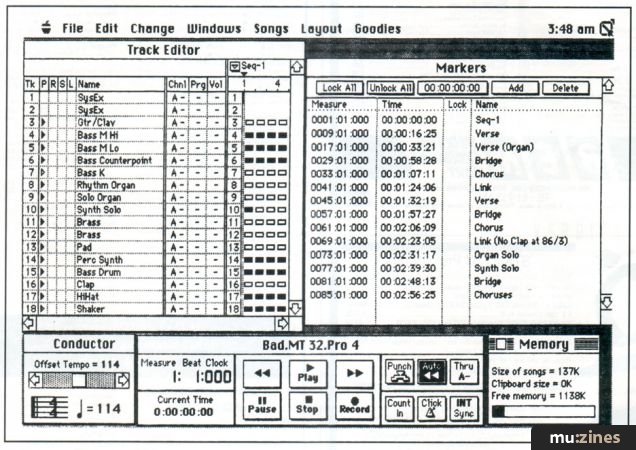
For me the beauty of this system is the fact that you can mix and match windows and perform what would seem to be complex operations without having to switch screens.
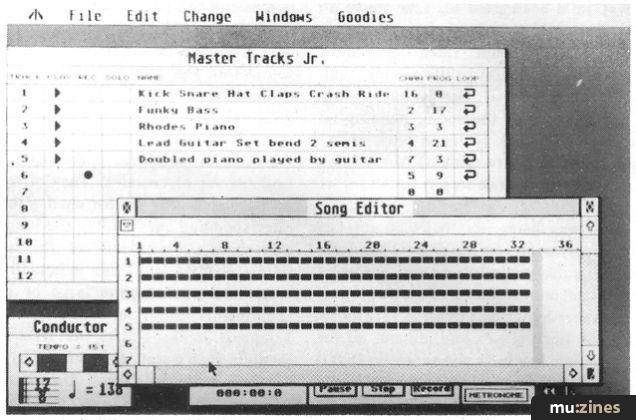
How about lining up the Sequencer window (which has your "instrument" listing) with either Song Editor or Step Editor windows?
The former displays your tune in measures (bars) - a black box representing a bar containing MIDI note information, a hollow box, an empty bar.
The Step Editor window though, is the most pleasing on the eye to a musically illiterate person such as myself, displaying your music on a grid (which can be removed) against a keyboard diagram - a black dash representing each note and the length of the dash indicating note length.
You can write your music to this grid using the pencil icon (having chosen desired note length) or remove offending bits using the eraser.
Both Editor windows scroll and follow your music bar for bar when activated during playback and in the drop-down Layout menu is a Zoom In facility for scrutinising those musical twiddly bits. All of the above windows can be displayed simultaneously, plus any one of the remaining seven windows, of which the Conductor Track window deserves a special mention. It allows you to draw subtle (or not so subtle, Gogz!) changes in tempo throughout the whole of your song. Very effective.
As with the Editor windows, they all scroll and follow your tune in real time.

Step time editing page

Various pull down options

Selecting the Humanize functions
Cutting up Bach
One of the four music files provided on the MTPro disc is Bach's RONDO. Pups says he's never heard such beautiful music emanating from his keyboards (and he should know) and indeed we sat there for the whole duration just lapping it up.
This is ideal music for testing the edit facilities on the MTPro. Select RONDO.MTS from the directory and activating the Song Editor window we see five rows of rectangular boxes (measures) representing five "instruments" listed in the Sequencer window. Click on the first measure of the screen you wish to repeat and holding down the mouse button, drag the mouse diagonally across - say 12 measures - until the whole section you fancy is highlighted (over all five tracks which make up the band on Rondo).
Select COPY from the Edit menu and you have already copied these bars of music to a magical clipboard! (Nice this. You can display what's on the clipboard if you so wish).
In order to repeat this bit, click the mouse at the point at which you'd like to insert the repetition and you'll see a blinking cursor at that point.
Here you need to insert empty measures in order to make room for your repeat section and you do this by simply selecting INSERT MEASURES from the Edit menu. Up pops the INSERT MEASURE dialog box into which you type the number of measures your repeat section will take up. Click OK and five rows of empty measure boxes are created where your blinking cursor was. But now comes the real magic! Select PASTE (from the Edit menu) and the empty measures are instantly filed with your repeat section. CUT and PASTE! Bach turns in his grave!

Entering the first note on the Step Editor
Time for Bed
One or two groovy features which should whet your appetite...
- In the Goodies menu is a facility called simply KEYBOARD. Gogz clicked this on and evoked a magic box in which you can assign notes on the master keyboard to perform Transport window functions. In other words you can initiate STOP, PLAY, RECORD etc from the keyboard - a real plus for the one man band cum producer who would otherwise be picking his way through seas of wires in order to fulfill his various self-imposed functions. (The MTPro is making life a real doddle for some of us!)
- Quantizing (regularising irregular input) can be arranged before or after recording, and you have the choice of quantizing entire notes or just attacks.
- A "humanizing" facility (on the drop-down Change menu) slightly randomizes the timing of notes such that they don't sound like they've been recorded by androids and actually sound "live".
- It reads and writes Industry Standard files, has SMPTE sync, Auto Punch in and out, and a whole wealth of features which I haven't even begun to explore, such as the FIT-TIME facility which adjusts tempos to fit a given time period, which I intend to try soon with some Warholas videos.
- You can slide tracks against each other - great fun! If it doesn't work out, slide them back! Sliding is particularly effective, we found, on drum tracks - you can lend a song a very dangerous edge - mind your back.

Loadsa windows from the Master Tracks Pro

Loadsa windows from the Master Tracks Pro

Loadsa windows from the Master Tracks Pro
Last Words
Roger Benou, who runs Monroe Studios in Barnet, and is an old Steinberg Pro 24 veteran, could come up with only one disadvantage of the MTPro compared to his Steinberg. This was that his music publishing clients sometimes expected a print-out of their music in proper musical notation - which he can give them with his Pro 24 but the MTPro can't deliver. But as a music score dyslexic (like myself) he prefers the MTPro as an instrument for personal composition, and that seems to sum up this package. It's been designed for real people.
Personally I couldn't ask for more from a MIDI sequencer, and those magic touches make the MTPro a real joy to work and play with.
This is the MIDI sequencer with which sequencers of the future will be compared. And it's worth every penny. Vicious!
MASTER TRACKS PRO (ATARI version 2.1) by Passport Designs
Supplied by MCMXCIX (Sole UK Distributors) (Contact Details)
Price £275.00
Also featuring gear in this article

Master Tracks Pro
(MIC Feb 90)

Master Tracks Pro 5 - Mac Sequencing Software
(SOS Jul 92)


Passport Master Tracks Pro 4.5.3
(SOS Oct 91)

Passport Mastertracks Pro
(MT Sep 90)
Browse category: Software: Sequencer/DAW > Passport Designs
Featuring related gear

Making Tracks - Passport Master Tracks Junior
(SOS Sep 88)
Browse category: Software: Sequencer/DAW > Passport Designs
Publisher: Micro Music - Argus Specialist Publications
The current copyright owner/s of this content may differ from the originally published copyright notice.
More details on copyright ownership...

Micro Music - Apr/May 1989
Donated by: Colin Potter
Review by Phil Brammer
Ads for Gear in this article:

Help Support The Things You Love
mu:zines is the result of thousands of hours of effort, and will require many thousands more going forward to reach our goals of getting all this content online.
If you value this resource, you can support this project - it really helps!
Donations for July 2026
Issues donated this month: 0
New issues that have been donated or scanned for us this month.
Funds donated this month: £0.00
All donations and support are gratefully appreciated - thank you.
Magazines Needed - Can You Help?
Do you have any of these magazine issues?
If so, and you can donate, lend or scan them to help complete our archive, please get in touch via the Contribute page - thanks!
Please Contribute to mu:zines by supplying magazines, scanning or donating funds. Thanks!
Monetary donations go towards site running costs, and the occasional coffee for me if there's anything left over!

 @mu_zines
 RSS Feed
 Blog
Blog