


Magazine Archive
Home -> Magazines -> Issues -> Articles in this issue -> View
Parametric Equaliser Project (Part 4) | |
Article from Home & Studio Recording, March 1985 | |
The fourth module for our 19" rack-mounting modular effects system. Full design and construction details supplied.
In this month's offering for the Modular Effects Rack project which kicked off in the December 84 issue, Paul Williams describes a high quality, low noise, feature-packed Parametric Equaliser which incorporates a novel 'adaptive bandwidth' control, and an LED peak indicator.
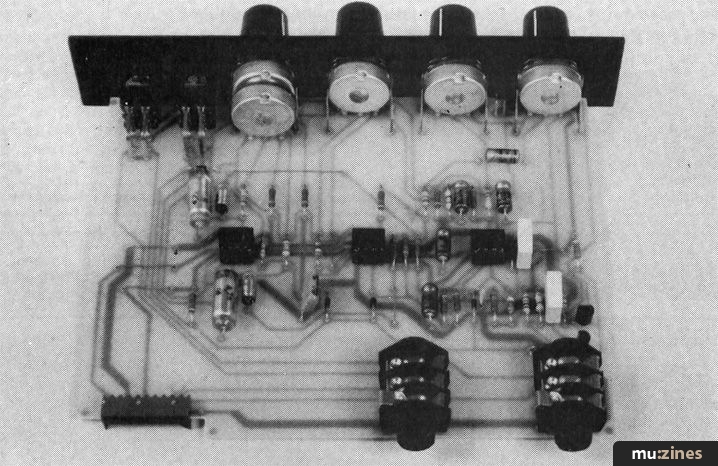
Every reader will have used some form of equalisation at some time, be it a graphic equaliser, a sweep equaliser on a mixer channel, or just bass and treble controls on the Hi-Fi amplifier. They all fulfil essentially the same purpose; to alter the frequency response of the system so that a deficiency at any point in the audio spectrum can be corrected by boosting that band, or if a particular band is too prominent, this can be cut.
Not only do equalisers (EQ for short) play a vital corrective part in the recording process, they are an important creative tool too, particularly when the device in question allows all parameters to be 'juggled'. This is where the name 'parametric' EQ comes from, since it provides control over all three important parameters, namely: frequency, bandwidth and the degree of boost or cut (EQ). If the device does not allow all three parameters to be adjusted then strictly speaking, it is not a true parametric equaliser. If only frequency and EQ are adjustable, then this is usually known as a sweep equaliser.
The Frequency control is vital so that the particular area of interest can be pin-pointed. A Bandwidth control then allows the 'spread' either side of the chosen frequency to be optimised so that anything from general wideband lifting at mid frequencies for vocal presence enhancement, to a very narrow band cut (notch) at a particular unwanted frequency such as 50Hz (hum) can be achieved.
Features
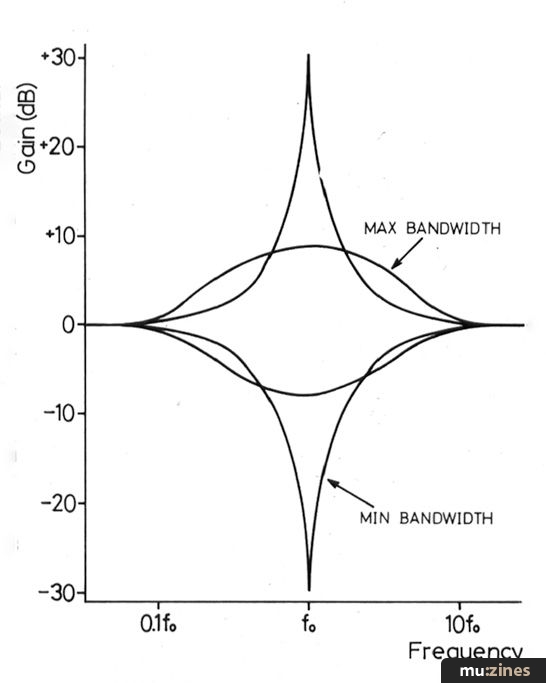
Figure 1. EQ and Bandwidth control responses.
The module described here allows frequency to be adjusted in two switched ranges over an 8½ octave span. The bandwidth control is variable from just a tenth of an octave to a full three octaves. The EQ control itself gives boost and cut from ±10dB, at high bandwidth settings, to ±30dB with narrow bandwidths. The figure is automatically optimised by an 'adaptive bandwidth' technique so that when a wide band is being affected, the EQ control is sufficiently gentle to achieve good resolution, while at narrow bandwidths a cut of up to 30dB is available to produce efficient notching. Figure 1 demonstrates the effect of the bandwidth control at both extremes of the EQ control.
Since all this boosting and cutting can upset your normal working signal level, and even lead to overload distortion, a Drive control trims the input by ±20dB, aided by an LED peak indicator, which monitors four critical points in the circuit simultaneously.

Figure 2. EQ circuit diagram.
(Click image for higher resolution version)
Circuit
The heart of the circuit shown in Figure 2 is the state variable filter built around IC1 and 2. The standard state variable filter, using analogue computer building blocks, would consist of two integrators represented by IC2a & b, and a summing stage represented by IC1a. Feedback around this loop (via R5) then produces simple harmonic 'motion', which is an analogue computer's answer to a pendulum. Perpetual motion (oscillation) is prevented by feedback taken from the output of the first integrator to the summing stage. In the classic circuit, this damping would normally be provided by resistive mixing directly to the summing stage. However, in the design presented here, an additional operational amplifier, IC1b, is used to determine the degree of damping, and thus 'Q' factor of the damped oscillator filter, which is inversely proportional to bandwidth.
Apart from the normal bandpass output from IC2a, whose gain is proportional to 'Q', another output is available, whose level is constant, regardless of 'Q'. It is the mixture of these two outputs which produces the 'adaptive bandwidth' feature.
Rather than using series variable resistance elements on the inputs of the integrators to set the centre frequency, a potential divider technique has been used, as at VR3a & b. This produces a pseudo-exponential relationship which results in a very smooth sweep for optimal resolution over the wide range of the frequency control. The integrating capacitors are switched by SW2 to give a 10:1 change in the frequency range.
The input signal is buffered by IC3a which additionally provides, by means of VR1, the ±20dB of variable drive to the equaliser. If VR2 is central, then the signal enters IC3b, the output amplifier via R16, and is passed to the output unaffected. If VR2 is turned clockwise, however, the signal passes via C2 and R4 to the state variable filter. The bandpass outputs previously mentioned are mixed in the appropriate proportions via R14 and R15 into the output amplifier, IC3b, which then produces a peaked response at the selected frequency. When VR2 is turned anticlockwise, it is the output signal which is fed to the state variable filter, creating a tuned negative feedback loop around IC3b such that its response is dipped at the selected frequency. The effect of R4's load on VR2 imparts a pseudo-exponential response on the EQ control, giving the best resolution close to zero.
Simultaneous monitoring of the outputs of IC1a & b, IC2b and IC3b is made possible by diodes D1 to D4 which, when the signal level on any one output peaks negatively by more than 9V, causes TR1 to conduct current into C9. This charges rapidly, allowing TR2 to draw current through D5, the peak LED. When the peak has passed, C9 discharges slowly enough through R25 to allow even short peaks to show up.
It is necessary to monitor all four of these points because the relative levels at different parts of the circuit change quite dramatically at different control settings. Full wave peak detection was found to be quite unnecessary for two reasons: firstly, the differing phases of the monitored stages tend to back each other up in terms of catching asymmetrical peaks and secondly, large overload peaks are usually associated with high 'Q' (low bandwidth) settings, when the boosted frequencies tend towards sinusoids, and are hence symmetrical.
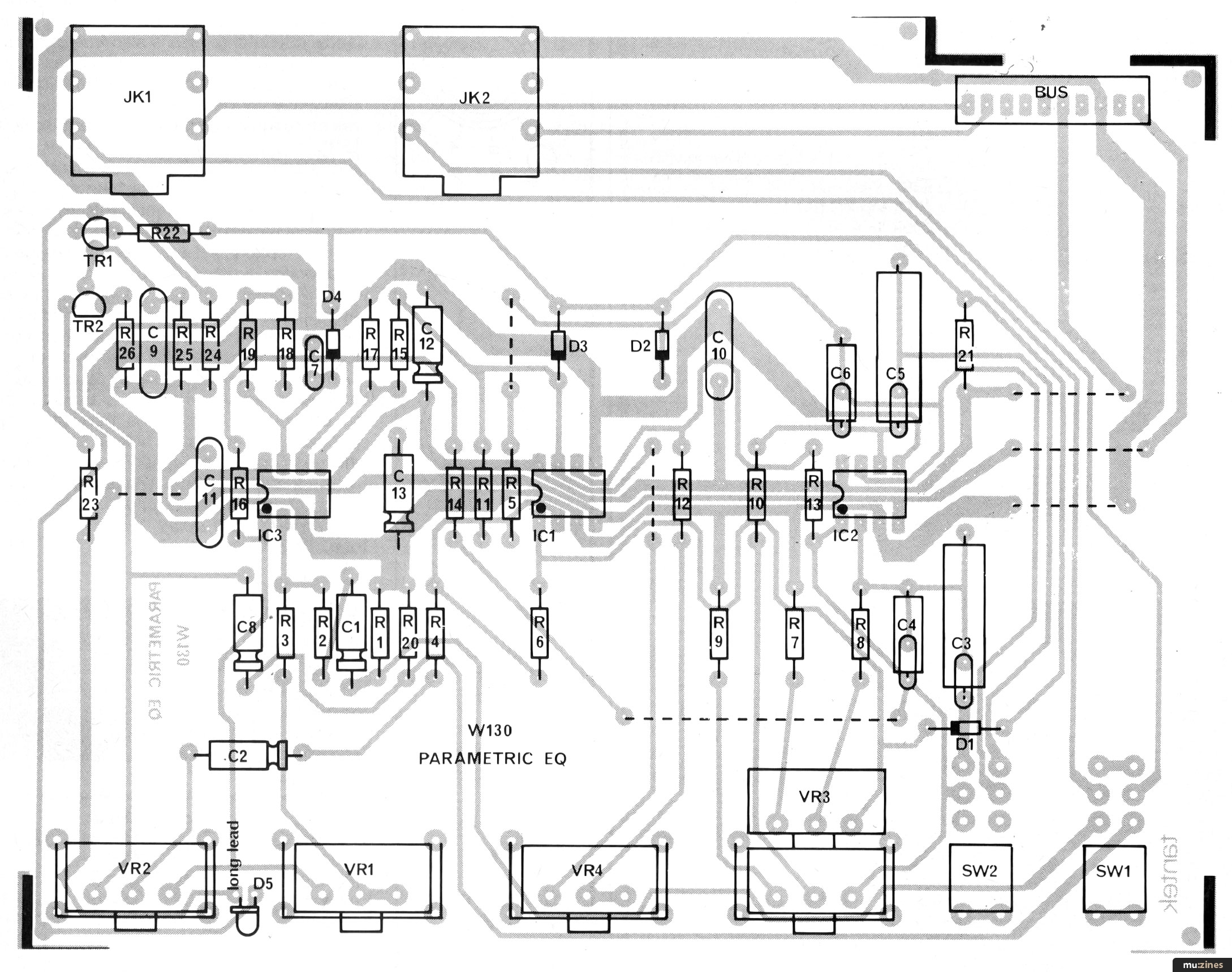
Figure 3. Parametric EQ PCB overlay.
(Click image for higher resolution version)
Construction
Building the Parametric EQ module using the high quality kit should present no problems especially since, by exclusive use of PC mounting connectors, switches and potentiometers, there is no interwiring to do.
The first step in construction is to insert, solder and crop the resistor leads, populating the PCB according to the parts list, and the overlay printed on the PCB itself. Bending the leads outward at 45 degrees prior to soldering will hold the components in place without running the risk of shorting together a pair of pads. Solder the seven links in place using tinned wire, at the dotted positions shown on the overlay.
Taking care with orientation, locate and solder the diodes D1 - D4 and the transistors TR1 and TR2. The IC sockets come next, making sure that they are pressed down onto the PCB whilst soldering, but leaving the ICs themselves out until later. Now insert and solder the capacitors, taking care with the polarity of the electrolytic types. The bus connector and the two jack sockets can then be soldered whilst holding them firmly down onto the PCB. A piece of foam rubber laid on the bench comes in handy during soldering for holding connectors and the like in place on upturned PCBs.
Trim each pot shaft to 8mm from the bush using a hacksaw, whilst holding the shaft in a vice, or just use a pair of cable cutters. Fit a PC bracket to each pot and locate into the appropriate PCB positions, but don't solder at this point. After determining the correct orientation of the LED, bend its leads down at right angles, 4mm from its body and locate into the PCB without soldering.
Screw one nut onto each toggle switch then locate them into their PCB positions, again without soldering. Place shakeproof washers on the pots and switches, then offer the front panel up, feeding the pot and switch bushes and LED dome into the appropriate panel apertures. The panel is then fixed in place by means of the pot nuts, which should be fully tightened. Only finger tighten the front switch nuts, however, leaving the final securing to the rear nuts, which must be screwed up against the rear of the panel. The pots, brackets, switches and LED can now all be soldered, after making sure that they are all positioned correctly, and that the panel is at right angles to the PCB.
Spend some time now to check over the assembly very carefully, especially on the PCB track side where dry joints and solder splashes are all too common, even for the experienced constructor. When you are completely satisfied with the assembly, load the ICs into their sockets, being careful with orientation. Finally, fit the knobs with caps so that the marker line of each covers the scale evenly, then push on the toggle switch level covers.
Equalising
Since there is no setting up to do on this module, just slide it into place in the Sub-Rack and apply the rack power. With all controls central, apply a music signal to the input and monitor the output. Very little difference should be heard when the lower toggle is switched either way.
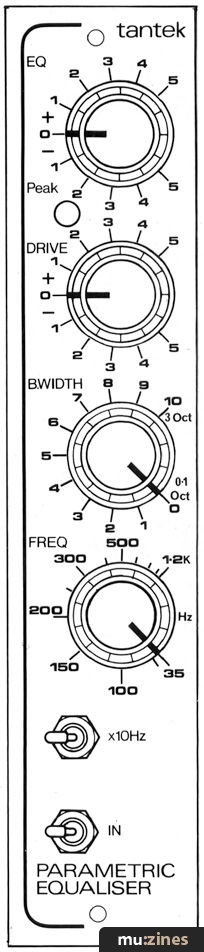
Leaving the module switched in, turn the EC control clockwise. Adjustment made to the Frequency control and Range switch should now be very evident as the peak in response is moved up and down the spectrum. If the peak LED flashes or any other equipment in your system overloads, adjust the Drive control to correct it. Turning the Bandwidth control to zero should result in a very peaky, highly selective response, only affecting a narrow range of frequencies, whereas turning it clockwise will cause a much wider band of frequencies to be operated on. With the EQ control anticlockwise, the response will be heard to dip at the selected frequency, again very selectively if the Bandwidth control is set to zero.
In Use
There are no hard and fast rules to using a parametric EQ, or any other creative effect for that matter. General unevenness in response is usually corrected using wide bandwidth settings at the appropriate frequency. Instruments which have a desirable characteristic at a particular frequency, such as the 'slap' on a kick drum can be picked out using a low bandwidth setting. This is also true of removing a troublesome frequency such as 50 Hz mains hum, where the EQ control will obviously have to be taken anticlockwise, just enough to attenuate the offending noise sufficiently.
A parametric EQ also makes a very desirable companion for a noise gate so that, by filtering the key input signal, selective gating can be achieved to improve separation in a multi-microphone set-up, where the frequency band of the wanted signal is the only one which will open the gate. EQ'ing a compressor key input can also be quite useful for limiting a restricted range of frequencies, such as vocal sibilance to produce a de-essing effect.
Any instrument will display a completely different character when EQ is used to alter the distribution of energies throughout the spectrum. Some have 'hidden' characters which can only be brought out with EQ. Table 1 gives the approximate frequencies of these hidden characters as a guide.
Next month: Multi Delay
PARAMETRIC EQ SPECIFICATION
| Frequency response (—3dB): | 3Hz to 37kHz |
| Maximum output level: | -19dBm |
| Output noise (controls flat): | -93dBm (A) |
| Output noise (EQ, BW & Freq. CW): | -87dBm (A) |
| Drive control range: | ±20dBm |
| EQ control range (BW min): | ±30dB |
| EQ control range (BW max): | ±10dB |
| EQ frequency range: | 35Hz to 12kHz |
| Bandwidth control range: | 0.1 to 3 octaves |
Table 1. Characteristic Frequencies
| INSTRUMENT | CHARACTERISTICS | FREQUENCY |
|---|---|---|
| Kick drum | Slap Body | 3kHz 40-80Hz |
| Snare Drum | Crack Body | 5kHz 150-300Hz |
| Hi-hat & cymbals | Sparkle Ring | 8kHz 150-250Hz |
| Toms | Slap Body | 5kHz 60-250Hz |
| Guitar | Bite Body | 2.5kHz 250Hz |
| Bass | Slap Bite Body | 1kHz 2.5kHz 50-80Hz |
| Vocals | Presence Sibilance Body | 5kHz 10kHz 150-250Hz |
Other Module Kits
| Sub-Rack | Dec 84 | £39.95 |
| Dust cover | Dec 84 | £6.95 |
| Blanking panel | Dec 84 | £32.95 |
| Power Unit | Dec 84 | £33.95 |
| Pro-Gate | Dec 84 | £33.95 |
| Comp-Lim 2 | Jan 85 | £36.95 |
| Dynamic Noise Filter 2 | Feb 85 | £32.95 |
Parts List: Parametric Equaliser
| Resistors - ¼W 5% carbon film | ||
| R1,25 | 470K | 2 off |
| R2,5,6,11,14,15,16,18,21,22 | 47K | 10 off |
| R3,23 | 4K7 | 2 off |
| R4 | 18K | |
| R7,9,17,20 | 8K2 | 4 off |
| R8,10 | 27K | 2 off |
| R12,19 | 390 | 2 off |
| R13 | 3K9 | |
| R24 | 1K | |
| R26 | 680 | |
| VR1 | 470K log PC pot | |
| VR2 | 100K lin PC pot | |
| VR3 | 220K lin dual PC pot | |
| VR4 | 10K log PC pot | |
Capacitors | ||
| C1,2 | 1μF 63V electrolytic | 2 off |
| C3,5 | 4.7nF polyester | 2 off |
| C4,6 | 470pF ceramic | 2 off |
| C7 | 33pF ceramic | |
| C8,12,13 | 10μF 25V electrolytic | 3 off |
| C9,10,11 | 100nF polyester | 3 off |
Semiconductors | ||
| D1-4 | 1N4148 | 4 off |
| D5 | Red LED | |
| TR1 | BC212 | |
| TR2 | BC182 | |
| IC1-3 | TL072 | 3 off |
Miscellaneous | ||
| JK1,2 | 2" PC jack socket | 2 off |
| SW1,2 | DPDT PC toggle switch | 2 off |
| Toggle lever cover | 2 off | |
| Knob | 4 off | |
| Knob cap | 4 off | |
| Bus connector | ||
| 8 way DIL socket | 3 off | |
| Pot PC bracket | 4 off | |
| Front panel (punched & screen printed) | ||
| Black M2.5 x 6 screw | 2 off | |
| PCB (with printed overlay) | ||
| Tinned wire Solder | ||
A complete kit of parts for the Parametric EQ is available from Tantek, (Contact Details) for a fully inclusive price of £33.95. Allow 28 days for delivery.
Series - "Modular Effects Rack Project"
Read the next part in this series:

Multi-Delay Project (Part 5)
(HSR Apr 85)
All parts in this series:
Part 1 | Part 2 | Part 3 | Part 4 (Viewing) | Part 5 | Part 6 | Part 7 | Part 8 | Part 9 | Part 10 | Part 11 | Part 12
More with this topic
 BeeBMIDI (Part 1) |
 To Phase or to Flange - Or To Each His Own |
 Using Microprocessors (Part 1) |
 Build A Hum Loop Isolator |
 Modify Your "Phlanger" - for Lower Noise |
 Putting on the Style |
X-Ray Specs - Ben Duncan explains the language of the specification sheet (Part 1) |
 Augmenting the 3750's Memory |
 DIY Direct Inject Box - A high quality DI box circuit |
 Studio Project - Going Direct |
 Data To Music Conversion - A Low Cost Peripheral Circuit For Your Computer |
 Workbench - Go Active! |
Browse by Topic:
Electronics / Build
Publisher: Home & Studio Recording - Music Maker Publications (UK), Future Publishing.
The current copyright owner/s of this content may differ from the originally published copyright notice.
More details on copyright ownership...

Home & Studio Recording - Mar 1985
Donated & scanned by: Mike Gorman
Topic:
Electronics / Build
Series:
Modular Effects Rack Project
Part 1 | Part 2 | Part 3 | Part 4 (Viewing) | Part 5 | Part 6 | Part 7 | Part 8 | Part 9 | Part 10 | Part 11 | Part 12
Feature by Paul Williams
Help Support The Things You Love
mu:zines is the result of thousands of hours of effort, and will require many thousands more going forward to reach our goals of getting all this content online.
If you value this resource, you can support this project - it really helps!
Donations for May 2026
Issues donated this month: 0
New issues that have been donated or scanned for us this month.
Funds donated this month: £0.00
All donations and support are gratefully appreciated - thank you.
Magazines Needed - Can You Help?
Do you have any of these magazine issues?
If so, and you can donate, lend or scan them to help complete our archive, please get in touch via the Contribute page - thanks!
If you're enjoying the site, please consider supporting me to help build this archive...
...with a one time Donation, or a recurring Donation of just £2 a month. It really helps - thank you!

 @mu_zines
 RSS Feed
 Blog
Blog