


Magazine Archive
Home -> Magazines -> Issues -> Articles in this issue -> View
Article Group: | |
Aleph Time Talk | |
digital time-conversion software for the STArticle from Music Technology, April 1994 | |
For easy-to-digest samples and delays that repeat on you at just the right moment.
Tired of trying to estimate the right sample length to fit song tempos? Fed up with scribbling delay calculations on bits of paper? It's time to start talking to your machines in a language they can understand.

No matter how simple manufacturers make their products, and no matter how straightforward they are to operate, there will probably never be a time when number-crunching is completely removed from the studio. The problem of machines talking in one language and musicians talking in another is not easily overcome; while your sequencer still works with bars and beats, your sampler works in kiloHertz and milliseconds, and your tape machine works in SMPTE minutes and frames, making all of your gear communicate smoothly will take a significant amount of mental arithmetic. Unless you use Time Talk, that is.
A 3-page desk accessory for the Atari ST, Time Talk aims to solve all your time conversion nightmares. The software is designed to run in conjunction with 'industry-standard' sequencing packages such as Cubase and Notator, and supports - at the time of writing - all current Akai and Roland samplers. (Owners of other samplers may have to investigate just how to match up their readouts with Time Talk's, but in practice this shouldn't pose too much of a problem.) Installing the program is a doddle; you simply run the supplied 'Install.Prg', insert the disk you want Time Talk to boot up from when you switch on your machine, and let the software do the rest. The resulting fully-installed file should never be erased from your bootup disk, as it acts as your complete copy of the software; however, you can move the program to another disk simply by running 'Install.Prg' again.

One of Time Talk's most impressive features is actually the supplied manual, which is one of the most exhaustive and easy-to-follow handbooks I have ever encountered with any piece of software, let alone a simple desk accessory. Even though the program itself is simple to use, Aleph have spent a great deal of time producing a pleasantly comprehensive set of instructions that should ensure you get the best from Time Talk's features. And talking of features...
The first page you encounter on activating the accessory is the Delay/Tempo calculator. The ability to configure a delay time from a specific tempo is nothing new to the sequencing world, but Time Talk's version is cleverly laid out and instantly accessible. All you have to do is dial in your tempo and read off the delay time in milliseconds at the required note length - you can directly choose any note value from 1/2 to 1/32, 1/3 to 1/48 (for triplet time) and any 'dotted' value in between. More bizarre calculations - such as the millisecond value needed when working with 3/16 note intervals - can also be handled, once you have entered the required note length from the Atari's keyboard.
The really interesting features reveal themselves when you activate page two. Here, all the calculations pertaining to sampler-sequencer communication can be found - and extremely welcome they are too. The left-hand side of the screen shows all the sampler information; the right hand shows the sequencer's. Time Talk's protocol can be set to line up with a variety of Roland and Akai samplers, and Cubase or Notator sequencing packages - once you have configured your system, the information may be saved as a default value file on your bootup disk, and you won't need to tweak things again.
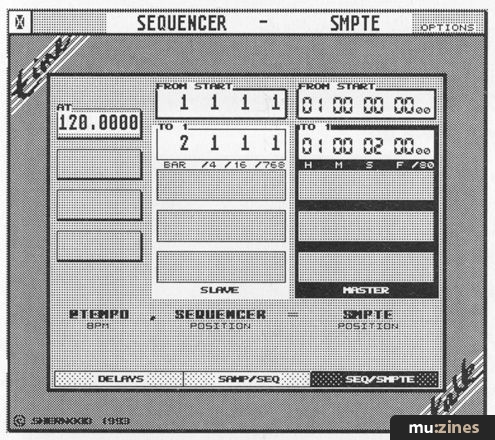
Once again, the operation of this page is relatively simple: you enter your start positions, the tempo and sampling frequencies being used, any detune or delay settings on the sequencer track, and either the end position of your sequencer pattern or the end value of your sample, depending on which is known. The manual provides several examples to illustrate just how this can be put into practice. You may have a rhythm sample of exactly two bars in length, and a tempo of 127 bpm. How much will you need to detune the sample by to make it fit your track? Or, perhaps, how much will you need to timestretch it by? And what about if you have a vocal sample being triggered at the beginning of bar 9, delay -24, and want it to end exactly as another sample starts 5/16ths into the bar, delay +27? Time Talk will tell you how long the sample needs to be. Even if you then decide to halve the tempo and shift the time signature of the entire piece, Time Talk can cope. Conversion can occur in either direction, depending on whether you want to work out values for your sampler, or information for your sequencer. Get the picture?
The final page on offer deals with all the timecode/tempo calculations that are required for syncing your sequenced music to tape in sound-to-picture work. Five independent 'stages' allow you to set a complex tempo/time signature map that follows a director's whims while locking perfectly with SMPTE - and Time Talk even helps you 'patch up' timecode drop outs or erasure. Your music might be running at 123bpm, then 130bpm, then 82bpm - but at what SMPTE points should you set the tempo changes to occur? And what about 'stretching' a tempo over a fade in? What are the changes required here? Time Talk happily reveals the impossible.
In fact, these examples are only the tip of the iceberg. I can only recommend you get hold of a copy of Time Talk as soon as possible and check out its versatility and usefulness for yourself. Should you feel that only the first two pages interest you, and that the video features are of less relevance, you can opt to buy a scaled-down version of the program for slightly less money. Either way, everyone who uses sequencers, synths, samplers, tape machines and/or effects would find a use for an accessory like this; it's simple, friendly, invaluable and always there when you need it.
THE LAST WORD
| Ease of use | Top marks |
| Originality | There are other programs with similar features |
| Value for money | Not cheap, though it will pay for itself in tin |
| Star Quality | It has much to recommend it |
| Price | Sampler only version: £49 (one disk); £59 (two) Full version: £79 (one disk); £89 (two) |
| More from | Aleph, (Contact Details) |
Publisher: Music Technology - Music Maker Publications (UK), Future Publishing.
The current copyright owner/s of this content may differ from the originally published copyright notice.
More details on copyright ownership...

Music Technology - Apr 1994
Donated & scanned by: Mike Gorman
Quality Control
Review by Ian Masterson
Help Support The Things You Love
mu:zines is the result of thousands of hours of effort, and will require many thousands more going forward to reach our goals of getting all this content online.
If you value this resource, you can support this project - it really helps!
Donations for May 2026
Issues donated this month: 0
New issues that have been donated or scanned for us this month.
Funds donated this month: £0.00
All donations and support are gratefully appreciated - thank you.
Magazines Needed - Can You Help?
Do you have any of these magazine issues?
If so, and you can donate, lend or scan them to help complete our archive, please get in touch via the Contribute page - thanks!
Please Contribute to mu:zines by supplying magazines, scanning or donating funds. Thanks!
Monetary donations go towards site running costs, and the occasional coffee for me if there's anything left over!

 @mu_zines
 RSS Feed
 Blog
Blog