


Magazine Archive
Home -> Magazines -> Issues -> Articles in this issue -> View
Black To The Future | |
Fostex 160 MultitrackerArticle from Home & Studio Recording, November 1986 | |
What can I say... it's black, it lights up... they've done it again — another winner.
The futuristically styled 160 cassette Multitracker from Fostex incorporates some ingenious design innovations to make it even more flexible and cost-effective than its predecessors.
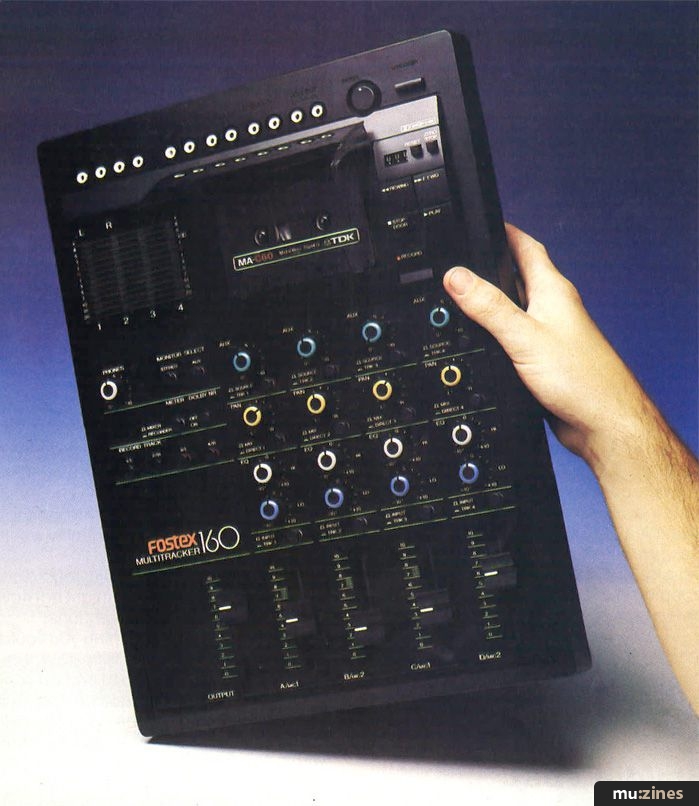
Cassette-based multitrack all-in-one studios appear in many different guises, ranging from the basic to the incredibly sophisticated. This model is positioned somewhere in the upper middle ground; it has simultaneous 4-track record capability, double tape speed and both EQ and auxiliary send facilities. It also has a separate input for recording time codes cleanly onto track four, channel insert points and separate monitor outputs.
Some compromises are always necessary to maintain an attractive retail price, but there is nothing omitted that should unduly curtail the creativity of the home recordist. Granted, it only has four input channels rather than the six found on top-of-the-market models and the routing facilities are slightly unconventional. Also, the way in which effects can be connected is not quite as comprehensive as on more expensive systems and the tape transport buttons are mechanical rather than the soft touch type that we have come to expect in hi-fi circles.
Physically, the unit is compact, and yet sports an open layout that allows easy access to all controls. The case is of black moulded plastic while the legending is clearly screened on in white. Rather than adopt the mixer on one side, recorder on the other approach, Fostex have gone for the option of locating the recorder above the mixer so that this unit is narrower than most: a sensible space saving move. Although this means that you have to reach over the mixer section to operate the tape transport controls, this is not much of a problem, due to the relatively small size of the machine.
All the phono inputs and outputs are located on the top panel where they can be seen, so there's no need to grope around the back when repatching. Also the Mic, Line, Phones and Punch In/Punch Out jack sockets are mounted in the traditional position along the front edge of the mixer section.
Power is supplied from a separate AC adaptor provided with the unit. There's no provision for battery operation. But now for a look round.
Mixer Section
Assuming that the recorder section performs up to scratch, it's the mixer section of any multitrack recorder that determines the system's capabilities and limitations. This one is a little unusual in that the channels are not routable via routing buttons when recording; channel one feeds track one and so on, unless you use the Mix option in which case the channel input is fed to all channels simultaneously. The Pan control then sets the balance feeding odd and even numbered tracks. This method allows the user to set up a mix on all four channels and record it onto any track you wish. Of course you can bounce two or three tracks down to one once you have filled up a few tracks and here again the routing is handled by the Mix buttons and the Pan controls. When you come to do the final mix, the channels are directed to the stereo buss and the pan pots are used to position the sounds between the left and right speakers.
Four bar graph meters monitor either the four tape in/out levels or the 2-track output signal depending on the status of the Meter switch and the output monitor sockets may be switched to carry the stereo mix, the aux buss or both. The way the system is arranged, you cannot monitor the input signal unless the Record switch has been pushed once. At this stage a green LED flashes and the input signal is monitored for all channels that are set in ready-to-record mode. When you enter record, the flashing green LED becomes a steady red LED. Now let's take a look through the channel controls to see how all this hangs together.
There are four line inputs but only two mic in puts. These latter accept unbalanced low impedance mics and feed channels 1/3 and 2/4 simultaneously. If a line input is connected, the mic input is overriden and the line takes priority.
Unlike a conventional mixer, there's no separate input gain control to set; the channel fader takes care of that. The channel layout too is a little unorthodox, as the Aux control is nearest the top. The aux buss may be fed either from the channel or from the off-tape signal depending on the setting of the Source/TRK switch adjacent to it and the auxiliary output is in the form of a phono connector at the top of the unit; there's no master auxiliary control. These controls may be used during record to set up a monitor mix. When switched for use as effects sends during mixdown, their operation automatically changes from pre-fade to post-fade: another neat idea.
Next in line is the Pan control which routes between odd and even busses. Also, at mixdown, it is used for positioning sounds left to right. The associated Mix/Direct switch bypasses the Pan control when recording and feeds the channel output directly to the corresponding tape channel.
Next, the EQ. It's a conventional but effective 2-band shelving cut/boost affair giving 15dB of cut or boost at 10kHz and 150Hz. Though this isn't ideal for really sophisticated EQ jobs, it's more than adequate for most sound tweaking requirements. Between the EQ section and the channel fader is the Input/TRK button. This determines whether the channel carries the mic or line input signal or the off-tape signal and would be set to tape (TRK) when mixing or bouncing.
The main output stereo fader is to be found to the left of the mixer section (rather than to the right as is more usual). This, of course, means that right handed users will have to try not to disturb the channel faders with their shirt cuffs during fades.
In the cunning innovation department, the line input jacks are in fact stereo jack sockets and can double as insert points when a suitably wired stereo lead is connected. When a mono lead is used, they revert to being line inputs. This is very handy for patching in effects and signal processors when mixing or bouncing tracks and is a novel way of conserving space. Also as mentioned, channel four has a separate sync code input. This doesn't generate any code but simply provides a clean signal path to and from tape for FSK or sync pulses which will be unaffected by EQ or noise reduction. When this socket is used, the mic and line inputs for that channel are overridden.
Recorder
The cassette mechanism runs at 3¾ips: twice the normal speed, and this naturally gives better recording quality but half the recording time for a given tape length. Nevertheless, don't yield to the temptation to use C120 cassettes as these use very thin tape which cassette machines of all types love to eat. A standard 2-head set-up is used so that recording and playback is carried out by one head and erase by the other. This saves having to worry about sync problems as everthing you record will be in time with any material already on tape (playing skills permitting).
"Assuming that the recorder section performs up to scratch, it's the mixer section of any multitrack recorder that determines how the system can be used and what its limitations are."
Dolby C noise reduction is used, generally accepted as being the best non-professional noise reduction system available. It keeps the noise down without being unduly detrimental to the sound quality. This may be switched out if required but I can't see many users wanting to do this as the Dolby C works so well. The obligatory varispeed control gives up to 15% of speed control, either up or down, and the mechanical tape counter features a stop at zero facility.
The transport controls are absolutely straightforward and are mechanical switches rather than soft touch buttons. Even so, the feel might be described as refined, lacking those dreaded bangs and clunks of lesser designs. Ready-to-record status is selected on a track by track basis using the four Record Track buttons. The bi-coloured record/input monitor LED we have covered already.
It is worth mentioning that all the buttons have coloured sleeves that show when the buttons are in their out position making it easier to see what's going on. This is a good system but the coloured bands could have been larger as they are still quite difficult to see.
Dropping in a track is accomplished by running the machine in play mode with the appropriate Record Track buttons down. When the drop-in point is reached, the Record and Play buttons are pressed simultaneously and monitoring switches from off-tape to input automatically at this point. To exit record, you simply press Stop. There is also an optional punch in/out footswitch which does the same job. Remember that dropping out always leaves a slight gap due to the time it takes for the tape to travel from the erase head to the record head. Also dropping in or out on a strong beat, preferably a snare drum, helps to disguise any small discontinuity that may occur due to imprecise playing. That's all there is to it in the control department. Now it's time to find out how it handles out on the road.
Studio Test
If you're used to working with a conventional mixing desk, the lack of routing buttons is a bit disconcerting but it only takes a few minutes to get the hang of things. You have to remember to push the Record button to get into input monitoring mode, but after a minute or two of wondering where the signal has gone, it becomes second nature.
Having got something onto tape, in this case the output from a CD player, I was very pleasantly surprised at how quiet and clean the recordings sounded. There was no evident breathing from the noise reduction, even on complete mixes, and the percussion sounds were still as bright as when they started out. Bouncing three tracks down onto one was no problem and you can add extra parts live as you bounce via the mic or line inputs.
I found the cueing system a great help in locating positions on tape. If the fast wind buttons are pressed when the machine is in play mode, the monitors carry an attenuated version of the fast wind sound output and as soon as the wind button is released, the machine goes back into play. Neat.
Drop-ins are easiest implemented using the optional footswitch. They are precise and free from noticeable clicks. There's the inevitable short drop-out gap but all tape machines have this problem and it's nothing that can't be sidestepped by careful planning.
Mixing down is very straightforward. You can connect effects or processors to the insert points and you can use the auxiliary controls to drive an external effect, bringing the outputs back into the stereo buss input sockets. The only disadvantage here is that some effects units don't have an output level control so you could end up with more noise than is strictly necessary due to you having to reduce the input to the effects unit in order to regulate the amount of effect. Also, if you use an effects unit with no input gain control, you have to reset all four aux sends when setting up the input signal level as there's no aux master control. For 4-track use, this compromise isn't too tiresome but if you're the handy type, you could stick a ganged pot in a coffee tin and use this to knock down the input or output from your effects unit if it's too high.
Conclusions
This is a rather elegant machine, both in terms of its features and its construction, and the sound quality in particular is excellent. I think it would be fair to say that the degree of sophistication belies the very reasonable selling price and the sound quality would bear comparison with any cassette-based home studio, regardless of cost. The mixer section might not not work in an absolutely conventional manner but it does everything you could reasonably want of it and is flexible. It is easy to say more aux sends and extra channels would be nice or more bands of EQ are needed but you have to call a halt somewhere if you are to keep the product within its target price range. After all, you can feed the tape outs to a separate mixer if you wish or you could plug a small mixer into the stereo buss returns if you need more channels at mixdown, as might be the case if you have a MIDI system running off the sync track.
This model is capable of producing some very sophisticated recordings when used properly and the manual gets you off to a good start. You can get away with two or three track bounces without adding much in the way of noise and the sync facility means that you can run your drum machines and sequencers from code without running into code misreading problems. This is a very well thought out unit and should make a large impression in the market place. Too bad it's not British.
The Fostex 160 costs £499 including VAT.
Further details can be obtained from: Turnkey, (Contact Details).
Also featuring gear in this article


Publisher: Home & Studio Recording - Music Maker Publications (UK), Future Publishing.
The current copyright owner/s of this content may differ from the originally published copyright notice.
More details on copyright ownership...
Home & Studio Recording - Nov 1986
Donated & scanned by: Mike Gorman
Review by Paul White
Ads for Gear in this article:


Help Support The Things You Love
mu:zines is the result of thousands of hours of effort, and will require many thousands more going forward to reach our goals of getting all this content online.
If you value this resource, you can support this project - it really helps!
Donations for May 2026
Issues donated this month: 0
New issues that have been donated or scanned for us this month.
Funds donated this month: £0.00
All donations and support are gratefully appreciated - thank you.
Magazines Needed - Can You Help?
Do you have any of these magazine issues?
If so, and you can donate, lend or scan them to help complete our archive, please get in touch via the Contribute page - thanks!
Please Contribute to mu:zines by supplying magazines, scanning or donating funds. Thanks!
Monetary donations go towards site running costs, and the occasional coffee for me if there's anything left over!

 @mu_zines
 RSS Feed
 Blog
Blog