


Magazine Archive
Home -> Magazines -> Issues -> Articles in this issue -> View
MIDI - The Absolute Basics (Part 2) | |
SequencingArticle from Recording Musician, October 1992 | |
The theory and practice of MIDI sequencers, explained in simple terms.
MIDI sequencing has revolutionised modern composition and recording — couldn't it revolutionise your music, too? Stephanie Sobey-Jones offers a painless introduction to this important production technique.
Several years ago, labouring on my multitrack recorder with the umpteenth 'take' of a particularly vicious piece, a friend commented: "What you really need is one of these new sequencers. It would save you so much time, and you could correct all those mistakes without having to re-record the track". Had this been suggested at the start of the project instead of at its conclusion, I might have been more immediately receptive to the idea! Nevertheless, with a sneaking curiosity, I went off to try and track down one of these (then) new inventions which allowed you to connect a keyboard to a computer, via MIDI (another relatively recent invention!) and view the results of your performance in a series of small rectangles, each corresponding to a played note. These could then be moved up and down, or shifted elsewhere on the screen, causing quite radical changes to my original performance. It was quite amazing — no more frustration, trying to get those fiendish passages right on the first take. That was it — I was an addict!
MIDI sequencing has transformed the music industry, music education, and the home studio market, opening up opportunities for song writing and music production to thousands of people. So what exactly is it, and why has it become so popular?
In some ways, a sequencer is rather like a type of multitrack recorder, which allows you to record material onto several tracks — one track at a time, or several at once, in some cases — and to play it back. At this point, however, the similarity really ends, for, although they seem to have many parallels, sequencing and analogue tape recording are two fundamentally different concepts. In conventional analogue recording, the sound itself is recorded onto tape. Sequencing, on the other hand, involves the transfer and storage of MIDI information, not sound itself, confining it to use with MIDI instruments. (This does not necessarily mean that owners of acoustic instruments are excluded from the fun — more later!). In a typical setup, a MIDI Instrument will be connected to a sequencer via a MIDI cable. When the sequencer is set to record and the keyboard is played, MIDI Information (Note On/Off, Pitch, Velocity, etc.) is generated, recorded by the sequencer and held in its memory. When the sequencer is directed to play back, it transmits that information in exactly the same order or sequence (hence the name), to whichever MIDI Instrument is programmed to receive it (see Figure 1). At this point we hear what was originally played — not from the computer, but from the synthesizer being controlled by it. The MIDI information which makes up a completed song can normally be saved onto either floppy or hard disk in the form of a song data file.
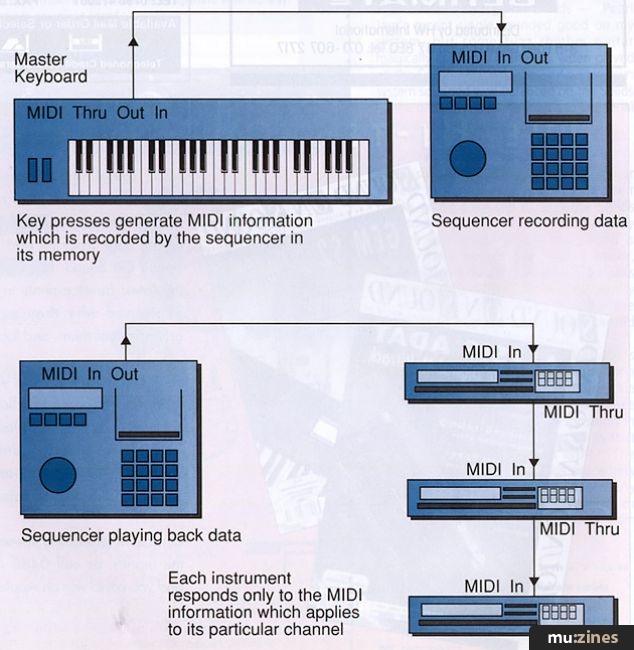
Figure 1.
Apart from its similarities to a multitrack tape recorder, a sequencer system can also be thought of as a kind of hi-tech pianola — one of those automated pianos that plays back music stored as punched holes on rolls of paper. The device that first punches and later reads the paper roll is equivalent to the sequencer, while the automated piano section is analogous to a MIDI instrument. Furthermore, the ability to correct and edit a sequence after it has been recorded is not unlike the musical equivalent of a word processor, where misspelt words can be fixed and paragraphs moved around or duplicated.
Multiple Parts
If you want to record several tracks and replay them using different voices or sounds, you will either need several keyboards in your setup, or a multitimbral keyboard/sound module which can be controlled on several different MIDI channels at the same time. Because a sequencer works on the principle of transmitting and storing numerical information, that information can be changed or edited, altering, for example, the pitch or length of a note. It is the ability to edit compositions in this way that makes sequencers such powerful musical tools.
Types Of Sequencer
There are basically two different types of sequencers: software sequencers which are designed to run on a computer, and hardware sequencers which may be separate, self-contained units or incorporated into workstation-type keyboards. The two types function in a similar way — what tends to vary is the way in which the recorded information is displayed and how it can be edited.
With on-board hardware sequencers, the recording process is fairly 'immediate'; you press Record and start playing. The smaller display facilities make them less visual than computer-based systems, though they are, arguably, more practical in a live performance situation, as they are more compact and less vulnerable than a computer plus monitor. All but the most basic hardware sequencers have a built-in disk drive, allowing songs to be saved as files on floppy disk. Sequencers with no disk drive are more restrictive, as your songs have to be stored in their internal memory, which may or may not be large enough to hold more than a few songs at a time!
One solution to this potential problem is to use a separate MIDI storage device which has its own inbuilt disk drive. This frees the sequencer's limited memory for another project without losing the work you have just done.
The Soft Approach
Instead of the largely textual display offered by hardware sequencers, computer/software systems make more use of graphics, usually in conjunction with mouse-driven operation. Nowadays, there is some sort of sequencing software available for nearly every make of computer, invariably offering some or all of the features and facilities to be discussed shortly. To make the computer compatible with the rest of your setup, you'll require a MIDI interface; Atari computers have this interface built in, which is why they have always been popular as music computers. External MIDI Interfaces are available for Apple Macintosh machines and are equally user friendly, quite cheap, and will easily plug in to the modem or printer ports on the machine. PC users need an interface card which plugs into the computer and is linked to an external adaptor box with MIDI sockets.
Most software sequencers, visually, consist of a main page which handles the basic 'recording' of the information, and two or three other pages, or windows, which deal with aspects of editing. Again, the link with conventional multitrack recording is usually evident in the use of the standard transport controls (Play, Record, Rewind, and so on), which are represented graphically and can be 'clicked' with a mouse. Also similar is the concept of tracks, which are usually displayed by number on the main page; there may be from 12 to 64 (or even more) tracks available, depending on the package, but you have to remember that you can only play back as many tracks as your MIDI Instruments can handle. For example, an 8-part multitimbral synth can't play back more than eight different sounds at one time, though you may choose to use the same sound on more than one track. This is common practice in the case of drum sounds, where different keys trigger the sound of different drums; you may find it convenient to record, say, the bass drum on one track, the snare drum on another and maybe some cymbals on another.
On the monitor screen, recorded MIDI information may be presented in several different ways. Some packages display it as standard musical notation; others show notes more graphically, as rectangles on a grid, or piano roll. Some packages have integrated sequencing/score writing facilities which allow you to print out conventional scores of your music, in which case you'll need a printer which is compatible both with your computer and the software package!

A typical screen from a sequencer showing note durations and pitches on a piano roll.
Sequencer Features
Since all sequencers, whether hardware or software, perform in a relatively similar manner, it is invariably the individual features and facilities, and how they are presented, which separates one particular sequencer from another. In general, though, most sequencers incorporate some or all of the following features:
- Real time recording: Playing in your material from a keyboard, similar to conventional recording, except that passages can be recorded at a slower tempo for ease, then played back at normal speed without causing pitch alteration.
- Step time recording (sometimes called MIDI step input): Material can be played in one note at a time, with note values (lengths) individually selected. It can then be played back at the required tempo. Software sequencers also allow individual notes to be drawn in using the mouse, or conventional notation to be positioned on a staff — laborious, but accurate!
- Quantisation: This allows you to tidy up an erratic performance by shuffling all the notes on to the nearest beat, or part of a beat, which can be selected to the most minute degree, or 'resolution'. In other words, selecting a 1/8th note resolution means that everything will be moved on to the start of the nearest 1/8th beat. Should this then sound too mechanical, some packages can 'humanise' the quantised performance by introducing a random element or by giving a 'groove' or 'swing' to the music.
- Transposition: Single notes can be moved up or down in pitch, or whole phrases can move by a fixed interval.
- Copying: This dispenses with the need to play in repetitive (or tricky) rhythms and phrases more than once! A phrase (or larger chunk, often referred to as a Pattern) can reappear in a different part of the song and can be repeated several times. Individual tracks can be duplicated to be played by another voice, and can be moved to combine with other material.
- Arranging: This facility allows you to try out the different parts of your song in a variety of permutations! Intros, verses and choruses can be interchanged using this facility, which is great for trying out and combining ideas.
- Removing material: Most sequencers have a 'Cut' facility which allows you to remove unwanted material, (rather like razor blade editing on tape, but less messy). Also, individual notes can be deleted.
There are also further functions which prove very useful whilst experimenting with, or practising ideas.
Most sequencers allow you to Mute tracks, or Solo a track to hear it in isolation. Cycle mode is also a good facility, enabling you to repeat several bars of the song continuously whilst you experiment with ideas to add.
Finally, if you record over a track by mistake, the Undo facility, which is fairly widely available, will restore the track to its former state! The more complex sequencers offer many more facilities, but the basic facilities described here enable you to make a good start in MIDI recording.
Other MIDI Controllers
Entering MIDI Information into a sequencer via a keyboard is fine if you are a keyboard player. If not, there are now several different types of MIDI instrument, or 'controller', which perform similar functions. In some ways, other controllers offer greater flexibility, as they inherit certain features which are characteristic of the 'instruments' they are representing, and which can therefore generate additional MIDI information, giving added 'realism' to the performance.
"Most software sequencers consist of a main page which handles the basic 'recording' of the information, and two or three other pages, or windows, which deal with aspects of editing."
One of the most popular types of controller is the MIDI guitar. These instruments exist both as guitars with built-in 'guitar to MIDI' conversion, or as add-on units which can be installed on a separate instrument. MIDI note information is generated when a string is picked, and some models will allow guitar-like expression, such as string bends, hammer-ons and so on. Because of inherent technical limitations, guitar controllers take a little getting used to, but the extra effort is worth it.
Drum pads are another favourite type of controller, where hitting the pad generates the appropriate MIDI note. Apart from the obvious musical advantages, this provides a wonderful way to practice percussion without annoying the neighbours, and you can trigger any MIDI sound you like, not just drums! Rather less common are the xylophone-like percussion controllers, which work on a similar principle and which are designed to facilitate MIDI activity in the orchestral percussion section.
Wind controllers are still enjoying some considerable exposure, being available in a couple of price ranges. Here, breath and lip pressure control the main MIDI parameters, and these instruments can be wonderfully expressive, enabling the slurring and portamenti which can be more difficult to achieve on the average keyboard. As a previously neglected string player, I have been delighted to see the advent of MIDI violins, violas and cellos, ergonomically 'interesting' looking instruments which have opened up new avenues for the old string quartet. Some of these instruments are fairly pricey, but cheaper alternatives exist in the form of a bridge/tailpiece pick-up mechanism which can be fitted to any traditional violin body.
Now we even have MIDI for singers and acoustic instrumentalists. The MIDI microphone (or pitch-to-MIDI converter) is quite an affordable little device, which converts any audio signal from a microphone into MIDI information which can be stored in, and replayed from, a sequencer. For educational music, this is a really worthwhile investment, since it facilitates composition and recording of musical ideas without the physical restrictions imposed by an instrument. The cheaper systems aren't perfect and sometimes produce unexpected results, but they are still worth persevering with. Also remember that in the majority of cases, these controllers have no built-in sound capability, and require an additional sound module to play back sequenced material.
Finally, although we have only really scratched the surface of what MIDI sequencing has to offer; one thing is certain — it's a highly addictive activity, and once you get started it's almost impossible to stop!
MIDI With Multitrack
Software Sequencers — What's Available For Your Computer?
Key:
N = Standard musical notation display
P = Score writing/printing facility
£ = Currently retailing at less than £100
ATARI:
C-Lab: Notator (N/P)
C-Lab: Notator Alpha — Cut down version; 16 tracks available (N/P)
C-Lab: Creator
Steinberg: Cubase 3.0 (N/P)
Steinberg: Cubeat
Steinberg: Cubase Lite (New Product) — Cut down version; 12 tracks available (N/P/£)
Dr T's: Tiger Cub — 12 tracks available (N/£)
APPLE MACINTOSH:
C-Lab: Notator Logic (New Product) (N/P)
Opcode: Vision
Opcode: EZ Vision — 16-tracks, cut down version.
Mark of the Unicorn: Performer (N)
Steinberg: Cubase 1.8 (N)
Dr T's: Beyond 2.0
Passport: Master Tracks Pro 5
Passport: Trax (£)
PC COMPATIBLES:
Steinberg: Cubase Windows (New Product)
Voyetra: Sequencer Plus V.4 (Also "Gold" Version).
Voyetra: Sequencer Plus Junior (£)
Dr T's: Prism (£)
COMMODORE AMIGA:
Steinberg: Pro 24 (N)
Dr T's: KCS Level II 3.5 (N)
Dr T's: Tiger Cub — 12 tracks (N/£)
Tips and Troubleshooting
In a typical MIDI sequencing setup, you will invariably start with your keyboard (or other controller), the master device which generates the original MIDI Information. Connect a cable from the MIDI Out socket of the keyboard to the MIDI In of the computer interface or hardware sequencer. If your keyboard produces sounds (as opposed to being a master keyboard only), then a cable from the sequencer's MIDI Out back to the keyboard's MIDI In will provide a complete setup and you will be ready for action. However, you may be including an additional sound module or drum machine, in which case you can continue the 'chain' by going from the MIDI Thru of the keyboard to the In of the new module, and so on, as shown in Figure 2a. Another way would be to return to your master keyboard last of all, having hooked up your additional module from the MIDI Out of the sequencer (Figure 2b). Alternatively, if you have a larger system, think about using a MIDI Thru box connected to the MIDI Out of the sequencer, which will avoid the deterioration of the MIDI signal which can occur when a large number of items are chained together.(Figure 2c).

Figure 2a.

Figure 2b.

Figure 2c.
If your system seems reluctant to work, there are a few troubleshooting points which might be worth investigating before starting to panic:
- Check that each piece of equipment is switched on, and that the master volume control is up — stupidly obvious, but a surprisingly common fault.
- Check the MIDI cable connections are correct — be careful that the MIDI Out socket has not been used on a piece of equipment when its MIDI Thru should have been connected instead. Some instruments have a shared MIDI Out/Thru socket, so make sure in this case that MIDI Thru is enabled on the instrument.
- Check the MIDI channels which each sound source is set to receive on are correct.
- Multiple notes or erratic behaviour may be caused by a MIDI loop, where MIDI data generated by the master keyboard/instrument passes through the sequencer, back to the master keyboard instrument and then back to the sequencer again, and so on. Your keyboard may have a Local On/Off facility which can be turned off to break this loop or, alternatively, some software sequencing packages have a MIDI Thru facility, which may be set to prevent MIDI information on a specific MIDI channel passing through the sequencer. For example, if the master keyboard is set to transmit on channel 1 and the keyboard has its Local switch set to On, then MIDI Thru should be switched off for channel 1 on the sequencer. Conversely, the sequencer MIDI Thru may be left on but then Local should be set to Off on the keyboard. If both are on, then you have the conditions for a MIDI loop.
- Finally, if your MIDI setup is correct, the MIDI Message light (where applicable) will flash on all the appropriate sound sources when the master keyboard is played or the sequencer is run on their channels. If this is OK but you still hove no sound, check that your instruments are properly connected to your amplifier via your mixer.
Series - "MIDI Basics"
This is the last part in this series. The first article in this series is:

MIDI - The Absolute Basics
(RM Sep 92)
All parts in this series:
Part 1 | Part 2 (Viewing)
More from these topics
 A Time Trip - Ready:_ |
 Technically Speaking |
 The Performing Art (Part 1) |
 Software Support - Hints, Tips & News From The World Of Music Software |
 General MIDI - Who? What? Why? When? |
Software Support - Hints, Tips & News From The World of Music Software |
 The Integration Game - Improving your MIDI Environment (Part 1) |
 General MIDI - A True MIDI Standard? |
Protocol (Part 1) |
 Dream Sequences (Part 1) |
Virtual or Reality |
Software Support - Hints, Tips & News From The World of Music Software |
Browse by Topic:
MIDI
Sequencing
Publisher: Recording Musician - SOS Publications Ltd.
The contents of this magazine are re-published here with the kind permission of SOS Publications Ltd.
The current copyright owner/s of this content may differ from the originally published copyright notice.
More details on copyright ownership...
Recording Musician - Oct 1992
Feature by Stephanie Sobey-Jones
Help Support The Things You Love
mu:zines is the result of thousands of hours of effort, and will require many thousands more going forward to reach our goals of getting all this content online.
If you value this resource, you can support this project - it really helps!
Donations for July 2026
Issues donated this month: 0
New issues that have been donated or scanned for us this month.
Funds donated this month: £0.00
All donations and support are gratefully appreciated - thank you.
Magazines Needed - Can You Help?
Do you have any of these magazine issues?
If so, and you can donate, lend or scan them to help complete our archive, please get in touch via the Contribute page - thanks!
Please Contribute to mu:zines by supplying magazines, scanning or donating funds. Thanks!
Monetary donations go towards site running costs, and the occasional coffee for me if there's anything left over!

 @mu_zines
 RSS Feed
 Blog
Blog