


Magazine Archive
Home -> Magazines -> Issues -> Articles in this issue -> View
Article Group: | |
Passport Producer v1.1 | |
multimedia software for the MacArticle from Music Technology, October 1993 | |
A video edit suite on disk?
Fancy being the producer of your own audio-visual spectacular? Fancy doing it in the comfort of your home? Fancy Ian Waugh?

Top: A blank cue sheet in Producer waiting for cues to be dragged to it from the cue palette.
Bottom: A typical cue sheet layout including slide shows, animation, digital audio and QuickTime Movies.
Over the past few issues, MT has done its bit to de-mystify the phrase multimedia. In case it's a word you're still not familiar with, multimedia (in computing) is about combining music, speech, graphics and animation to produce, well, a production of some sort.
Multimedia presentations are already widely used in business, but with the advent of affordable computer music, video and animation packages, it's now possible for any Tom, Dick or Harriette to produce backgrounds, graphics and animation to create a video which can represent anything from a promo to a work of art in itself. The technology at this level is not quite ready to challenge the professional TV studio and edit suite, but the results can be impressive and applications are becoming a lot more affordable.
Producer is concerned with assembling the various bits and pieces which make up a production rather than with creating those elements in the first place. Producer's timing system is based on SMPTE which makes it very easy to sync to external devices, though you can also select a Real Time option if you don't need to sync. Operation is very easy and, thankfully, most of Producer's functions follow standard Mac operational procedures.
Producer has a number of tracks, like a sequencer, arranged vertically in a cue sheet window. To assemble a production you simply drag cues onto the tracks at the required positions. The tracks are marked in seconds and a counter tells you exactly at which position the cues are as you drag them. This makes it very easy to place and move cues to an accuracy of 1/100th of a second.
When you drag a cue onto a track, a dialogue box opens for you to locate the file you wish to play at that position. As Producer reads the files from disc, your production can be made up from many megabytes of data which does not all have to be in memory at once.
There are several types of media or cues you can work with - text, graphic images, movies, animation and sound files. The sound files can be digital audio files, MIDI files or sound files played from a CD - you'll need a CD-ROM drive for this. Producer supports several digital audio cards including Digidesign's AudioMedia II and ProTools, Media Vision Pro Audio Spectrum 16 and RasterOps Media Time.
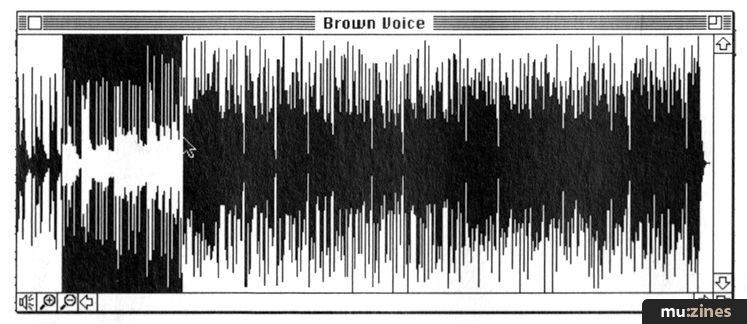
You can cut and paste digital audio files.
If too much is happening, some of the cues may not appear at all. You may well spend a fair amount of time making sure that the things you want to happen actually do happen, given the limitations of your Mac. However, Producer's timing and syncing abilities are one of its strongest features and take precedence over the playing of cues, so you should not run out of sync even if you do lose a cue or two. This, I think, is the way it should be.
The program defaults to eight tracks - which should be quite adequate for most productions - but you can add as many more as you need. However, if you ask your Mac to do too many things at the same time, expect hiccups and delays. It will help of course, if you have a reasonably powerful Mac: the program recommends at least a IIci.
Although Producer will handle 24-bit colour, the productions run more smoothly in 8-bit colour. If you are using 24-bit, you'll need at least 8Mb of RAM, otherwise 5Mb will suffice. You can run with less, if say you're using a black and white system or a Powerbook or if you're just too plain mean to put some decent RAM in your machine, but once you start working with graphic images, you'll find RAM vanishes very quickly.
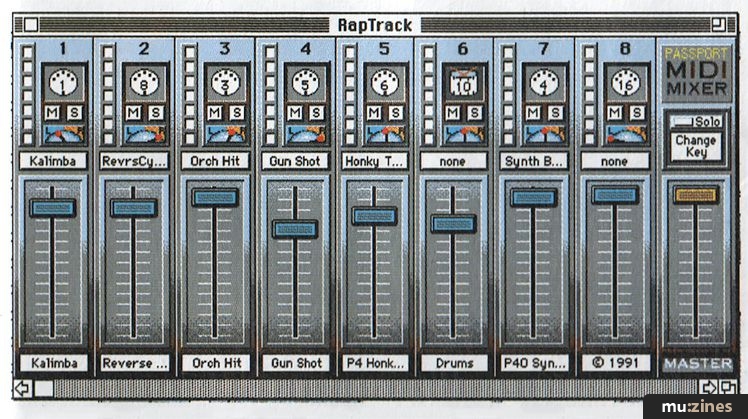
Producer has a sophisticated MIDI Mixer for setting up playback of MIDI files.
The visual cues are placed on a 'stage', which is that area of the screen used for the production. This defaults to the size of a 13" monitor but you can adjust the size and the position of the stage on the screen. The cues can be dragged to their required positions on the stage, too. One neat feature is the ability to work with multiple monitors although, of course, you need the wherewithal to buy a wall of Mac monitors in order to make the most of a production.
There are editors for the various cue types which let you tweak the associated files and perform functions such as retaining graphic files in memory for faster display. You can also link the files to proprietary editors such as Adobe Premier, VideoShop, Master Tracks Pro and Vision for more complete editing.
One of Producer's weakest points is its slide show and text editor, which is rather basic. It has limited formatting functions and lacks a transparent background so you can't print words on top of an image, for example. Also, it only supports PICT images, so if you want to use other types of image such as TIFF you'll need an image converter.
However, Producer has excellent sound and MIDI handling capabilities which is, perhaps, hardly surprising as it comes from a music software company. It also has a very good MIDI Mixer for selecting instrument sounds (defaulting to General MIDI), volumes and pan positions when it plays MIDI files. And it's possible to cut and paste digital audio files.
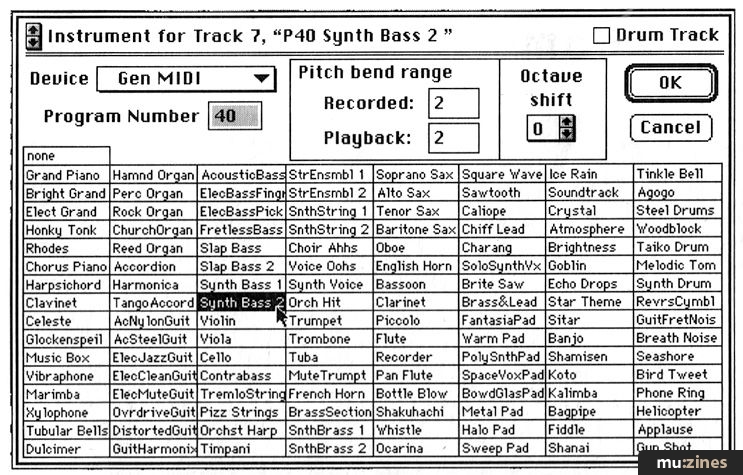
You can assign GM sounds to each of the MIDI tracks.
There are two manuals: Getting Started and a Reference Guide. The tutorial is excellent and takes you through most of the major features of the program. There is a 'Hints & Tips' section too which explains, among other things, how to speed up and improve the display performance. The package includes lots of backgrounds, audio and MIDI files which you can use in your own creations. When your production is complete, you can save it to video although you'll need a video card or composite video encoder for this.
You can also give away copies of your production to other Mac users using Producer Player, which is supplied with the package. This, as you can probably guess, is a playback-only version of Producer. It needs access to the files used to form the production and there are options to move, copy and produce aliases of the files. But if this is your intention, remember that graphic, animation and QuickTime files can be very large and even a fairly simple production will very likely be too large to fit onto a 1.4Mb floppy. Producer does allow PICS animation and AIFF files to be converted into QuickTime Movies using a range of compression techniques, but compression has its limits.
If you want to create a business-type presentation then you may find certain of Producer's limitations in the text and graphics department more restrictive than you would like - even though the program is easy to use. However, if sound and music play a large part in your presentation, do give Producer a particularly close look.
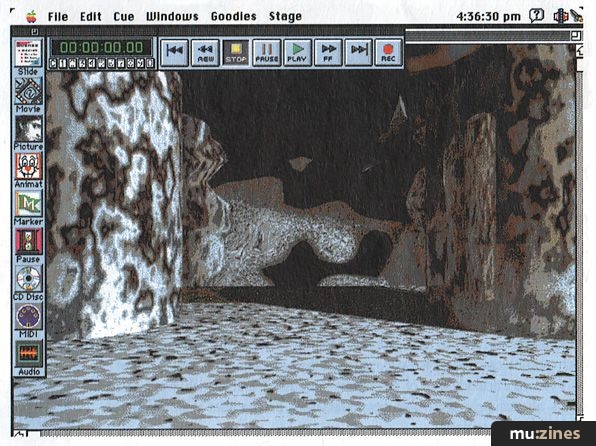
You can select a wide range of backgrounds for your production.
If you're looking for a way to create some sort of visual display to accompany your music then Producer's text handling limitations will possibly seem less important, particularly in view of the program's excellent sound-handling capabilities and, as has already been said, its ease of use. This should not be overlooked when considering multimedia production software - some of it can take an age to get to grips with.
However, multimedia packages such as Producer are not digitised video editing kits, so don't think you're getting the computerised equivalent of a £20,000 video editing suite. QuickTime is fine as far as it goes, but it's not that good yet. Part of the problem, as ever, is the relatively slow speed of computers. The more Mac you have the better.
Producer has been well thought-out and although the die-hard multimedia user may enjoy picking holes in it, it does what you'd expect a multimedia package to do, and - here we go again - it does it with ease. Unless text is a major part of your plans, Producer has an awful lot to recommend it, and it's certainly a program to look at if you're new to the multimedia field.
THE LAST WORD
| Ease of use | Excellent user interface |
| Originality | Its ease-of-use makes a refreshing change |
| Value for money | Ouch! |
| Star Quality | Wins out with its sync and timing abilities |
| Price | £499.99 inc. VAT |
| More from | MCMXCIX, (Contact Details). |
Take your cue
Slide: A combination of text and graphics which share a common background colour or PICT image. There are transition functions which cause the text to be displayed by effects such as an opening iris, opening curtains and so on.
Movie: A series of frames in standard QuickTime Movie format.
Picture: Still graphic image in PICT format.
Animation: A series of frames in PICS format.
Marker: A placeholder used to mark a location within the cue sheet. These can be recorded manually into a track as the production plays and you can align Movies, for example, to the markers.
Pause: A command that stops playback and waits for a specific time or event such as a mouse or key press or a MIDI message.
CD: A command to play a CD audio track from a CD-ROM player.
MIDI: A command to play a Standard MIDI File in format 0 or 1.
Audio: A digital audio file in AIFF or Sound Designer II format.
Featuring related gear

Publisher: Music Technology - Music Maker Publications (UK), Future Publishing.
The current copyright owner/s of this content may differ from the originally published copyright notice.
More details on copyright ownership...
Music Technology - Oct 1993
Donated by: Ian Sanderson
Quality Control
Review by Ian Waugh
Help Support The Things You Love
mu:zines is the result of thousands of hours of effort, and will require many thousands more going forward to reach our goals of getting all this content online.
If you value this resource, you can support this project - it really helps!
Donations for June 2026
Issues donated this month: 0
New issues that have been donated or scanned for us this month.
Funds donated this month: £0.00
All donations and support are gratefully appreciated - thank you.
Magazines Needed - Can You Help?
Do you have any of these magazine issues?
If so, and you can donate, lend or scan them to help complete our archive, please get in touch via the Contribute page - thanks!
If you're enjoying the site, please consider supporting me to help build this archive...
...with a one time Donation, or a recurring Donation of just £2 a month. It really helps - thank you!

 @mu_zines
 RSS Feed
 Blog
Blog