


Magazine Archive
Home -> Magazines -> Issues -> Articles in this issue -> View
Roland PM16 | |
Electronic DrumsArticle from Music Technology, December 1987 | |
Pick up sticks; the latest electronic kit from Roland doesn't come with its own voices but Nicholas Rowland discovers its MIDI converter may have other uses in the studio.
As the beat sounds ever louder in popular music, more attention is being focussed on the sources of electronic rhythm - and as "human feel" comes back into vogue, the electronic drum kit is becoming a more popular means of making it.
THERE ARE HAZARDS involved in reviewing equipment hot off the production line. Sometimes things don't look quite as they should, other times preliminary software means that attempts to invoke certain functions give you irritating messages along the "not yet implemented" lines. And then there are instruction manuals - or sometimes there aren't. But most frequently they too are preliminary, leaving the luckless reviewer a lot of finding out for him/herself to do.
Take the Roland PM16 for example - a sophisticated trigger-to-MIDI converter which in the right hands could become an extremely creative tool for the MIDI percussionist. And its manual? At the time of review this was a sketchy 24-page guide as to the button-pushing necessary to get yourself in and out of various modes with little or no mention of exactly what all the options were giving you. (Rest assured though - by the time you read this, Roland will be slipping a fully comprehensive instruction booklet and their helpful guide to MIDI into each and every PM16 box.)
But while the complete manual might have made my task that bit easier, I'm almost glad that I didn't have one, because when it came to evaluating its features, nothing could be taken on trust. The result? My investigation simply had to be extremely thorough. So now, if Roland are reluctant to spill the beans on just how good their products are, at least I am in the position of being able to do it for them. Trouble is, just where do you start?
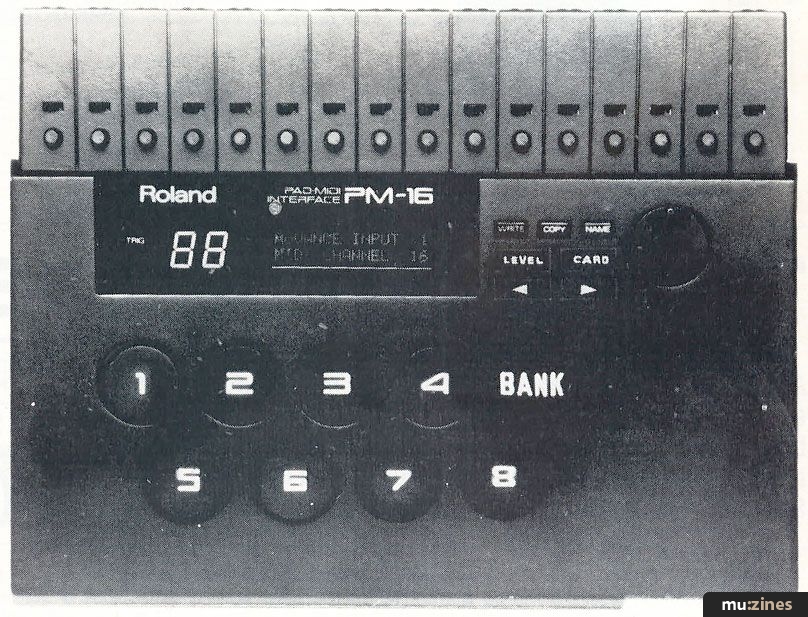
The first bit's easy enough. For those too dimly sighted to discern the object in the photograph, the PM16 is a black plastic wedge-shaped box with some buttons, a programming dial and an LCD on the front. Trigger signals go in and MIDI information comes out, this being used to access the voices of any MIDI-equipped drum machine, synth or sampler.
The first feature to cause sharp intake of breath is that the PM16 can accept up to 16 trigger inputs. Yes, 16... that's twice as many as, say, the Simmons TMI, MTM or Casio DZ1. Secondly, the input gain is switchable for either electronic pads or microphones, which means that you can play an acoustic kit and, through the mics, trigger electronic drum sounds as well. The PM16 will also accept line signals, meaning that you can take an audio output off a tape recorder and trigger a different sound with it. Hence you could take that multitrack recording with the duff snare and, providing it's on a separate channel, use the PM16 to replace it with a better sound.
In addition to a switch which allows you to set the machine up for incoming pad/line or mic signals, there's also a small knob that allows you to adjust the sensitivity (much the same as you'll find on any other converter or electronic kit for that matter). A nice touch is that in Play Mode the central LCD will give you a read-out of just how hard you're hitting the pad, so you can set the sensitivity controls exactly to suit your individual playing style.
The Play mode is just one of three, the others being Edit and Advanced Edit. Play is fairly self-explanatory - it's the mode that you're going to find yourself in when you pair the thing up with some suitable pads and take it on stage - but, it does have certain features we'll touch on later. For the moment, let's get on to the more involved process of creating groups of sounds - patches.
As their names suggest, the two edit modes represent two levels of complexity. Put quite crudely, the simpler Edit mode is the one you're likely to choose if you're using a single and fairly straightforward (in MIDI terms) unit as your sound source - a drum machine such as the Roland TR505, TR707 or TR727, for example.
Edit allows you to program five parameters in all. Three of these - MIDI Channel, Program Change, and Gate Time - are set for the patch as a whole; the other two - MIDI Note Number (0-127) and Threshold (0-99) - can be set individually for each of the 16 inputs.
Programming
THIS IS PERFORMED with the help of a couple of increment/decrement keys and Roland's familiar alpha-dial. The input channel number, the name of the parameter and its value are all displayed on the LCD, which, incidentally, features a backlight control for ease of visibility. Choosing which input you want to work on is a simple matter of hitting the appropriate pad, or using the buttons/dial which is more time consuming.
If you need to hear the sound you're triggering but don't want to go to the trouble of plugging in pads, then you can use any one of the eight large rubber Program Select buttons on the front panel, which in both edit modes act as trigger buttons. When used this way, it seems to be the case that if you strike these buttons in order (say, one to eight) then you get a fairly accurate idea of what the dynamic range of the sound is going to be like. This feature comes into its own in the advanced edit mode, where (as you'll see) various parameters are controlled by the force with which you strike the pads, so again you can hear what you're doing without needing to plug in.
Overall, like all programming systems where one button does the work of six, the system suffers the drawback of being extremely time-consuming flicking back and forth between parts of the program, but at least the display is easy to follow and is logically laid out. And with only five parameters to worry about at this level, the inconvenience is not too much to bear. However, in the Advanced Edit mode, things start to get a little out of control - two buttons and a dial just aren't enough to deal with the whole host of new options on offer.
You now have a total of 13 parameters to play with. The first five are identical to Edit mode, but MIDI Channel and Gate Time can now be programmed individually for each input. (Program Change, however, still has to be set for the patch as a whole). The other parameters (which again can be set individually for each input channel) are Dynamics Curve, Dynamics Pitch, Dynamics Bend, Bend Depth, Bend Decay, Minimum Velocity, Layer and Retrigger Limit Time.
What does it all add up to? Well for a start, with MIDI channel programmability available for each channel, you are given much more control over communicating with more than one device. Indeed, you could trigger sounds from a total of 16 different sound sources (as many as there are MIDI channels). More likely, you'd be able to make use of the many multitimbral synth expanders which are now on the market, where you'd be able to play a different sound at a different pitch with each pad.
This versatility can be combined with the dynamics-related parameters to give some quite amazing effects. For example, with the Dynamics Pitch control, you can program any individual input to play a higher or lower MIDI note (anything up to 24 semitones) depending on the strength of the trigger. With pitch programmability now becoming available on many drum machines, a light tap might trigger a low snare sound, a heavier whack would result in a much higher pitched one - and any force of stroke in between would produce a snare of corresponding pitch. Alternatively, with melodic sounds you can literally play tunes just from the one pad.
Another useful feature is the Dynamics Bend. This acts a bit like a synth's pitch-bend wheel and can be used to simulate the way that the timbre of an acoustic drum changes when you hit it harder. Again, you have to have a unit capable of responding to this type of MIDI information - cheaper and older drum machines won't - but where you can make use of its capabilities it's a feature which adds a lot of realism to an electronic sound.
I should also mention the Layer feature, which allows you to add two further sounds on top of anything you've programmed for the first - great for doubling up on certain sounds to give them extra punch. However, it's actually more versatile than this because what you're really doing is adding all the MIDI information from two other inputs in that same patch, to the first.
So, at the simpler level, if you've programmed input four to trigger a cowbell and inputs five and six to trigger a timbale and a conga, layering five and six onto four means that when you trigger four you'll hear all three sounds at once, and when you trigger five and six, you'll hear timbale and conga separately.
Now imagine that you've programmed five with dynamics pitch information which means the higher the trigger, the higher pitched it is. Similarly for six, the higher the trigger the lower it goes. Now by layering them on four you'll get the sound of a cowbell plus an ascending timbale, plus a descending conga sound. Kinda spooky, huh?
And so it goes on - providing, of course, you're prepared to sit down for a week or so and really get to grips with all that this box of tricks has to offer. And there's the rub. Because it does take quite a time to set up the more advanced patches, this is the sort of equipment which could really benefit from a more immediately accessible programming system. I'm not saying it's difficult to use, it just takes time and patience. Ideally MIDI should be a spontaneous performance tool, not the reason why you end up stuck in your bedroom, never seeing the light of day for months at a time.
Performance
THERE ARE SEVERAL features of the PM16 which make it ideal for performance. Yes, we're back in Play mode. First of all, there's the fact that it is capable of storing a total of 64 patches (in eight banks of eight) in its onboard memory with a further 64 on an optional memory card inserted into the front of the machine. These patches can be accessed by pressing the large buttons on the front panel or sequentially by a couple of footswitches - one for stepping up, one for stepping down.
Another nice touch is being able to name each patch using the 16 characters of the display. Hence, you can type in the name of the song or part of the song that the particular patch relates to and when you call it up know for definite it's the right one. No more scraps of paper with "Feel My Love Pump = Patch 23" scribbled all over them.
Finally, I should also make it clear that the PM16 receives MIDI information as well as dispensing it - essential when you start using a sequencer. In this case, the PM16 would, in effect, be acting as a sort of sub-mixer for complex percussion sounds which could then be triggered by a single MIDI instruction from the sequencer.
Padding
ITS NOW TIME to have a look at the other part of Roland's 1987 assault on the world of electronic percussion, their new electronic pads. The original Roland DDR30 drum system featured some attractive and responsive electronic pads, doing much to dispel those myths about unplayable rubber tea-trays.
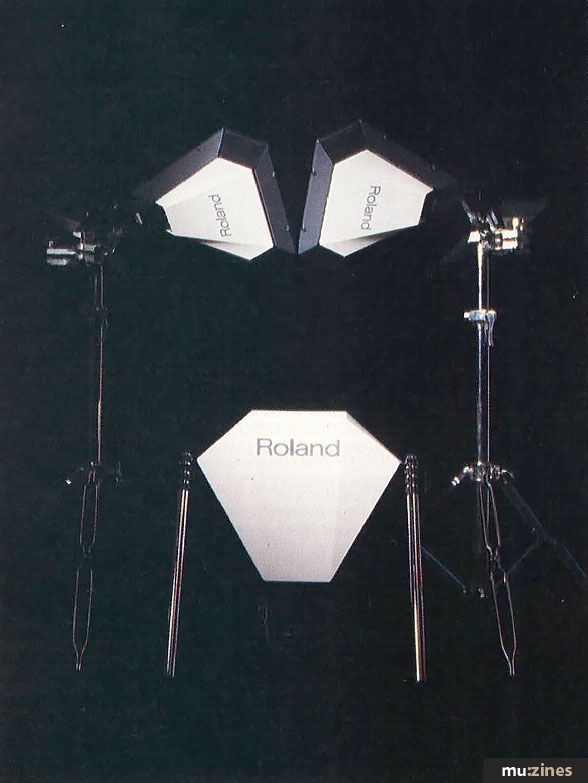
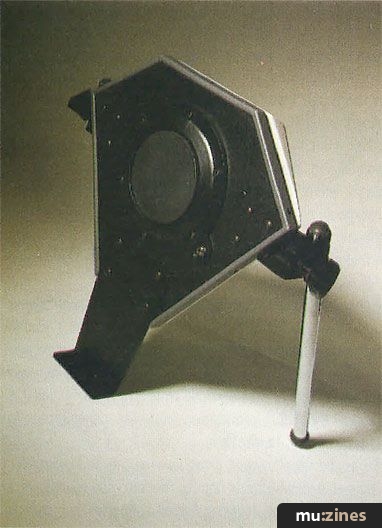
These new tea-trays (PD11, PD21 and PD31) are even better, having been upgraded in just about every department. They are still based around the truncated triangle shape (polygonal variations being a bit thin on the ground these days), but the styling has been modified to give them a more sleek appearance.
These "heads" play extremely well - I'd go as to say they are by far the best on the market at the moment. Most importantly they give a good dynamic response, even the bass pad - which of all the pads on an electronic kit seems to end up giving you only the two options (off and on) - responds excellently.
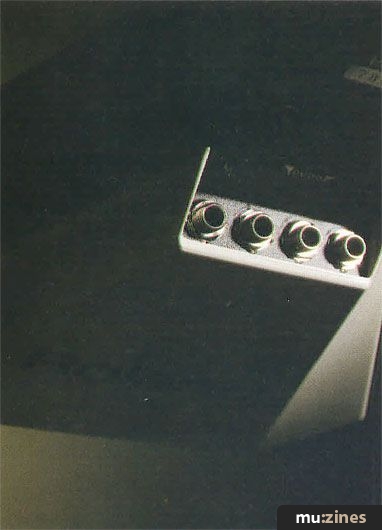
My only worry was that the surface area of head is relatively small, as much of the pad is taken up by a raised plastic rim. But the would-be drummers amongst us need fear not, this is no careless waste of space. In their cunning, Roland have provided the PD31 with a pickup in each side of the rim, making a total of four - an exciting opportunity for having many different percussion sounds (various snares for example) within easy reach, enabling you to weave a far more complex rhythmic thread.
Verdict
FOR THOSE WHO have been involved in electronic percussion for some time, it always seems to be the case that when a new piece of gear comes out it can do a little bit more than the last, but still not enough for its resources to be inexhaustible. In other words, you always get to the stage where it just can't do what you want.
The PM16 is without doubt getting closer to what percussionists are beginning to realise they need: an extremely flexible triggering system, which has plenty of memory, plenty of programming options and which can be sophisticated when it needs to be, but which can also be set up very quickly.
With its two-stage editing, the PM16 provides just those options. The easier programming stage offers a good introduction to the art of MIDI triggering, but if you find that initial experiments leave you with the desire to go one step beyond, then the Advanced Edit mode means you're not going to end up frustrated or with the need to spend yet more money to upgrade.
Neither does the design of the PM16 limit its applications to stick-wielders. With its switchable trigger inputs it could prove a useful studio tool for replacing those gutless drum sounds with something a little more meaty.
Sweet sixteen? You bet.
Price PM16 £450; PD31 £88; PD21 £75; PD11 £153; all prices inclusive of VAT
More from Roland (UK) Ltd, (Contact Details)
Publisher: Music Technology - Music Maker Publications (UK), Future Publishing.
The current copyright owner/s of this content may differ from the originally published copyright notice.
More details on copyright ownership...

Music Technology - Dec 1987
Donated & scanned by: Mike Gorman
Gear in this article:
Review by Nicholas Rowland
Previous article in this issue:
Help Support The Things You Love
mu:zines is the result of thousands of hours of effort, and will require many thousands more going forward to reach our goals of getting all this content online.
If you value this resource, you can support this project - it really helps!
Donations for April 2026
Issues donated this month: 0
New issues that have been donated or scanned for us this month.
Funds donated this month: £0.00
All donations and support are gratefully appreciated - thank you.
Magazines Needed - Can You Help?
Do you have any of these magazine issues?
If so, and you can donate, lend or scan them to help complete our archive, please get in touch via the Contribute page - thanks!
Please Contribute to mu:zines by supplying magazines, scanning or donating funds. Thanks!
Monetary donations go towards site running costs, and the occasional coffee for me if there's anything left over!

 @mu_zines
 RSS Feed
 Blog
Blog