


Magazine Archive
Home -> Magazines -> Issues -> Articles in this issue -> View
Self Control | |
EMR Miditrack Performer Software (Spectrum/BBC)Article from Electronic Soundmaker & Computer Music, June 1985 | |
8 track real time MIDI sequencer software from Electronic Research.
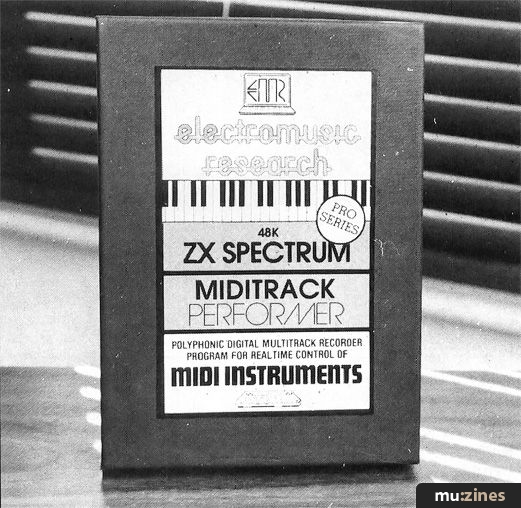
Performer: 'a powerful source for the composer'
The home micro offers possibilities for control of MIDI instruments and there are numerous programs for Spectrum or BBC owners to use their machines as a multitrack recording device. The Miditrack Performer software is the latest offering from Electromusic Research and is part of a growing range of software to assist the musician.
Using the package assumes that you have a MIDI interface for either micro (also available from EMR) and 5-pin DIN cables for connecting to MIDI devices. The software is supplied on either cassette or disk for the BBC and cassette for the Spectrum. Running the software is straightforward using one screen display. I'll be describing the BBC version here but the Spectrum package is essentially similar with a few differences that I'll point out.
The upper part of the screen displays 8 vertical columns each representing an individual track and each of these are separately accessible. Down the left of the screen are seven horizontal rows. The first of these indicates the eight TRACKs and is best thought of as a multitrack tape recorder. This row is only used for recording on a particular track and is simply effected by placing the cursor over the track to be recorded and pressing the R(ecord) button. Once the track has been recorded a square above the track number will light up to show that the track has been used.
On playback, one or more of the tracks can be selected by indicating under each track number whether that track is active or not. When playback is then used, only the tracks indicated by a 'P' on the PLAY row, will sound. PLAY and the remaining five options in this section are all entered by placing the cursor at the relevant row/column and pressing the zero key (an odd choice and ensures that you have to look at the manual first!). Then depending on which setting you are altering, a further set of prompts are represented in the bottom window.
The third option is CHANNEL and this gives a choice of 16 MIDI channels which the user can specify. Transposition is controlled from the PITCH option which can be maximum of 12 semitones in either direction of pitch. The user need only specify a number in this option (ie C to F would be 5).
Later on you'll see I've indicated how long you can record for, but one possibility for extending the length of music is to use the LOOP function which allows indefinite looping of music. This option can also be used to repeat a small sequence which can be used as a background to a longer melody track.
To take account of the different MIDI control codes (ie Modulation wheel, pitch bend, etc) and the varying information that can be stored by the micro, there is a CONTROL setting which gives the musician 4 options; Full, Velocity, Pressure out and No pressure/velocity. These take account of whether information relating to pressure control or velocity are recorded. One word of warning. If you do have a MIDI instrument that allows pressure control, check out the software with the instrument as this information eats up memory.
Finally the MODE option indicates whether the keyboard part is Polyphonic or Monophonic.
MIDDLE SECTION
The middle section contains further commands which are all accessed by pressing one key. These are indicated on-screen by the appropriate letter in upper case (timesiG - where G is the key to be pressed). Besides acting as a command section, the middle section also displays the current status. These are as follows: Time Signature, Tempo, Metronome (on/off), Start Bar, Play, Count, Clock, Zap and Text.
The first three are self-explanatory. Start Bar is used on playback to start from a particular bar. I found it could sometimes take 15-20 seconds to reach the correct bar if the piece of music was long.
PLAY indicates the number of times a piece of music is played, either continuously looping or for any number of repeats up to a maximum of 254. COUNT gives an audible count-in of up to 8 beats or a zero count can be set.
If you use a rhythm unit, the system can be controlled from the external sync-out of the rhythm unit and the CLOCK setting allows the user to set the clock to External control or to use the micro's Internal clock.
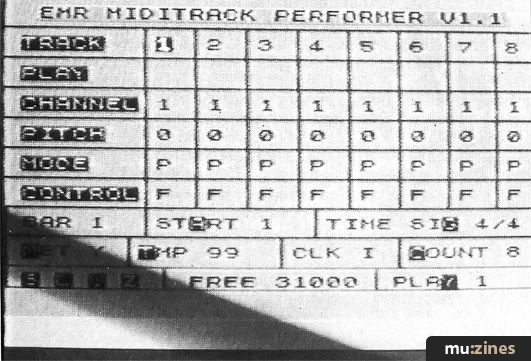
Performer screen display
Removing a piece of music from memory is dead easy, ZAP totally resets all the settings and clears all the tracks of their information. One thing I didn't like about the software was that there was no command to delete any single track. To clear a track one had to record for a few seconds a blank track. This effectively clears the track and returns memory to the user. It would have been better to see a command to do this rather than going through a mock recording procedure.
Finally any information relating to the piece being recorded can be stored by using the TEXT option. This allows 'memos' to be stored and recalled in the bottom window.
The software also allows the data to be saved (S), loaded (L), deleted (D) and verified (V). If you're using the BBC, a catalogue of files can also be seen by pressing the * (asterisk) key.
An option also exists for the EMR miditrack editor to be accessed from the performer package if you have it. And finally, two further commands. ARRANGE, allows up to 64 arrangements of the recorded tracks to be played after the tracks set by the PLAY option. All that is needed is to enter the track numbers to be arranged (ie 1, 4, 5). This is a useful feature that extends the possible playing time (see below).
NOTE is an auto timing correction feature to synchronise different tracks to the main beat. A Punch-in option also exists so that music can be corrected from a certain point if used with the startBar setting.
Tracks can also be merged together by recording onto a spare track the information held in other tracks. This would also give extra memory as the previous tracks could be wiped out as described above.
Memory has always been a problem on the BBC and it was good to see that the author of the package (Mike Beecher) has used screen mode 7, which uses the least memory. This leaves the user with around 15k of memory and the author has obviously given this thought. The manual claims that at least 10 minutes can be recorded and that is indeed the case. The Spectrum version, because of the greater memory capacity, offers about an extra five minutes. Of this I have no complaint and taking the micro's limitations into account, 10-15 minutes seems adequate for most uses.
Whilst recording, a horizontal bar of squares at the top of the screen indicates the amount of free memory. This bar decreases in length from left to right as you record. This gives the user a reasonable indication of recording times left. There is a second indication of memory used and this is show by FREE. This gives the amount of memory, in bytes, left. However, this value does not change until recording has ceased. I would have preferred to see this value changing on-screen but it's no great hassle.
The screen display is self-explanatory and the manual provides a 'Getting Started' section which is more than welcome if you're like me and want to do something straight away. Two demo pieces are provided which are useful for experimenting on whilst learning the software.
As I said earlier, the Spectrum software is very similar though there is no LOOP setting as described earlier. The TEXT option is also absent but this is merely an embellishment.
Generally I was pleased with the software though some screen information wasn't updated till recording or playback was finished. In particular the tempo can be changed during playback (slower/faster) but the information isn't updated on-screen till the music is stopped by pressing the Spacebar. One word of warning though. Although theoretically this software should control and receive information from any MIDI instrument, because of the variation between instruments I'd suggest you check the software out with your particular instrument(s) as the software may either exceed the possibilities of your instrument or even place limitations on your machine.
However, this is a competent piece of software which really comes into its own when several MIDI instruments are being used. Overall I was happy with the Miditrack Performer and it certainly provides a powerful source for the composer.
Price: Progs: £79.95 (inc VAT) + Interfaces £89.95
Contact: Korg UK. (Contact Details).
Publisher: Electronic Soundmaker & Computer Music - Cover Publications Ltd, Northern & Shell Ltd.
The current copyright owner/s of this content may differ from the originally published copyright notice.
More details on copyright ownership...

Electronic Soundmaker - Jun 1985
Donated & scanned by: Mike Gorman
Review by Jeremy Vine
Help Support The Things You Love
mu:zines is the result of thousands of hours of effort, and will require many thousands more going forward to reach our goals of getting all this content online.
If you value this resource, you can support this project - it really helps!
Donations for April 2026
Issues donated this month: 0
New issues that have been donated or scanned for us this month.
Funds donated this month: £0.00
All donations and support are gratefully appreciated - thank you.
Magazines Needed - Can You Help?
Do you have any of these magazine issues?
If so, and you can donate, lend or scan them to help complete our archive, please get in touch via the Contribute page - thanks!
If you're enjoying the site, please consider supporting me to help build this archive...
...with a one time Donation, or a recurring Donation of just £2 a month. It really helps - thank you!

 @mu_zines
 RSS Feed
 Blog
Blog