


Magazine Archive
Home -> Magazines -> Issues -> Articles in this issue -> View
Simmons SDE Module | |
Percussion Voice ExpanderArticle from Music Technology, January 1987 | |
Nick Rowland takes sticks to Simmons pads - and finds a whole load of tuned percussion sounds appearing at the other end. Will drummers start putting xylophonists out of work?
It may look like just another black box full of knobs and switches, but the SDE may just change the face of electronic percussion playing as we know it.
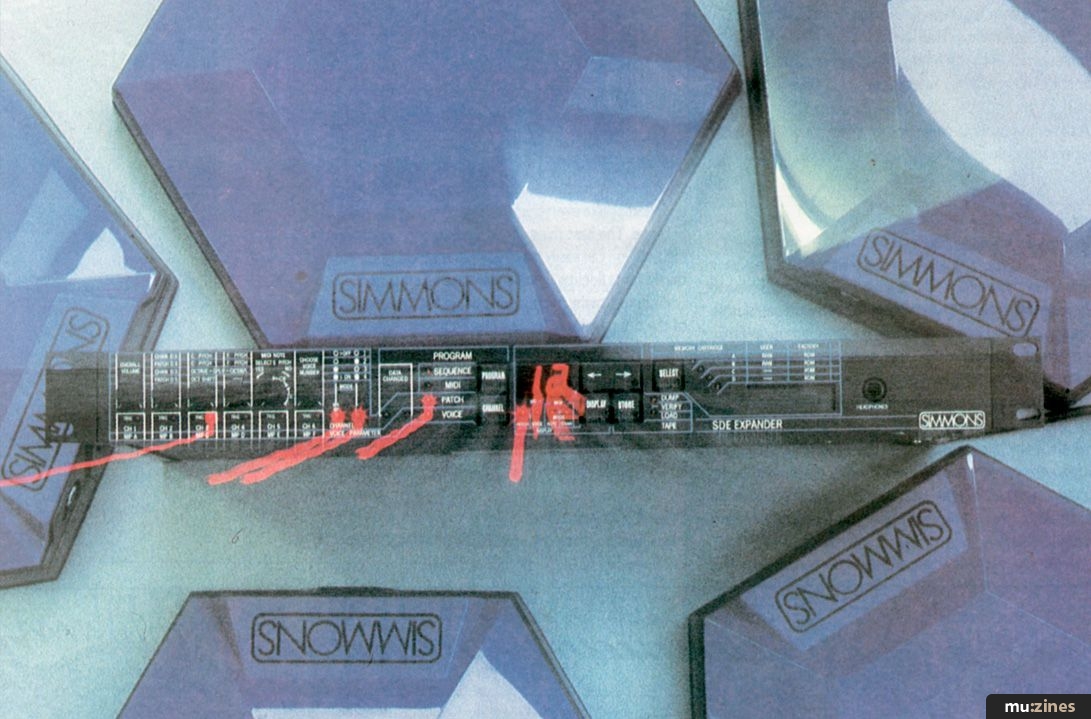
ALTHOUGH 1985 SAW WHAT could be described as a deluge of electronic drum kits from anybody even remotely connected with musical instrument manufacturing (and a few people that weren't), 1986 seems to have left us with those (all too few) companies whose vision ranges beyond merely jumping on the bandwagon.
Enter an unassuming black box from a company known as Simmons Electronics. A box which, I'll tell you now, pushes back the capabilities of electronic percussion that one stage further. Ladies and gentlemen - the SDE. Not exactly a name that gives much away, and even when I tell you that those three little letters stand for "Simmons Drum Expander", a little more explanation is required.
Put simply, what the SDE does is to extend the range of an electronic kit, allowing the drummer to create melody lines as well as rhythm on the drums. What this black box actually is is a six-channel, MIDI-controlled percussion synthesiser, capable of generating a huge variety of "tuned percussion" voices which can then be triggered from the pads of a MIDI-equipped kit (such as the Simmons SDS9) or through a trigger-to-MIDI converter (such as the Simmons TMI and MTM). If you ever caught one of the earlier Simmons demonstrations, you'll probably remember they featured "tone generators" (such as Yamaha's TX7) to show off the MIDI capabilities of the SDS9 kit. However, the SDE is the first such voice expander whose tone generation is wholly dedicated to the percussionist, all the sounds having a high percussive as well as harmonic content.
Although I refer to them as "tuned percussion", the range of voices on the SDE encompasses much more than those instruments which traditionally come under that definition. For example, along with such instruments as vibes, bells, gongs, marimbas, timpani and xylophones, the SDE is capable of synthesising the sound of log drums, steel drums and congas, plus less conventional percussion sounds with names like "Toy Piano", "Long Banjo" and "Bass Synth".
By pre-programming combinations of these sounds at different pitches, it's possible to play melody lines, chords, basslines and harmonies from the pads. Mix those in with the drum voices of whichever drum "brain" you possess, and you have a very powerful rhythmic and melodic instrument - really, a complete percussion system.
Add to that the ability to assign completely different voices to different drums and to change those sounds at the merest touch of a button or footswitch, and you're beginning to get close to just what this electronic percussion system has to offer in terms of flexibility and sheer musical power.
Imagine triggering three differently tuned cowbells from the toms, two congas from the snare and its rim, plus a huge gong effect from the bass pad. Then, before you know where you are, you're playing a melody on tubular bells to beef up that quiet instrumental which up to now you always thought lacked sparkle. With 40 sounds already in the SDE's memory (20 preset, 20 user-programmable) and two other cartridges of 20 sounds each available, plus blank cartridges to store yet more of your own sounds, the sheer number of voices available becomes wickedly tempting.
Getting to know the SDE isn't something that's going to happen in an evening with a can of Stella Artois in your hand and the America's Cup on the box. You have to work your way carefully through all 60 pages of Simmons' well-produced and clearly laid-out instruction manual and, in particular, you need to get to grips with the SDE's implementation of MIDI, with all its terms and functions. Remember that the SDE is totally MIDI controlled, so you can only trigger it from either a MIDI-equipped drum brain (such as the SDS9) or a trigger-to-MIDI converter (the TMI or the MTM). However, once you do know what you are doing (which takes about two to three days of concentrated mental effort) then believe me, the SDE is a joy to use - an inspiration to anyone looking to explore more exhilarating percussive climes.
The strength of the SDE lies in two areas - the quality of its voices and the versatility of its programming features. Let's have a look at (listen to?) the sounds first.
Sounds
ALL THE SDE'S sounds are digitally synthesised from one of eight digital generators - or DGs - numbered not 1 to 8, but 0 to 7. Each DG produces a slightly different waveform from the rest, suiting it to the creation of a particular type of sound. Thus, in the accompanying SDE Voices Handbook, Simmons explain how, for example, DG number 0 generates a waveform which adapts itself more easily to the creation of mellow, yet metallic, sounds (eg. gongs, steel drums and cowbells). On the other hand, DG number 3 is best for creating synth, synth bass and brass effects.
All the various SDE factory presets have been created by taking the DG with the waveform that approximates closest to the desired result, and then modifying its parameters until that result is achieved.
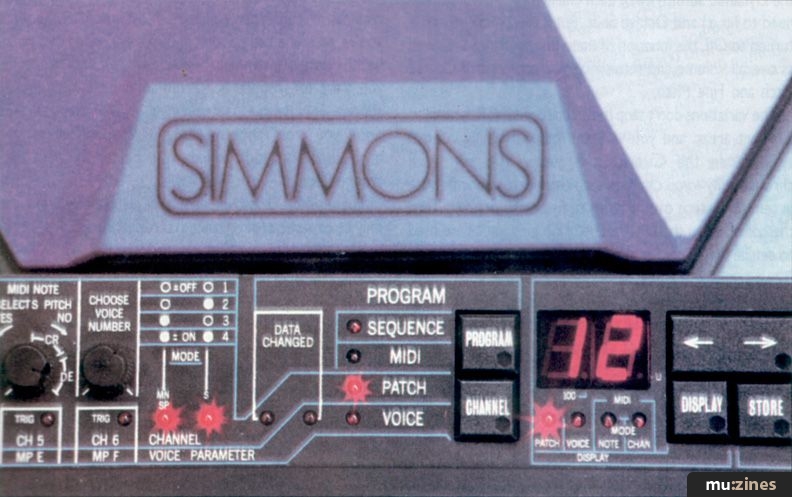
And when it comes to creating your own voices, you just take a preset which falls into the same group as the sound you want (eg. a bell or a marimba-type sound) and then make your own modifications. This is achieved using six multi-function rotary parameter controls on the left-hand half of the unit. Put the SDE into Program Voice mode, and these knobs become responsible for altering (from left to right) Brightness, Harmonic, Bite, Attack, Release and Gate Time. To be honest, these titles are only approximate because the parameter each knob alters depends on which DG you're playing with. But as a general indication of what's going on behind that hi-tech fascia, the descriptions work well enough, and should prove familiar to anyone who's played around with analogue synths in the past.
"By pre-programming combinations of sounds at different pitches, you can play melody lines, chords, basslines and harmonies from electronic pads."
In practice, the modification or "editing" of sounds really couldn't be easier. Once again, the manual provides a comprehensive guide to exactly what job each control does, but even without the benefit of Simmons' advice, you can still experiment by twiddling the knobs and seeing what you come up with. In a way, it is very much like using an older synth - any fool can get some sound out of it, but an experienced fool can work wonders.
My initial attempts at hit-or-miss editing produced some unusual but nevertheless usable results. One sound I came up with quickly was a cross between a talking drum and someone blowing into a large milk bottle, if you can imagine that. Others included a sort of deep-toned "blip" and "boing" - something akin to tablas. Sounds a little odd, but like I say, they were usable, and what's more, they gave added lift to what would otherwise have been very ordinary rhythm tracks.
Once you've arrived at a sound you're happy with, a couple of taps on another button store it for posterity, either in the SDE's onboard memory or in one of the plug-in cartridges. Should you then get bored with it, you can call it up again, modify it further and save it once more. Easy.
All the factory-programmed sounds come across as modern and aggressive with a high harmonic content, which given the right sort of amplification (not your brother's Cheeptone hi-fi) will do you proud in any live band situation.
Programming
BUT THE GOOD news doesn't stop here - even though it's at this point that the hard work really starts, because we're about to move across to the programming side of things...
Actually, it's not all that bad. Like the voice editing, once you get the hang of it you begin to realise that the SDE's programming system is supremely logical. And if you suffer a sudden lapse of memory, the equally logical front panel should point you in the right direction.
Leaving aside the MIDI aspect of things (which mainly serves to control the way the SDE is triggered), the main programming functions of the SDE revolve around the creation of "patches". In SDE parlance, a patch is any collection of six sounds - either six completely different sounds, or the same sound at six pitches.
Programming a patch consists of assigning any sound at any pitch to any or all of the six channels, and then saving them as a whole to be called up as and when desired. Now, if that sounds like you're being given a heck of a lot of choice, you can appreciate that making the most of that choice involves a good deal of button-pushing. As with a lot of hi-tech gear nowadays, virtually all the SDE's knobs and buttons are multi-function, as is the large, informative central LED display.
Programming a patch involves, first of all, a decision as to what MIDI mode you're going to operate in. This is determined by three things: whether you want to change the SDE patch to correspond with patch changes on your drum brain; whether you want the MIDI notes which trigger the voices to determine their pitch as well; and whether you're using the SDE with other expanders and therefore need to split the incoming information down different channels to trigger different expanders at different times. Without going into great technical explanations, once you've chosen the Mode that suits your particular situation best, the rest of patch programming comes fairly quickly.
Again, changes are made via those six knobs on the lefthand side, though exactly what they control is determined both by the MIDI mode and whether you're going to use more than one voice per patch. The crucial control is MIDI Note Selects Pitch (or MNSP), which determines whether the incoming MIDI notes merely trigger the channels, rather than controlling the pitch of the voice. If this is turned to On and you're using more than one voice in the patch, you'll gain control over Overall Volume (used for adjusting the different percussive properties of each sound), the Dynamic Sensitivity of each channel (ie. how hard you need to hit it) and Octave Shift. But if the MNSP switch is turned to Off, the function of these knobs changes. As well as overall volume and sensitivity, you can control Coarse Pitch and Fine Pitch.
"My initial attempts at hit-or-miss editing produced one sound that was a cross between a talking drum and someone blowing into a large milk bottle."
The variations don't stop here: turn the MNSP control to different areas, and you vary the type of tuning control available. In the C area, the tuning controls work chromatically - you can tune each channel to a specific note in semitone steps over a range of five or so octaves. Turn the control into the D area, and the tuning knobs are used to detune the voices, anywhere within a range of two tones. By switching the MNSP in between the two, you can get any voice to a specific pitch and then detune it. This works exceptionally well on, say, congas or gongs, whose acoustic equivalents are usually of indefinite pitch.
The system works in much the same way in Single mode ie. when you're using just one voice for all six channels. The only difference is that Sensitivity controls the whole voice, rather than individual channels.
Again, once you're clued into the system, the logic of the front panel begins to reveal itself. The instruction matrix tells you what each control does in various modes, while various LEDs keep you informed as to which mode you're in and which component of the patch you're altering - be it MIDI information, voice numbers, patch numbers, and so on. Most of this information appears on the two central seven-segment LEDs when called up by the Display control (it's situated just to their right).
Having created a patch, you're able to store it in the SDE's memory or on cartridge. A couple of touches on the Store button, and providing you're not trying to overwrite the "Factory" area of memory (which you can't), the job is done.
Of course, you may find you want to arrange the patches in a certain order to fit in with your stage set, so the SDE allows you to change patches via the mother MIDI controller (SDS9, MTM, TMI, or whatever). Alternatively, you can program a sequence of patches and then step through them via the SDE's own Data Control button, or from a footswitch which plugs into the unit's back panel.
Anything else? Well, there is more - such intriguing features as "Note Robbing" and "MIDI Splits". However, these features only really begin to come into their own when the SDE is coupled to the MTM and TMI - each of which is capable of playing more than six notes at once, and (in the case of the MTM) of letting you play chords and note sequences from one pad alone. As we'll be covering both of these pieces of equipment in future issues of Music Technology, we'll leave the full details until then. Suffice it to say that Simmons have ensured the SDE is compatible with the (powerful) capabilities of their other products, providing a comprehensive and - as I said at the start complete electronic percussion system.
Verdict
BEFORE I GOT my hands on the SDE, the aspect of its performance that interested/worried me the most was the aspect that plagues all hi-tech black boxes. How useful is it really?
After living with it for some while, my answer is quite simple - very useful. Yes, of course it takes a while to get familiar with. Of course it means having (or acquiring) musical and technological skills beyond merely bashing it on the two and the four. Of course it demands careful thought about how, when and where you're going to apply its considerable sound-generating powers.
But what you get in return for all this is not just the ability to play entire rhythmic and melodic passages instead of the more usual drum solo, not just the chance to incite jealous comments from your audience. Most importantly, what you're getting is the opportunity to be exposed to a good, healthy dose of inspiration. I don't know why, but as soon as you start to produce non-drum sounds from drumming actions, your whole perception of rhythm changes. And once you start applying drum-kit techniques to the production of melodic sounds, your perception of melody changes, too.
The result? A crossover rhythmic/melodic area which can only be exploited (or advanced) through the unique skills of the humble drummer and percussionist.
The beauty of the SDE is that it allows you to push this area just about as far as you want to. You can start by simply adding an extra dimension to more conventional electronic kit sounds, but you could finish up seeing the playing of rhythm in a completely different light.
If you have the vision, the SDE has the eyes.
Price £499 including VAT
(Contact Details)
Also featuring gear in this article
Publisher: Music Technology - Music Maker Publications (UK), Future Publishing.
The current copyright owner/s of this content may differ from the originally published copyright notice.
More details on copyright ownership...

Music Technology - Jan 1987
Gear in this article:
Review by Nicholas Rowland
Ads for Gear in this article:


Help Support The Things You Love
mu:zines is the result of thousands of hours of effort, and will require many thousands more going forward to reach our goals of getting all this content online.
If you value this resource, you can support this project - it really helps!
Donations for April 2026
Issues donated this month: 0
New issues that have been donated or scanned for us this month.
Funds donated this month: £0.00
All donations and support are gratefully appreciated - thank you.
Magazines Needed - Can You Help?
Do you have any of these magazine issues?
If so, and you can donate, lend or scan them to help complete our archive, please get in touch via the Contribute page - thanks!
Please Contribute to mu:zines by supplying magazines, scanning or donating funds. Thanks!
Monetary donations go towards site running costs, and the occasional coffee for me if there's anything left over!

 @mu_zines
 RSS Feed
 Blog
Blog