


Magazine Archive
Home -> Magazines -> Issues -> Articles in this issue -> View
Soundcraft K2 | |
8-Buss Live Sound ConsoleArticle from Sound On Stage, January 1997 | |
Richard Waghorn dons his crampons and discovers the learning curve of K2, Soundcraft's new highly affordable pro live sound console, isn't as steep as you might imagine.

Soundcraft is a name synonymous with live mixing in the real world, and their consoles have won international respect. For those of you who don't remember, Soundcraft were the people who implemented the idea of building a desk directly into a flightcase — the original Series 1S. Over the last few years, the mixer market has expanded dramatically, and attention has been drawn away from Soundcraft by ground-breaking advances in design by companies such as Midas at the high end and by reductions in cost at the budget end from companies like Mackie. Soundcraft may also be victims of their own success as many of their old consoles simply refuse to die — for example, the Delta and 8000 Series are still going strong in many of the world's theatres and are not yet ready for mixing desk heaven.
Over the last couple of years, however, there have been developments at Soundcraft, which are making engineers prick up their ears. One particular development is the K Series range of mixing desks (K Series was originally just the working title for the range, but it seems to have stuck). With the K2, Soundcraft is to reproduce the best elements of its top of the range consoles in a more affordable form.
FORMATS
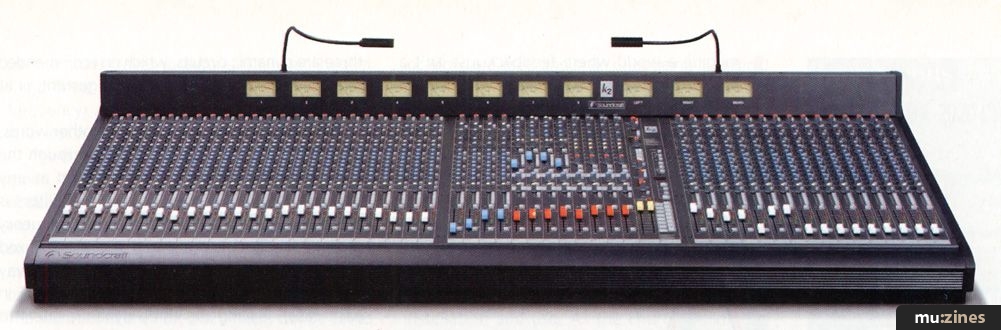
The console is available in 24, 32, and 40 input sizes, has eight auxiliary sends, eight mono sub-groups, stereo and mono (centre) master outputs, four stereo input channels, four stereo effects inputs, and four balanced matrix outputs (accessing all groups and mix outputs) as standard! These features are normally supplied as extras on desks costing far more than the K2. There is also a 128 scene MIDI mute system and eight instantly accessible mute groups.
The mixing desk is arguably the most important part of a live PA system, and reliability is of vital importance as there is only one in most systems. The K2 feels reassuringly well built; it's surprisingly rigid with no noticeable twist from one end to the other (24 channel). Unlike the K3, the K2 is not a modular console, and herein lies the biggest compromise, at least from the maintenance point of view. The circuit boards are mounted vertically and connected to the single top panel by brackets fixed via the nuts on the channel pots. To access the circuit boards, the nuts (up to 17 on each channel) would have to be undone, the desk turned upside down, and the back panel removed — not a 'between bands' operation. However, it is easy enough to repatch to another channel on the back panel to get you through the show. I can see this being more of a problem in theatre installations, with a production every day, but then, there's always the modular K3.
The desk has a fixed meterbridge, which has been used to strengthen the frame. It contains 11 VU meters; one for each of the eight groups, the remaining three for the left, right, and mono outputs. The mono VU doubles as a solo indicator. The meters are cleverly illuminated using rows of LEDs rather than filament bulbs, thus saving power and eliminating the possibility of blown bulbs. An ergonomic problem here is that the overload LEDs are mounted in the top right-hand corner of the VUs, which are themselves recessed in the metalwork of the bridge. This means that when standing at a sensible height behind the desk, it is not possible to see the overload LEDs flashing. This is a major oversight in the design; I'm sure it would be just as easy to mount the VUs on the front face of the meterbridge rather than recessing them.
CHANNEL TOUR
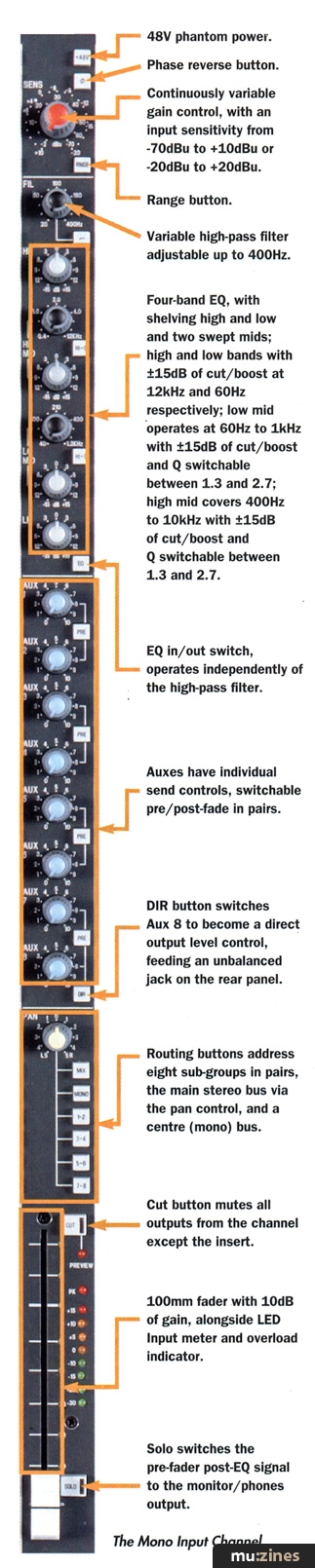
The Mono Input Channel.
(Click image for higher resolution version)
At the top of each channel is the gain control. This is a continuously variable type, with a range button, giving it an input sensitivity from -70dBu to +10dBu on the XLR input, or -20 to +10 dBu on the balanced stereo jack inputs. This means it will handle pretty well anything you can throw at it. This is a top class preamplifier — no compromise here. There is 48V phantom power individually switched on every mic input (XLR input only), and a phase reverse button to play with. Unfortunately, there's no channel number marked at the top of the channel strip, and the legend at the bottom is in the scribble strip area where it will probably get covered with tape the first time the mixer is used.
Next down is the equalisation section, beginning with the desk's star attraction: a variable high-pass filter adjustable up to 400Hz. So many desks lack this valuable control, so effective for getting rid of vocal pops and unwanted rumble. This is a very nice touch (it also releases your Drawmer DS 201s for their intended job rather than using them just for their filters).
The main body of the EQ is a four-band design (borrowed from the Europa), with shelving high and low, augmented by two swept mid-sections with two switched Q settings (see box for specs). This is amply flexible for most situations and is quick to set up. The EQ can be switched in or out, independently of the high-pass filter. All the cut/gain controls have a positive feel and are fitted with centre detents. The subjective sound quality of the EQ is good, and I found it easy to focus in on what I wanted; the EQ gets a definite thumbs up.
And now another ergonomic point. I would like to see (on all desks, not just this one) some kind of small pointer or mark on the base of the knobs rather than just on the cap. This would be welcomed by live engineers who find themselves having to reset all the controls on the desk, normally with insufficient time, a maglight in their mouth for illumination, while trying to listen to the recorded settings from a dictaphone with the added distraction of the interval music. In real life, you spend two-hours doing a soundcheck, the other band's engineer comes along and changes all your settings, then you have maybe 10 minutes to put the console back as it was. It seems to me quite mad not to have the clearest possible indications of knob positions on the desk. Given that Harman are doing their best to buy up the audio industry as we know it, perhaps they should consider buying a small plastics company so that they can get sensibly designed knobs made at an affordable price.
The channel insert, which appears on the rear panel, is unbalanced and uses a single stereo jack socket, ring send/tip return. I don't have a problem with it being unbalanced, although some balanced outboard equipment may come back at a lower level if used unbalanced. The insert point is between the high-pass filter and the main EQ, which I feel is the best place for it.
The K2 has eight auxiliary sends for feeding the signal to effects units, stage monitors, and so on. They can all be switched pre or post-fader, in pairs. All the auxes are post EQ, but can be modified easily to pre EQ and/or pre mute in groups of four, using easily accessible jumpers on the circuit board. Aux 8 also switches to become a direct output level control, feeding an unbalanced jack on the rear panel. The main signal through the channel is then sent via the fader and constant level pan control to the eight Groups, Mix, and Mono buss switches. My preference is to place the routing switches at the top of the channel and to have some indication of which buttons are depressed. However, the K2 uses a similar type of switch to those used on the old mid-priced desks (such as the 600 Series), and in this case, they are placed directly above the fader. As is so often the case, it is quite difficult to see if they are up or down. On a recent visit to Soundcraft, one suggested solution was the addition of a momentary switch, which could use the input channel LED meters as routing indicators. For example, you could use the red LED for the Mix, an amber for the Mono, and the four greens for the paired Groups. This is something Soundcraft may be looking at in the future. Channel number identification is too small and is placed exactly where you'd want to stick your white insulation tape to write on. Soundcraft are also looking into the feasibility of changing this.
"... a nicely controlled bass, clear mid-range, and an open, crisp top end with plenty of EQ flexibility."
There are Solo and Cut buttons; the Cut button mutes all outputs from the channel except the insert. And finally, a reassuring LED input meter and overload indicator is located next to the channel fader.
Four stereo input channels, which come as standard, have balanced line inputs with a variable sensitivity of -20 to +10dBu. They have phase reverse on the left channel, inserts pre EQ, and the ubiquitous (and useful) Soundcraft stereo width control. The EQ has one swept mid section, instead of two. Everything else is as per the single channel, except that the pan knob is replaced by a balance control. A Mute Safe switch is recessed into the front panel to prevent the stereo channels muting when solo in place or the MIDI muting is used elsewhere on the console. The four stereo effects returns have a recessed switch to set the input sensitivity at -10dBV or +4dBu. The level can be visually monitored by switching the group output VU to read the stereo return level. The effect returns have Hi and Low shelving EQ and the ability to send the signal on either Aux 1&2 or 3&4. There are eight Master auxiliary output level knobs sending the signal to balanced jacks, and eight Master group output faders (with insert points) sending to balanced XLRs. Button switches and a pan pot route the Group signal to the Mix and Mono busses.
Another important feature is the ability to swap the Auxiliary and Group master controls so that the faders source their signals from the Aux sends (with inserts and metering), and the Group output levels are controlled by the Aux master rotary pots (without inserts and metering). This is necessary when using the console as a stage monitor desk, and I think it is one of the key attractions for companies looking at this console. It gives the K2 flexibility and broadens its range of possible applications.
The remaining outputs and inputs include two stereo balanced tape returns, switched between A or B and feeding the main Mix buss, after the fader, via a rotary level control. A recessed switch selects -10dBV or +4dBu operating levels; this is useful when setting up the desk discretely while background music or other activities (if a separate desk is inputted here) continue through the speaker system. The tape inputs bypass the mix insert points, but appear on the Matrix. A stereo headphone output is fitted at the front of the console, under the armrest (headrest?) and monitors any solo'd section or Mix output. The same appears on the monitor output on the back panel; useful if you are using delayed, nearfield monitors on top of the desk.
MAIN OUTPUTS

The Master Section.
(Click image for higher resolution version)
The main outputs, which have ample headroom of 26dBu, are controlled by the two Master faders. They may be set by the Fader Mode switch, which is accessible through a screwdriver hole in the front panel, to work in two ways: L/R-Mono mode, where the main left and right outputs are jointly controlled by the left fader and the mono output is controlled by the right fader, or L-R mode, where you can control the main left and main right outputs individually, with the mono output fixed at unity gain. All main outputs have insert points and appear at XLRs on the back panel. Finally, there are four Matrix outputs, which can pick up the signal from the eight Group outputs, left and right Mix and Mono outputs, mix them together using the 11 receive pots, and send the resulting signal, via the Matrix master rotary faders, to the balanced XLR outputs. The output can be visually monitored by depressing the MTX switch, which then commandeers the group VU from the same strip. This is a must if using the desk in theatres or venues where several different speaker systems are being used to cover side and top balconies, infills or even other feeds to different parts of the building. This feature is normally found as an option fitted at extra cost so it's great to find it here as standard.
GLOBAL FUNCTIONS
The K2 has a comprehensive Solo system of prefade (PFL) for inputs and after-fade (AFL) for outputs. An electronically-latching system, which uses illuminating buttons, is fitted to all inputs and outputs (except, of course, the main output section). The Solo function has its own level trim control plus a Solo clear button, which returns you back to the default Mix output on the headphones. When Auto cancel is activated by the ENBL button, pressing any other PFL or AFL will cancel the last one — this is handy when trying to track down feedback in a hurry. The channel Solo in Place button, when depressed, causes all the console input mutes to be activated except on the selected channel (but not on the stereo channels, if they have been set to Safe).
"... the EQ gets a definite thumbs up."
The talkback microphone plugs into an XLR socket on the front of the master module and has a level control pot. It can be routed to Aux 1-4, 5-8, the Groups, and an external out XLR. The external signal could be fed back down the multicore system to the monitor desk, enabling communication with the performers on stage during soundchecks. If the monitor desk happens to be another Soundcraft desk, then you can use their proprietary system, which doubles as a headphone communication and call system. For the engineers to communicate during the performance, a headset microphone would be needed. I like the idea of only having one pair of headphones for monitoring and communication (as long as you trust the monitor man not to feed your conversation into the wedges!). With this in mind, the Talkback mic input would be better positioned next to the Headphone socket.
The oscillator has an on button and level control. It pushes out pink noise unless you press the tone button, then it outputs a sine wave, variable from 63Hz to 10kHz in two switched ranges. The oscillator is fed to the Group, Aux, Stereo, and Mono Mix busses (any of these can be disabled with jumpers on the circuit board). The oscillator is useful when setting up the PA — to seek out new life and identify problematic standing waves, to boldly EQ the space...
The power supply seems sturdy enough and is reasonably light due to the use of switch mode circuitry. However, it remains to be seen whether increasingly stringent EC measures force companies back to more conventional PSU designs. Two supplies can be linked together so that if one fails, the show can continue uninterrupted. I would always recommend using two supplies for critical applications, just in case.
Finally, the last feature on the desk is the provision of two power sockets on the back panel for 'Littlelites'. The lights come as an option at £80 each, although if you shop around, you can pick them up for around £50 or even less.
CONCLUSION
To bring the cost of the K2 down, two areas have been compromised. Firstly, LED indication of the desk routing has been omitted, and secondly, the non-modular design makes servicing less straightforward. That aside, the K2 comes very close to offering the same features and sound as the K3, but with a few useful additions derived from listening to feedback from engineers in the field. What's more, the K3 matrix is an option, not a standard feature.
Having worked on a broad cross section of live shows, I feel the K2 is best suited to mid-size venues or touring companies, or as a second desk, which can double up as a monitor board. I can think of at least one hard working musical show I've worked on recently where this desk would have been ideal. Soundcraft are confident that the refined design and manufacturing method used for the circuit boards will lead to a high level of reliability, and the ribbon cable back-plane helps greatly in avoiding the stress related failures associated with fixed backplane systems. In marketing the K2, Soundcraft's problem will be selling the concept of a non-modular console to professionals who expect to be able to change faulty channels very quickly.
The K2 is a compact, relatively lightweight console (until you put it in a flightcase), delivering stunning sound quality and enough output options for most requirements. The standard of the audio circuitry you get for your money is presently unbeatable and is very closely related to that found in the K3. I found the desk intuitive to use, and to my mind, the EQ section struck a good balance between flexibility and ease of use. It has plenty of versatility and range to focus in on the sound, while the inclusion of a variable high-pass filter is a true piece of inspiration for a desk in this price bracket.
Of course, a desk must not only be reliable and include the right range of features, it must also sound good. In this case, the K2 has a nicely controlled bass, clear mid-range, and an open, crisp top end with plenty of EQ flexibility. Even with added high frequency boost, the desk sounds transparent and not 'phasey'.
24-channel £6,100. 32-channel £7,200. 40-channel £8,500. All prices include VAT.
Soundcraft, Harman International Industries, (Contact Details).
pros & cons
pros
- Good sound quality.
- Really nice EQ including variable high-pass filter.
- Meterbridge & VUs as standard.
- Flexible output options.
cons
- Non-modular design.
- A few ergonomic niggles.
summary
A good sounding desk at an exceptionally low price. Particularly worthy of mention are the superb EQ and the four matrix outputs provided as standard. The K2 is suitable for all live applications where VCA fader control isn't required, and it has the ability to double as a monitor board.
SPECIFICATION
| Oscillator: | 63Hz to 10kHz/pink noise variable level |
| Frequency response: | +0/-0.5dB, 20Hz - 20kHz (any input to any output, measured at up to +50dB gain) |
| Equalization | |
| - High: | ±15dB © 12kHz |
| - Hi Mid: | +15dB @ 400 - 12kHz; Q 1.3 & 2.7 |
| - Lo Mid: | ±15dB @ 40 - 1.2kHz; Q 1.3 & 2.7 |
| - Low: | ±15dB @ 60Hz |
| Stereo input | |
| - Mid: | ±15dB @ 300 - 3kHz; Q 1.0 |
| - Hi-pass: | 12dB/oct 20 - 400Hz |
| THD and noise | |
| - High impedance I/P to Group or Mix O/P (measured at +20dBu output): | <0.005% @ 1kHz |
| - Mic input EIN (22Hz - 22kHz bandwidth, unweighted): | <-127dBu (150 Ohm source) |
| - Mix bus output noise (40 ch routed): | <-84dBu |
| Crosstalk (all measurements at 1kHz) | |
| - Channel muting: | >90dB |
| - Channel routing: | >80dB |
SCENE MUTES
To set a scene, press the required cut buttons on any of the input channels, Group or Matrix outputs. The seven-segment display will show three flashing dots (this indicates that a change to the cuts has taken place), and the Store and Recall buttons illuminate. Then select a scene number using the up or down buttons and press STORE. It now asks you to confirm that you want to overwrite the selected scene number by pressing the 'YES' or 'NO' buttons. A preview mode is selectable by pressing 'PREVIEW'. This mode is not 'live' — any cuts which you select will not cut the audio signal, but they will be shown on the preview LEDs adjacent to the CUT switches in question on each channel. This would be used to edit scenes during a live performance. The newly edited scenes could then be stored in the same manner as for the active mode. To recall, simply press the up/down buttons until you arrive at the scene you want; the number will flash at you. The mutes will activate when you hit 'RECALL'.
The K2 also has eight mute buttons, which have two modes. They can act as conventional mute groups, independent of the MIDI mutes but set up and used in the same way, or as programmable select buttons for the MIDI mute mode. Only eight of the 128 scenes can be selected, so for instance, it could be the most used scenes in a production. Unfortunately, the mute buttons are particularly easy to trigger accidentally as they are sited next to the faders at the right of the console — this is potentially dangerous if in Mute group mode. It would be reassuring to have an additional button at the top of the Mute section to lock the mute status of the desk to avoid any possible embarrassment. All the mute information is stored in the battery-backed memory within the desk, although it may also be dumped to an external device via the MIDI ports.
Publisher: Sound On Stage - SOS Publications Ltd.
The contents of this magazine are re-published here with the kind permission of SOS Publications Ltd.
The current copyright owner/s of this content may differ from the originally published copyright notice.
More details on copyright ownership...

Sound On Stage - Jan 1997
Gear in this article:
Mixer > Soundcraft > K2
Review by Richard Waghorn
Help Support The Things You Love
mu:zines is the result of thousands of hours of effort, and will require many thousands more going forward to reach our goals of getting all this content online.
If you value this resource, you can support this project - it really helps!
Donations for August 2026
Issues donated this month: 0
New issues that have been donated or scanned for us this month.
Funds donated this month: £0.00
All donations and support are gratefully appreciated - thank you.
Magazines Needed - Can You Help?
Do you have any of these magazine issues?
If so, and you can donate, lend or scan them to help complete our archive, please get in touch via the Contribute page - thanks!
If you're enjoying the site, please consider supporting me to help build this archive...
...with a one time Donation, or a recurring Donation of just £2 a month. It really helps - thank you!

 @mu_zines
 RSS Feed
 Blog
Blog