


Magazine Archive
Home -> Magazines -> Issues -> Articles in this issue -> View
Tantek Master Matrix | |
Article from Sound On Sound, August 1987 | |
It may sound like something out of a Dr Who plot but this British electronic patchbay system attracted enormous interest from pro studio users at this year's APRS show. David Mellor got hold of a Matrix to find out just what all the fuss is about.
Question: When is a patchbay not a patchbay? Answer: When it's a crosspoint matrix. David Mellor examines the difference between the two and tries out Tantek's modern substitute for good old-fashioned cables and connectors.

If you were never a Boy Scout (or Girl Guide) then, chances are, the first time you made a reef-knot was when you tried to patch all your auxiliary sends and returns to the studio effects rack! The subtle and gentle art of patching (or 'knitting' as some would have it), using patchcords and a conventional jackfield, can be wearisome in the extreme - especially when you have to delve amongst a Sargasso Sea of cords to check exactly what you plugged where at the start of a long session. The idea of a computerised, MIDI controllable alternative may seem like a godsend to studio owners and users who need a patchbay but find it the most user-unfriendly piece of equipment in their inventory.
PATCHBAYS AND CROSSPOINTS
"What's a patchbay?" I know someone, somewhere, must be asking that. I apologise to those who already know, but since I'm going to get deep and meaningful shortly, it's better to start at the shallow end.
A patchbay, said the Walrus to the Carpenter, used to be known as a jackfield in this country until the upstart word was smuggled across the Atlantic in a consignment of Colorado beetles. What you do is take a load of jack sockets and mount them all next to each other in a rack. If you connect every audio input and output of your equipment to a corresponding socket on the jackfield, then it will be dead easy to connect whatever output to whatever input you like. Some people still manage without one. I don't know how...
Not only can you connect your equipment up with standardised patchcords, but pairs of inputs and outputs can be normalled so that they are connected internally when there is no external cord travelling between the sockets. Let's have a look at a very small jackfield (Figure 1).

Fig 1
This would be wired so that Tape Output 1 was normalled to Mixer Channel 1; Tape Output 2 to Channel 2 and so on. You wouldn't need any patchcords at all to mix every track on the tape. There would be the additional advantage that any output could be paralleled to somewhere else ('sniffed'), to an effects unit, for example. Also, if you wanted something other than Tape Output 3 to go to Mixer Channel 3 then all you would do is to overplug the normal, inserting a patchcord connector into Channel 3 breaks the normal connection to the tape recorder. There are other, more complex, systems of normalling but this is the usual studio method.

Fig 2
That's a patchbay, what about a crosspoint matrix? The difference is that you do not have patchcords, just connectors. Figure 2 shows a crosspoint matrix.
In this case, every socket in horizontal row 1 is connected to Tape Output 1 and every socket in vertical column 1 is connected to Channel 1 of the mixer. To connect an output to an input, you simply plug a connector into the socket where the appropriate row and column cross. For example, to connect Tape Output 3 to Channel 4 see Figure 3.

Fig 3
This system is potentially more elegant than the patchbay. There are no dangling cords to get in the way and there is also the convenience of being able to connect one output to as many inputs as you wish.
The crosspoint matrix seems to have a lot going for it, so why don't you see more of them knocking about? You can, after all, make them out of exactly the same components as a patchbay.
There are two reasons. To illustrate the first, imagine that you have a studio set-up with 20 outputs and 20 inputs. You would need a 40 socket jackfield - occupying a mere 2U of rack space. To have a crosspoint matrix, you would need 20 x 20 sockets - 400! - which would take up a mere 20U (35 inches) of rack space using standard connectors. An 8-track studio with possibly a 100 hole jackfield would need a 2500 hole crosspoint matrix for full coverage. There are clear economic problems here.
The second snag is that every input and output has a considerable length of wire connected to it at all times, and these wires pass pretty close to each other. So, suddenly, your crosspoint matrix becomes a crosstalk matrix, not to mention all that hum and interference it's probably picking up too.
MATRIX MASTERY
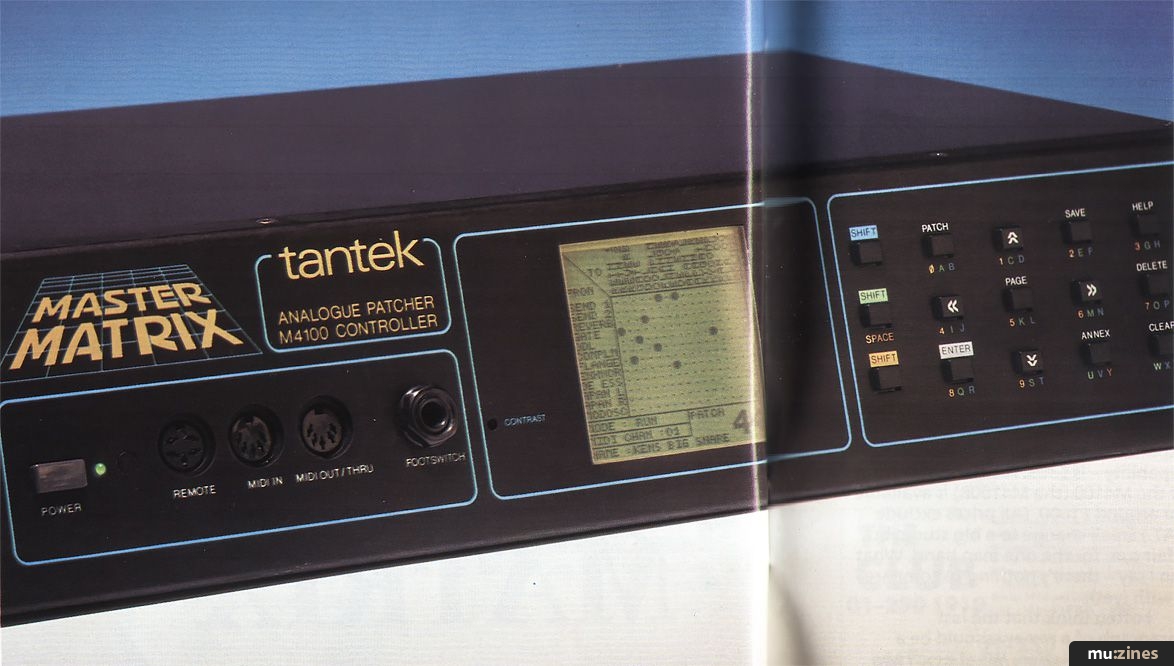
All the above preamble brings us to the piece of equipment that is the subject of this review. I am not aware of anything like it in a price bracket reasonably close to ground level, so I think it's important to make my perspective clear. The Tantek Master Matrix is not an electronic patchbay, not in my opinion anyway, and I don't intend to review it as such. I think it can be a valuable tool in its own right, especially when used in a MIDI system. Let's find out why...
The Master Matrix is a 12 source, 16 destination electronic crosspoint switcher. If you had 12 synthesizers and a 16 channel mixer you could patch any synth output to any mixer input using this system. There is also an expander unit which quadruples the number of crosspoints available (24 source, 32 destination). Since the switching is electronic, there is none of the crosstalk I mentioned earlier (-95dB according to the spec).
I found that the best way to use the machine was to connect my most used ins and outs to it, leaving the rest to my conventional jackfield. I have a total of 32 synth and effects outputs in my own set-up, so some had to be excluded.
The first thing to do is to assign inputs and outputs to positions on the matrix. All outputs go to rows, all inputs to columns. A grid appears on the display with space for naming inputs and outputs. Each name can have six characters which I found was quite ample.
I must put in a comment about how wonderfully large the display was. Other manufacturers please note. This reviewer hopes to see displays getting larger and more informative every year. I hope someone is listening!
Large though the display is, it is just enough to cope with the unexpanded version. As I hinted earlier, doubling the number of inputs and outputs quadruples the number of crosspoints. Four display pages are needed to cope with the whole system. This isn't a quibble, just one of those things, and in fact Tantek have done quite well because they include a small graphic on the display which shows you pictorially which page you are on. An alternative is to use the Compact function, in which unmade crosspoints are not shown.
As with a conventional patchbay, pairs of connections can be normalled together, this being part of the assignment process. They work in exactly the same way as the normals I described earlier and if you don't want them to apply to a particular patch you set up, they don't have to.

Fig 4
It takes a bit of button pushing to complete the assignment but, fortunately, once it's done, it's done - at least until you add a new piece of equipment to your set-up. Although I tried more comprehensive assignments, one interesting one is shown in Figure 4.
Okay, so it's not very big, but it's surprising what you can do with very little. (I'll tell you what I did with it later.) Once you have got the assignment, setting up a patch is easy. Press 'Patch' (so obvious!) and a pair of cross-hairs appear on the display so that we can do a bit of target shooting. Move the centre of the crosshairs using the arrow buttons. When in position, fire! Sorry - press 'Enter'. A black blob will appear which indicates that the crosspoint is made. I 'blobbed' Tape Out 1 to Delay In, Tape Out 2 to SPX90 In, Delay Out to Mixer Channel 5 and SPX90 Out to Channel 6. The four tape tracks went directly to mixer channels 1 to 4 via my patchbay, although I could have used the Master Matrix.
Looking at it like this, I seem to have gone to a lot of expense and bother to do something I could have done with good old copper wire. The magic begins when you think that patches can be much, much more complex - I wouldn't like to calculate how many combinations of crosspoints there must be - and that 99 different ones can be memorised. This is especially good news for anyone who needs to repeat set-ups, such as a live keyboard player. Patches can be named too - with up to 14 letters to make life even easier.
My first set of blobs therefore became Patch 01, entitled 'First Bit'. (I'm so original.) For my second patch I connected Tape Out 3 to Delay In, Tape Out 4 to SPX90 In, Delay Out to Channel 7, and SPX90 to Channel 8. Title: 'Second Bit'. So what? Could it be that I'm leading up to something?
THE BEAST WITH FIVE FINGERS
Yes, it's MIDI again. The Tantek Master Matrix responds to program change data just like any good signal processor. (I remember when Yamaha brought out the first MIDI controlled digital delay - the D1500 - and everybody scoffed at it!) The usual 16 MIDI channels are catered for and up to six cross-programming tables can be set up. This means that selecting program 17 on your master keyboard does not necessarily have to call up patch 17 on the Tantek - it could be any of the 99 possible patches. Tantek also envisage a situation where more than one keyboard may be used to transmit program changes. This might happen in a live situation when the player performs on several MIDI keyboards (for added audience excitement) and uses a MIDI merger to combine data. The Master Matrix can have its six program tables set up to recognise different MIDI channels.
Not currently being a live performer myself, it sounds to me as though this could become rather complex rather quickly. (Last time I played keyboards with a band I used a Fender Rhodes piano! 88 notes are enough for me.) I think it's time I went back to that curious patch I was talking about earlier.
Looking back at the diagram (Figure 4), it looks a bit too simple to be of any real use. What I wanted was a way of switching auxiliary sends to different signal processors. I had four tracks on tape which were the basics of a song demo I was working on. Being into random processes at the moment.
I thought that if I set up several patches with different tracks feeding the effects, and if I switched the effects returns between several mixer channels with different EQs, I might stand a chance of coming across something interesting.
I have to say (brag, brag) that it worked very well. I had my sequencer switch patches every two bars, with the result that I would get drum echoes and flanged bass in one section of music, then synth echoes and flanged drums in another - with EQ changing all the time. It was a bit raw at first but at the right level it certainly brought some action to the track.
After some thought and some rearranging of patches, I had a very lively little backing track. I'm just waiting for the lively little singer to turn up now.
To summarise my 'getting to know you period' with the Master Matrix: I went through a complete change of opinion. I started out seeing it as a patchbay replacement that wasn't really powerful enough to be any use and ended up using it almost as another musical instrument. I could even have used it to automate channel muting during mixdown in a similar fashion to MIDI controlled mixers - and there is more to come.
MIDI TRANSMIT
Not only is the Master Matrix adept at controlling audio signals, it can also set up your MIDI equipment for you. (No - not hump it out of the van and onto the stage!) It can transmit a complete set of MIDI program numbers for channels 1-16 for each of the possible 99 patches. For example, if you selected patch 5 on the Tantek, it could be made to transmit program change 15 on channel 1, program 27 on channel 2, etc ... all the way up to channel 16. So changing the patch on the Tantek changes the program for each MIDI synth. Not only that but it handles song numbers as well, so your MIDI drum machine knows which tune it is supposed to be playing.
Patch data can also be transmitted via MIDI, not using system exclusive messages (what a bore they are). By assigning note values to patch data, any old MIDI sequence can store an entire library of sound patches - as long as it can manage 6000 notes or more. The Master Matrix itself doesn't have a cassette interface but by going through a sequencer in this manner any number of patches could be stored.
CROSSPOINTS
Nothing in life is perfect and a couple of points did make me cross. Nothing too serious, but I did think the unit could have been better finished. The Master Matrix isn't cheap and obviously hasn't been designed on the cheap, so it shouldn't have to look quite as cheap as it does. For example, the rack mounting lugs come packed separately and have to be bolted on. This leads me to think that Tantek have considered the possibility of using the Master Matrix and its expander as free-standing units. If so, why are there no rubber feet to stop the protruding screw heads from scratching whatever they stand on? Why are the screws not properly countersunk anyway? Why is the supplied interface cable for the expander so short? There are no controls on the expander so it could be situated somewhere out of the way instead of taking up valuable eye-level rack space. And why on earth are the MIDI sockets on the front panel?
Please, at least, bung some parallel sockets on the back so that we can keep cables where they belong - out of sight. It seems ironic that a device which promises to eliminate dangling patchcords should itself encourage dangling MIDI cables.
PLUSPOINTS
These are the good bits that I might have neglected to mention because of all the problems they didn't cause!
Anyone buying a switching matrix ought to be worried that it might degrade the sound quality. This one doesn't - at least very, very minimally. Frequency response is flatter than a Grace Jones haircut (+/- .25dB, 20Hz to 20kHz). Noise is lower than a snail's belly (-110dBm, A weighted). It has less distortion than a report in a tabloid daily. (Much less, 0.008%). These are all manufacturer's figures, incidentally, but I trust the confirming evidence of my ears. Impedances are sensible, headroom is high - what more can one say? I could mention that the first four sources and destinations have switchable gains to match -10dBu equipment to 0dBu settings. The last four sources and all destinations are DC compatible allowing for interconnection of control voltages for modulation of effects where applicable.
CONCLUSION
The Tantek Master Matrix analogue patcher M4100 controller (to give it its full title) costs £766; the M4200 expander - which quadruples the capability - is £383. A balanced version of the M4100 (the M4100B) is available for around £1000. (All prices exclude VAT.) Small change to a big studio but a fair sum for the one man band. What can I say - there's nothing to compare it with (yet).
I often think that the last paragraph of a review should be a time for speculation. What next? My answer to Tantek is that I like their crosspoint matrix but can I have a proper electronic patchbay as well, please? Come on lads, you can do it.
Contact: State Of The Art Distribution, (Contact Details).
Also featuring gear in this article

Publisher: Sound On Sound - SOS Publications Ltd.
The contents of this magazine are re-published here with the kind permission of SOS Publications Ltd.
The current copyright owner/s of this content may differ from the originally published copyright notice.
More details on copyright ownership...

Sound On Sound - Aug 1987
Gear in this article:
Review by David Mellor
Ads for Gear in this article:

Help Support The Things You Love
mu:zines is the result of thousands of hours of effort, and will require many thousands more going forward to reach our goals of getting all this content online.
If you value this resource, you can support this project - it really helps!
Donations for July 2026
Issues donated this month: 0
New issues that have been donated or scanned for us this month.
Funds donated this month: £0.00
All donations and support are gratefully appreciated - thank you.
Magazines Needed - Can You Help?
Do you have any of these magazine issues?
If so, and you can donate, lend or scan them to help complete our archive, please get in touch via the Contribute page - thanks!
Please Contribute to mu:zines by supplying magazines, scanning or donating funds. Thanks!
Monetary donations go towards site running costs, and the occasional coffee for me if there's anything left over!

 @mu_zines
 RSS Feed
 Blog
Blog