


Magazine Archive
Home -> Magazines -> Issues -> Articles in this issue -> View
Making Tracks | |
Tascam Porta TwoArticle from Home & Studio Recording, December 1986 | |
This month's cover feature, the brand new Tascam Porta 2. Bristling with features, this 6-channel, 4-track portable studio still falls within an attractive price bracket.
Tascam's new Porta Two is furnished in the same style as the immensely popular Porta One but now features six input channels, a sync input for time code recording and simultaneous 4-track record capabilities.
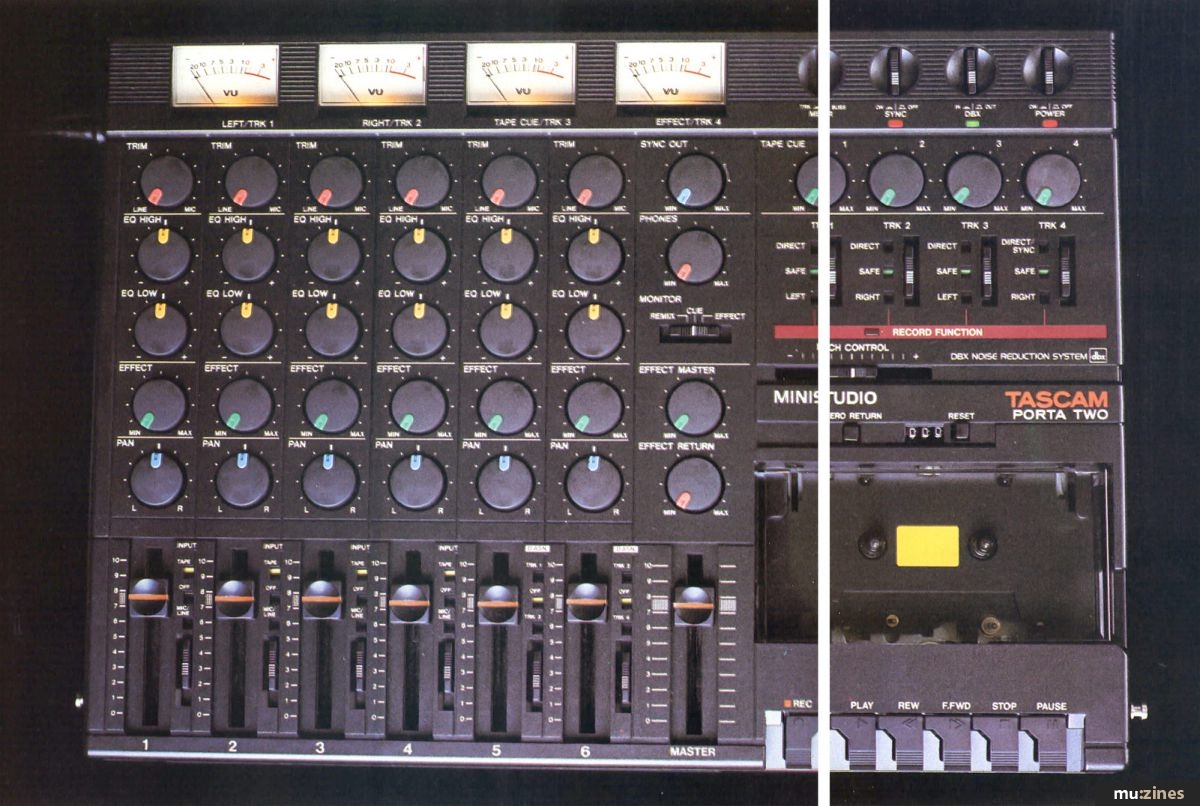
When the Porta One was launched just over two years ago, it represented just about the most cost-effective way for the home recording enthusiast to get involved in multitrack recording and at the same time, offered a reasonable number of facilities. Since then, the demands of the home user have changed somewhat and the Porta Two has been designed to satisfy as many of those requirements as possible while still maintaining an attractive retail price. With the introduction on to the home recording market of MIDI sequencers and drum machines that can sync to tape via their own FSK (frequency shift keying) codes it became possible to extend the capabilities of budget multitrack by running some instruments in real time from a time code track at the mixing stage. This technique generated the requirement for more mixer channels to handle the extra instruments and for some way of reliably recording and retrieving the time code generated by the drum machine or sequencer.
Secondly, cassette multitrack recorders such as this one have become popular for recording live music and so 4-track simultaneous recording is essential.
Lastly, the availability of good quality, low cost studio effects means that any self-contained studio needs a proper effects send facility with a stereo effects return point. Not surprisingly, the Porta Two has all these things.
A Look Around
The Porta Two is a battery or mains 4-track cassette-based all-in-one studio centered around a cassette mechanism running at the standard speed of 1⅞ips and using DBX noise reduction. A zero return function works together with the mechanical tape counter so that the tape can be made to stop automatically during fast rewind when the counter reaches zero. There's also a fast cue facility which works by pressing either of the fast wind keys while the unit is still in play. This causes the transport to fast wind only for as long as the keys are pressed whereupon it returns to play mode. During this fast wind (cue) mode, an attenuated version of the signal is heard at the output so that starts and finishes of songs or sections can be recognised without your tweeters tearing free from their mountings.
As is now customary, the Porta Two has varispeed so that it may be tuned to awkward instruments rather than vice versa. This offers more than enough range to compensate for tuning deficiencies and also allows scope for the creation of the odd special effect. If the Porta Two is to be used to record a sync track from a sequencer or drum machine, there's a switch entitled Sync which activates a separate sync input and routes it to channel four.
As stated, the Porta Two can record onto all four tracks at the same time which is a big step forward, particularly in its role as an on-location portable recorder. Because the unit runs on batteries as well as mains, several design innovations have been incorporated to conserve power. The four illuminated moving coil VU meters don't light up in battery mode and all the indicators, with the exception of the DBX, Power, Record and Sync LED indicators are mechanical consisting of strips of reflective material uncovered by the various switch actions: another clever power saving move.
With portability in mind, Tascam have built the control panel almost flush. All the controls are all recessed and the switches all low profile. The knobs are made from the same rubbery material as the ones on the Porta One but have improved position markers. Pegs for the included carrying strap are fitted and as the whole unit weighs only 3½kg, it's light enough to carry for long periods.
Up the Channel
The mixer channels are all capable of accepting both mic and line levels and the trim control is used to set the required amount of gain. Since there is no PFL (Pre-Fade Listen) of the kind you would find on a separate mixer, the gain is optimised with the channel fader set between seven and eight whilst observing the meters. Additionally, each channel has bass and treble controls, an auxiliary send and a pan control as well as a gain slider, so it follows the same format of up-market mixers. Adjacent to each fader is a 3-position selector switch. On the first four channels, this determines the source of input for the channel which may be either mic/line, tape or off.
The first four channels can be routed to any tape tracks you like but remember that the left buss goes to both tracks one and three while the right buss goes to tracks two and four. Of course you don't have to record both tracks, you would normally only set one track to record. Conversely, mixer channels five and six are limited in their possible destinations. They only go to one tape track at a time and channel five is limited to odd numbered tape tracks while six is limited to the even ones. During the final mix though these channels feed the main stereo buss. Actually, as compromises go, this is pretty good because it means that with only a little forward planning, you can do virtually anything you could do on a more expensive machine offering full routing.
Along the front edge of the machine are the channel inputs, the phones output and a socket for a remote punch-in footswitch which may be purchased as an option.

All the other connections are to be found on the left hand side and these include the power supply input and the main line outputs. These, like the four Tape Outs and the Sync In and are on phono connectors. The effect output is on a standard jack as are the effects returns. The two effects returns are panned hard left and right, but if you want to use a mono effect, you can plug into the left return only which will then distribute the effect's output evenly between the left and right speakers, thus giving the impression that the sound comes from the centre of the mix. Lastly we have the Tape Cue Out which carries the outputs from the four Tape Cue controls above the recorder section. These may be used to set up a rough mono mix for overdubbing so that the performer can hear what's already on tape.
The moulded plastic case houses four meters which monitor signals going onto and coming off tape and can be switched to monitor the effects line and the tape cue level whenever these need checking. The record controls themselves are located directly below the Tape Cue controls and are in the form of 3-way switches which select Safe, Direct or L/R buss. In Direct mode, channel one is fed to tape track one and so on. In L/R buss mode, the channel output may be steered between the left and right busses using the pan controls - odd numbered tape tracks receive the left buss signal with the even numbered tracks receiving the right buss.
The master section has a single stereo slider so you don't have to worry about unbalanced fades and there are level controls for both the effect send and the effects return. The sync out level is also variable as are the phones which may be switched to monitor Cue, Remix or the Effect buss.
Laying the Tracks
Setting up the channel input levels is easy enough, but you have to plan things a little bit in advance where routing is concerned. This is because only channels one and two have insert points, so if you want to use an in-line processor such as a gate or compressor while you are recording, these are the channels to go for.
For those of you unfamiliar with insert points, they're quite simple. A stereo jack socket is wired into the channel electronics after the input gain control but before the EQ section. The tip of the stereo jack carries the outgoing signal whilst the ring carries the return signal. When nothing is plugged in, these are switched together so that the signal path is unbroken. If you want the signal to go through something like a flanger as well as through the mixer channel, then you patch your flanger into the insert point and it then acts as part of the channel. And because the signal has passed through the input amplifier of the channel first, you don't have to worry about levels whether your input is from a mic or an instrument.
You also have to consider the way in which the channels can be routed. The direct mode is easy to understand and for most applications, it's the one that will be used most, at least for getting the first few tracks down. However, the buss mode too is useful because it means that several sources can be combined and steered to the same channel.
Once you have recorded the first two or three tracks, these may be bounced onto a single track to conserve space and of course you can add other instruments and effects at the same time. Once you are satisfied that this new track is satisfactory, you can re-record over the first three tracks. If you really want to get as many layers down as possible, the best method is to record just two of the three remaining tracks and then bounce these down onto the third, adding another instrument at the same time. This leaves you the two tracks free to record new parts and in this way, you can get up to ten different parts onto your four tracks without any track being bounced more than once. Remember though that if you're using the sync facility, you can only record music onto the first three tracks.
When you mix, you can add even more parts live as you go along and you can add effects using the effects send facility and via the two insert points. When using the effects send, your external effect should be set to give the effected sound only, and remember that the only effects suitable for use in send/return systems are those that add an effect to the basic sound, not ones that process the whole sound. For example, you can use echoes, reverbs, choruses and flangers from the effects send system but compressors, equalisers, gates and enhancers should only be used in the insert points. However, delays, reverbs and the like may be used in the insert points to treat a single channel as most have a control for mixing the direct and effected sound.
Record mode is entered by first setting record status on the track or tracks you wish to record and then pressing the Record button. You don't have to press Play and Record together, as the two controls are mechanically interlinked. When you press record, the Play button automatically goes down too. All the switches are mechanical but they're fairly easy to use and don't feel unduly clumsy. To exit record mode you can either press Stop or use Pause followed by Stop. You can also enter record from pause mode by pressing Pause followed by Record. When one or more tracks are armed ready to record, the record function LED flashes as a warning. When Record is pressed, the LED stays on to show that recording is taking place.
At this point it's well to point out that the meters which indicate the record level are VU meters and not peak reading meters. Also, presumably because of monetary considerations, there are no peak LEDs. The outcome of this is that you have to be a little careful when interpreting the meters, particularly when recording percussive sounds. VU meters are not fast enough to respond to drum beats and so will always read lower than the peak value. Once aware of this you can take the necessary action which is to allow a few extra dB safety margin when recording drums by ensuring that the meters don't go higher than about -3dB. To perform this more precisely, you need to make a few test recordings at different levels to see how loud you can record before audible distortion sets in. This will provide you with the best signal to noise ratio. When adding tracks, the tape cue section is used so that you can hear the tracks you've already recorded. This is also used when dropping in sections that contain mistakes to monitor what you've already done. The easiest way of dropping in is to use the optional punch in/out switch but you can drop in just by pushing the record button at the appropriate point and pressing stop to drop out.
Bouncing tracks is done in much the same way as recording the original tracks except you set the channel switches to tape on the tracks you are bouncing from. These are than routed to the appropriate destination tracks and may treated in much the same way as ordinary live input signals.
The DBX noise reduction is capable of reducing the tape noise to the point of extinction but it's not without its side effects. It works by heavily compressing the input signal on record and expanding it on playback. The result on playback is that the original dynamics are restored though the average signal level recorded on tape is far higher than it would be without DBX. The noise is still present during loud passages but is masked by the music. On quieter passages, the expander action reduces the noise at the same time as it reduces the wanted signal to its original level.
The compromise is that percussive sounds are sometimes changed in character and can lose a bit of their attack. Analogue drum machines especially are susceptible. Nevertheless, forewarned is forearmed and you can compensate for this to some extent by recording the drum sounds with a little extra top. It is possible to switch the DBX off but the results are a bit on the noisy side, as you might expect.
For mixdown, switch the first four mixer channels to Tape and you're ready to go. You can use the last two channels to add more instruments live as you mix or to accommodate the outputs from drum machines or sequenced synths running from a sync track recorded on tape. Conversely, if you have a rich friend with a full scale studio, you can plug the four tape outputs into his system and mix the whole thing using his mixer and whatever effects are to hand.
Syncing
The current trend is to fit the more sophisticated drum machines and sequencers with sync inputs and outputs so that they can be locked to tape. The principle is that firstly the drum machine is set up to the correct tempo and a suitable guide rhythm programmed. Then the sync output from the drum machine is recorded onto one track of the tape recorder and the guide drum part onto another. It doesn't matter if at this point the drum part isn't exactly right as long as it's in the right time, has the right tempo and is long enough. Now, when the drum machine is switched to follow a sync code rather than to generate one, it can be fed from the sync track and it will faithfully keep time with the tape.
Of course you wouldn't normally sync up the drum machine at this stage as you'd have nothing to gain. In practice, you'd record most of the other tracks first and then see if you wanted to change the drum part. Then finally, you'd record over the guide drum part and use the drum machine running from the sync code during the mix. The sort of occasion on which you might want to sync up right from the start is when you are locking a sequencer to tape and this would enable you to hear the parts loaded into your sequencer and played via your MIDI keyboards at the same time as you are overdubbing new parts.
One misconception to dispel though is that the sync facility miraculously creates sync codes or allows you to sync up machines that don't have a sync output. Your drum machine or sequencer must produce a sync code output and if it only has a Roland style DIN sync socket, you'll still need something like an MPC Sync Track to convert the sync output into a suitable code so that it can be recorded onto tape.
Sync codes have a reputation for being awkward to record, especially when the recorder has noise reduction. In this respect, DBX can prove more troublesome than Dolby C. To get around the problem, the sync input on the Porta Two bypasses the DBX, the EQ and even the level controls so that your code is always recorded onto tape at the correct level and in an uncorrupted form. When the tape is played back, the sync output level may be varied by means of a simple level control so that the optimum level can be set up for your particular drum machine or sequencer. Once the most reliable level has been established, you shouldn't need to change it again. Of course this facility does rob you of one of your tracks unless you decide to record all your sequenced parts onto tape before the remaining three tracks are all full. If you do this, then you can record over the sync track, but just make sure that you aren't going to need it again.
There seems to be no reason why this system couldn't be used to record SMPTE codes too but, as SMPTE units are still relatively expensive for most people using cassette multitrack recorders, I shouldn't think that many will make use of this approach.
Impressions
A portable studio like this one needs to be logical to operate, fairly flexible and most of all, produce good sound quality. It must also have an appropriate price tag for the type of person likely to need it. Given that this is a standard speed machine equipped with DBX, the sound quality is well up to standard. Drawbacks caused by the DBX aren't as serious as found on some machines, and shouldn't cause any serious problems. An advantage of DBX is of course the exceptionally low background noise, and you'll probably find that your instruments and effects add more noise than the tape does. Even so, I would have preferred to see Dolby C rather than DBX because it sounds more attractive to my ear and doesn't take the edge off percussive sounds. As this particular chestnut is a continuous source of conjecture, argument and in some cases fights to the death, I'll leave it at that.
As for bounces, two or three are possible before noise becomes a problem, but bouncing does tend to alter the tonal quality of the recording for the worse each time it is done so it is as well to plan for the minimum number of bounces.
Operating the unit is no problem if you plan your session in advance including any bounces that you might have to do. (This represents good studio practice in any case.) As to flexibility, there will always be facilities you'd like that are absent, but you do get proper auxiliary sends, even though there is only one per channel, and the two insert points are invaluable. Also important is the fact that tape outs are fitted, so the user has the option of patching into an external mixer. It would however have been nice to have a stereo buss input so that a small mixer could be added without tying up any of the existing channels, but sadly this is not provided. You could at a pinch feed a mixer in through the two aux returns though.
The drop-ins are as free of clicks as you could expect from a cassette machine and are quite inaudible in a mix. Nevertheless, it's good practice to drop in and out on drum beats so that any discontinuities are masked.
One disadvantage is that the machine fairly eats batteries when used as a portable but, that's one of those immutable laws of physics and no fault of Tascam's.
At the asking price, the Porta Two must be considered good value for money and it's styling is as elegant as its operation. Perhaps next year we'll see a Porta Three with twelve mixer channels a built-in MIDI sequencer and digital reverb, who knows? But for now, it's a product that makes a lot of sense and reflects the market research that went into it.
The Porta Two costs £625 including VAT.
Further details can be obtained from: Harman UK, (Contact Details).
Also featuring gear in this article

Reviews
(IM Dec 86)

Tascam Porta Two
(MM Nov 86)


The Porta Two has Landed - Tascam Porta Two
(SOS Dec 86)
Browse category: Cassette 4-Track > Tascam
Featuring related gear

Four-track Cassette Machines
(12T Jan 85)

One Upmanship - Tascam Porta One
(ES Jan 85)

Tascam Porta One Ministudio
(HSR Dec 84)

Tascam's Porta-1
(IT Dec 84)

The New Portastudio - Tascam Porta One 4-track
(12T Nov 84)
Browse category: Cassette 4-Track > Tascam
Publisher: Home & Studio Recording - Music Maker Publications (UK), Future Publishing.
The current copyright owner/s of this content may differ from the originally published copyright notice.
More details on copyright ownership...

Home & Studio Recording - Dec 1986
Donated & scanned by: Mike Gorman
Review by Paul White
Ads for Gear in this article:


Help Support The Things You Love
mu:zines is the result of thousands of hours of effort, and will require many thousands more going forward to reach our goals of getting all this content online.
If you value this resource, you can support this project - it really helps!
Donations for July 2026
Issues donated this month: 0
New issues that have been donated or scanned for us this month.
Funds donated this month: £0.00
All donations and support are gratefully appreciated - thank you.
Magazines Needed - Can You Help?
Do you have any of these magazine issues?
If so, and you can donate, lend or scan them to help complete our archive, please get in touch via the Contribute page - thanks!
If you're enjoying the site, please consider supporting me to help build this archive...
...with a one time Donation, or a recurring Donation of just £2 a month. It really helps - thank you!

 @mu_zines
 RSS Feed
 Blog
Blog