


Magazine Archive
Home -> Magazines -> Issues -> Articles in this issue -> View
Vox Populi | |
Microvox Mimic Digital Sound EditorArticle from Electronic Soundmaker & Computer Music, September 1985 | |
High-spec sampler for the CBM 64
Wandering around a Commodore Computer show recently, I noticed a crowd gathering round one stall from whence came a disturbing mixture of drum sounds, people coughing, and, unmistakably, DX7 presets.
Upon closer inspection, I saw a gangly, fuzz-bearded young man, clearly having the time of his life blasting said sonic melange from out of the humble CBM64.
Not just another sampler, I hear you cry. Well, no. Not just another sampler, actually. Even in the less-than-ideal circumstances of a busy show, the quality of the sampled sounds filling the air, together with the lack of background noise, was remarkable. Clearly, a closer look at the gadget was in order.
So it was that a few days later, gadget inventor and owner of the fuzzy beard, Andrew Trott, paid me a visit to give a sneak preview of the unit — which should be available by the time you read this. The enthusiastic Mr. Trott has already established a formidable reputation as a 64 programmer, with his Mikro Assembler utilities package.
At present, the basic Microvox package consists of the sampling unit itself, the system disk, (which also contains some 'start-up' samples) and a Library disk of more sampled sounds. A Sync box, connecting to the 64's User Port, will also be available, allowing the sequencer to sync to an external drum machine (24ppqn) and featuring 8 Trigger Outs, thus allowing it to also control external synths, sequencers and so on. This add-on is expected to cost 'no more than £20'. Future plans also include software updates, and extensive Sound Library releases.
HARDWARE
The sampling unit itself is a neat, (8" x 5½" x 3" — W x D x H) blue and cream-finished plastic box. Housing two programmable 24dB/octave filters along with the ADC/DAC hardware, the unit gives a very respectable S/N ratio of 59 dB, rising to an even more respectable 88 dB with the software-selectable companding switched in.
Front panel controls (which apply mainly to the Digital Delay mode — of which, more later) consist of Gain, Repeat (number of), Mix, (the balance between clean and delayed signal), Output level, and a mic/line jack in socket. Round the back, you've got the 26-way IDC ribbon connector (to the 64's cartridge slot), MIDI In/Out Dins, and a single Jack socket for Audio out (line level).
SOFTWARE
Loading time of the Editor program is about 1½ minutes — par for the course on the sluggardly 1541 drive. The first page, System Index, offers nine possibilities, selected either from the computer Function and Return keys, or, very sensibly, from joystick — a rationale used throughout the System. As Andrew Trott points out: "You're much more likely to be able to have a joystick next to you when you're working than a whole computer set-up". Step through the menu via the function keys or joystick - the currently selected option is highlighted. Selecting option 1 (Press 'Fire'/'Return') takes you, logically enough, through to the Sound Sampler Page.
Using it couldn't be simpler. Select Sample, and adjust the green Threshold bar so that it matches the incoming red Peak Level signal. Press Record, and as soon as the Threshold point is passed, recording begins. (Threshold defaults to "about halfway".) You can then immediately Listen to your sample across its pitch range, by playing it either from the top two rows of the QWERTY keyboard, or from an attached MIDI keyboard. The system defaults to Sample Mode 1, the highest bandwidth setting of 20 Khz (sample rate: 42Khz), which gives a maximum sample time of just under a second, and near-perfect reproduction. Remember — the original Fairlight spec offered only 14khz! This setting eats into memory though, and is unique in denying you access to some of the more esoteric editing options; so any of 7 other defaults, can be chosen instead, giving a maximum, in Sample Mode 8, of 19.5 seconds — at a fairly useless 1 Khz bandwidth! Still, it's nice to have the choice, and Sample Modes 2 to 4 all provide useful time/quality trade-offs, with a still-musical 2.5 seconds of 8Khz sampling available in Mode 4.
Sample Mode also determines how far a sample can be shifted up from its original pitch. (All Modes can be shifted down 2 octaves.) Mode 1 goes a measly 4 semitones, 2 is better at 1 octave, Modes 3 and 4 manage an additional 5 and 9 semitones respectively, while Modes 5 to 8 all go up a full two octaves. I imagine most people will opt for Mode 2, most of the time, with its sensible 1.5s sample time/13 Khz bandwidth (27 Khz sample rate) tradeoff.
Noise reduction, in the form of Companding, can be applied if desired, with impressive results, though it does rather take the edge off brighter sounds such as cymbals and guitars. Also helping out on the sound side of the things are the two programmable 24dB filters, one for input, one for output, which can be used to cut hiss at the record stage, or remove quantization error noise on playback. Having two, independently programmable filters gives you a lot of musical latitude - full marks for putting that ahead of fixed, 'correct' filter values.
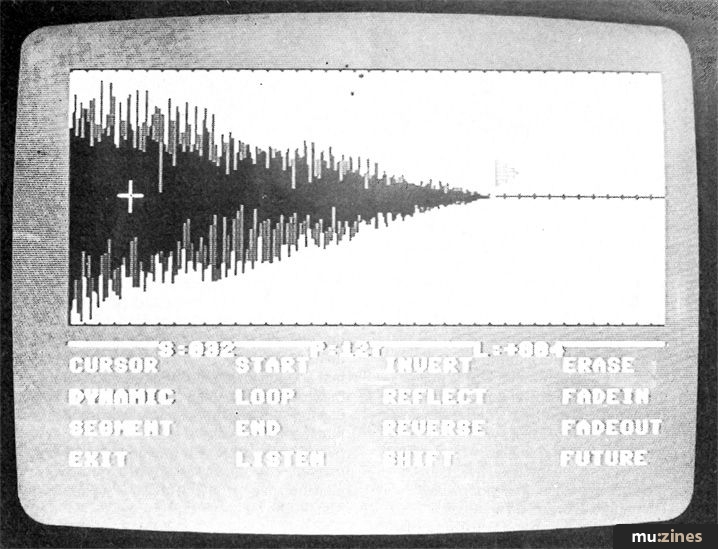
Assuming that the sample you've recorded sounds alright on a first Listen, then you'll probably want to edit it; so Exit to System Index, and onto option 2, the Waveform Editor, a two-page section. First up is the Dynamic page, which automatically draws the entire waveform, Fairlight page 8-style. Time taken to complete this depends on the complexity and duration of the sample, but it's never more than a few seconds. Now the fun begins. The overall envelope of the sound is fixed by three 'Flags', selected from the onscreen menu as appropriate — green for Start Point, red for End, and Blue for Loop. The sample will play from the Start, to the End, and then Loop continuously from the Loop Point to the end. Usually, therefore, Loop and Start will be at the same place — but they don't have to be...
Moving these three through the sample and placing them is again via joystick or function keys. Usually the start and end points are obvious, and placing the relevant flags on these simply tidies up the sample for playback. Finding a suitable loop point, though, can be a bit tricky, so to help out, there is a second, hi-res page which allows you to step through each of the 128 bytes which constitute each segment of the overall sample one by one, until you find two adjoining segments which are similar — the mark of a good loop-point. Once found, the Loop flag is placed as before. If on Listening, the sample still glitches, don't worry — just try again. All of the original sample remains intact. Although this procedure seems quite arduous, in practice, it's simple and reasonably quick. However, with complex or layered sounds, things can get tough — so the possibility of an 'Auto-Loop' update a la Greengate is being looked into.

The sample can be further manipulated in a number of ways — though these permanently affect it. It can simply be Reversed, Fadein, from the start point to the end point, Fadeout from start to end, or be Reflected. (A 'mirror-image' is created from the end point. This gives a distinctive effect, especially on drum sounds — one that you'll have heard on more than a few disco records.) The whole sample can also be Inverted, but Fadeout in particular is useful for preserving the 'feel' of long decay sounds on shortened samples, thus saving on memory space.
Once a sample is complete, it's on to the Voice Handler page. Assign it away (give it a Voice No. and name) and it's protected in memory — you can't edit it, or overwrite it. Up to 16 voices can be held simultaneously in the machine (memory permitting), with Voice 1 always representing the sound you are currently working on. Back to the Dynamic page, and the memory available figure (bottom R on screen) indicates, in bytes, how much room is left. Any further samples will be recorded into the space remaining after the endpoint of sample 1 on the graphic display. Thus, you have a clear, rough and ready guide, of literally how much room you've got (and whether this might be a good time to lower bandwidth before the next sample...). New samples are stored independently into the memory remaining, but can be 'overdubbed' onto any number of existing samples simply by Adding (i.e. Voice 1+Voice 2...) — enabling very complex sounds to be built up.
The Sequencer page wasn't complete at the time I saw the Microvox, but it will be capable of storing 2000 notes, recorded in real-time (with timing correct) and edited in step time. The Sequencer will be able to play back samples stored in the computer, and sequence external devices via the optional sync box. Chaining, and storage of complete songs to disk, will also be available, though loading the sequencer will overwrite the System editing facilities.
Keyboard Assigner allows any of up to 16 samples contained in memory to be played (simultaneously but monophonically) at any pitch, within the limitations previously mentioned, across a maximum of sixteen programmable split points — and since this is all achieved within software, you don't need a synth with its own programmable split points to do it. Note (Pitch) and Voice information can be entered one at a time, for each key on the keyboard, or whole sections of a keyboard filled with the appropriate information at a stroke using the Sweep function. Split point information can be entered either via computer (using the joystick, if you want), or by pressing the relevant key on your MIDI synth — again, a very sensible idea. Using Sweep, it takes only a matter of seconds to set up, say, DX7 Bass across the bottom octave, Minimoog lead across the middle two, and a variety of variously-pitched effect sounds on the fourth octave.
Lurking behind the innocent title of Special Effects (page 7) is in fact a digital delay of quite exceptional quality, for this price range, utilising as it does all of the Bandwidth/Noise reduction characteristics of the sampler itself. Not available in Mode 1, the DDL nevertheless offers, in conjunction with the sampler unit's front panel controls, all of the facilities you would expect from a dedicated unit of identical specification — slapback, infinite repeat without degradation, sound on sound effects, and so on. Needless to say, the DDL cannot be used in conjunction with the sampler, and is bound to the currently selected Mode for its maximum repeat length and sound quality. Production versions of the software will also feature additional 'Special Effects' — a Flanger, or possibly even a Harmoniser. I'd plump for the Harmoniser myself, but, as essentially an 'extra' to the main business of the gadget, the existing DDL option alone is leaving little room for complaint.
MIDI implementation (Page 8) is extensive — each output voice can be set to a separate MIDI channel, the unit can be set to respond to any incoming MIDI channel, you have the choice of Omni or Mono Modes, and, a nice touch this — Note Off information can be Accepted or rejected, as appropriate, thus avoiding false triggering on drum sample patterns, for example.
Disc handler allows the Catalog of a voice/sequence disk to be read (each one can have a name up to 16 characters in length), files to be loaded or scratched, and the disk itself to be formatted. Individual Voices may be loaded singly, or in sets — a complete set of drums, or a sax, multi-sampled across the keyboard to retain its fidelity, for example. These sounds are stored complete with all original information (Filter and Compander status, Voice Handler and Keyboard Assignment, etcetera.)
Each disk can store about 4-6 'full keyboard' sounds, or numerous short samples (drumkits and so forth.) Loading time varies, but reckon on a top time of about 40 seconds — not really fast enough for lots of on-stage voice changes, then, though the ability to save and load 'sets' of sounds is a big bonus. One nice feature is that the system will still load as much of an overlong sample into remaining memory as possible — you can still play it, and through judicious use of the Edit facilities, acceptable results can be obtained.
THE FUTURE
In the pipeline, along with the Sound Library Disks, are a Fourier Synthesis package — enabling you to build up sounds harmonic by harmonic, in a way not unlike the Wave or DX7, plus perhaps further updates to the Sequencer package. Andrew Trott also mentioned that the bandwidth and sample times of the Microvox might also change — but only for the better!
Mr. Trott himself is looking forward to the establishment of the Commodore 128 in this country, which he reckons will be powerful and fast enough to handle a polyphonic version of the Microvox.
CONCLUSION
Everything about the Microvox impressed me — its (carefully worked-out) user friendliness, the commitment and enthusiasm of the people involved in it, the 'extra' DDL, it's great value-for-money price — but above all, the quality and clarity of its sampled voices. There's never been a better reason for buying a Commodore.
Price: £229
Contact: Supersoft (Contact Details)
Also featuring gear in this article

Supersoft Micro Vox Sampler
(12T Dec 85)

Vox Pop - Microvox Sampling System
(EMM Apr 86)
Browse category: Software: Sampler > Supersoft
Publisher: Electronic Soundmaker & Computer Music - Cover Publications Ltd, Northern & Shell Ltd.
The current copyright owner/s of this content may differ from the originally published copyright notice.
More details on copyright ownership...

Electronic Soundmaker - Sep 1985
Donated & scanned by: Chris Strellis
Review by Tony Reed
Ads for Gear in this article:

Help Support The Things You Love
mu:zines is the result of thousands of hours of effort, and will require many thousands more going forward to reach our goals of getting all this content online.
If you value this resource, you can support this project - it really helps!
Donations for May 2026
Issues donated this month: 0
New issues that have been donated or scanned for us this month.
Funds donated this month: £0.00
All donations and support are gratefully appreciated - thank you.
Magazines Needed - Can You Help?
Do you have any of these magazine issues?
If so, and you can donate, lend or scan them to help complete our archive, please get in touch via the Contribute page - thanks!
If you're enjoying the site, please consider supporting me to help build this archive...
...with a one time Donation, or a recurring Donation of just £2 a month. It really helps - thank you!

 @mu_zines
 RSS Feed
 Blog
Blog