


Magazine Archive
Home -> Magazines -> Issues -> Articles in this issue -> View
All Under Control | |
Article from Sound On Sound, January 1986 | |
Vesta Kozo's latest offering is a MIDI to CV conversion box, the MDI-1, primarily designed to allow control of that company's rack-mount sampler from a MIDI keyboard, though its usefulness doesn't have to end there - as Ian Gilby discovered.
The latest offering from Vesta Kozo is an unassuming MIDI-to-CV convertor designed to provide MIDI control of their inexpensive Sampler/Delay, though its applications don't end there according to Ian Gilby...
Vesta Kozo's Sampler/Delay unit appeared some months back to a shower of applause for it offered a truly affordable sound sampling facility with voltage control of sample pitch targeted sensibly at the bottom end of the market - an area where CV/Gate type analogue synthesizers are found in abundance.
Utilising the CV/Gate system for control of the pitch of stored samples makes very good sense but does restrict the unit's appeal considerably. If your first 'serious' keyboard is a Korg Poly 800 or Casio CZ-101 (neither of which feature CV/Gate connections) and you'd love to get into sound sampling, a non-MIDI controllable sampler such as the Vesta unit would be of little use to you, wouldn't you think?
Well, that was then but this is now, and the release of Vesta Kozo's new MIDI Box, the MDI-1, makes possible MIDI control of their Sampler (amongst other things) for the ridiculously low cost of £132.
And the complete package of Sampler and Convertor still remains the good side of £450 which can't be bad.
We'll delve more into this in a moment, but it's worth pointing out that operation of the MDI-1 is not limited purely to controlling the Sampler. As a MIDI-to-CV interface, it can also be used with any MIDI keyboard (or sequencer) to breathe new life into that analogue mono synth you've got buried away in the corner of your studio. Using a MIDI keyboard, the MIDI Box and your old analogue synth together can give you the best of both worlds in terms of sound creation, making blended analogue and digital voices a reality. For the best part of the review period, I used a DX21 linked to the MDI-1, controlling my trusty Sequential Pro-One, and it sounded great! But let's stop there and return to how we use the MDI-1 to control the Vesta DIG420 Sampler/Delay.
SAMPLING CONTROL
Although the Vesta DIG420 functions as a standard digital delay, we'll concentrate on its use as a sound sampler for the purposes of this article, and for those unfamiliar with the unit a recap is therefore in order.
Basically, the device offers a one second maximum sample with a bandwidth of 7.5 kHz — hardly spectacular but perfectly usable. What interests us about the Vesta DIG420 is that the memory can be sub-divided into eight equal segments to allow butt-editing of eight different sampled sounds, each one eighth of a second long. This broadens the creative scope of the device compared to similarly priced rack-mount samplers that are really only digital delays with a triggerable freeze mode.
It also allows you to edit the start of any sample, and quite accurately too, using the course-tune Range and fine-tune Multi controls. This means you don't have to worry so much about truncating the start (attack period) of whatever sound it is you're sampling when you trigger the sample record mode - you can define your sample duration using the Range function, press Record/Hold, play your sound, then go back and trim off the unwanted silence you'll undoubtedly find at the start. It's a simple action but overcomes the perennial problem of trying to trigger Record exactly as the sound begins a virtually impossible task that always results in an audible glitch on the sample.
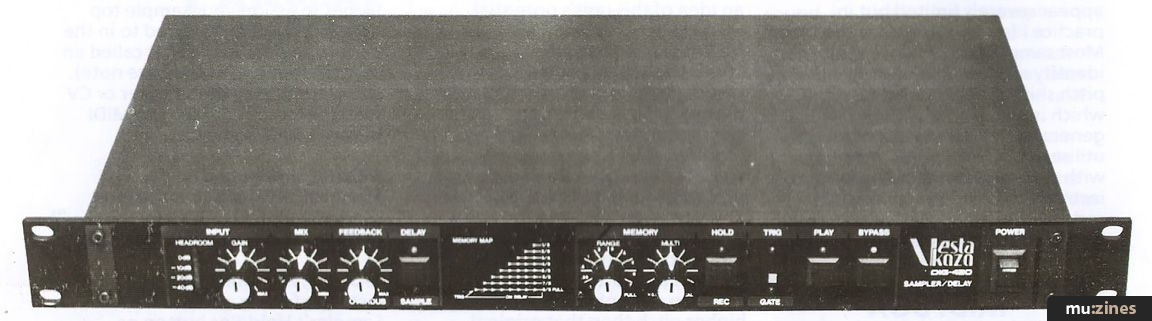
The Sampler features an overdub facility which is handy for layering sounds on top of each other to create composite samples, but you have to reduce the volume of each new sound layer using the Overdub level knob, to avoid masking the previously stored sound. It's also logical to sample 'loud' sounds like fuzzed guitar chords first, then overdub gentler elements, like a DX bell chime, later.
One annoying quirk of the unit that's emphasised when overdubbing is that the input gain control doubles up as your sample replay volume when operating the DIG420 in sample mode. No problem you might say, just that the level increases anticlockwise for sample replay, but clockwise for input. This requires you to keep adjusting the control unnecessarily every time you record a sample. Optimising the input level after all is crucial to achieving clarity on any sampling device, but more so on budget units like this that offer less generous dynamic range and, consequently, less margin for error when setting levels. This is the sort of compromise you have to accept on budget products, as to allocate a separate output level knob for this function alone, would add horrendously to the selling price of the unit I'm sorry to say.
Keyboard control of samples on the DIG420 (with or without the additional MIDI Box) is kept to a sensible three octave range as the unit works with the conventional 1 volt/octave standard and accepts a 0-3 volt signal at its CV input on the rear panel. Three octaves may appear severely limited but in practice I found it not to be the case. Most sampled sounds lose their identity and become unusable if pitch shifted beyond this range - which is precisely why the new generation of sampling keyboards utilise a multi-sampling technique with several samples of the same instrument being made, each restricted to an octave range or less and distributed across the length of the keyboard.
MIDI BOX
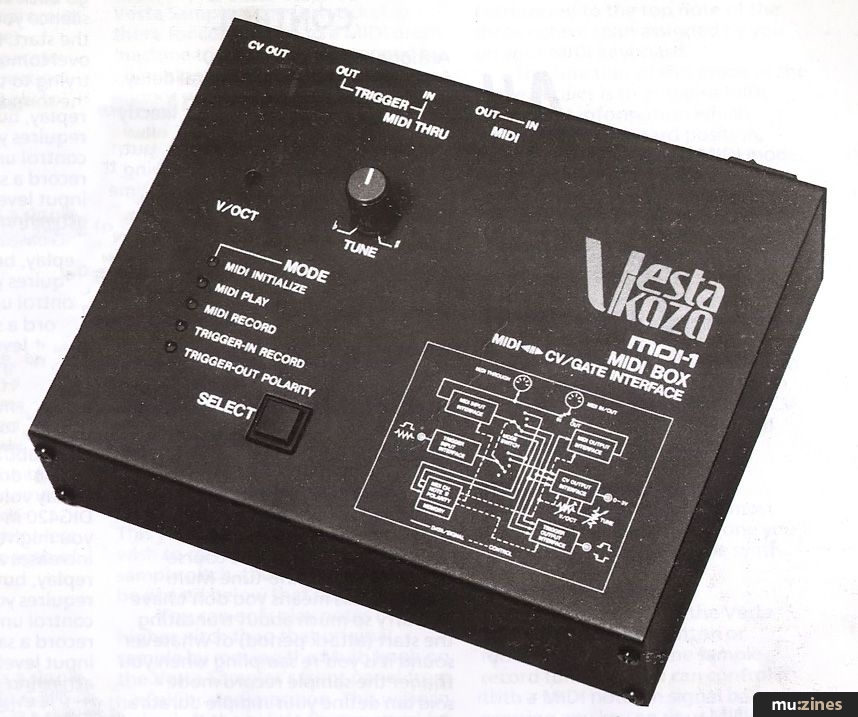
On to the MDI-1 MIDI Box. Connection-wise, this offers a single switchable MIDI In/Out socket, MIDI Thru (both DIN), Trigger In and Out plus CV Out - all on jacks which can interface with your synth or the Vesta Sampler. The Out socket is there for connection to a MIDI drum machine to allow it to be stepped by an analogue sequencer or gate trigger synth, and functions only in Mode 4 - which leads me nicely on to the MIDI Box's modes of operation.
There are five of these listed on the unit's front panel for easy reference and you press the large Select pushbutton until the red LED lights for the appropriate one indicating the current operation. A rundown of each mode will give you an idea of this unit's potential.
MODE 1: MIDI Initialise
This is the MDI-1's default mode when power is first turned on. When using a MIDI keyboard to control samples on the DIG420, you are required to define whereabouts you want the available three octave replay range to fall on the keyboard. This you do by pressing the key you wish to correspond to the original sample pitch, then three octaves can be played below that note.
You can only play notes of a higher pitch than that original sample by moving the Multi knob on the Vesta Sampler's front panel from its Cal(ibrated) position. This will then shift the whole three octaves up by an equal degree but the new sample pitch will still physically correspond to the top note of the three octave span assigned by you on your MIDI keyboard.
The function of this mode as the name implies is to initialise MIDI note event information which defines your keyboard position, MIDI channel in use and MIDI mode. Apart from performing the keyboard assignment just described, you don't need to worry about setting your MIDI synth to Mono mode in order to play the monophonic samples of the DIG420 - it's all done for you. If you do forget to assign your sample top note (confusingly referred to in the awfully misleading leaflet called an owner's manual, as the base note), you can still play the Sampler or CV synth because it defaults to MIDI keynote 60 (Middle C).
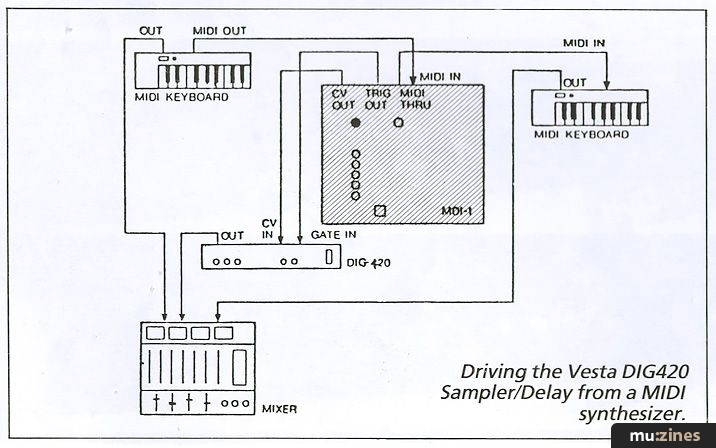
Driving the Vesta DIG420 Sampler/Delay from a MIDI synthesizer.
MODE 2: MIDI Play
Straightforward: this is the most used mode of all as it's the one you'll need to be in to control the synth.
MODE 3: MIDI Record
Instead of using either the Vesta Sampler's Hold/Rec button or footswitch to select the sample record function, you can control it with a MIDI note-on signal by pressing any key on your MIDI synth, which is all this mode does.
To be honest, it seems a redundant feature to me because what it doesn't do is allow you to sample your sound using the keyboard to activate the record status, then immediately play your samples back. You have to unplug the lead from the Hold/Rec footswitch socket on the Sampler and place it into the Gate In socket before you can replay the sample. This idiosyncrasy of the Sampler was one I had hoped the MIDI Box might have cured, but it doesn't unfortunately.
MODE 4: Trigger-In Record
This basically duplicates the action of Mode 3, but takes its cue from a 5 volt trigger pulse sent by the synth, drum machine or sequencer to the Trig In socket on the rear of the MIDI Box. It's useful for triggering a percussive sample stored in the Vesta unit using, say, a Roland TR606 Drumatix, though as no pitch information is sent it'll always replay the sample at its original pitch. An audio signal such as a miked-up acoustic drum kit could also activate the Sampler in this mode if desired or, more usefully, it could be used to salvage the necessary timing relating to the tempo of a poorly recorded drum track, and then used to trigger a MIDI drum machine connected to the MDI-1's MIDI Out.
MODE 5: Trigger-Out Polarity
In this mode a pulse received at the Trig In or MIDI In socket will cause the trigger to flip from positive to negative or vice versa. Don't let this put you off, it exists primarily to satisfy the quirky nature of the Vesta Sampler's Hold/Rec footswitch socket which operates when it obtains a negative trigger.
So that's about it for the MIDI Box apart from mentioning the Tune control which allows adjustment to be made to the control voltage output to help compensate for tuning errors (remember them) between various makes of the old analogue synthesizers.
CONCLUSIONS
The marketing guy at Vesta obviously knows what he is doing. A digital delay (albeit a pretty fundamental one) which functions dually as a true sound sampler, and offers voltage control of the pitch of the sample, is undoubtedly a desirable item when priced at only £330. To support that with the release of a device like the MIDI Box that permits owners of the Vesta Sampler to reap the benefits of MIDI control for the nominal charge of £132 is commendable enough. Yet to throw in, what is to all intents and purposes, a very useful MIDI-to-CV convertor whose potential applications I have only just touched on, is astonishing.
You don't need to own a Vesta Sampler to justify a place for the MIDI Box in your equipment arsenal. If, like me, you still own an analogue monosynth that cost you well over £500 when new, and you already possess a MIDI keyboard, then £132 seems a small investment to make to expand the range of controllable sounds at your disposal, doesn't it?
(Contact Details)
Also featuring gear in this article

Publisher: Sound On Sound - SOS Publications Ltd.
The contents of this magazine are re-published here with the kind permission of SOS Publications Ltd.
The current copyright owner/s of this content may differ from the originally published copyright notice.
More details on copyright ownership...

Sound On Sound - Jan 1986
Gear in this article:
Review by Ian Gilby
Help Support The Things You Love
mu:zines is the result of thousands of hours of effort, and will require many thousands more going forward to reach our goals of getting all this content online.
If you value this resource, you can support this project - it really helps!
Donations for April 2026
Issues donated this month: 0
New issues that have been donated or scanned for us this month.
Funds donated this month: £0.00
All donations and support are gratefully appreciated - thank you.
Magazines Needed - Can You Help?
Do you have any of these magazine issues?
If so, and you can donate, lend or scan them to help complete our archive, please get in touch via the Contribute page - thanks!
Please Contribute to mu:zines by supplying magazines, scanning or donating funds. Thanks!
Monetary donations go towards site running costs, and the occasional coffee for me if there's anything left over!

 @mu_zines
 RSS Feed
 Blog
Blog