




Magazine Archive
Home -> Magazines -> Issues -> Articles in this issue -> View
Music on-line (Part 2) | |
Article from Sound On Sound, February 1987 | |
Part 2. Richard Elen concludes his guide to computers and communications for musicians with details of how to join and log on to two musicians' networks: PAN and Esi Street. There's also an extensive glossary of terms to help newcomers to this exciting field understand what it is all about.
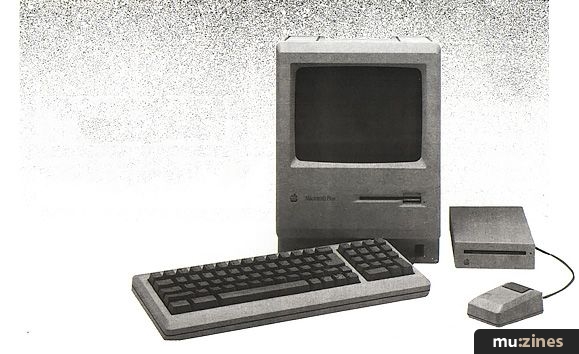
Apple Macintosh - the 'friendly' computer.
Now you've got all the gear together that I outlined last month, who can you talk to? Well, to begin with, you can communicate with friends. If you have different computers, you can only send messages to each other - a waste of time. But if you both have similar systems, you can exchange files rather than sending disks to each other in the post.
GOING ON-LINE
In simple terms, this is how you do it:
- First, establish voice contact by phone. Most modems allow you to connect a telephone through the modem, and have 'data' and 'talk' modes - otherwise, attach a phone with a splitter box. If you're using an acoustic coupler, simply don't put the handset on to the coupler yet.
- Establish what baud rate you are going to use, and who is going to 'originate' and who will 'answer'. Decide what file transfer protocol (eg. XMODEM) you're both going to use. Check that your communications package settings match what you have decided, and set your software to half-duplex mode - otherwise you won't be able to see what you are typing into your computer.
- When all is set correctly, the person who is in 'answer' mode should switch in the modem. At the other end, a tone will be heard. When this happens, switch in the 'originate' modem and put the phone down. It may take a few seconds for the link to be established: most modems have a data light which will come on when the link is set up.
- Then type a short message to make sure that communication is happening without errors. Check for line noise or a protocol mismatch. Say when you are ready to send or receive the file.
- Then, using the facilities in the communications software, go into download (to receive a file) or upload mode (to send one), according to the protocol you have agreed beforehand.
- If all is well, transfer will proceed. Most software will give a 'progress indicator' to show how much of the file has been transferred.
- After transfer is complete, pick up the phone, switch the modem to 'talk' or whatever, and do what you want to do. Be sure to switch the modem off-line after you finish the call, or you will keep the line engaged!
ACCESSING A NETWORK
Sending files to friends as outlined above is one thing, but it is of limited usefulness. Far more interesting for many is the ability to contact an international network of like-minded people, for business or pleasure. Such networks exist, and the two of most interest to professional musicians are described here. One, Esi Street, is a truly international system based in Europe, the United States, and Australasia; while the other, the Performing Arts Network (PAN) is US-based, but with an international membership. The methods of access are similar, but differ in some details.
First of all, both networks require you to become a subscriber before you can use the system. You can join PAN on-line, simply by accessing the system and asking to join. You choose a user name and password, and once you have supplied billing details and waited 24 hours for them to be processed, you can use the system. Esi Street requires that you contact one of their regional offices - they will supply information and a demonstration if you want it - and they will issue you with an 'ID' and password on payment of the sign-up fee.
In addition, the methods of accessing these networks are slightly different. You can get into both systems via PSS (see Glossary) and, in addition, Esi Street has direct lines in the London area which bypass this process. When you join Esi Street, you are issued with a special PSS NUI (see Glossary) which gives you access to the Esi Street computer from any PSE (Packet Switching Data Exchange) in this country - and there are many. Being an American system, this is not the case with PAN. Instead, you must apply to British Telecom to rent your own personal NUI, for a few pounds per quarter-year. You can contact BT's International Packet SwitchStream (IPSS) sales people at the following address: (Contact Details)
Ask for an NUI Application Form. This will be sent to you at once. On the form, you specify which PSEs you wish to use (they are listed on the form). Typically, this could be one at home and one at the office or studio. You can be validated for more than three or so nodes (see Glossary) at an extra cost, but this is seldom necessary. On the form, you also specify the first few characters of your NUI. The NUI itself consists of 12 characters: you specify the first six, and the rest are allocated by PSS. This NUI is your personal one, and is used for billing based on the amount of time you use PSS, so it should be treated carefully and kept to yourself! In addition, you may need to specify what baud rate you will be using.
A couple of weeks after you have returned the form, your NUI will be supplied.
Both networks are similar in principle: you are contacting a mainframe computer which several users can access simultaneously. On that computer, you have an 'electronic pigeonhole' which you can access with your ID (Esi) or user name (PAN) and your personal, private password. From your ID, you can send messages, access special interest areas, and collect information from various information providers.
The PSS access procedure is as follows (note that Esi Street can be accessed directly in London without going through PSS). Note: The instruction
- Set your modem and software to the appropriate baud rate, and set the data format (8N1 for PAN and 7E1 for Esi Street), full-duplex, originate mode.
- Dial your local PSS telephone number appropriate to the baud rate you wish to use.
- Dial the number. When you hear the tone, switch your modem on-line.
- When the link is established (after a few seconds), enter the following on your keyboard:
-for PAN type
-for Esi Street type
This will 'wake up' the PSS node, which will display its identification. If it doesn't wake up, do it again. If it still doesn't happen, hang up, check your connections, settings, and phone numbers, and try again.
- Next, enter the NUI. For PAN, enter your own NUI preceded by the letter N and followed by a RETURN. For example: if your NUI was ABCDEF123XYZ, you should type:
NABCDEF123XYZ
For Esi, use the NUI supplied with your User Guide, again preceded by N and followed by
- The system will respond with ADD?, prompting you to enter the Network User Address (NUA) of the system you require. For PAN enter A9311061703093
- After a few seconds you will see a welcoming message (refer to Screen 1). Then sign on as described later. If, instead, you get a message from PSS consisting of CLR or NC followed by a string of numbers, it means that your call failed. Hang up, check that you are entering the correct information, and try again.
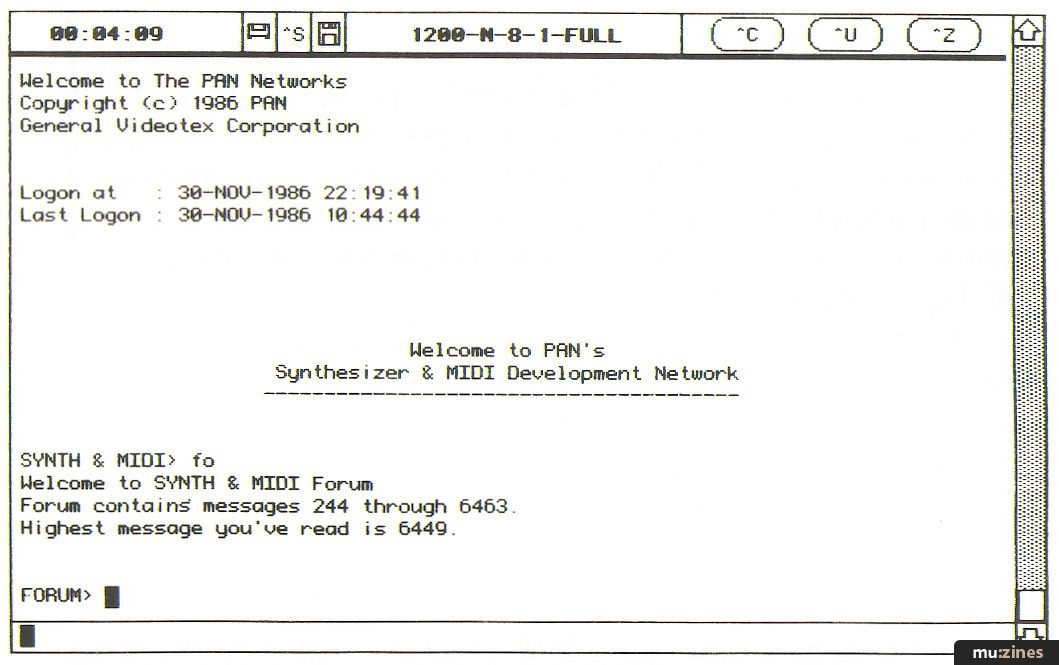
Screen 1. Welcome to the PAN network.
- If you are signing on to PAN for the first time, you will need to become a subscriber. Do this by typing PANJOIN
Many communications programs can be set up to log you on automatically, so that with a single keystroke, you can set the above procedure in motion. I would recommend that you do not include your private password in such an 'auto logon' procedure file, in case it falls into the wrong hands! Apart from that, you should change your password regularly in any case.
ABOUT THE NETWORKS
Esi Street and PAN between them fulfil most of the communications needs of musicians and others in the music industry, but they have distinctly different applications, and this is reflected in the services they provide. Which network(s) you join should be determined by the kind of facilities you want.
Esi Street (Entertainment Systems International - an IMC Network)
Contact (UK): (Contact Details)
Customer Service: (Contact Details)
Joining Charges: First mailbox (inc training and manuals) £144. Additional mailbox £44.
Connect Charges: 11p/min peak time, 3.5p/min off-peak plus PSS access charges outside London (2.5p/min 300 baud, 3p/min 1200 baud).
Minimum Charge: £10 per month.
Payment Method: On receipt of invoice.
Facilities:
- Electronic Mail
- Telex
- Special interest groups (USA only at present) including SPARS, SSL Users, Synth-Net, etc
- System-wide bulletin board
- Information services, including record charts database, industry news, specialised on-line business packages custom-designed for user applications, etc
Membership: Generally record companies, music publishers, travel agencies, management companies, producers, professional musicians, studios and others requiring specialised music business communications services.
Broadly speaking, Esi Street (Entertainment Systems International) is designed for industry professionals who need rapid, accurate, international business communication and information, typically between artists, record companies, music publishers, management, travel agencies specialising in the music industry, studios, tour transportation companies, legal specialists and so on.
Esi Street is a set of account groups on the international Dialcom network (Telecom Gold in the UK), and has put a lot of effort into making the system as user-friendly as possible, and into giving users all the support they need, 24 hours a day, anywhere in the world. In addition, the one-off joining fee includes full documentation and training. The price structure favours companies in the industry rather than ordinary individuals, the former being the people for whom the system is designed.
There are at present three Esi Street mainframe computers serving the UK and Europe, North America, and Australasia. It is, however, possible to access all three computers from virtually anywhere via international data networks. In addition, 'link IDs' are available, as are IDs on foreign systems, so that when you are on-tour abroad, for example, you can either access your 'home' ID or use a temporary one to which all your electronic mail can be routed automatically.
All existing systems provide electronic mail facilities (see Glossary), and it is as easy to mail someone in the United States, say, from the UK system as it is to mail someone in Britain. In addition, there is the facility to send and receive conventional telexes from and to your 'mailbox'.
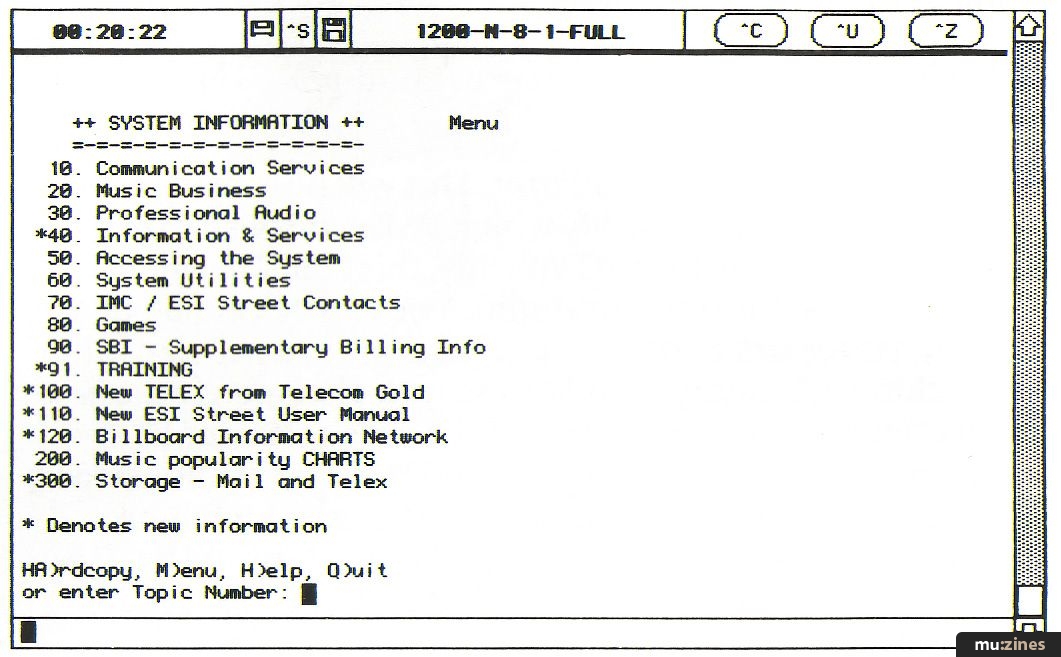
Screen 2. Esi Street's System Info main menu.
Esi Street also offers comprehensive news and information services on an international basis, including up-to-the-minute chart databases from Billboard, Radio & Records and The Album Network, which can be used to generate reports ordered by chart position, artist, record company etc (see Screen 2). The Gallup charts (used in the UK) should be available on the network shortly. The Pollstar service provides a weekly update of news and information in the music industry.
Esi Street began several years ago as International Management Communications (IMC) and changed its name in 1986 to one more appropriate to its activities. It has grown in the last few years from a system used primarily by touring artist: to keep in touch with their offices, into a vast international network linking over 3,000 of the top people in the music business.
The US Esi Street computer also has special interest groups (SIGs) covering several aspects of the industry, including a user group for owners of SSL mixing consoles, and SPARS (the American Society of Professional Audio Recording Studios). It is intended to set up similar groups on the other systems. These SIGs offer specialised bulletin boards and information services to their members.
Another SIG on the US network is Synth-Net, run by Gary Rottger in New York (Contact Details) This has information exchange and database facilities, the former including a special Fairlight on-line magazine (which can also be accessed on the UK system - see Screen 3) and the latter including synth voices, sound samples and the like, in industry standard formats. Synth-Net can be accessed via the UK system, but unfortunately the UK system is 7-bit only, so data files cannot be downloaded. The US system can be accessed directly with your own NUI, however: contact Esi Street (Contact Details) or Gary Rottger for details. Esi Street tell us that it would consider setting up a UK version of Synth-Net if there is sufficient interest, with the proviso that it would not offer file transfer facilities.
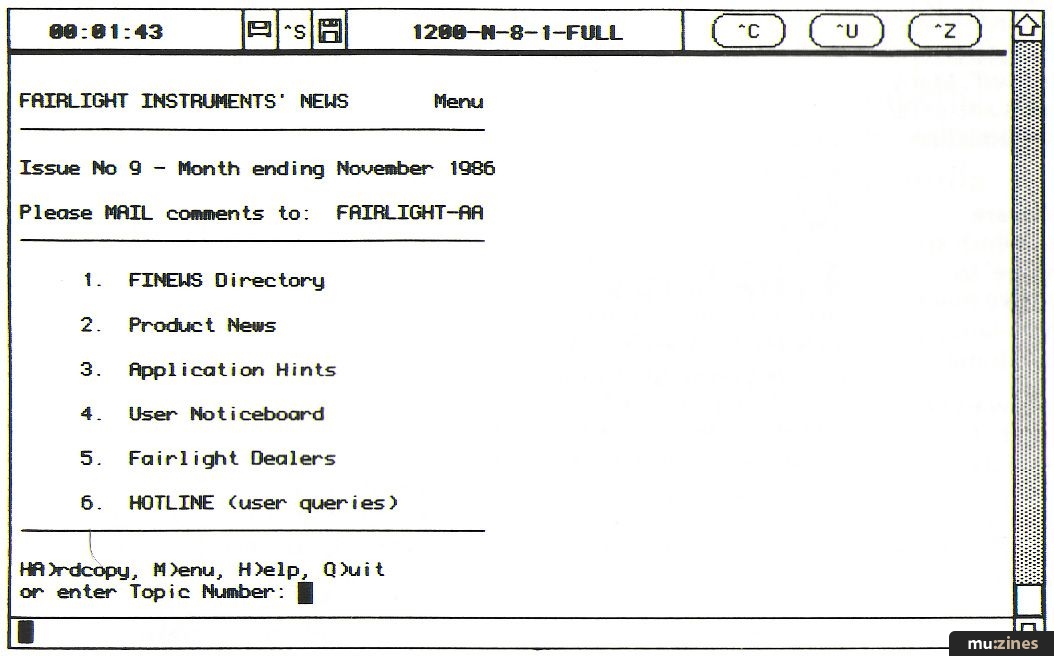
Screen 3. Esi Street's FINEWS - an on-line support magazine for Fairlight owners.
PAN (Performing Arts Network)
Contact: (Contact Details)
Customer Service: (Contact Details)
Joining Charges: 150 dollars per ID.
Connect Charges: 40 cents/min peak time, 20 cents/min off-peak, plus PSS access charges (2.5p/min 300 baud, 3p/min 1200 baud).
Billing Method: Credit card (Visa, Access, Amex).
Facilities:
- Electronic Mail
- Live teleconferencing
- Special interest groups, including Synth & MIDI group, Audio-Net, Synth bank etc
- Special interest forums for exchanging information
- Databases, including sounds, music programs, samples, utility programs
- Access to Delphi public database
Membership: Generally professional musicians, instrument manufacturers and dealers.
The Performing Arts Network is operated on the computers of the General Videotex Corporation in Boston. Just as Esi Street is the largest single group on the Dialcom system, PAN - with over 1,000 users - is the largest on GDC. The same organisation runs a large public database of particular interest to computer users, known as Delphi, where there are SIGs specialising in many types of computers, each group having its own database and programs etc for downloading. PAN users have access to this facility.
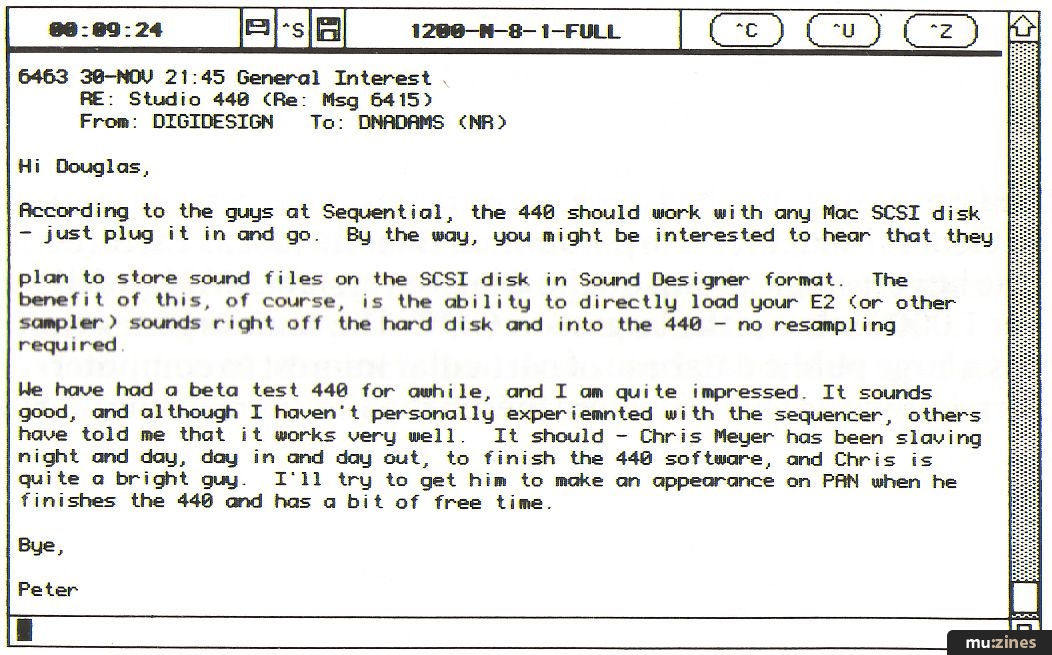
Screen 4. A reply to a certain Douglas Adams' (Hitchhiker's Guide) query about the forthcoming Sequential 440 sampler/drum machine, downloaded from PAN's 'Forum' service.
But of primary interest in the music field is the Synth & MIDI group on PAN. Activities here are centred around a 'forum' where members can express their views, discuss equipment, and talk about goings-on in the industry (see Screen 4). There are also regular reports filed from important industry exhibitions in the USA like the NAMM shows and AES Conventions. Most of the major manufacturers of music technology gear are on-line too - generally providing comprehensive on-line support and information on their products - as are many of the industry magazines (Sound On Sound will soon be on-line too!), and a large number of dealers as well as end-users. As a result, it is easy to find out exactly what's going on in the music industry and what new products are to be expected, sometimes months before they appear in the UK. (For example, the 'leaked' specification of Yamaha's forthcoming successor to the DX7 has been common knowledge to PAN subscribers for many moons now! All will be revealed next issue...)
From the Synth & MIDI group, users can access a wealth of databases containing sound files, samples, programs and useful documentation. Many of these are in Apple Macintosh format. Programs can be downloaded and run immediately, and sounds and samples can be loaded and transferred via suitable software such as that from Opcode and Digidesign. Much of the material in the PAN databases is public domain or shareware, and is thus either free or inexpensive.
Several manufacturers have set up special SIGs off the Synth & MIDI area to support registered users of their gear, including Ensoniq, Kurzweil, Southworth, Mark Of The Unicorn, Digidesign and Opcode. Each of these companies offers discounts on the PAN sign-up fee - at least to US users. And many of these companies have special 'support hotlines' running on the network.
Also available is a conferencing system. Here, groups of PAN users can get together live and discuss topics of mutual interest. Often there are pre-arranged conferences with guest celebrities from the industry.
A recent development is a SIG called Synth-Bank, run by Bryan Bell (Contact Details). This features a database of public domain sounds and samples for a wide range of equipment, and acts as an on-line dealer for several items of music-related software. There is also a shopping area, where synth sounds from major artists and programmers can be purchased.
DOWNLOADING A FILE
Downloading a file from PAN is very straightforward. The system accepts a number of transfer protocols including XMODEM. You simply access the database you require, examine the list of files available, and then ask to read the file you want. The system will ask for the protocol you want to use, you select download on your computer, and watch it come in.
The process is not quite as fast as one would like, due to the fact that there are delays caused by the transatlantic access, but this can be alleviated by using software facilities like the 'Supercharged XMODEM' facility in the Red Ryder comms package for the Apple Macintosh computer. This speeds up the download by asking the remote system to send the next block of data before it has spent time checking the block that has just come in. This increases the speed - at 1200 baud, a DX7 bank takes well under a minute to capture, for example - but with the penalty that if an error is detected, you have to download the complete file again. 1200 baud full-duplex is recommended if you intend to download anything more than the shortest files from PAN - otherwise it will take a long time, and time on-line equals money!
THE BOTTOM LINE
Accessing a system like PAN or Esi Street costs money. There is a local phone call, first of all, for the time that you are connected to the system. Then there is the PSS network charge, again time-related, and finally there is the connect-time charge for the period you are connected to your ID on the remote system. If you're using the full facilities of the system on a regular basis, you should be prepared to run up charges of at least £50-100 per month, plus the phone bill. As a result, it should be emphasised that neither system is for the casual hobbyist or those with only a passing interest. Both are designed for industry professionals, and the costs of access reflect this.
But if you need the kind of information and facilities that these systems offer, then use them. Keep a close eye on your bills for the first month or so and adjust your use of the system to suit the amount you're prepared to pay. Remember that every minute you are on-line costs you money, and use your time wisely.
OTHER NETWORKS
Apart from those described, there are other networks with active music-related user groups. A notable example is the Bix (Byte Information exchange) network operated by McGraw-Hill, the publishers of Byte computer magazine: this has both 'music' and 'MIDI' conference areas, as well as areas devoted to specific computers and applications. Details are available in any copy of Byte.
HELP AT THE START
The present author specialises in music industry computer applications, and is available to assist industry professionals wishing to access these systems from the UK. For a reasonable time-related consultancy fee, I will advise on suitable hardware and software and where to obtain them, and set systems up for users if necessary, with training as required. Once on-line, I am available on both systems for technical support (Esi Street: ELEN-UK; PAN: ELEN; Bix: RGELEN). It should be noted that this is not a free service, however (sorry!): I can cope with a reasonable number of basic on-line queries free of charge via PAN and Esi Street, but where dealing with the query requires a lot of work, you may be billed for the support via the networks concerned. If you need this kind of assistance, write to me care of Sound On Sound and I will respond to serious requests: please give a daytime phone number.
'Sound On Sound' will be on-line very soon - watch this space for some interesting developments!
COMPUTER COMMUNICATIONS GLOSSARY
Inevitably, when you get involved in any new area, you find that it has its own words and jargon, simply because a new field may well need to describe facilities and facts which aren't in common everyday use. In time, you learn the terms by working in that field - just as you hadn't the faintest idea what a MIDI Thru port did when you first came across one on the back of your new synth, you'll probably be similarly foxed by a term like '1200 baud' when it comes to contacting an international music network with your computer. Hopefully, the following list of explanations will help you understand the accompanying article and help get you off the ground. For a fuller discussion of the intricacies of computer-to-computer communication, a recommended paperback on the subject is Hugo Cornwall's The Hacker's Handbook, published by Century Books.
Serial Interface A link between your computer and the outside world in which data is sent and received serially, ie. one piece of data follows another in a sequence. MIDI is a serial interfacing system, for example. (Stan Kelly-Bootle, in The Devil's DP Dictionary [McGraw Hill] defines 'serial' as "Being or pertaining to just one damn thing after another.")
Serial Port A socket on your system or on a peripheral device (a modem, printer, etc) which enables pieces of equipment to be connected together and communicate with each other serially. May also be labelled 'RS-232', 'RS-422', 'Modem' or similar. The actual port is often a 25-way flat connector ('D-Type') but may be a DIN or mini-DIN.
RS-232, RS-422 The two commonest serial interfacing standards. They are similar, but different, although generally one can talk to the other.
Modem (MOdulator-DEModulator) A piece of hardware which transfers data between a serial port and a telephone line. Data from the computer is converted into a series of audio tones which can be transmitted down the phone line, and vice-versa.
Baud Rate The speed of serial communication, in bits ('Binary digITS') per second (bps). Generally, the rate is the same in both directions, send and receive, but sometimes they are different. The commonest speeds are 300/300 (300 baud send and receive), 75/1200 (75 baud send, 1200 receive - used for Prestel in the UK) and 1200/1200. Modems operating at higher speeds are generally more expensive. The baud rate set in your communications program must match that set up in the modem, and the modem must use the same rate as the network you are trying to contact. If they do not match, you will see nothing more than garbage when you try to communicate.
ASCII (American Standard Code for Information Interchange) A set of patterns of bits used for sending and receiving alphabetic and numeric characters on a computer. Each letter has a unique numeric value which is sent in Binary code.
Communications Program A piece of software which enables your computer to act as an 'intelligent terminal' - that is, so that you can type on the keyboard and have those characters sent out of the serial port to the modem. At the same time, characters received via the phone line from a remote computer can be displayed on the screen. A good communications program will also allow you to 'capture' received data into a file and save it, as well as write a message with your word processor and send it to the remote computer. It should also allow file transfer via systems like XMODEM.
Parity A simple means of error checking used in serial communications. It should be set correctly in the communications software. The options are: None (usually abbreviated to N), Even (E), Odd (O) or Ignore (I). 'None' is usually the best bet. If the parity is wrong, you may get garbled messages on your screen.
Data Bits The 'bits' of information that make up a transmitted or received character. The correct number must be set in your communications software. Usually there are 7 or 8 (8 is the safest bet). Eight bits allow up to 255 different characters to be sent or received, and this is necessary for file transfer with methods like XMODEM. Some systems only use 7 bits: this is fine for sending and receiving messages and ASCII files, but not for XMODEM transfer.
Stop Bits The binary digits used to signal the end of a transmitted character. The correct value must be set in your software; 1 is usually correct.
Parameters A generic term for the complete package of settings used to communicate with a system: Baud Rate, Data Bits, Parity, Stop Bits and Half/Full-duplex. Usually abbreviated: for example, 1200-8-N-1-FULL means 1200 baud, eight data bits, no parity, one stop bit, full-duplex. 7E1 means seven data bits, even parity, one stop bit. 8N1 is typical and will usually work.
Full-duplex, Half-duplex In simple terms, 'half-duplex' means that when you type a character, it is displayed on your screen and also sent out of the serial port. 'Full-duplex' means that when you type a character it is not displayed directly: it is sent to the remote system, which 'echoes' it back to be displayed on your screen. That way, you see exactly what the remote computer thought you typed, including any errors introduced by line noise, for example. In general, half-duplex is used to communicate with another personal computer (which will not usually echo characters back); when communicating with a major international network, you will almost always use full-duplex.
Packet Switching A system used by international data networks to enable many data 'calls' to be transmitted efficiently and simultaneously. The information is chopped up into 'data packets' which are then sent at very high speed. Most countries have national data networks which use these principles. International data calls can also be made using such a network.
Packet SwitchStream (PSS) The British Telecom data network. Very much like a telephone system designed specifically for data transfer, PSS has 'nodes' or entry points called 'Packet Switching Exchanges' (PSEs) located all over the country - generally no more than a local phone-call away. At each node, there are different telephone numbers to dial for different transmission speeds.
Network User Identify (NUI) A personal 'password'that you rent from British Telecom Data Services (in the UK) which enables you to use their PSS network (rather like a home telephone number). It is also used to keep track of your calls for billing purposes. You are charged for the amount of time you use PSS - 2.5p per minute at 300 baud [NOT '25p per minute' as was erroneously printed in 'Part Tin the January issue!-Ed], and 3p per minute at 1200 baud.
Network User Address (NUA) A unique string of numbers equivalent to a telephone number, allocated to a great many computer systems all over the world that can be accessed via a data network like PSS.
Host Computer Generally a large, sophisticated mainframe computer that can be accessed, via a data network, by several users at once (a 'multi-user' system). Such computers are designed to be accessed by people interested in a wide variety of topics.
On-Line Communication with a remote computer via a telephone line.
Bulletin Board System (BBS) Usually private computer systems that must be dialled direct. They usually have only one phone line and may be difficult to access if they are popular. Often, they are dedicated to users of one particular type of computer, or are run by manufacturers to support their products, but many BBS' are for general interest. The computer magazines often publish lists of telephone numbers for such systems. Note that mainframe systems also have Bulletin Boards, but these are usually areas where news items are published.
Sysop (System Operator) The person in charge of a BBS or other on-line computer, who is responsible for keeping track of activity on the system.
Logging On (sometimes 'logging in') The act of establishing contact with a host computer by entering, typically, a personal ID number and password. Leaving the system at the end of a session is called, obviously enough, 'logging off.
Hacker Originally, a hacker was a computer freak who spent all hours of the day or night in front of a computer screen. These days the word tends to be more specifically applied to people who spend their time trying to 'break in' illicitly to on-line computers.
XMODEM One of a number of systems for transferring files from one computer to another. Usually, messages and text are sent by means of plain ASCII characters. If there are errors, perhaps caused by line noise, you can usually see them. Errors in a program file, on the other hand - which contain a lot more than mere letters of the alphabet, and look like rubbish on the screen - would mean that you simply couldn't use the program you'd received. So, instead, you use a system like XMODEM, which is an 'error-correcting filetransfer protocol'. The file is broken up into blocks which are sent one by one. At the receiving end, the system checks each block automatically to make sure that it makes sense. If it does, it asks to be sent the next block. If it was wrong, it asks for the incorrect block to be sent again. Other file transfer systems work in a similar, but incompatible way; for example, 'YMODEM' and 'Kermit'.
Checksum A number sent at the end of each block during an error-correcting file transfer operation. The number supplies data about what the block should have contained, so that the receiving system can make sure it arrived correctly. CRC (Cyclic Redundancy Check) is a more sophisticated method of error-checking. XMODEM may use either method. Similar techniques are used - in a far more complex fashion - in digital audio recording.
Username, Customer Identity, ID, Mailbox These are all labels given to the 'electronic pigeonhole' that you access when you log on to a remote computer system to which you are a subscriber. It designates an area of memory on the host computer that only you can access, with your personal password. Through it, you can receive files, read messages and run programs on the system. From it, you can send messages, add comments to a forum or bulletin board, or send programs for other people to use.
Upload To send a pre-prepared file (a message, program or whatever) to the host computer.
Download To receive a file from the host computer and save it on your own system.
Electronic Mail (E-Mail) The generic name for private electronic messaging between subscribers on a host computer system. From your ID, you can send messages to other IDs. When they next log-on, they can read your message. An E-Mail can only be read by the person to whom it was 'addressed'. Many major on-line systems also offer other messaging systems, like Telex.
Public Domain Software Programs, files, etc, which are offered 'free of charge' to anyone who would like them. Many programs in on-line databases are public domain.
Shareware (or Honorware) A very effective method of distributing high-quality software cheaply, which originated in the USA. The software can be given by anyone to anyone, or downloaded online. But if you receive a shareware program, like it and use it, you are expected to send money to the originator ('play before you pay' so to speak).
CCITT An international committee which determines worldwide standards for electronic communication. The main CCITT specifications which concern us here are those relating to tone frequencies for modems. Like all the best standards, the USA does not adhere to them, even though almost everyone else (including Japan) does! The most common are: V21 (up to 300 baud); V22 (1200/1200) and V23 (75/1200).
Bell Modem Specifications The tone systems that modems in the United States use down the phone line. The common ones are: Bell 103 (0-300 baud) and Bell 212 (1200 baud, and virtually the same as CCITT V22). Bell 103 is of little use unless you live in the States; and Bell 212 modems are much cheaper than V22 models, but they are illegal in the UK (although they work beautifully). At the highest common speed of 2400 bps, the Americans curiously decided to use the CCITT V22bis specification. And V22bis modems are very expensive.
Forum An area on a host computer where subscribers can exchange news and views by leaving messages for other users. Messages can be addressed to a specific subscriber, or to everyone - but unlike E-Mail, anyone can read them. They will remain visible as long as there is room for them on the system. Sometimes these forums are called 'bulletin boards', just to be confusing.
Conferencing A method which allows users who are on-line to the same computer at the same time to 'talk' (or at least type) to each other 'live', rather than by sending an E-Mail. Also called 'chat mode' on some systems. Host system owners make their money by charging connect time, so conferencing systems are very good for business.
Connect Time The time you spend 'connected' to a host computer. Most systems bill you for a certain rate per minute based on your connect time, which is calculated every time you log on or off.
Special Interest Group (SIG) An area on a host computer reserved for subscribers who are particularly interested in a specific topic: a manufacturer's products, for example, or a particular type of computer or activity. Sometimes you have to pay to join; usually you are either able to access the appropriate SIG by being a registered purchaser of the products concerned, or access is free of charge. Some SIGs are reserved for members of professional industry organisations.
Series - "Music On-Line"
This is the last part in this series. The first article in this series is:

Music on-line
(SOS Jan 87)
All parts in this series:
Part 1 | Part 2 (Viewing)
More with this topic
 PC Notes |
 PC Notes |
 Amiga Notes |
 PC Notes |
Amiga Notes |
 Chip Parade (Part 1) |
 Atari Notes |
 Technically Speaking |
Software Support |
 The Art of Going Soft (Part 1) |
 Digital Signal Processing (Part 1) |
 Atari Notes |
Browse by Topic:
Computing
Publisher: Sound On Sound - SOS Publications Ltd.
The contents of this magazine are re-published here with the kind permission of SOS Publications Ltd.
The current copyright owner/s of this content may differ from the originally published copyright notice.
More details on copyright ownership...

Sound On Sound - Feb 1987
Feature by Richard Elen
Help Support The Things You Love
mu:zines is the result of thousands of hours of effort, and will require many thousands more going forward to reach our goals of getting all this content online.
If you value this resource, you can support this project - it really helps!
Donations for May 2026
Issues donated this month: 0
New issues that have been donated or scanned for us this month.
Funds donated this month: £0.00
All donations and support are gratefully appreciated - thank you.
Magazines Needed - Can You Help?
Do you have any of these magazine issues?
If so, and you can donate, lend or scan them to help complete our archive, please get in touch via the Contribute page - thanks!
If you're enjoying the site, please consider supporting me to help build this archive...
...with a one time Donation, or a recurring Donation of just £2 a month. It really helps - thank you!

 @mu_zines
 RSS Feed
 Blog
Blog