Single Performance
MIDI
(MT Jul 89)


Magazine Archive
Home -> Magazines -> Issues -> Articles in this issue -> View
How to Store your SPX90 Effects | |
Using System Exclusive Bulk DumpsArticle from Sound On Sound, October 1988 | |
Have you ever wished you could save your SPX90 effects programs to disk or into your MIDI sequencer for instant recall at the right point in your music? Using the power of MIDI’s System Exclusive Bulk Dump commands, Mike Collins explains how it can be done.
Have you ever wished you could store your SPX90 effects programs onto disk or into your MIDI sequencer for instant recall at the right point in your sequence? Using the power of System Exclusive commands, Mike Collins explains how it can be done.

Although the correct procedure is not documented in the SPX90 owner's manual, it is in fact perfectly possible to dump the contents of both the user memories and the Program Change Assignment tables via MIDI System Exclusive communication to an external MIDI storage device such as a sequencer or data recorder. Before you can do so, however, you have to turn the MIDI Thru socket on the back panel of the SPX90 into a MIDI Out socket.
THRU INTO OUT
To do this, you must first take the metal cover off the SPX90, which is a very simple task and involves undoing about half a dozen screws. You then change the position of the internal switch marked 'SW105' on the main circuit board inside the unit. That's all there is to it - a 12 year old kid could do it, but do make sure that you have unplugged the SPX90 from the mains supply before you open the case, as even the most experienced of us don't need to run the risk of accidentally touching something 'live' with mains voltage inside the unit.
When using most MIDI gear it is far preferable to use a splitter box or a MIDI patchbay to route MIDI signals separately to each MIDI device in your set-up, and to connect both the Ins and Outs of each unit to the patchbay. This helps prevent MIDI delays which can accumulate using the Thru sockets, and also allows for the possibility of instant set-up and subsequent recall of all the parameters of every MIDI device in your system using System Exclusive (two-way) communication. For these reasons, I would suggest that it is probably a good move for most SPX90 owners to change their MIDI Thru socket into an Out permanently, especially if your SPX90 is mounted in a rack and thus less accessible when it comes to removing the cover to change the switch setting inside.
BULK DUMPS
There is no front panel switch which allows you to instruct the SPX90 to transmit and receive its programs to and from an external MIDI device. To do this, you must send the appropriate instruction to the SPX90 via MIDI System Exclusive. These instructions are printed in the back of the SPX90 manual, but are incorrect as published and incompletely documented. I obtained the correct Bulk Dump Request data from Yamaha in Japan via Eddie Kudo, the Technical Liaison guy at the Yamaha R&D Centre in London.
It turns out that you have to send an individual Bulk Dump Request message for each SPX90 user memory (60 in all), and for each of the Program Change Assignment tables (four in all). Also, you have to spread these Requests out in time, allowing at least one millisecond between each message, as there are too many messages for the SPX90 to respond to were they all to be sent at once. I had to work this out by trial and error, and it took several attempts before everything worked OK. Writing the System Exclusive Bulk Dump Requests can be a tedious process initially, but you only need to write this information once and save it on disk for future use, so it's not too bad really!
I have used a Yamaha QX5 sequencer both to send the Bulk Dump Request messages and to record the actual Bulk Dump data that the SPX90 outputs. Many other sequencers - both hard and soft-allow you to record System Exclusive data as part of a sequence (MC500, QX3, ASQ10, Pro24, KCS, PROMIDI) but the QX5 is ideal for this type of work, as its Event Edit mode allows you to enter System Exclusive messages directly, one byte at a time.
To do so, you would create a track (Track 1 on the QX5) with a length of four bars, say, and then go into the Event Edit mode on the track and place the 64 separate Bulk Dump Requests onto different clock locations, spread sequentially throughout the four bars (see separate panel for details). Then you would transfer this track on to Track 2 and put it into Play mode, with Track 1 in Record mode ready to receive the Bulk Dumps (this is necessary because the QX5 can only record on Track 1). Next, connect the MIDI Out socket of the QX5 to the MIDI In of the SPX90, and connect the MIDI Out (the converted Thru socket) of the SPX90 to the MIDI In of the QX5. Then play your sequence of Bulk Dump Requests into the SPX90 and, just like magic, this will cause the SPX90 to output your precious effects programs, which will be recorded (dumped) on to Track 1 of the QX5. (NB. Make sure the SPX90 is not in Utility mode or nothing will happen!)
APPLICATIONS
In practice, individual SPX90 effects programs could be recorded at the appropriate location (ie. just where they are needed) in a MIDI sequence, and the program parameters (in the form of System Exclusive data) stored at that point in the sequence, provided there is space in the music to allow time for the System Exclusive data to be transmitted from the sequence and received by the SPX90. Alternatively, a complete set of SPX90 programs could be loaded into the SPX90 at the start of a music sequence, in specially created set-up bars before the music starts, and normal Program Change messages could then be used to select required SPX90 effects programs within a sequence.
You should save the QX5 data sequence containing your SPX90 programs on a cassette, or preferably on a floppy disk using a MIDI data recorder such as Yamaha's MDF1 or DX7IIFD, or use a computer-based MIDI data recorder or MIDI sequencer which will record System Exclusive information and then allow you to save the information to disk.
If you already own a device which will record MIDI System Exclusive data, such as a DX7IIFD synth with built-in floppy disk, you can just use the QX5 to send the Bulk Dump Request messages to the SPX90 and then record the actual Bulk Dump data directly on to the device which is most convenient for your purpose. Not all MIDI sequencers will allow you to write and subsequently transmit the appropriate Request messages in the way that the QX5 will, but some MIDI master keyboards (like the Yamaha KX88 and Elka MK55/88) and some MIDI monitoring or sequencing software for the various personal computers do support this feature.
(Note: Not all MIDI sequencers which allow you to record System Exclusive data into a sequence will permit complete dumps of memory parameters at any particular clock location - they may only allow you to record small amounts of SysEx data. The SysEx capability of such sequencers is only intended to allow you to record real-time parameter changes from any synthesizer or MIDI effects unit which transmits such data. Check with the manufacturer.)
This facility to dump programs via MIDI is obviously an ideal thing for SPX90 users, of which there must be thousands throughout the world. It means you can now swap programs for fun, and busy professionals can take their favourite programs away from their home studio, without removing the actual SPX90 hardware. A guitarist friend of mine called J.J Belle, who does sessions for Johnny Hates Jazz, the Pet Shop Boys, and many others, was working in France recently and needed to take his SPX90 programs on a floppy disk to save the inconvenience of taking his personal SPX90 with him. I gave J.J the correct Bulk Dump formats and the information about how to use them with the SPX90, and he's been so busy since that I haven't heard from him yet about how he made out!
COMMENTARY
It does seem a pity that Yamaha don't see any need to make this sort of information available to SPX90 users. Obviously their attitude is that you buy the box and the uses to which it can be put are limited only by your own imagination - as the sales hype goes! Well, just try imagining the procedures I have outlined in this article!
All very easy once there is a well documented explanation, but how many of you would have figured it out without help? And how many SPX90 users are there out there in the big wide world? Quite a few I would say, many of them involved in professional recording work, and I am sure that a high proportion of these users would benefit from the ability to transmit and store their effects patches via MIDI. I believe that this type of information should be made more readily available via Application Notes from manufacturers, not only as a service to the end-user (providing information not clearly explained in the manual) but also (in their interest) to promote sales by pointing out any useful additional features of their products.
I hope that this information will be of use to many of you MIDI users, and that, in keeping with the original philosophy of MIDI as a communications standard between different manufacturers' products, it will allow people who own products from different manufacturers to get their MIDI system working in harmony to help-make even better music!
SPX90 BULK DUMP REQUESTS
In order for the SPX90 to dump the contents of its user memories and Program Change Assignment tables via MIDI to another device, it must be sent a System Exclusive Bulk Dump Request each time, telling it which user memory or table you wish to have dumped. The actual Bulk Dump Requests (shown in hexadecimal code) for each Memory Number and Program Change Assign Table Bank are listed below.
Note: The only byte in the first 60 Requests which changes is byte 14, the Memory Number, which increases in value sequentially from hex value 1F (= decimal value 31) to hex value 5A (= decimal value 90). All other bytes remain the same. The dollar sign ($) indicates hex code.
Note: The only byte in the first 60 Requests which changes is byte 14, the Memory Number, which increases in value sequentially from hex value 1F (= decimal value 31) to hex value 5A (= decimal value 90). All other bytes remain the same. The dollar sign ($) indicates hex code.
| Memory Numbers | Bulk Dump Requests |
| 31 | $FO $43 $20 $7E $4C $4D $20 $20 $38 $33 $33 $32 $4D $ 1F $F7 |
| 32 | $FO $43 $20 $7E $4C $4D $20 $20 $38 $33 $33 $32 $4D $20 $F7 |
| .. | - |
| .. | - |
| 89 | $FO $43 $20 $7E $4C $4D $20 $20 $38 $33 $33 $32 $4D $59 $F7 |
| 90 | $FO $43 $20 $7E $4C $4D $20 $20 $38 $33 $33 $32 $4D $5A $F7 |
| Bank Number | Bulk Dump Requests |
| 01 | $FO $43 $20 $7E $4C $4D $20 $20 $38 $33 $33 $32 $54 $01 $F7 |
| 02 | $FO $43 $20 $7E $4C $4D $20 $20 $38 $33 $33 $32 $54 $02 $F7 |
| 03 | $FO $43 $20 $7E $4C $4D $20 $20 $38 $33 $33 $32 $54 $03 $F7 |
| 04 | $FO $43 $20 $7E $4C $4D $20 $20 $38 $33 $33 $32 $54 $04 $F7 |
YAMAHA SPX90 BULK DUMP REQUEST FORMAT
| F0 | Status Code [Start of System Exclusive message] |
| 43 | Yamaha ID Number |
| 2n | n = Device Channel Number in hexadecimal. (See note 1 below) |
| 7E | Format Number |
| 4C | 'L' (These characters are the ASCII 'header' identifying the SPX90] |
| 4D | 'M' |
| 20 | '-' |
| 20 | '-' |
| 38 | '8' |
| 33 | '3' |
| 33 | '3' |
| 32 | '2' |
| XX | (See notes 2 and 3 below) |
| YY | (See notes 2 and 3 below) |
| F7 | EOX [End of System Exclusive message] |
NOTES:
1. For example: use n = 0 for device channel number 1, as I have done, or 1 through to E (hexadecimal) for device channel numbers 2 through to 16. You will need to choose different device channel numbers if you have several SPX90s in your system and wish to communicate individually with each of them.
2.
| XX = | 4D = 'M' | : Memory Parameters (as opposed to Program Change Assignment Tables) |
| YY = | 1F = 31 | : Memory Numbers (ie. the numbers of the SPX90's 60 user memories) |
| .. | ||
| .. | ||
| 5A = 90 | : |
3.
| XX = | 54 | = T : Table of Program Change to Memory Number assignments |
| YY = | 01 | = Bank A (Specifies Table) |
| 02 | = Bank B | |
| 03 | = Bank C | |
| 04 | = Bank D |
THE QX5 DISPLAY
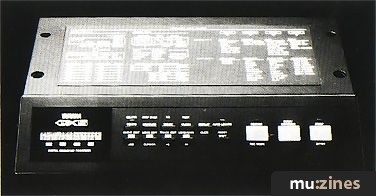
To enter the Bulk Dump Request messages into your Yamaha QX5 sequencer, you access Event Edit mode on the QX5 and insert the Bulk Dump Requests in hexadecimal in the locations given below.
The table shows each step in the sequence of Bulk Dump Requests in the QX5. There are 96 clocks per beat in the QX5. The bar, beat, and clock number of each Request is shown in the format displayed by the QX5, and the first byte (F0) of each Request is shown. (This is what you should see when you step through the clocks in Event Edit mode, after entering all the Requests).
There are 60 Memory Number Requests, each separated by 1 clock location within the first beat of bar 1 - ie. clocks 00/96 through to 59/96 (00 to 59 = 60) - followed by four Program Change Assign Table Requests which occur on the second beat of bar 1, and on the first clocks of bar 2, bar 3, and bar 4.
| Bar-Beat-Clock | Event Type |
|---|---|
| 0001-01-00/96 | EXCL 240 (F0) |
| 0001-01-01/96 | EXCL 240 (F0) |
| 0001-01-02/96 | EXCL 240 (F0) |
| 0001-01-03/96 | EXCL 240 (F0) |
| .. | .. |
| .. | .. |
| 0001-01-58/96 | EXCL 240 (F0) |
| 0001-01-59/96 | EXCL 240 (F0) |
| 0001-02-00/96 | EXCL 240 (F0) |
| 0002-01-00/96 | EXCL 240 (F0) |
| 0003-01-00/96 | EXCL 240 (F0) |
| 0004-01-00/96 | EXCL 240 (F0) |
How to enter SPX90 Bulk Dump Requests into the QX5
• STEP 1: Record four bars of time into the QX5, onto Track 1. (Just play one keyboard note on the first beat of bar 1 and let the sequencer continue recording for four bars, and then stop recording.)
• STEP 2: Go into Event Edit mode by pressing the SHIFT and EVENT EDIT buttons simultaneously. The QX5 display will show you the measure/dock display along the top line, and the note you played on the bottom line on clock 0001-01-00/96, if you managed to play it exactly on the beat. Don't worry if you didn't, and this note is on a different clock location, because we are going to erase this note anyway; it is just there to give us something in the QX5 display to change into a series of System Exclusive messages.
• STEP 3: Change the display along the bottom line by pressing JOB, then CURSOR to move the cursor on to the bottom line. Use the Left/Right arrow keys to select the event type EXCL 001 240 (F0) on the bottom line.
• STEP 4: Move the cursor to the byte number currently displaying 001, which will have 240 (F0) in the byte display. Hold SHIFT and press the Right arrow key to get to the next byte number (002), which will have 000 (00) displayed.
• STEP 5: Move the cursor to the System Exclusive data byte, which is shown on the bottom right of the QX5 display in decimal and in hexadecimal (in brackets). Scroll through the values of this byte using the Left/Right arrow keys to select the correct value for byte 2 of your SysEx message. When you have the byte you want in the display, you then move the cursor around the display to position it on the number of the SysEx byte again (still displaying 002), and change it to 003 by holding SHIFT and pressing the Right arrow key. You then repeat the above procedure to enter the third SysEx byte. Continue in this fashion until you have entered all the bytes for the first message (you don't need to enter F7 (EOX), which is already there, so you stop at byte 14).
• STEP 6: Move the cursor back to 'M' (in the top left-hand corner of the display), make sure the clock number reads 0001-01-00/96, and press SHIFT and START to replace your original keyboard note with the first SysEx Bulk Dump Request message. For subsequent messages you set the desired new clock location using the Left/Right arrows, and then you press SHIFT and STOP to insert each new message into the sequence.
• You need to repeat this procedure for each SysEx message, but instead of programming the whole message each time, you need only modify the first message by substituting the correct bytes for each subsequent message (only one or two bytes need to be changed in each new message). Then select the desired new clock location, and insert each new message into the sequence as in Step 6.
• For each complete Bulk Dump Request message, you will have to enter 13 bytes in all. There are 15 bytes in each of these messages - the first byte will always be 240 (F0), and the last will always be 247 (F7). However, there is no need to enter these two bytes into the QX5 because they are there automatically.
• When you have entered all your Requests into your sequence, remember to save it to a MIDI data recorder, because you definitely don't want to lose the valuable contents of this sequence once you have spent the time you will need to create it!
More from these topics
 |
 Good Enough For The Pro? - Thoughts on MIDI's Next Decade |
 MIDI Theory and Practice |
 Compression |
 MIDI - An Introduction |
 Maths, Music & Motion |
 MIDI Automation Systems - How Good Are They? (Part 1) |
 Delaying Tactics |
 Sound Bites - Production Tips & Techniques |
 MIDI Evaluated - info available |
 Adventures In MIDILand (Part 1) |
 MIDI In Control |
Browse by Topic:
Effects Processing
MIDI
Also featuring gear in this article

Fade away and radiate
(MX May 95)

Hands On: Yamaha SPX90
(SOS Dec 91)

Jack Of All Trades - Yamaha SPX90
(HSR May 86)

Mono Mode (Part 4)
(MT Nov 86)

The Power Behind the Button - Yamaha SPX90
(EMM May 86)

Trigger Converter for the Yamaha SPX-90
(HSR Jul 86)

Yamaha SPX90
(MM Apr 86)
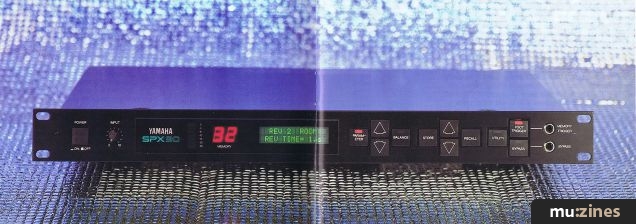
Yamaha SPX90
(SOS Apr 86)

Yamaha SPX90
(12T May 86)

Yamaha SPX90 Effects Processor - Studio Test
(IM May 86)

Yamaha SPX90 Multi-Effect Processor
(EMM Mar 86)
Browse category: Studio/Rack FX > Yamaha
Publisher: Sound On Sound - SOS Publications Ltd.
The contents of this magazine are re-published here with the kind permission of SOS Publications Ltd.
The current copyright owner/s of this content may differ from the originally published copyright notice.
More details on copyright ownership...

Sound On Sound - Oct 1988
Feature by Mike Collins
Ads for Gear in this article:

Help Support The Things You Love
mu:zines is the result of thousands of hours of effort, and will require many thousands more going forward to reach our goals of getting all this content online.
If you value this resource, you can support this project - it really helps!
Donations for August 2026
Issues donated this month: 0
New issues that have been donated or scanned for us this month.
Funds donated this month: £0.00
All donations and support are gratefully appreciated - thank you.
Magazines Needed - Can You Help?
Do you have any of these magazine issues?
If so, and you can donate, lend or scan them to help complete our archive, please get in touch via the Contribute page - thanks!
Please Contribute to mu:zines by supplying magazines, scanning or donating funds. Thanks!
Monetary donations go towards site running costs, and the occasional coffee for me if there's anything left over!

 @mu_zines
 RSS Feed
 Blog
Blog