


Magazine Archive
Home -> Magazines -> Issues -> Articles in this issue -> View
Marshall Arts | |
Marshall JMP1 Valve MIDI Guitar PreampArticle from Recording Musician, April 1993 | |
MIDI, metal mayhem and the Marshall logo add up to an impressive package. We find out whether it justifies its price tag.
The Marshall stack has become synonymous with rock 'n' roll; now the Marshall logo is emblazoned across a valve-based, programmable guitar preamp with MIDI, to enable you to capture that classic sound in the studio. Paul White finds out whether the JMP1 delivers the necessary punch and kick.
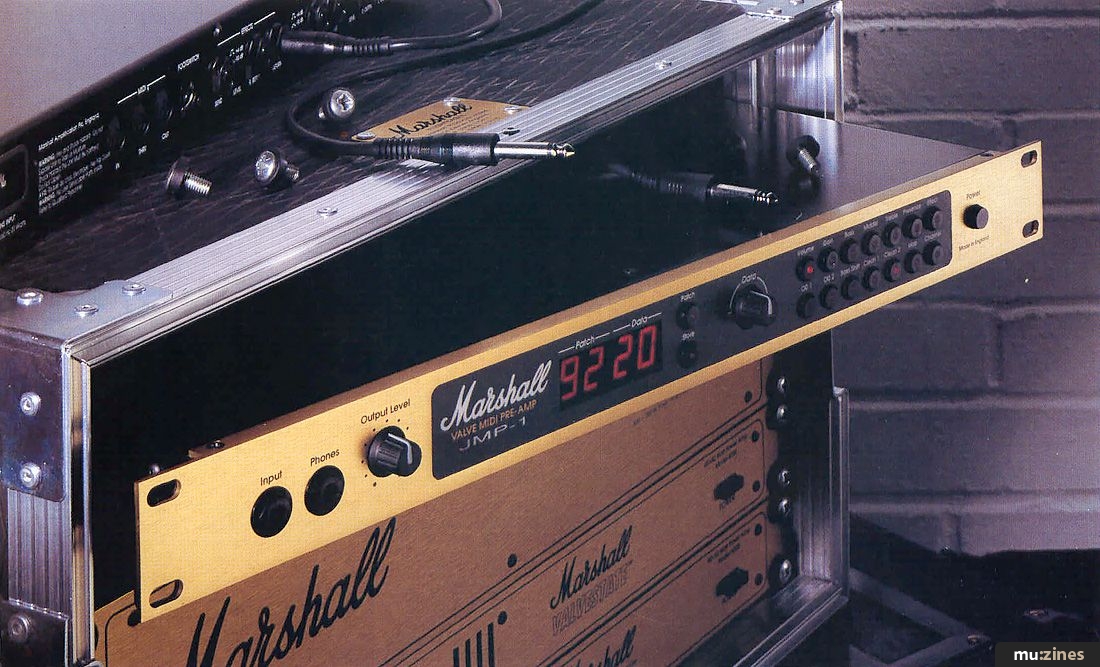
Programmable guitar amplifiers are by no means a new concept, with companies such as Dynacord and ADA venturing into this field several years ago, but the JMP1 is Marshall's first programmable product and they realised that it would have to be good if it was to warrant the Marshall logo. While some designers would have forsaken valves in the name of economy, Marshall believe that nothing produces quite the same character — the JMP1 simply had to be based around traditional valve circuitry. To bring the product up to date, it was designed with digital control circuitry, program memories, MIDI controls and a speaker simulator for studio use. There's also an effects loop which can be included as part of a program, and a MIDI mapping facility which allows incoming and outgoing MIDI data to be mapped to the internal program numbers in whichever way is most convenient to the user. While doing this, be aware that some MIDI equipment numbers patches from 0 upwards, while other units start at 1; the JMP1 numbers its patches 0 to 99.
The unit itself is a disarmingly compact 1U rack, finished in the unmistakable Marshall livery with the Marshall logo located directly to the right of the display window. Those used to conventional guitar amplifiers with knobs all over them might be thrown by the fact that the entire front panel has only two knobs — but only for a moment, as the control system is delightfully straightforward. Because the amplifier is programmable, it doesn't need to have two or more channels; there is just one channel which can be programmed to produce anything from a ringing, clean rhythm tone to heavy rock bedlam. There are 100 programs (0-99) available and the user can switch from one program to another in an instant, either by means of the front panel controls or, more effectively, from one of the many MIDI floor control units on the market. For those who just want access to a few basic sounds, Marshall produce a simple four-way footswitch which can be used to call up any four of the JMP1's programs.
Ring For A Brochure!
Considering its apparent simplicity, the JMP1 has a relatively busy rear panel, the mains going in via a conventional IEC mains lead and not one of those annoying adaptors. The guitar input jack and phones output jack are located on the front panel, but all the other audio connectors are to be found on the rear, the outputs being stereo to accommodate any stereo effects processors that might be connected into the effects loop. The stereo speaker simulator outputs are switchable from +4dBu to -20dBv, allowing them to work with either mixing consoles or instrument amplifiers; these outputs are not affected by the front panel Output Level control. Conversely, the Master stereo outs (also switchable from +4dBu to -20dBv) are controlled by means of the front panel Output Level control, allowing the unit to be connected directly to a suitable power amplifier and speaker system for live performance.
Because most effects units are mono-in/stereo-out, the JMP1's send/return system is configured in the same way, with one output jack and two returns. Switching is provided for +4dBu to -20dBv operating levels so that the unit can accommodate either professional rack effects or pedals.
The Controls
One thing that's guaranteed to alienate the traditional guitar player is a front panel covered in meaningless multifunction buttons and LCDs full of incomprehensible hieroglyphics — which is, presumably, why Marshall haven't taken that route. Instead, they've stuck as closely as possible to the traditional layout, using a combination of clearly labelled buttons and a data entry controller knob. On a traditional amp, you locate the knob you want and then turn it; with the JMP1, you press the button relating to the control you want to change and then turn the data knob. Whenever a patch is called up, any functions which are purely on or off are denoted by a red status LED in the cap of the switch button, while any other switch selected for editing is also similarly identified. The only other knob is the Output Level control, which sets the level of the Main output and the Phones output; this is not a part of the programming system.
Instead of a tiny LCD readout, the display window is split into two adjacent sections, each fitted with a two-digit, seven-segment LED display. The first shows the current patch (program) number, while the second shows data — usually the setting of whichever control has been selected. To the right of the window are two buttons labelled Patch and Store. Selecting Patch and then turning the data knob provides an easy way of accessing the 100 patches, and as soon as a patch is selected, it becomes active. Store is equally straightforward; hit it once and you get a chance to select a new patch location in which to store your new creation — hit Store again and it's stored.
"You shouldn't need me to tell you that a combination of the Marshall name, Marshall valve circuitry and MIDI programmability adds up to a very desirable package."
Of the remaining 14 buttons, 12 are associated with the sound, while the last two deal with MIDI mapping and MIDI channel selection. The unit can be set to work on any of the 16 MIDI channels or it can receive in Omni mode, in which case it transmits on channel 1. Though I've said the JMP1 has only a single channel, there are four different basic voicings, each with their own button, which can be selected as the basis of a program. These are worth investigating further, as they have a profound effect on the way the sound develops.
- Clean 1: a very full-sounding tone suitable for warm rhythm work or jazz. If the gain control is turned well up, it takes on a hint of distortion which is ideal for emulating a clean amp on the edge of breaking up.
- Clean 2: much brighter, with a slightly jangly edge which works especially well with single-coil guitar pickups such as Strats. Add a little stereo chorus and you get instant Police.
- OD1: the first of the overdrive voicings, which produces an instantly recognisable rock sound with an aggressive edge and sustain. The gain may be varied from 0 to 20 on all voicings, and in the case of OD1, you can move from the barest hint of distortion, through a convincing vintage blues sound right up to chainsaw rock. The really nice thing about OD1 is how well the tone of the guitar comes through over the distortion.
- OD2: this second overdrive setting creates what is, for me, a very 'singing' lead sound with the second harmonic always trying to edge its way in. It is less edgy than OD1 but at the same time, it cuts through in a very confident way and seems to have more gain. Turn the gain all the way up and you get a very lively sound that responds well to hammering and other 'widdly-widdly' party tricks!
The remaining control parameters are mainly based around what you'd expect to find on a traditional guitar amplifier: there's Bass, Middle, Treble and Presence, with Gain to set the amount of overdrive and Volume to set the overall level of the program. However, there's another button labelled Bass Shift which modifies the sound so that, to my ears, the result is very like an open-backed speaker cabinet rather than a stack. It increases the low-end punch and seems to impart a rather nice growl to the sound, without making it in any way muddy.
I expected the Effect button just to switch the external effect in or out, but I was pleasantly surprised to find that it could be used to vary the mix from completely dry to all effect (providing the external effect is set for effect only). This is particularly valuable when working with multi-effects units, as processes such as EQ and compression must be used on the effect-only setting, whereas reverb and delay need to be mixed with the original signal. It also allows the same effect to be used on different patches, in different degrees.
Sound Check
For live work, the JMP1 is extremely versatile and provides an accurate emulation of many of the classic Marshall sounds. It's also versatile enough to produce sounds that are less obviously Marshall. The overall sound will depend on the guitar used and also on the type of power amplifier and speakers chosen; if you want to get that big stack sound on stage, either a valve power amp or one of the newer current feedback, solid-state amplifiers designed specifically for guitar use is to be recommended. The only minor disappointment is that the headphone output delivers a sound that is, to my ears, rather too bright and raspy; it really doesn't do the unit justice.
In the studio, the speaker simulator worked very well, providing a very convincing sound directly into the desk. You do need to add reverb to fool the ears into thinking the result comes from a miked-up guitar amp in a real room, but in all other respects, any subtle differences between the real thing and this 'instant' solution are outweighed by the convenience, the ability to work at sensible levels and the simple fact that what you hear over the monitors is what you get. Switching between channels is as fast as it would be using a mechanical footswitch on a conventional amp but without the noise. If the channels are switched during periods of silence, switching is quite click-free, but if you switch while playing, there may be a bit of a thump if the sounds are very different.
Any criticisms? Surprisingly few. I would have liked some way of bypassing the speaker simulator as part of a program, for creating squeaky-clean rhythm sounds, and a second effects loop would also have been useful, so I could combine compression/EQ-type effects in the same patch as reverb, delay and chorus without having to compromise on the mix setting. I might also have asked for some form of pre-overdrive EQ to further increase the tonal flexibility of the unit, but you have to draw the line somewhere!
"There are other valve preamps that stand up well against the Marshall purely in terms of sound, but they tend to be either more expensive or non-programmable."
Conclusion
You shouldn't need me to tell you that a combination of the Marshall name, Marshall valve circuitry and MIDI programmability adds up to a very desirable package. Indeed, the JMP1 has turned out to be so popular that when we called the manufacturer to ask for a review model, they had just shipped every last one out to their clamouring dealers. Luckily, my local music shop, Music City in Worcester, had one in stock and were prepared to lend it to us for a few days (thanks Stu).
I must admit that I was expecting the JMP1 to sound more rigidly Marshall-esque than it does, but it seems to cover plenty of ground outside the traditional camp. It does have its own character, as does any worthwhile guitar amplifier, but you're by no means restricted to the migraine-inducing, snails-in-a-blender, MTV crunch metal type of sound (though it's in there if you want it!).
Marshall JMP1
- Easy to program.
- Tonally versatile.
- Programmable effects loop.
- Authentic valve sound.
- Effective speaker simulator.
CONS
- Awkward to switch patches live without either the optional four-way foot switch or a MIDI foot controller.
PERFORMANCE 9/10
VALUE FOR MONEY 9.5/10
As shipped, the unit comes with 26 patches already programmed, the rest being blank. Any or all of the 26 programs may be overwritten, but they do provide a good idea of what the unit is all about and it might be more prudent to start out by modifying these and then saving the results in the empty memory locations. It goes without saying that the memories and any MIDI patch maps are saved when the unit is switched off, but there is an initialisation procedure that allows the factory default settings to be restored if required.
In all, an impressive unit, and though it doesn't qualify for a budget tag, I feel its price is realistic given the features available and the overall sound quality. There are other valve preamps that stand up well against the Marshall purely in terms of sound, but they either tend to be either more expensive or non-programmable. For my money, Marshall have got the combination right and their success with the JMP1 is well deserved.
Thanks to Music City of Worcester ((Contact Details)) for making a JMP1 available for review.
Further Information
Marshall JMP1 £495 including VAT.
Jim Marshall (Products) Ltd, (Contact Details).
MIDI Programmability
It is also possible to send and receive SysEx dumps over MIDI, allowing the whole memory of the JMP1 to be saved to a MIDI sequencer or datafile device and then loaded in again at a later time. Though this may not have such an appeal to the live performer, it could be extremely useful in a busy studio where clients might want to bring in their own JMP1 programs without actually having to bring in their own machine.
Publisher: Recording Musician - SOS Publications Ltd.
The contents of this magazine are re-published here with the kind permission of SOS Publications Ltd.
The current copyright owner/s of this content may differ from the originally published copyright notice.
More details on copyright ownership...

Recording Musician - Apr 1993
Donated & scanned by: Mike Gorman
Review by Paul White
Ads for Gear in this article:

Help Support The Things You Love
mu:zines is the result of thousands of hours of effort, and will require many thousands more going forward to reach our goals of getting all this content online.
If you value this resource, you can support this project - it really helps!
Donations for April 2026
Issues donated this month: 0
New issues that have been donated or scanned for us this month.
Funds donated this month: £0.00
All donations and support are gratefully appreciated - thank you.
Magazines Needed - Can You Help?
Do you have any of these magazine issues?
If so, and you can donate, lend or scan them to help complete our archive, please get in touch via the Contribute page - thanks!
Please Contribute to mu:zines by supplying magazines, scanning or donating funds. Thanks!
Monetary donations go towards site running costs, and the occasional coffee for me if there's anything left over!

 @mu_zines
 RSS Feed
 Blog
Blog