


Magazine Archive
Home -> Magazines -> Issues -> Articles in this issue -> View
Power Players | |
Peavey DPM2 & DPM3SE PlusArticle from Sound On Sound, April 1992 | |
Peavey's DPM3 synth now has a little brother in the DPM2, and the DPM3 itself has been upgraded with new features that increase its powers dramatically. Martin Russ looks at a dynamic duo.
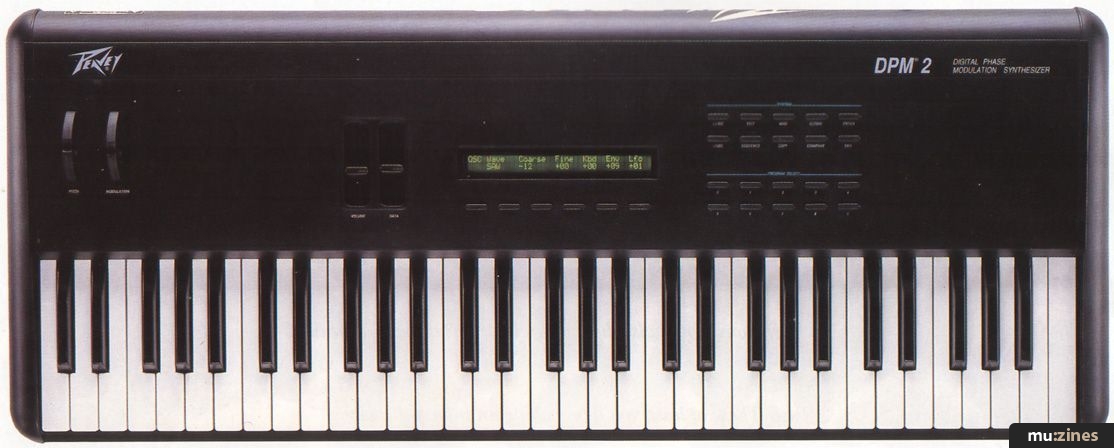
The DPM2 is the second keyboard instrument in Peavey's portfolio. A close relative of the DPM3, it offers a more affordable way to get the DPM3 sounds by losing one of the two oscillators, the aftertouch sensitivity, the disk drive, and the sequencer of its older brother. Like most of the current generation of synths it is a sample + synthesis (S+S) instrument, designed for performance yet sporting features suitable for sequencing use.
The DPM2 has 300 Programs available for immediate use, with a further 200 on an optional card. Each Program can be either a Single sound or a Combi sound made up of up to four Single sounds in splits or layers. The distinction between Singles and Combis is deliberately hidden from a casual glance — you just select a Program number using the increment and decrement buttons, or type in a number using the numeric keypad. This means that you can concentrate on the sounds rather than how they are put together, and avoids the complexities of different playing modes that you used to find in some instruments — the Yamaha DX7 being a famous example of 'hunt the mode'. Play, Performance, Function or Edit? The DPM2 keeps it simple.
SOUNDS
The sounds of the DPM2 range from classic analogue emulations through to modern digital S+S pads, with moods, textures, and the usual unusable effects as well. The sounds have a distinctive American character, hard and powerful with deep bass response and clear high frequencies. Given the limitations of the architecture, the sounds of the DPM2 are remarkably similar to the DPM3, but with less polyphony when Combis are used for doubling and layering.
The 300 factory sounds illustrate the available timbral possibilities well, and a 6-minute demo sequence shows the instrument's sounds in context. If you don't want to lose the factory Programs when you start creating your own sounds, you will need to back them up to memory card or MIDI, since they do not appear to be stored in internal ROM. You can re-initialise the DPM2, but this sets all the Programs to a 'vanilla' initialised state.
Unlike many synthesizers, in which custom chips are used to produce the voices, the DPM's approach of using general purpose Digital Signal Processing chips (DSPs) to implement everything in software means that the voice allocation can be 'intelligently' done within the sound generation software, instead of somewhere in the control software. The DPM2 will thus choose the least important voice as the one to be stolen when you play more notes than the polyphony will allow. This might be a voice which has almost reached the end of its decay or release stages, rather than one which was the first to be played. The end result is that the available polyphony is used very effectively without 'first note played is first stolen' rigidity.
Combis link one Program with up to three others, and the Programs can be used for doubling, layering, and key or velocity splitting, with additional parameters like detune, delay and transpose. Detune and transpose are good for doubling or thickening sounds, whilst delay is good for making evolving or complex sounds which change with time. Using Combis creatively depends on careful choice of elements — it is very easy to produce sounds which work as part of a linked combination, but which are useless on their own, and this wastes a Program location.
OPERATION
The control panel of the DPM2 continues the theme of simplicity that begins with avoiding a complex system of modes. To save space, the pitch bend and modulation wheels have been moved upwards from their more usual position on the left hand side of the keyboard, which means that the whole of the front of the instrument is playable keyboard. The keyboard is a light, responsive 5-octave C-to-C type, with Peavey's standard slightly curve-topped white keys and matt finish black keys. The volume and data sliders are positioned to fall conveniently under the control of the left hand, about one-third of the way across the instrument.
Apart from the LCD display, with its two rows of 40 green backlit characters, the front panel has 25 buttons, split into three groups. Five are soft keys underneath the LCD display, 10 are used as both a numeric keypad and as editing page selection shortcuts, whilst the remainder act as page selectors and controls for the rest of the system functions.
The main 'playing' page shows the current Program number with the 15-character name (at last, decent lengths of name seem to be catching on!) and uses four of the soft keys to give you instant control over some important live performance parameters: Octave transposition, Brightness (filter cut-off), FX On/Off and Single/Combi selection. Pressing one of the soft keys allows you to change the octave or timbre with the data slider or increment/decrement buttons, and you then press the exit button to return to Program selection. The FX and Single/Combi buttons just toggle you between the two states. That just about wraps up the user interface, except for the page selection process you press a soft key and either use the data slider and Enter/Exit, or just toggle between two values.
PAGES
There are three buttons which select the start of a series of pages: Edit; MIDI; and Global. You move between pages using the increment and decrement buttons, whilst in the case of the editing pages, you can also use the keypad's numeric buttons as shortcuts to specific pages. The Sequence button starts the demo sequence when you press the Enter button, and stops when you press the Enter key again. Pressing the Exit button returns you to the main Program play page.
The remaining two System buttons are the Copy button and the Compare button. The Copy page allows you to move Programs and drum kits to and from the internal RAM and the card memory, or even dump Programs to MIDI. It is also used for all the editing copy functions, so you can copy individual parts of Programs (the Osc parameters, or the Filter parameters, or the LFO etc.) from one Program to another. Similarly, effects and drum kits can be moved around, and the final page allows the formatting of memory cards.
You can use the Compare button to check the difference in sound between an edited version and the original. Unlike many synthesizers, pressing this button leaves the editing mode and returns you to the Program play page, displaying either 'C' for the original or 'E' for the edited version. It does not show the parameters changing value, so you cannot use it as a way of finding out what the parameter was before you altered it. I must admit that this is one of my standard uses for a compare function, but I can see that in the context of a performance keyboard that Peavey's auditioning is OK.
GLOBALS
The Global pages deal with the overall system functions of the DPM2. The pages are arranged in rough order of importance, so the first page has the master tuning (+99 to -99 cents), keyboard velocity curve response (three curves), Local Control On/Off to separate the keyboard from the sound generating DSPs, LCD viewing angle, Memory Protect On/Off, and Alternate Tuning Table selection (four presets and two user definable). Changes to the Global and MIDI page settings are always retained in battery backed RAM — the memory protect refers only to the internal Program RAM.
The next two Global pages deal with the setup of the 10 drum kits, each of which consists of 32 separate drum sounds. The drum kits are special cases of the oscillator wavesamples where the sample is made up of 32 different 'instruments'. Each individually tuned instrument covers a specific range of notes, has its own decay time and volume, and can be panned anywhere in the stereo image.
When a drum kit wavesample is allocated to a Program, then many of the Program parameters change or become inoperative — for example, the pitch bend has no effect, although you can alter the tuning in semitones over a six octave range. The major parameters which can be used in a drum Program are the filter controls and the volume envelope modulation. Once a drum kit wavesample has been created, you can use it in a Program just like any other wavesample.
The next Global page contains the tuning tables for the two user definable tunings, whilst the final page controls the two footswitch inputs. Each footswitch can be assigned to either Sustain or Program Increment or Decrement — you need either one footswitch with a mono jack plug, or two footswitches connected to a stereo jack plug.
MIDI
The MIDI pages are also organised logically, with the Input and Output MIDI Channel selection, Mode (Poly, Mono and Multi), MIDI Overflow On/Off and Middle C note number settings all on the initial page. The following two pages deal with MIDI Filtering. You can choose to ignore any of these types of MIDI message for Receive, Transmit or Both: System Exclusive; Volume; Program Changes (includes Bank Select); Sustain pedal; Pitch Bend; Mod Wheel; All Notes Off.
The next MIDI page edits the four Multi (multi-timbral) setups. Each lets you assign 16 Single or Combi Programs to MIDI channels, though be warned that using Combis in a Multi setup will eat into the 16-note polyphony in a big way. The last MIDI page contains the MIDI Program change map.
EDITING
Pressing the Edit button accesses the 22 edit pages. The numeric Program select buttons can be used as short cuts to the major pages within the edit section, which makes editing much faster. The first page deals with the Program name, and subsequent pages deal with the Oscillator, Pitch Envelope, Filter, Filter Envelope, Amplitude (volume) and Envelope, LFO, Output, Combi linking, and Effects. The final page allows the edited sound to be saved to a Program location any of the 300 internal RAM or 200 memory card locations.
CONSTRUCTION
When I reviewed the original DPM3, I criticised the rigidity, or lack thereof, of the plastic control panel. Peavey were obviously listening because the DPM2 has a solid metal panel holding the switches, backlit LCD, sliders and control wheels. In fact, the construction is mechanically astonishing — this is more like a piece of military hardware than hi-tech gear. By undoing about 30 bolts, you can remove the keyboard and the control panel assembly from the base section. The control panel is completely enclosed in a metal cage, removal of which means undoing another 30 bolts.
This is the first keyboard which has ever defeated my attempts to open it up and examine the interior — after a couple of hours I decided that the DPM2 could probably survive all but the toughest of on-the-road treatment. The only easy access to the inside is via a small metal plate on the underside, which allows you to fit ROM upgrades. Removing this reveals a high quality, plated through, solder resist covered PCB, with two empty sockets (for the sequencer upgrade) and two 8051 microcontrollers amongst some miscellaneous surface mount devices.
The input and output sockets at the rear of the DPM2 retain a couple of the less welcome features of the DPM3. All the sockets are recessed into the rounded metalwork and are not labelled on the top surface, which forces you to get behind the instrument to change any connections. The light blue legending on some buttons can also be difficult to read in monochromatic stage lighting. The two audio output jacks provide left and right signals, but the left jack can also be used to provide a stereo output to a pair of stereo headphones, although the volume is not very high. The IEC mains input socket, fuse holder and mains switch complete the roster of rear panel bits'n'bobs.
THE VERDICT
The DPM2 offers solid construction, thoughtful software design, and a wide selection of powerful 'DPM3 sound-alike' instrumental sounds, drums and percussion. Easy to learn, easy to use and easy to play, it feels like a player's gigging machine, with a smooth and mature feel to the user interface. It could be a great starting instrument for the live performer, with the drum and multi-timbral capabilities offering wider use with a sequencer.
Further information
Peavey DPM2 £999 inc VAT.
Peavey DPM3 SE Plus £1,499 inc VAT (with 512k sample RAM as standard).
V3.1 update from V2 DPM3 SE £47.99 inc VAT.
Peavey Electronics UK, (Contact Details)
VERTICAL INTEGRATION
DPM 2 EFFECTS
The single effects are: Reverb; Delay; Chorus; EQ; Gated Reverb; Distortion; and Exciter. The paired effects comprise 32 combinations of the seven single types, arranged in series, parallel or dual configurations. Dual configurations process the left and right channels separately. Each effect has between two and five parameters, and these unfortunately cannot be controlled by any of the modulation sources from the synthesizer section.
SOUND ARCHITECTURE - WHAT IS 'DIGITAL PHASE MODULATION'?
The oscillator output is connected to a Digitally Controlled Amplifier (DCA), with its own envelope. In the DPM2 the DCA output is then passed to the filter; in the DPM3 there are twin oscillators, whose post-DCA outputs are mixed before the filter. The filter is followed by another DCA with a dedicated envelope, and finally the signal passes to the output stage.
The DPM2 has one sample source, whilst the DPM3 has two, but the way that Programs can be layered into Combis means that the DPM2 really only loses out on polyphony, not complexity of sounds. The wavesample (see p22) is the source of the raw timbre, and you have both fine and coarse tunings controls for the pitch. In the DPM3, the modulation matrix scheme provides two independently scalable bipolar (ie. able to take both positive and negative values) sources for pitch control in each oscillator. This means that complex pitch and amplitude changes can be made to the raw samples, from simple LFO vibrato to envelope chirps and keyboard scaling.
The DPM2 has a slightly simplified modulation scheme with three fixed pitch modulation sources: Keyboard; Pitch Envelope; and LFO. The ROM samples are the same for the DPM2 and 3, with the DPM3 providing extra sample storage in its sample RAM.
The main sound modifier is the filter, a superb software emulation of a real variable-resonance analogue low-pass filter. This is the major timbral modifier in the synthesis, and the resonance can be changed from a smooth low-pass tone control through to a narrow band-pass resonator which can drastically alter the sound of the sample.
The Output and Pan stage controls the overall level and stereo positioning, whilst the Effects section which follows allows reverb, echo and modulation effects (chorus, flange etc.), distortion and exciter functions to be added to produce a finished, polished sound.
The synthesis potential is aided on the DPM3 by the provision of dual independent and bipolar modulation sources — rather than using only a single source, you can generally use two simultaneously on each mod destination — which allows complex tricks like using two envelopes to produce composite envelopes (very useful for sophisticated evolving 'vector' sounds), or LFO modulation combined with envelope sweeping for making distinctive stuttering textures.
The modulation matrix in the DPM3 offers many sources: dual LFOs for cyclic changes; keyboard velocity; keyboard note position (for key scaling); aftertouch; four envelopes (velocity or note position scalable); Mod Wheel; Pedal and Data Slider; and External MIDI Controllers. Mod destinations include: Oscillator 1 Pitch and Level; Oscillator 2 Pitch and Level; Filter Cutoff; Overall Envelope; Output and Pan; LFO Level and Rate. Modulation routing is highly versatile: virtually all combinations of sources can be connected to the destinations, with few restrictions (for example, you can only alter the LFO rate with the mod wheel and aftertouch). There are only a few fixed 'normalised', connections (Envelope 4 to overall volume, for instance).
The DPM2 has only three modulation sources (Keyboard, Filter Envelope and LFO), and the fixed envelope routing restricts creativity slightly. Also, the modulation routing for the DPM2 is not quite as flexible. It restricts the available routings to the most familiar ones — you are almost guided into following 'classical' analogue synthesizer programming techniques, which tends to make it easier to produce unusual and esoteric special effects sounds, for example.
The envelopes have five level and four time parameters, producing five segments in the resulting envelope. The overall output amplitude and relative timings of the envelopes can be independently controlled by either the keyboard note position or the keyboard velocity. The DPM3 has four independently assignable envelope generators whilst the DPM2 has three fixed envelopes for pitch, filter and volume.
The LFO has five waveshapes: Triangle; Sawtooth; Ramp; Square; Random (sample and hold). Besides the Rate and Delay parameters, the DPM3 offers an additional fade-in parameter which avoids the sharp transition of the delayed LFO output. The mod wheel can be used to alter the rate and output level of the LFO in the DPM2, whilst the DPM3's two LFOs can also be controlled by aftertouch.
Overall, the DPM architecture provides the potential for a wide variety of programming approaches, although the DPM2 is slightly less flexible than the DPM3 because of the fixed and restricted routing options. The factory sounds demonstrate that it is possible to create some very powerful and expressive timbres.
DPM2 SPECIFICATIONS (V1.1 SOFTWARE)
• Pitch bend and modulation wheels, data slider and 2 footswitch inputs
• 2-row x 40-character green backlit LCD display
• Stereo audio outputs
• Voice architecture: 1 Oscillator with DCA; 3 Envelopes; 1 Volume DCA; 1 LFO; 1 Lowpass Resonant Filter; 3 Modulation controls per Osc, Filter etc.
• 4MB wavesample memory.
• 16-note polyphonic
• 300 user Single/Combi Programs in battery-backed RAM
• 200 Single/Combi Programs in ROM or RAM memory card
• Alternate tunings: Equal temp; Just Major; Just Minor; Mean C; User1; User2
• 4 multi-timbral setups (16-part multi-timbral)
• 10 x 32-piece Drum kits
• 39 effects types from 24-bit dual effects processor
• MIDI In, Out and Thru
• MIDI Overflow
• Optional Sequencer ROM/Hardware Upgrade (16-track/80,000 events)
BEYOND THE DPM3
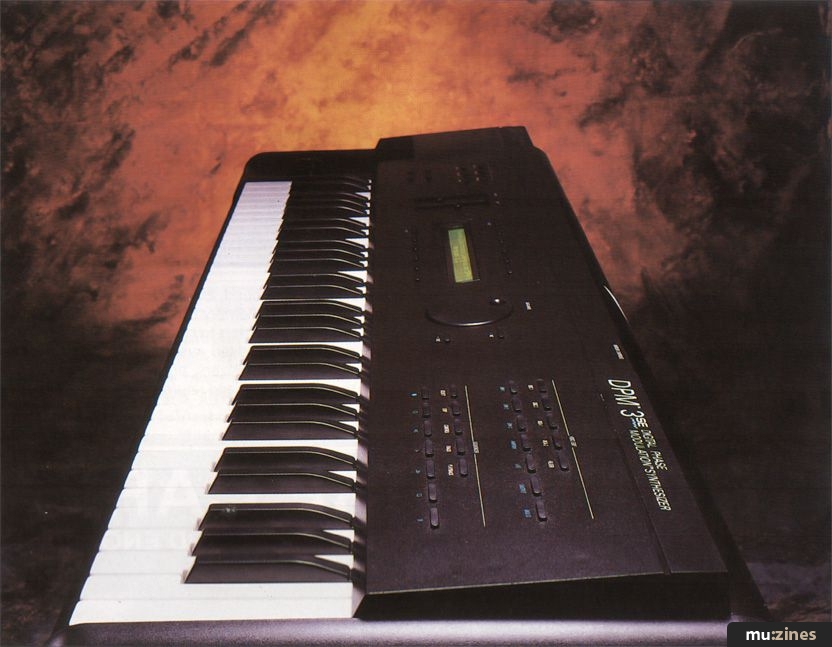
The DPM3 is the big brother of the DPM2. It has a powerful and versatile 16-note polyphonic, 16-part multi-timbral sound generator with instrumental and drum sounds, a 9-track 40,000 event sequencer, and a double-density floppy disk drive.
The original DPM3 was reviewed in the May 1990 issue of Sound On Sound. Since then several upgrades have been released by Peavey, notably the DMP3SE (Version 2.0 software) in 1991, and now the DPM3SE Plus (Version 3.1 software). Updating the DPM's operating system merely involves changing the ROMs, since the whole machine is software configurable. In fact, it should be possible to reconfigure the machine to perform FM, additive or almost any other method of synthesis, but this has apparently been left to third party developers — instead Peavey have concentrated on improving the original concept of the DPM3.
The SE upgrade made some very significant changes to the way that the DPM3 worked. The single Multi setup became four Combis (with time delays in the 'linked' Programs) to avoid any confusion with MIDI multi-timbral use, and separate MIDI In and Out channels were provided. Additional MIDI filters for SysEx and extra Controllers were added, too. One user-definable and four alternative tunings enabled the exploration of micro-tuning. The effects were assigned to Programs rather than being separate, the exciter was redesigned and an FX Bypass facility incorporated. The sequencer acquired mutes on the Track page, mixdown control was made easier with recordable volume changes, and the FX Send 2 level could be set individually for each track.
The SE also offered support for the DPM SX sample input module (to be reviewed, along with the DPM SP sample playback module, in our next issue) so that the synthesizer and rack module could work together as an integrated sampler and playback device. Simple sample editing like trimming the start and end points of the samples, as well as the loop points, meant that you could sample, edit, and then synthesize without any additional equipment. The addition of SDS sample dump capability for the DPM's user sample RAM opened up the way for easy transfer of additional samples from a wide variety of sources (see my review of Resotek's Virtual Wave sample creation software, in SOS Dec '91, for just one example). The SE's built-in disk drive provides another way of getting new samples into the instrument — Desert Island ((Contact Details)), for example, offer over 50 DPM format sample disks.
The Version 3.1 software update adds new factory sounds, plus all sorts of incremental changes to the user interface. There are many minor (but very neat) additions to the soft keys, for example. The envelopes now have powerful and sophisticated 'looping' parameters, which opens the way for much more complex evolving vector-type sounds (as on the Korg Wavestation or Yamaha SY77 and SY99). The key and velocity splits can now be assigned from the keyboard — whilst it is quite common for note splits to be set from the keyboard, this is the first time I have seen velocity split points being set directly in this way (and it is much easier to relate to).
The effects section has been integrated even more thoroughly into the voice architecture — the effects now appear at the end of the Program editing pages as part of the output page. Combis now include a pan parameter for each of the linked parts. The sequencer now has two separate banks of memory, which effectively doubles the memory to 40,000 events, 20 songs, and 100 sequences, at the price of only the first 64k of sample RAM. The SE Plus upgrade involves adding extra sample RAM to give a minimum capacity of 512k rather than the DPM3's 64k minimum — this means that lots more space (and therefore time) is available for user samples.
Peavey have shown their commitment to the evolution of the DPM3 with these two major software updates. The DPM3SE Plus is a much more powerful instrument than the original DPM3, and Peavey tell me that all the original DPM3 owners have upgraded to the SE software. This latest step offers additional benefits and brings the DPM3 very much up to date — at the price it offers excellent value for anyone looking for a powerful sample + synthesis instrument which can be customised with their own samples. Take a good look at the DPM3SE Plus. This is a serious rival to the Yamaha SY77/99 and Korg 01/W.
WAVESAMPLES
Analogue synth single cycle loops
Digitally generated single cycle loops
Non-harmonic spectrum loops
Rhythmic loops from combinations of other samples
Organ loops
Bell loops
Piano loops
Guitar loops
Orchestral instrument loops
Vocal loops
Accordion loop
Noise loops
Orchestral instrument attacks and decays (not looped)
Tuned percussion attacks and decays (not looped)
Drum sound attacks and decays (not looped)
Drum Kits
Many of the samples have the feel of being processed to maximise their usability — they seem like completed sounds rather than raw material which needs finishing off in the synthesis section. Some of the samples have minor imperfections, and the piano has rather too abrupt a decay for my taste, but they are mostly high quality 16-bit samples with low noise floors.
Featuring related gear


Publisher: Sound On Sound - SOS Publications Ltd.
The contents of this magazine are re-published here with the kind permission of SOS Publications Ltd.
The current copyright owner/s of this content may differ from the originally published copyright notice.
More details on copyright ownership...

Sound On Sound - Apr 1992
Review by Martin Russ
Ads for Gear in this article:


Help Support The Things You Love
mu:zines is the result of thousands of hours of effort, and will require many thousands more going forward to reach our goals of getting all this content online.
If you value this resource, you can support this project - it really helps!
Donations for April 2026
Issues donated this month: 0
New issues that have been donated or scanned for us this month.
Funds donated this month: £0.00
All donations and support are gratefully appreciated - thank you.
Magazines Needed - Can You Help?
Do you have any of these magazine issues?
If so, and you can donate, lend or scan them to help complete our archive, please get in touch via the Contribute page - thanks!
Please Contribute to mu:zines by supplying magazines, scanning or donating funds. Thanks!
Monetary donations go towards site running costs, and the occasional coffee for me if there's anything left over!

 @mu_zines
 RSS Feed
 Blog
Blog