


Magazine Archive
Home -> Magazines -> Issues -> Articles in this issue -> View
Korg T2 | |
The Professional's Keyboard?Article from Sound On Sound, December 1989 | |
Korg's follow-up to the successful M1 takes them further upmarket. David Mellor looks at an instrument for those willing to pay a little extra for the professional touch.

Musical instruments cost money, there is no getting away from that fact. Yet they don't cost nearly as much as they used to. For instance, not so long ago there appeared a synthesizer called the Prophet 5, whose fame and reputation endure to this day. To be a Prophet 5 owner you had to part with over three thousand hard-earned pound notes. And that is in the days when £3000 was considered a lot of money!
Now look at what you can buy with your inflation nibbled money. Top of the line synths and samplers are going out at between one and two thousand. Adjusting for inflation, the 1989 equivalent of what you had to pay for a Prophet 5 in 1980 is close to £5000!
Of course, I am not advocating that manufacturers should push their prices up to inflation-adjusted 1980 levels merely to give their instruments more scarcity value. What I would like to point out is that in recent years there have been few keyboards that you could really call professionals' instruments. One example that springs to mind is the Emulator, in its Mark II and III guises, which offers high performance at a premium price to those who can justify, through the money they earn with the instrument, the expense. Other manufacturers have placed their flagship models, such as the Roland D50 and Korg M1, at the price of a secondhand motorbike - accessible to anyone willing to give up their beer and cigarettes for a while. The instruments capable of supplying the professional his 'edge' are few and far between.
But what qualities should a 'professional' instrument have to give it an advantage over the standard model? Actually, extra sound production capability may come rather low on the list. The professional is looking for more convenience and practicality, and is prepared to pay for that. Convenience means that the instrument should be easy to handle physically and robust enough to take a few knocks - no protruding plastic bits, for example. It should have more memory for more presets, and convenient bulk storage on commonly available media. It should be logically laid out, with large displays and large illuminated buttons, and the panel markings should be easy to read. It should interface easily with other professional equipment. Last, but not least, it should have a very good keyboard so that the player can get the maximum amount of expression out of the instrument.
Could I be talking about the new Korg T2? Let's see...
FAMILY TREE
The Korg T2 has one larger and one smaller sibling, but they share the same essential qualities. The T1 has a piano-like 88-note keyboard in comparison with the T2's 76-note synth keyboard. The T3 has a conventional 61-note keyboard like the M1. Internally, they are identical with the exception that the T1 has as standard an internally mounted RAM card, which is an option on the other two models.
The T series have parents, too - the M1 and M1R. If you are familiar with either of these excellent instruments then the T series will be very easy to come to terms with, and you may recognise some of the voices. If you are not too familiar with the M1 and M1R (the rack-mount M1), then let me supply a few details...
The Korg M1 is very similar in concept to the ground-breaking Roland D50, though perhaps a little in advance. Roland have a name for the system of synthesis used in the D50 and its variants - LA or Linear Arithmetic synthesis. Korg also have a name for their way of working - AI or Advanced Integrated synthesis. I would prefer to call a spade a spade rather than a vertically operated digging tool, so let's use the term 'Sample+Synth', as employed by Martin Russ in his review of the M1R [SOS July 89].
Roland's implementation of Sample+Synth (S+S) involves combining very short samples of the attack transients of real instruments with conventional synthesized waveforms. The sample gives the sound its character and the synthesized waveform fleshes it out. You could, if you were really adventurous, achieve much the same result with a sampler and a basic analogue synth, but it's nice to have the whole thing in one box, and I am proud to be a D550 (rack-mounted D50) user myself.
Korg's S+S is somewhat different. Rather than combine the sample with a synth generated waveform, the sample actually is the waveform. Where Roland's samples are, in the main, just short transients, Korg's library includes a large collection of sustaining loops. Some of the samples just happen to be square wave, sawtooth, and other synth favourites.
In fact, the best way to describe the Korg system is as the front end of a sampler with the rear end of a synth (apologies for the inelegance). The sampler provides the raw waveform and the synth supplies filtering and modulation. Some would argue that it offers the best of both worlds.
Let's look at the way the T2 works in more detail...
INTERNAL INSPECTION
First of all, don't think of the T2 as having oscillators. The basic waveforms are all contained in ROM, eight megabytes of it! It would be pretty pointless to have real sine, square, sawtooth etc oscillators churning away when all of these waveforms can be contained in just a few kilobytes of ROM.
Despite what I just said, Korg do talk about oscillators in connection with the T2. But what they really mean are the sections of circuitry that retrieve the various sampled and artificially created waveforms from ROM. Since there doesn't seem to be a word for 'sections of circuitry etc' in the dictionary, 'oscillators' is probably as good as any - as long as you remember that all they do is pull the waveforms out of ROM.
Contained in the eight megabytes of ROM are 189 'multisounds'. A multisound is simply a sample, or a series of samples split across the keyboard. These samples cannot be edited, nor can the keyboard splits be reset. Although the T2 uses samples as a basis for sound production, it is not a sampler as such and does not offer sampler-style editing facilities.
Many of the multisounds have looped samples, and listening to the raw samples is an instructive experience. The Korg sampling department have achieved amazingly good results from very short samples with, apart from the very occasional exception, totally glitch and wobble-free loops. As any samplist knows, the longer a sample is, the easier it is to edit and to use. Short samples, more of which can be squeezed into a given amount of memory, are much more difficult to handle.
Each oscillator can access one multisound and each program can use one or two oscillators per voice, giving 16-note or 8-note polyphony respectively. Each oscillator has its own set of synthesizer type processing attached.
WORKSTATION?
It almost goes without saying these days that every new keyboard that comes along is described as a workstation. It is not a term which appeals to me very much. When I am writing an article for Sound On Sound I sit at a workstation - a desk with a computer, telephone, my rough notes and various reference materials. I don't need to leave my seat for anything except coffee and to stretch my legs. When I am being musically creative, I operate a fair quantity of equipment which takes up a certain amount of space, and entails hopping from one point in the studio to another on a continuous basis. And rather than wishing to condense this equipment into a tabletop package, I am earnestly intent on expanding it.
The Korg T2 is described as a workstation and, to be fair, you can operate quite a lot of MIDI gear from this one unit, and it is pretty versatile in its own right. But I hope no-one will gain the impression that this is all you need to make music. Music is a much bigger concept than any one keyboard can encompass, and I predict that by 1990 'workstation' will be very much last year's buzz word.
That's got that off my chest. Now I can move on to what the T2 can do to enhance your life, if not make it totally complete. As well as the synthesizing section, the workings of which I described above, the T2 has a fully-fledged high quality effects unit and a proper sequencer. And by 'proper' sequencer, I mean one that you can use for serious work and to control a MIDI system, rather than use only as a musical sketchpad.
LAYOUT
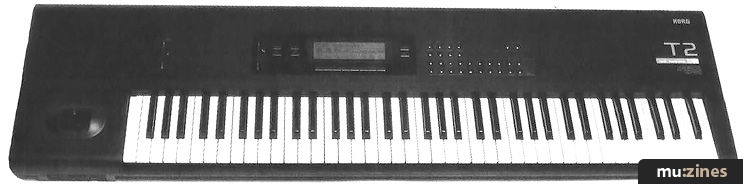
Looking at the T2 from the outside, you will see a smooth black object with 76 pearly white keys, several buttons and a large LCD window. The display is indeed a very good size with a backlit 240x64 matrix, enough for several lines of text. Many of the buttons are brightly illuminated when pressed - good point - but are designed for show rather than go. They are convex, so that your finger tends to slip off them, and are rather stiff to operate. I had an aching finger by the time I had taken the reverb off all the presets to see what they really sound like. A professional instrument should feel good to use, as well as sound good. The non-illuminated buttons are on the small side, particularly as there is so much free panel space going to waste.
The construction seems adequately sturdy, but the T2 could really do with a couple of handles. It's not heavy, but it is a full armspan in width and can be tricky to move around. Also, the joystick pitch bend/modulation control looks a bit delicate. I speak as one who broke his Roland joystick down to a small - but usable - stump years ago.
Data entry is by the familiar slider and up/down nudge buttons. There is a 'Fine' button which increases the slider's resolution so that you can make single step parameter adjustments with it easily. Below the display are eight buttons marked 'A' to 'H', which provide easy access to a number of the parameters during performance, rather than having to enter the editing pages to make changes. To the right are the edit buttons - 'Edit Combi', 'Edit Program' and so forth - and the Page and Bank Select buttons. A nice feature of the bank select system is that when you pick a bank, the display shows the name of each of the 10 programs in that bank.
On the back panel are the MIDI sockets: one In, one Thru and four Outs. The MIDI Outs are arranged as two pairs, which are separately processed to minimise MIDI data clogging. Also on the back are two card slots: one for program data, the other to provide access to additional samples.
Audio output from the T2 is by way of four jack sockets. Two are arranged as a stereo pair, between which sounds can be panned; the other two are individual outputs.
Bulk storage is via a high density 3.5" floppy disk drive. Normally speaking, a high density drive would not, of course, be necessary just to store program data occupying a few tens of kilobytes. Indeed, the whole instrument can be loaded in two to three seconds. But a high density drive is necessary for loading one megabyte's worth of sample data into the T2's PCM RAM option, which I shall talk briefly about later.
PROGRAMS
The T2 is plentifully supplied with program memory. There are two banks, A and B, each of which can store 100 programs and can be edited at will. A third bank holds 100 Combinations. A Combination can mix the sounds of up to eight programs for megathick sonorities. So on the T2, a total of 300 sounds are at fingertip recall. Who was it at MIDI headquarters that thought 128 program change numbers would be enough?
In program mode, there is a useful degree of control provided by the A to H buttons below the display, in combination with the data slider. They are:
A. Oscillator balance, controlling the relative levels of the two oscillators, if two are used in the program.
B. VDF Cutoff, changing the cutoff frequency of the filters. (VDF, I assume, stands for Variable Digital Filter, the manual doesn't say).
C. VDA level, adjusting the oscillator levels. (VDA = Variable Digital Amplifier?).
D. Velocity sensitivity.
E. Aftertouch sensitivity.
F. Attack time, adjusting the VDFs and VDAs simultaneously.
G. Release time, again operating on the VDFs and VDAs.
H. Dry/Effect balance, controlling the contribution of the effects section.
These offer quick and very useful control over the sounds generated. As each one is altered, the display shows the amount of change graphically.
Editing the programs is simple enough once you have the hang of the cursor key system. There are two buttons at the left of the display for up and down movement. In edit mode, the A to H buttons below the display work as horizontal cursor shift buttons. In practice, you find the cursor bobbing and weaving and going to parts of the display you didn't anticipate. But there are only so many display pages and you soon get used to the layout of each. Anyway, it's a hell of a lot better than squinting into a two line LCD!
There are seven edit pages available in program edit mode. They can be stepped through using the increment/decrement buttons, or by pressing the appropriately numbered bank button. There is an impressive range of editing functions available, but not a superfluity - every function is there for a useful and sonically effective purpose. A nice touch is that when you leave any page for another, the cursor position is remembered, so that you return to where you left off when you come back to a particular page.
One element that deserves a special mention is the filter. Some synth and sampler filters work, but don't achieve an awful lot. In the old days of analogue synthesis the Minimoog was famous, with just cause, for its filter because it was simply more effective than those provided by other manufacturers. The T2's filter is very good indeed. As the cutoff frequency is lowered from its maximum, you really hear the sound change, never for the worse but always to something different and interesting. I like it so much I wish mixing console manufacturers would take a look and apply something similar to their high frequency EQ controls.
COMBINATIONS
Combinations are basically layered programs. Layered, that is, up to the maximum of the 16 voices of which the T2 is capable. (There is a MIDI overflow mode by which excess notes can be passed on to another instrument, if necessary). Combinations are multitimbral, the individual program sounds being controlled, if desired, by separate MIDI channels.
But the T2 is not limited to controlling its own voices in Combination mode. It can take direct charge of up to eight MIDI channels externally. One channel might be controlling a stack of eight T2 internal programs, the other seven might be controlling totally separate MIDI keyboards or expander modules.
Combination mode has two pages before you even get into editing. The first page displays and controls the program numbers - any mixture of banks A and B - and their levels. The second page is for controlling program changes and levels of external synths. Combination editing covers the fine details of each program: tuning, velocity and aftertouch sensitivity, key range, velocity window, and more. Rather than being a simple way of playing two or more sounds at the same time, Combination mode is complex enough almost to be synthesis in its own right, but starting with complex sound sources.
One program element that doesn't get passed on with each program when used in Combination mode, by the way, is the effects setting. Having a separate effects unit for each of eight programs might be nice, but not really practical. The effects unit is therefore applied to the Combination as a whole, and programmable for each individual Combination.
OVERALL VIEW
The Korg T2 is a very powerful instrument. Particularly so when the bonus of a 50,000 event 8-track sequencer is added. As indicated in a separate panel, the on-board sequencer is quite capable of standing on its own two feet and giving a good level of service. I wouldn't swap it for my own favourite sequencer for ease of operation, but it can do a workmanlike job of controlling the T2 and other connected synths.
As it stands, the T2 can be seen as a very high quality synth with sampled sound sources, looking on the sequencer as a bonus. The sound quality is excellent, the keyboard is excellent, and so are the program and Combination editing facilities. There is also plenty of memory space, and convenient program and sequence storage on floppy disk.
If I had a complaint, it would be that Korg have not taken the professional angle quite far enough. A couple of handles and larger, flatter buttons might mar the designer looks slightly, but it's the music we care about and increased user convenience equates, in the end, to better music.
When the optional one megabyte RAM card is available, it will transform the T2 from a good sounding instrument with one set of samples into an instrument with a potentially unlimited range of sound sources. And if we are provided with raw material on disk of the quality level that already exists in ROM, then we are in for a treat. And if MIDI sample dumps into the RAM card will be feasible, as it appears from the manual, then even better.
In short, if the Korg M1 was anyone's candidate for the number one synth, the T2 must now be top dog (aside from the T1, of course!). With the optional RAM card fitted, it could well be the professional's keyboard of choice.
FURTHER INFORMATION
£2999 inc VAT.
Korg UK Ltd, (Contact Details).
DRUM SOUNDS
Kick 1-3, Snare 1-4, Side stick, Tom 1-2, Closed Hi-Hat 1-3, Open Hi-Flat 1-3, Crash, Conga 1-2, Timbale 1-2, Cowbell, Claps 1-2, Tambourine, E Tom, Ride, Rap, Whip, Shaker, Pole, Block 1-2, Fingersnap, Drop, Vibe hit, Hammer, Metal hit, Pluck, Flexatone, Wind bell, Tubular 1-4, Bell ring, Metronome 1-2, Pro BD, Tight BD, Synth BD, Pro SD 1-2, Tight SD, Ambient SD, Synth SD, Rim shot, Stick hit, Ambient tom, Pedal Hi-Hat, Clang hit, Bell ride, Ping ride, Bongo low, Bongo high, Bongo slap, Maracas 1-2, Cabasa, Bell hit, Techno zap, Marimba, Gamelan 1-2, Pot cover, Cymbell, Timpani, Clicker 1-2, Spectrum 4 L, Spectrum 4 H, Noise, Perc wave L, Perc wave H.
KORG T2 SPECIFICATION
Tone generator 16 voice, 16 oscillator (single mode); 8 voice, 16 oscillator (double mode).
Keyboard 76 notes, velocity and aftertouch.
Wave memory PCM ROM 4Mword (8Mbyte).
Tone effects generator 16-bit.
Effects Two digital multi-effects.
Programs 200.
Combinations 100.
Sequencer 20 songs, 200 patterns, maximum 50,000 notes. 8 tracks, 8 multitimbres (dynamic voice allocation).
Control Inputs Damper pedal, assignable footswitch (pedal) 1/2.
Floppy disk drive 3.5" 2HD. Stores program/combination/sequence data and PCM sample data.
Card slots Program/combination/sequence data; PCM data.
MIDI ports In (1), Out A (2), Out B (2), Thru.
Display 64x240 backlit LCD.
SEQUENCING
RECORD/PLAY: Real time recording; Punch in recording, in whole bars; Program for each track; Volume for each track. The time signature may be 1/4 to 16/16, variable from bar to bar. Tempo range is 40 to 208 bpm, also variable during the song.
TRACK: Track status (on/off, MIDI channel); Track protect; Transpose (+/-24 semitones); Detune (+/-50 cents); Pan pot.
MIDI: MIDI channel for each track; Velocity window for each track (range of velocities to which the track will respond); Key window for each track (keyboard range to which each track will respond). MIDI data can be recorded from an external source. Each track records data corresponding to its allocated MIDI channel.
EDIT SONG: Step recording; Event edit; Erase track; Bounce track; Copy track; Erase song; Append song.
EDIT MEASURE: Quantise (quarter note to 1/192nd note); Insert measure; Delete measure; Erase measure; Copy measures; Put pattern (places a pattern in a specified bar); Copy from pattern (copies a pattern into a bar).
EDIT PATTERN: Real time recording; Step recording; Event edit; Pattern parameter (time signature and length of track); Erase pattern; Get from track (turns track data into a pattern); Bounce pattern; Copy pattern.
EFFECT: Effect settings as in Program and Combination editing.
SONG: Next song; Rename song; Metronome; Pedal assign; Scale type; Velocity/aftertouch curve; Copy effect.
The step-time recording and event editing systems are particularly good, better than on some dedicated sequencers.
T2 MULTISOUNDS
| Piano 1-2 | Koto trem | DWGS voice | Hard flute |
| E piano 1-2 | Bamboo trem | Square wave | Clarinet |
| Clav 1-2 | Rhythm | Digital 1-5 | Alto sax |
| Harpsichord | Lore | Saw wave 1-2 | Hard sax |
| Organ 1-4 | Flexatone | 25% pulse | Baritone sax |
| Magic organ | Windbells | 10% pulse | trombone |
| Guitar 1-2 | Pole | DWGS tri | French horn |
| E guitar 1-2 | Block | DWGS sine | Harmonica |
| Sitar 1-2 | Fingersnap | SoftEP | Accordion |
| Ac bass | Pop | Hard EP | Clicker |
| Pick bass | Drop | Pipe organ 1-3 | Waterphone |
| E bass 1-2 | Breath | Harmonics | Bell hit |
| Fretless | Pluck | Slap bass | Clang hit |
| Synthbass 1-3 | Vibe hit | Round bass | Stick hit |
| Vibes | Hammer | Mandolin | Block 2 |
| Bell | Metal hit | Banjo | Cabasa |
| Tubular | Pick | Harp | Choriana |
| Bell ring | Distortion | Koto | Analog |
| Kalimba | Bass thumb | Pick piano | Piano pad |
| Synmallet | Wire | Stick | Wave sweep 1-4 |
| Flute | Pan wave | Marimba | Mouth harp 1-2 |
| Pan flute | Ping wave | Gamelan | Zawinul |
| Bottles | Fv wave | Pot covers | Spectrum 1-4 |
| Voices | Mv wave | Music box | Noise |
| Choir | Voice wave | Toy piano | Perc wave |
| Strings 1-3 | DWGS EP1-3 | Cymbell | Wire 2 |
| Brass 1-2 | DWGS piano | Bell synth | Prosync |
| Tenor sax | DWGS clav | Timpani | 16% pulse |
| Mute TP | DWGS vibe | Vocoder | 8% pulse |
| Trumpet | DWGS bass 1-2 | Da voice | 4% pulse |
| Tuba flugel | DWGS bell | Cha voice | 2% pulse |
| Double reed | DWGS organ 1-2 | Solo string |
EFFECTS
Hall, Ensemble hall, Concert hall, Room, Large room, Live stage, Early reflection 1-3, Stereo delay, Cross delay, Stereo chorus 1-2, Stereo flanger, Cross flanger, Phaser 1-2, Stereo tremolo 1-2, Equaliser, Overdrive, Distortion, Exciter, Symphonic ensemble, Rotary speaker.
Featuring related gear
Publisher: Sound On Sound - SOS Publications Ltd.
The contents of this magazine are re-published here with the kind permission of SOS Publications Ltd.
The current copyright owner/s of this content may differ from the originally published copyright notice.
More details on copyright ownership...

Sound On Sound - Dec 1989
Donated & scanned by: Mike Gorman
Review by David Mellor
Ads for Gear in this article:

Help Support The Things You Love
mu:zines is the result of thousands of hours of effort, and will require many thousands more going forward to reach our goals of getting all this content online.
If you value this resource, you can support this project - it really helps!
Donations for May 2026
Issues donated this month: 0
New issues that have been donated or scanned for us this month.
Funds donated this month: £0.00
All donations and support are gratefully appreciated - thank you.
Magazines Needed - Can You Help?
Do you have any of these magazine issues?
If so, and you can donate, lend or scan them to help complete our archive, please get in touch via the Contribute page - thanks!
Please Contribute to mu:zines by supplying magazines, scanning or donating funds. Thanks!
Monetary donations go towards site running costs, and the occasional coffee for me if there's anything left over!

 @mu_zines
 RSS Feed
 Blog
Blog